

Start here
Here’s how to get started with CoreWeave. Each step jumps to the details further down this page.- Set up your account and team. Activate your account, invite users, and grant access with IAM Access Policies. See Account setup.
- Set up your tools. Install
kubectland Helm for CKS, or Git and SSH for SUNK. See Environment setup. - Run a workload. Deploy a model for inference on CKS, or run distributed training on SUNK. See Run workloads.
- Secure and connect. Add VPCs, network policies, and private connectivity as you scale. See Security and networking.
- Automate it. Manage your infrastructure with the REST APIs, the Terraform provider, and CoreWeave Skills. See Automate your solution.
Where common tasks live in the Console
Use this table as a quick lookup for the most common tasks. Each row links to the page with full instructions. The Cloud Console navigation evolves over time, so follow the linked pages rather than memorize menu positions.Account setup
Account activation and user invitation apply to all CoreWeave users. If your team uses SUNK, admins must also complete a separate user provisioning step before you can connect to Slurm login nodes over SSH.Activate your account
When CoreWeave approves your organization, the CoreWeave Sales team sends an invitation email. Click Activate to access the Cloud Console.The first user invited becomes an administrator by default and can invite others.
Invite users and manage your org
Admins invite users from the Users page. New users click the invitation link and sign in with the same email used for the invite. To sync users and groups from your IdP (Okta, Microsoft Entra, and others) instead of inviting manually, use Automated User Provisioning (AUP) with SCIM. This keeps your organization in sync with your identity provider. See the following guides for setup instructions:IAM and access policies
Identity and Access Management (IAM) Access Policies define which users and groups can perform actions on platform services, such as creating and managing CKS clusters, managing IAM users and groups, and viewing billing. Admins create policies in the Cloud Console and assign roles to principals. The following services use their own separate authorization systems rather than IAM Access Policies:- CoreWeave AI Object Storage, which uses organization and bucket access policies.
- CKS clusters, which use Kubernetes RBAC.
- SUNK clusters, which use SUNK User Provisioning (SUP) rather than IAM Access Policies directly.
Provision users for SUNK
Users who need access to SUNK require additional provisioning beyond the standard Cloud Console invite:- An admin must enable SCIM API and SUNK User Provisioning in the Cloud Console.
- Each user must add an SSH public key before they can connect to Slurm login nodes.
nsscache configuration.
Environment setup
The tools you need depend on your path:- CKS users need
kubectland Helm. - SUNK end users need Git and SSH.
- AI Object Storage is optional and works with both CKS and SUNK workloads.
Kubernetes and kubectl (CKS)
kubectl is the command-line tool for interacting with CKS clusters. To use it, you first need a cluster (see Create a CKS cluster). Once a cluster exists, install kubectl, then create an API access token and download the kubeconfig file from the Tokens page in the Cloud Console.
See Manage API access tokens and kubeconfig files for setup instructions.
Helm (CKS)
Helm is an admin and infrastructure tool that deploys CoreWeave-provided charts, including Traefik, cert-manager, and container registries. If you’re an admin, install Helm (3.8+). End users running workloads on CKS don’t need Helm installed locally. See CoreWeave Charts for the available charts and how to add the repository to Helm.AI Object Storage
AI Object Storage has an S3-compatible API that you can use with any S3-compatible client, such as the AWS CLI, s3cmd, or Boto3. LOTA is an intelligent caching proxy installed on every Node that improves data transfer rates for training and inference workloads. When running workloads inside a CoreWeave cluster, use the LOTA endpoint (http://cwlota.com) instead of the primary endpoint (https://cwobject.com).
Before creating buckets and objects, admins must configure access policies and authentication:
- Create at least one organization access policy before any S3-compatible request can succeed. See About policies for more information.
- Choose how workloads authenticate: static access keys for simplicity and quick testing, or Workload Identity Federation for production workloads that shouldn’t rely on long-lived credentials.
Git and SSH (SUNK)
Use Git to clone training code and job scripts onto the login node or shared storage. SUNK end users connect to Slurm login nodes over SSH. SSH is typically pre-installed on macOS and Linux. On Windows, use OpenSSH or enable it in Settings. See Connect to the Slurm login node for setup instructions.Documentation MCP server
The CoreWeave documentation site exposes a Model Context Protocol (MCP) server endpoint that lets AI coding assistants query the docs directly in your development environment. (This is a separate control from the Ask AI button at the top of the page.) To connect your assistant, do the following:-
Expand the Copy MCP Server menu at the top of any documentation page, to the right of the page title:
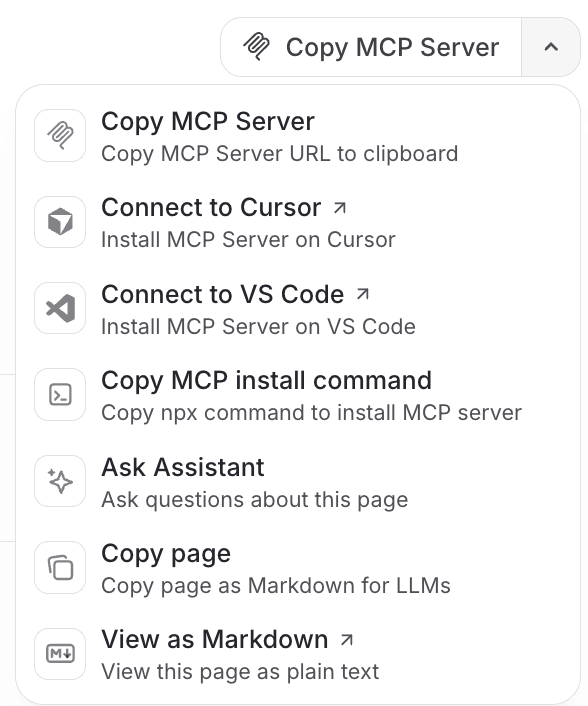
- Copy the MCP server URL to configure tools manually. Alternatively, you can install the MCP server on an IDE or install it locally. You can also copy or view the page content as Markdown, and launch the AI assistant chat window in your browser.
Run workloads
Choose your path based on your use case.Inference
Deploy a model for inference on CKS. See Deploy an open source LLM on CKS for a complete walkthrough covering cluster setup and Open WebUI.Training
Run multi-node, multi-GPU distributed training with Slurm on SUNK. See Train on SUNK for a complete walkthrough covering cluster setup, job submission, and monitoring.Security and networking
Explore the following recommended functionality as you scale:- VPCs: Virtual Private Clouds isolate clusters and control traffic. Use custom VPCs for multi-cluster communication, peering, or on-premises connectivity.
- Network policies: Deploy network policies to enforce Layer 4 and Layer 7 traffic rules at the DPU level.
- Direct Connect: Direct Connect provides private, dedicated links to CoreWeave from Equinix or Megaport.
- HPC interconnect: GPUDirect RDMA with InfiniBand enables low-latency, high-throughput multi-node training.
Automate your solution
CoreWeave exposes REST APIs, infrastructure-as-code options, and agent-driven workflows for managing resources programmatically.REST APIs
CoreWeave provides the following REST APIs:- CKS API: Create, list, update, and delete clusters programmatically. See CKS API Reference.
- VPC API: Manage VPCs through REST. See VPC API.
- Object Storage API: Manage access keys, policies, and organization settings programmatically. See AI Object Storage API Reference.
Infrastructure-as-code
The CoreWeave Terraform Provider lets you manage your CoreWeave infrastructure as code, including CKS clusters, VPCs, Object Storage buckets, and Object Storage access policies. Declare your infrastructure in configuration files and apply changes consistently across environments. See Terraform reference architecture for a complete example.Agent-driven workflows
CoreWeave Skills are Agent Skills that let Claude Code and other compatible agents carry out CoreWeave workflows for you, such as creating a cluster and Node Pool or loading a model into a bucket. Install them from the officialcoreweave/skills repository.
For more information
Explore these resources to plan and scale your CoreWeave deployment:- Instances: GPU and CPU specifications help you choose the right instance for your workload.
- Node lifecycle: See how CKS Nodes are validated and maintained, from Day 1 setup through Day 2+ operations.
- Observability: CoreWeave Observe covers Grafana dashboards, logs, metrics, telemetry, and alerts.
- Regions: Regions and availability zones covers global infrastructure and how CoreWeave delivers reliability and connectivity.
- Pricing: Instance pricing provides guidance on costs and how to optimize them for your workload.