

IAM Access Policies don’t grant access to Forge. Forge uses a separate identity and access system. See Forge and CoreWeave identity.
- The CoreWeave AI Object Storage S3-compatible API, which is governed by organization and bucket access policies.
- Kubernetes authorization within CoreWeave Kubernetes Service (CKS) clusters, which uses Kubernetes RBAC after a user authenticates to the Kubernetes API.
- SUNK identity provisioning and compute-node authorization. SUP creates POSIX and Slurm identities from CoreWeave IAM users and groups, while POSIX permissions and Slurm controls govern access inside the cluster.
Core concepts
The following terms are central to how IAM Access Policies work:
CoreWeave IAM operates on a default-deny posture. Without an access policy that grants privileges to a principal, that principal can’t perform an action.
How groups, policies, and roles relate
If you’re new to CoreWeave IAM, the following plain-language summary describes how the pieces fit together:- A role is a named bundle of permissions. Each role grants a specific set of actions, such as viewing clusters or managing billing data. You don’t grant individual actions directly. You grant a role.
- A group is a named set of users. Instead of assigning roles to people one at a time, you put related users in a group and assign roles to the group. Anyone you add to the group gains the roles the group has. An IAM Admin creates and manages groups and their memberships.
- A policy ties everything together. A policy holds one or more rules, and each rule assigns one or more roles to a principal (a user or a group). The policy is where access is granted.
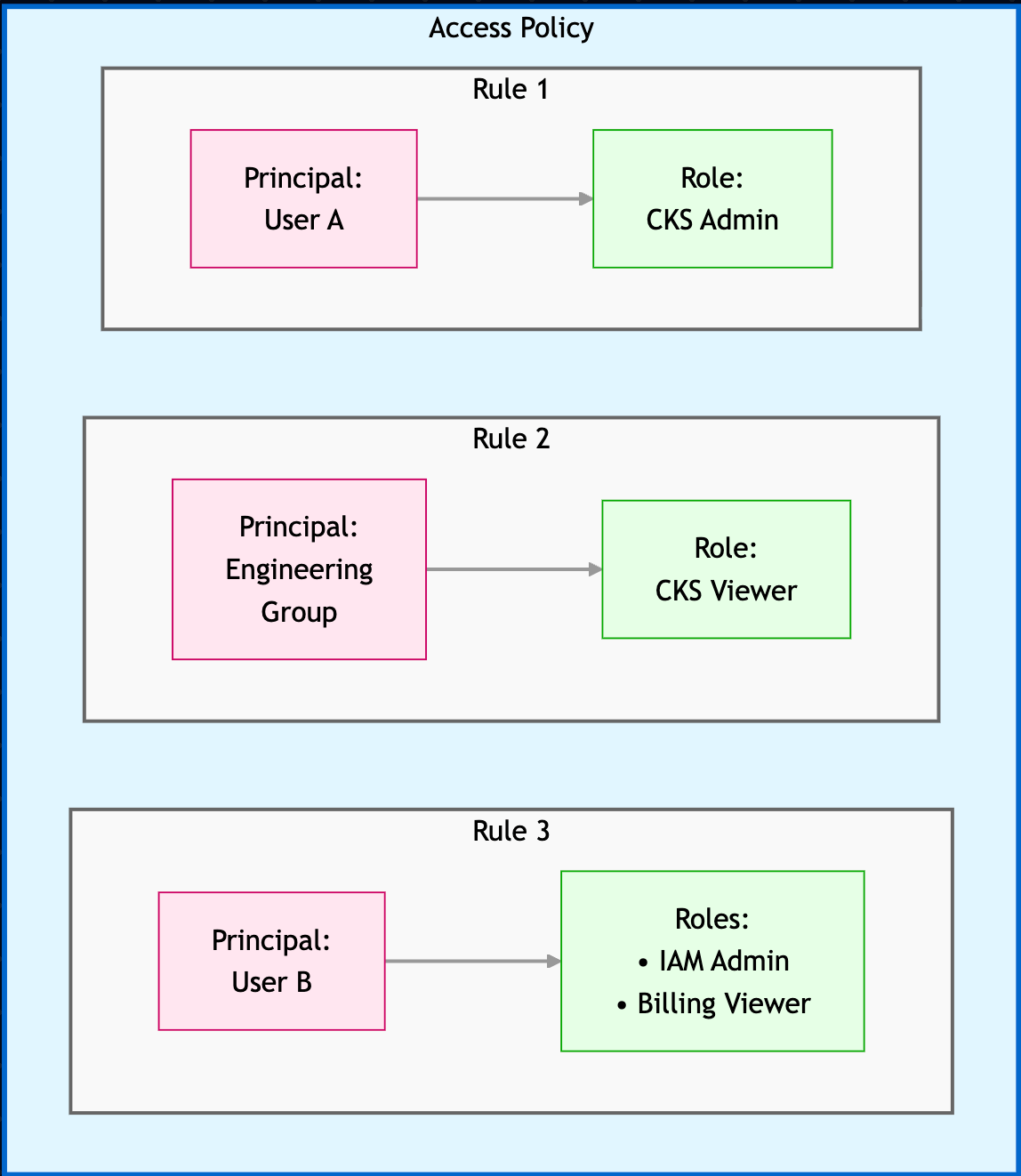
- User A has the CKS Admin role, which lets them manage Kubernetes resources.
- User B has the IAM Admin and Billing Viewer roles, which let them manage IAM resources and view billing data.
- Engineering Group has the CKS Viewer role, which lets them view Kubernetes resources.
Roles
A role is the unit of access you assign in a policy rule. Each role grants a fixed set of actions. Most services have a Viewer role for read-only access and an Admin role for full management. Assign the least privileged role that lets a principal do their job. For the full list of roles, grouped by functional area, and how legacy groups map to current roles, see IAM roles.Default Access Policies
CoreWeave creates and maintains Default Access Policies. The Cloud Console marks each default policy with a Default badge next to its name. Default policies bundle the roles required for a common access pattern. For example, the Administrator default policy includes all available roles, and CoreWeave adds new roles to it as they become available. Default policies behave differently from policies you create yourself:- CoreWeave manages the roles. The role set of a default policy is immutable: you can’t add, remove, or otherwise edit its roles. As CoreWeave ships new products and actions, or introduces more fine-grained permissions for existing roles, CoreWeave adds the relevant roles to the applicable default policies automatically. Roles are rarely removed.
- You manage the principals. You can add and remove principals (users and groups) on a default policy to control who it applies to.
- They can’t be deleted. Default policies don’t offer a delete option.
You may see a duplicate-looking policy. When CoreWeave introduces a new default policy, it’s added alongside your existing policies rather than replacing them. Because CoreWeave never removes a policy you already have, a new default policy can look substantially similar to one already in your organization. This is expected behavior.Review the principals on each policy to decide how to proceed. Your existing non-default policies remain fully under your control: you can edit or delete them. The default policy itself can’t be deleted.
Next steps
- See the full list of IAM roles.
- Create an IAM Access Policy.
- Learn about the CoreWeave authorization model.