

How it works
CoreWeave systems perform ongoing hardware tests and fabric diagnostics, which enable faster cluster provisioning and early fault detection. This proactive approach keeps infrastructure running efficiently. To keep your workloads reliable, CoreWeave uses a combination of active testing and passive monitoring to identify and resolve issues, often before they affect your workloads. The following sections describe how each part of this system works, from active HPC Verification tests and passive monitoring to InfiniBand validation and trend analysis.Active HPC Verification tests
To keep Nodes reliable, CoreWeave runs periodic HPC Verification tests that use all GPUs on a Node for 20 to 30 minutes. These tests run once per hour and appear in Grafana dashboards, where you see a spike in GPU SM Utilization, CPU Utilization, and GPU Memory Utilization metrics. The GPU SM Utilization metric indicates how actively the test uses the GPU’s compute cores (streaming multiprocessors). High values reflect the compute-intensive activity during the test window. These spikes follow a consistent pattern across all GPUs on each Node, as shown in the example image.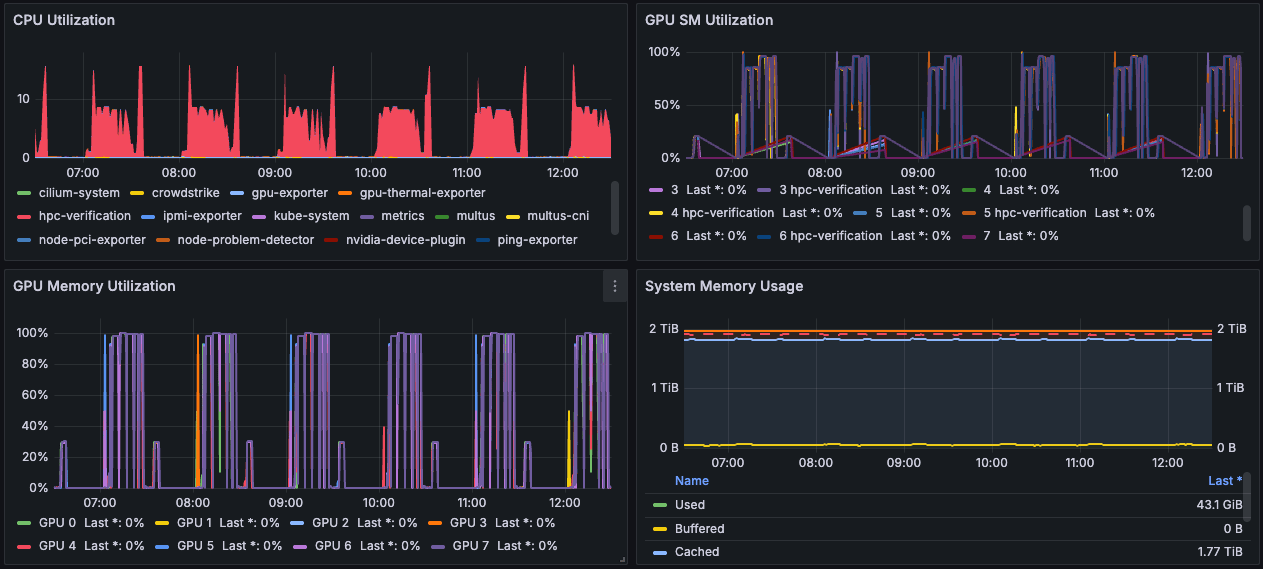
.spec.nodeName, and work started outside Slurm on SUNK clusters.
On SUNK clusters, a process started over SSH on a node with no Slurm job doesn’t preempt these tests, because neither Slurm nor Kubernetes knows about it. You might see GPU and GPU memory usage from a test on that node. See Preemption on SUNK clusters.
HPC Verification tests require all GPUs on a Node to be available. A long-running Pod that holds GPUs prevents these tests from scheduling on that Node for as long as the Pod runs. To run both a long-running GPU Pod and periodic HPC Verification tests on the same Node, the Pod must not hold any GPUs. For an example of this pattern, see SUNK-specific scheduling, which uses a separate sunk.coreweave.com/accelerator resource for slurmd Pods so the Node’s GPUs remain available for HPC Verification.
Third-party schedulers, such as Volcano and the KAI Scheduler, don’t preempt verification tests by default. Before you run one on a production cluster, see Custom schedulers and third-party integrations and contact CoreWeave Support.
Passive monitoring
When workloads are active, CoreWeave collects and analyzes both in-band and out-of-band telemetry, and monitors logs to detect anomalies. When issues arise, CoreWeave systems trigger automated remediation through Node lifecycle events.Automated remediation and Node replacement
Any deviation from specifications automatically triggers a lifecycle event that rectifies the identified issues and maintains the fleet’s integrity and performance. When a predetermined set of remediation strategies can’t resolve an issue, CoreWeave transitions the affected Node out of production to prevent impact on service quality. To learn how these lifecycle events behave inside a CKS cluster, including pending states, reboot transitions, and the labels and conditions that mark them, see Node state transitions in CKS. CoreWeave automatically replaces Nodes that leave your production cluster with new Nodes, which keeps the cluster at full capacity. Before a failed Node returns to the production fleet, CoreWeave re-validates it. A Node that needs the full onboarding suite of tests takes roughly 48 hours to verify it is ready to resume production workloads.Automated InfiniBand validation
CoreWeave tests the InfiniBand fabric multiple times daily. Any deviations from the intended topology raise automatic tickets for data center technicians.Trend analysis
CoreWeave uses historical test data to identify patterns, predict failures, and fine-tune performance over time.Manual InfiniBand testing
The CoreWeave network team also performs weekly manual inspections to catch rare or complex issues that automation might miss.Why this matters
With CoreWeave’s automated infrastructure lifecycle, you get the following benefits:- Faster Node provisioning.
- Earlier detection of system health issues.
- Fewer performance bottlenecks.