

Quota overview
CoreWeave applies several distinct quota limits. They aren’t interchangeable, and a request can fail against any one of them.
Compute class is the Node Pool’s tier, either
default or spot (preemptible). A default Node Pool and a spot Node Pool of the same instance type and zone draw on separate quota lines with independent limits.
What counts against your quota
Each Node you provision of an instance type counts against the instance quota for that instance type, compute class, and zone, whether you created it manually by settingtargetNodes or the autoscaler created it. Nodes that are queued or in progress also count toward your request.
Keep these distinctions in mind:
- Quota is separate from capacity. A request can be under quota but still wait for capacity if the instance type isn’t available in the zone. A Node Pool reports both states through its
QuotaandCapacityconditions. - The autoscaler’s
maxNodesis a per-Node-Pool ceiling, not your quota. Organization instance quota is shared across all Node Pools of the same instance type and compute class in the same zone. Two Node Pools withmaxNodes: 10each, both of the same instance type and compute class in the same zone, can together request 20 Nodes against a single quota line. If the quota is 10, the second Node Pool to scale hitsCWOverQuota. - Quota is tracked per zone. Node Pools of the same instance type in different zones draw on separate quota lines.
- A Kubernetes
ResourceQuota(a namespace-level object you create) is a different concept from CoreWeave organization quota.
Compute your current usage
The organization instance quota applies across Node Pools of the same instance type and compute class in the same zone, so total your Nodes across all Node Pools to compare against quota. To get the total current Nodes by instance type across all Node Pools, run:Quota and Capacity conditions on a Node Pool, see Node Pool status.
View quotas
To view your resource quotas, log in to your CoreWeave organization on the Cloud Console and go to the Quotas page. On this page, you can browse quotas or search for a specific one.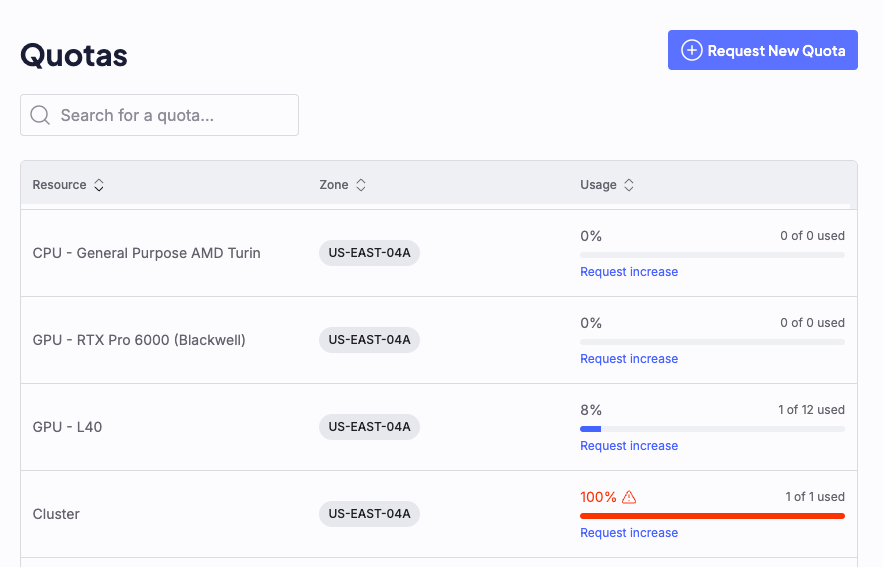
How quotas apply to instance types
Quotas apply per organization, per instance type, per compute class, and per zone. Compute class is the Node Pool’s tier, eitherdefault or spot (preemptible). A default Node Pool and a spot Node Pool of the same instance type and zone count against separate quotas. For example, in the same zone, CKS tracks gd-8xh100ib-i128 at default compute class and the same instance type at spot as two separate quotas with independent limits.
CKS checks the quota every time targetNodes is set, whether you’re creating a new Node Pool or scaling an existing one. If a request exceeds the quota, CKS caps it to your remaining headroom, queues that many Nodes, and discards the remainder. Headroom is your quota limit minus the Nodes your organization already has assigned or queued for that instance type, compute class, and zone. Nodes queued by your other Node Pools reduce your headroom. Only the request being checked stays out of that total, so CKS doesn’t count it twice. When no headroom is left, CKS queues nothing and the Quota condition becomes Over.
On rack-scale instance types, the cap rounds down to whole NVLink domains. A domain holds 18 Nodes on GB200 and GB300, so headroom of fewer than 18 Nodes queues nothing on those types.
To identify the instance types your organization uses, see GPU instances and CPU instances. To check which instance types are offered in each zone, see the Availability matrix.
To check the quota status of a Node Pool, run kubectl get nodepool and read the QUOTA column, or run kubectl describe nodepool [NODE-POOL-NAME] and read the Quota condition. An Over status means the Node Pool’s targetNodes exceeds your organization’s quota for that instance type, compute class, and zone, and no headroom is left, so CKS queued nothing. A capped request that still queued some Nodes reports Under. For the full meaning of each status, see Node Pool conditions: Quota.
Quota errors
When a Node Pool’stargetNodes request reaches a quota limit, the Node Pool controller emits a Kubernetes event. The bottom of kubectl describe nodepool [NODE-POOL-NAME] lists recent events. For example:
Example output
For the complete event schema, see the Node Pool reference: Events. For troubleshooting quota and capacity states together, see Node Pool status: Common capacity and quota states.