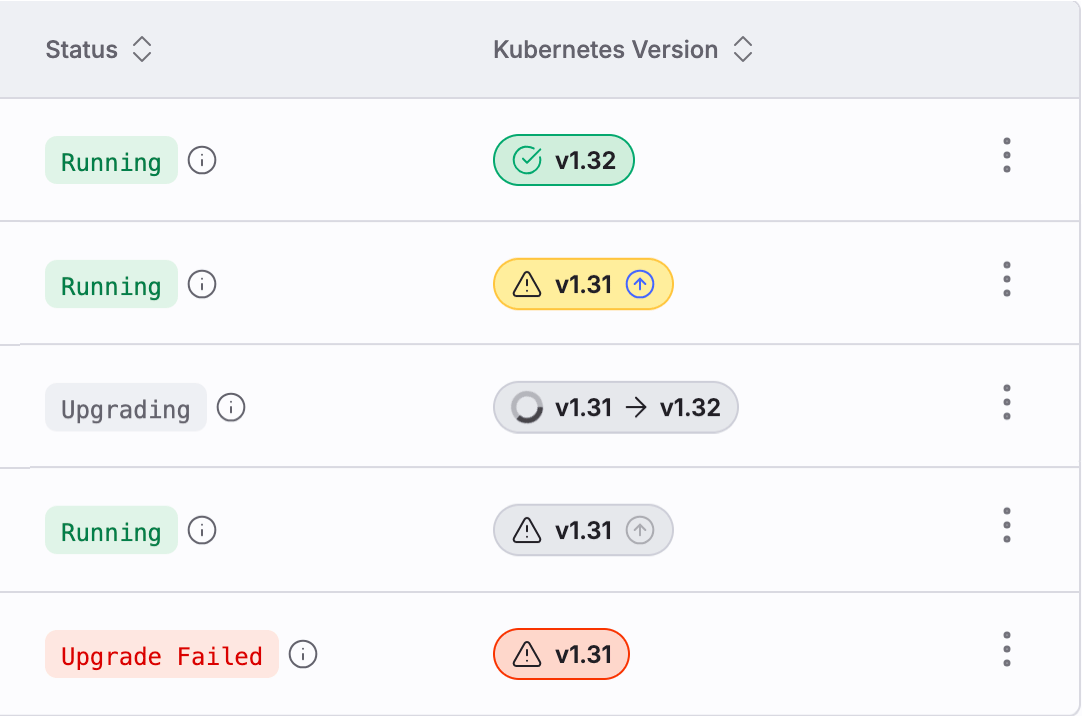
Upgrade CKS clusters to the latest Kubernetes version
Upgrading your CKS cluster ensures access to the latest features, performance improvements, and critical security updates. This guide provides step-by-step instructions for upgrading your CKS cluster to the next available Kubernetes version.
A cluster isn’t eligible for upgrade in the following cases:
Unsupported configuration: Some clusters don’t support self-service upgrades when internal components are out of date or not enabled.
Deprecated Kubernetes APIs: If a cluster uses Kubernetes APIs that are deprecated in the target version, the upgrade can’t proceed.
Note: CoreWeave checks for deprecated APIs in your cluster, but can’t guarantee that it detects all deprecated APIs in use. Before you upgrade, review the Kubernetes Deprecated API Migration Guide for your target version and ensure that your workloads are compatible.
Cluster health issues: Upgrades require the cluster to be in a healthy state.
Node version skew: If any Nodes are more than two versions behind the Control Plane, the upgrade can’t proceed until you reboot those Nodes, which upgrades them to the latest kubelet version.
Use the Cloud Console or the CKS API to upgrade the Control Plane of your cluster. The Control Plane upgrade is a prerequisite for rebooting Nodes to complete the Kubernetes upgrade.
Replace the required fields with your cluster’s specific values. Set version to the next Kubernetes minor version. See the versions supported by CKS.
Submit the request with data.json in the request body. Replace [CLUSTER-ID] in the endpoint URL with the cluster ID, and replace [API-ACCESS-TOKEN] with an API access token for your cluster.
Upgrading the Control Plane doesn’t automatically update the Nodes. They continue to run their current Kubernetes version until rebooted, which lets workloads run without interruption. After you upgrade the Control Plane, reboot all Nodes in your Node Pools as soon as possible. This completes the Kubernetes upgrade and ensures consistent performance and feature compatibility.See Reboot Nodes on CKS for detailed instructions.