

- Usage by resource type breaks usage down by GPU, CPU, storage, and network.
- Usage by capacity plan breaks GPU and CPU usage down by capacity plan: Reserved Instances, On-Demand, Spot, and Flex.
Permissions
The Cloud Console only displays the Billing insights page if you have the required role. The following role or legacy group allows access:- The
Billing Viewerrole in an IAM Access Policy - The legacy
billing_viewergroup
Filters and date range
At the top of the page you can scope and filter the data:- Cluster and Zone dropdowns to limit usage to specific infrastructure. Both dropdowns are available only on the Usage by resource type tab. The date range applies to both tabs.
- Date range picker with quick options: MTD (Month to date), Last 7 days, Last 30 days, and Last month (the previous calendar month).
- A note showing the billing day window (for example, “Billing day runs from 5:00 PM to 5:00 PM ET”).
Usage by resource type
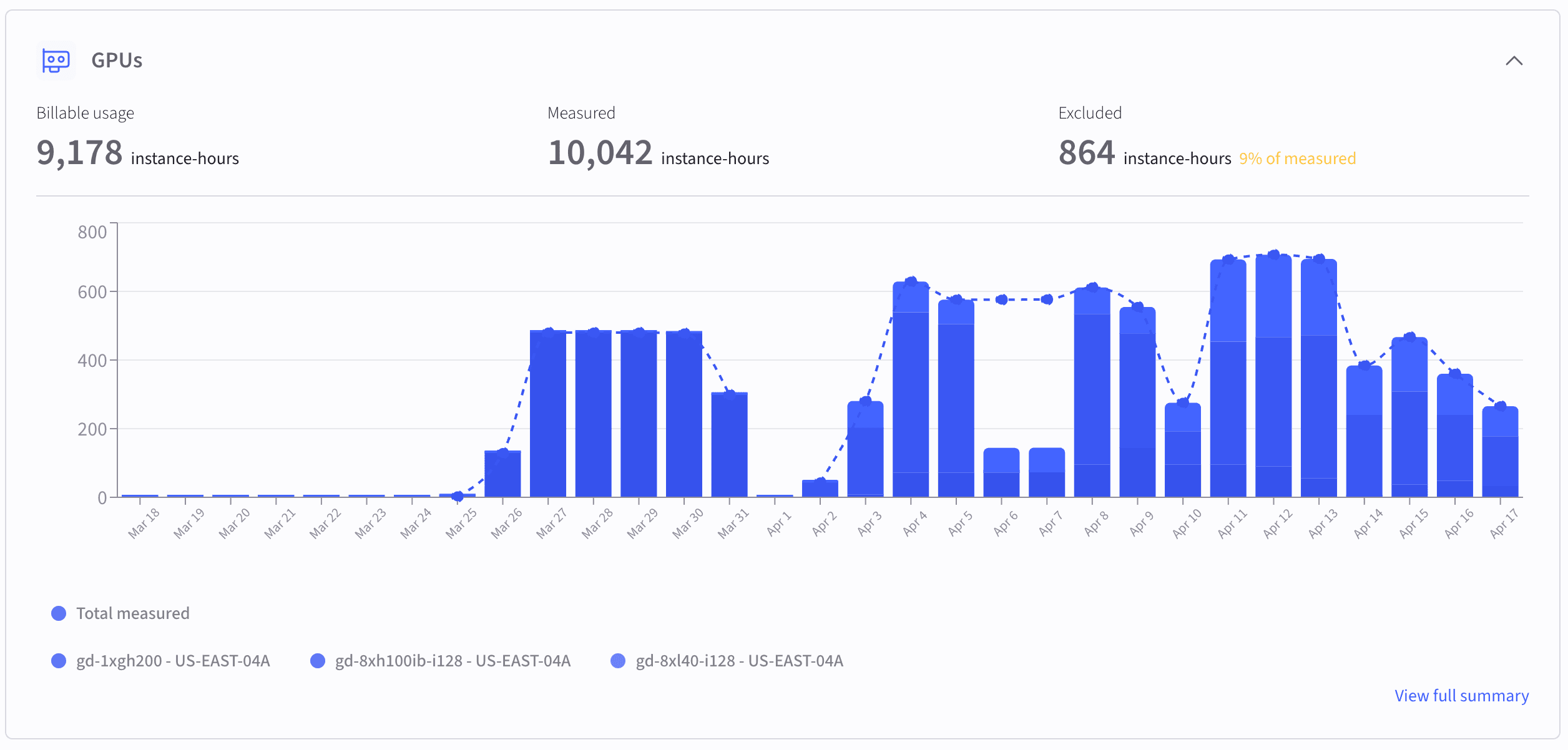
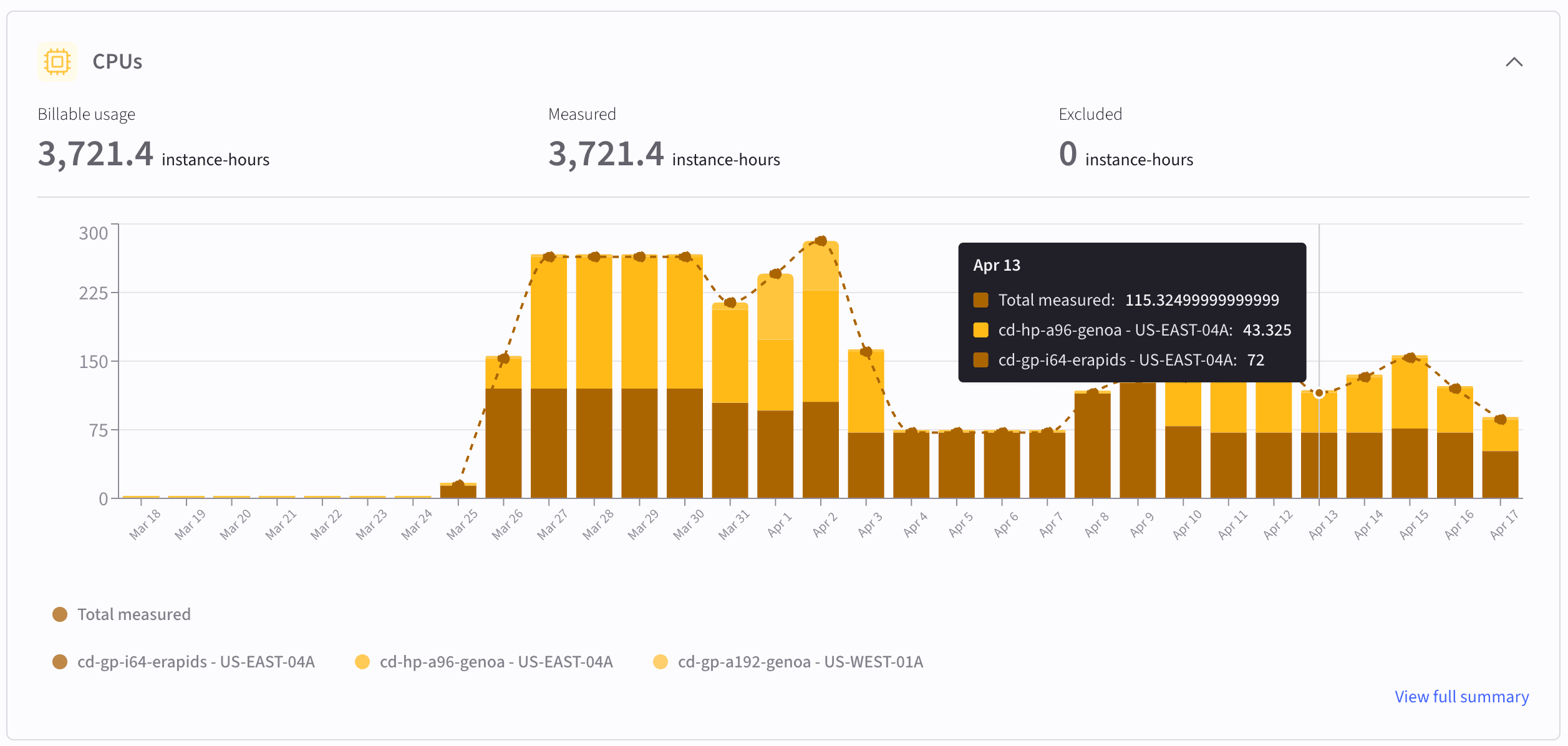
On the Usage by resource type tab, usage is grouped into four resource categories, each displayed as a collapsible card:Resource cards
Expanding a resource card reveals three metrics for the selected time period:- Billable usage: The amount that appears on your invoice, after exclusions.
- Measured usage: Total metered usage before any exclusions are applied.
- Excluded: The portion of measured usage removed from billing, shown in both absolute units and as a percentage of measured usage.
Product exclusions summary
The Product exclusions summary table at the bottom of the page shows a row for each exclusion applied during the selected time range:All values are scoped to the currently selected environment, clusters, zones, and time range. Changing any filter recalculates the totals and charts.Exclusions are visible only after they have been configured and applied by CoreWeave. If you expect an exclusion and don’t see it, contact support or your account team.
Usage by capacity plan
The Usage by capacity plan tab groups your billable GPU and CPU usage by capacity plan instead of by resource type. Use it to see how your consumption is distributed across Reserved Instances, On-Demand, Spot, and Flex for the selected period. This tab uses the same date range as the Usage by resource type tab. The Cluster and Zone filters don’t apply here. The tab has three sections: summary cards, usage charts, and a breakdown by product.Summary cards
The tab shows one card per capacity plan: Reserved instance, On-demand, Spot, and Flex. Each card reports, for the selected period:- GPU billable hours and their percentage of the GPU total across all plans.
- CPU billable hours and their percentage of the CPU total across all plans.
Usage charts
Two stacked bar charts show daily billable instance-hours, broken down by capacity plan:- GPU usage by capacity plan: daily billable GPU instance-hours stacked by plan.
- CPU usage by capacity plan: daily billable CPU instance-hours stacked by plan.
Breakdown by product
The Breakdown by product table lists total billable hours per SKU across all capacity plans for the selected period:
You can sort the table by any column.
For details on how usage is attributed across plans, including the order in which Reserved Instance, Flex, and On-Demand capacity is filled, see About capacity plans.
Key concepts
The following concepts describe the metrics used throughout this page. Measured usage is the raw metered consumption for a given resource and SKU over the selected time window. This is the Total measured series shown in the charts. Billable usage is the portion of measured usage that appears on your invoice. It equals measured usage minus any exclusions. Excluded usage is usage that was measured but explicitly removed from billing, for example for a proof of concept, a credit, or a make-good. The Product exclusions summary table shows the line-item details for each exclusion, including the reason and the percentage of measured usage that was excluded.Related resources
The following resources provide additional context for billing and access management:- Export usage with the FOCUS API (Public Preview) to pull the same billable usage programmatically in FOCUS JSON or CSV format.
- The Grafana dashboard Usage by Product and Zone shows detailed resource consumption metrics.
- The IAM Access Policies page covers managing user roles and permissions.