

Each capacity plan balances cost and flexibility differently. Workloads with uneven capacity demands benefit from the Flex model. Fixed workloads work best with the low flat rate of a Reserved Instance.
Flex Reservations
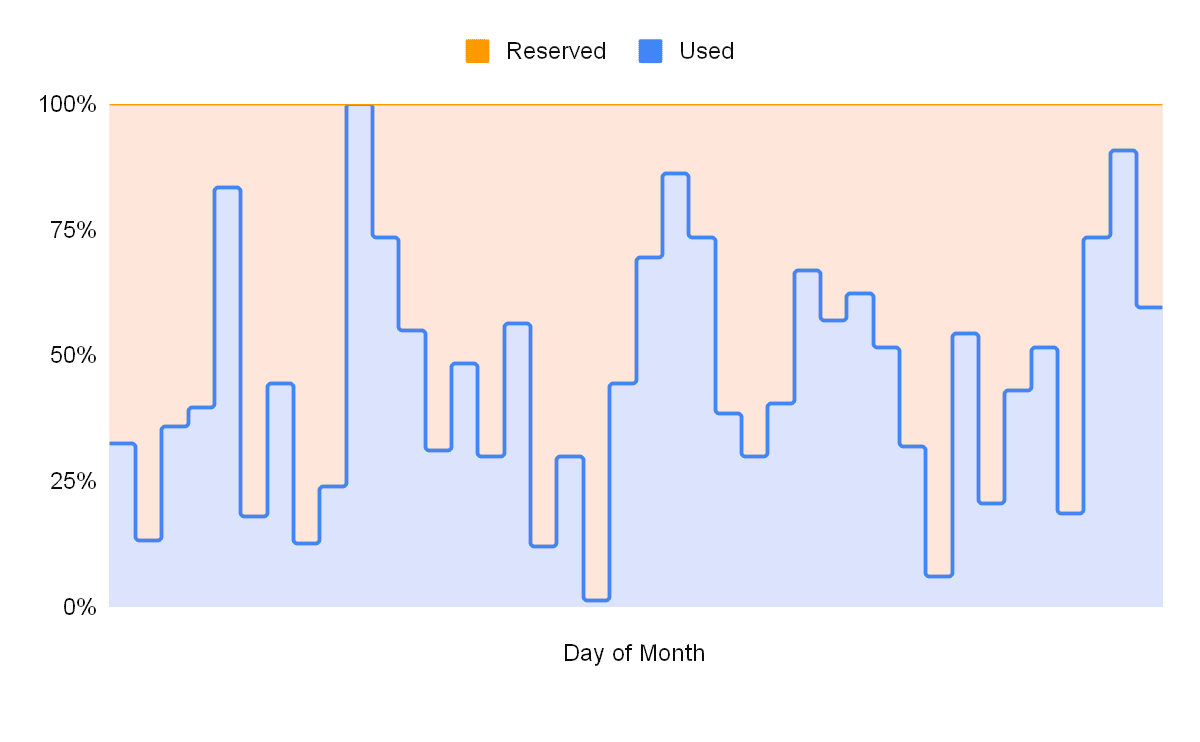
Flex Reservations provide guaranteed peak capacity while reducing the cost of idle capacity. This model suits critical workloads that need guaranteed capacity but have low enough utilization to make full-time Reserved Instances cost-prohibitive.Dual-rate billing structure
Flex uses two rates: a Holding rate for reserved capacity and a Usage rate when instances are active.- Holding rate: A baseline fee that guarantees capacity is held for you. This rate applies to all reserved capacity throughout the billing cycle.
- Usage rate: An incremental fee applied only when instances are active in your cluster.
Reserved Instances
Reserved Instances (RI) provide a guaranteed capacity reservation. During your term commitment, the reserved instances are available in your chosen region regardless of platform-wide demand. You pay a flat rate for every hour in the billing period, regardless of whether instances are running or idle.Spot Instances
Spot Instances provide access to unused CoreWeave capacity at reduced rates. Spot Instances are preemptible, so CoreWeave can reclaim them at any time if the capacity is required elsewhere. They work well for fault-tolerant or stateless workloads like AI inference. Spot Instances are managed through Spot Node Pools. To find a Zone most likely to fulfill a Spot request, use Capacity Finder in the Cloud Console.On-Demand
On-Demand instances provide burst capacity for unpredictable workloads, where you need to scale up to meet demand. These instances are billed based on actual use without a long-term commitment. They have no capacity guarantees. During peak demand periods, On-Demand instances may not be available.Understand billing and usage attribution
Combining capacity plans lets you reserve a “floor” of capacity for steady-state workloads while keeping headroom for spikes. The billing pipeline attributes usage at the SKU level and produces an itemized invoice from your contract terms and real-time usage with separate line items for Reserved Instances, Flex holding fees, and Flex usage rates. The following sections describe what appears on your invoice, the order in which usage is attributed across plans, and how each line item is calculated.What appears on your invoice
Billing reconciles all consumption into one invoice. Each line item shows the SKU, quantity (hours), and the applied rate type. The following table illustrates how a typical month might be broken out for a customer with a B200 Flex Reservation who also used On-Demand, plus RTX PRO 6000 Spot capacity.Order of attribution
Attribution runs every 30 seconds. For each SKU, usage is applied in this order:- Reserved Instances: Usage fills all available Reserved Instance capacity first.
- Flex: Remaining usage is applied to the Flex capacity band.
- On-Demand: Usage beyond the sum of Reserved Instance and Flex capacity is billed as On-Demand overage.
How each line item is applied
The following list describes how each rate type contributes to your invoice:- Flex (Holding + Usage): The Holding rate applies to every hour in the period (for example, 720 hours in a 30-day month) to guarantee the reservation. The Usage rate applies only to the hours when Flex Nodes are active in the cluster. Total Flex cost is the sum of those two components.
- On-Demand: When usage for a SKU exceeds your Reserved Instance and Flex capacity, the excess is attributed at the standard On-Demand rate. In the preceding table, the 12 On-Demand hours represent a peak that goes beyond the Flex ceiling.
- Spot: Workloads scheduled on Spot Node Pools are billed at the Spot rate for that SKU and region. Spot is tracked as a separate compute class, so it doesn’t consume or affect your RI or Flex capacity.
Request more capacity
When you need more hardware than you’ve provisioned, the path depends on the plan. Reserved Instances and Flex Reservations are set up commercially through your Account Executive, quota increases go through a support ticket, and Spot capacity is self-serve through Spot Node Pools. Keep capacity, quota, and capacity plans distinct: capacity is whether the hardware physically exists in an Availability Zone, quota is the ceiling your organization is allowed to provision (see Quota self-service), and a capacity plan is how you commit to and pay for it over time. Provide all of the following on the first message so the request can be evaluated without follow-up questions:- Organization name and the relevant namespace.
- Instance type or GPU SKU, named exactly. See About instances.
- Node count you need, and whether that’s a firm number or a range.
- Region or Availability Zone, or a short list of acceptable Zones if you’re flexible.
- Capacity plan preference: Spot, On-Demand, Flex Reservation, or Reserved Instance.
- Timeframe: when you need it and for how long.
- Workload summary: training, inference, or batch, and whether it’s interruptible.