

Prerequisites
- You must generate an Access Key before you create a bucket. When you use the Cloud Console, use an API access token to generate the Access Key. Workload Identity Federation is supported with CLI clients.
- To create a bucket with the Cloud Console, you must have
s3:CreateBucketandcwobject:CreateAccessKeypermissions granted to your user or group by an organization access policy. - Make sure your configuration uses the correct endpoint URL and has virtual-hosted addressing enabled.
Create a bucket with Cloud Console
To create a bucket with the CoreWeave Cloud Console, follow these steps:- In the Cloud Console, navigate to the Buckets page.
- Click the Create Bucket button at the top right corner of the page.
-
In the dialog, enter a Bucket Name.
Bucket naming rules
Bucket names must be globally unique and adhere to the following rules:- Length: 3 to 63 characters.
- Characters: Only lowercase letters (
a-z), numbers (0-9), and hyphens (-). No dots, uppercase letters, underscores, spaces, or other special characters. - Start and end: Must begin and end with a letter or number. Cannot start or end with a hyphen (
-). - Prohibited patterns: Cannot start with
xn--. - Reserved: Must not begin with
cw-,vip-, orlog-stitcher-ch-. Must not be the exact nameint. CoreWeave reserves these for internal use.
-
Select an Availability Zone.
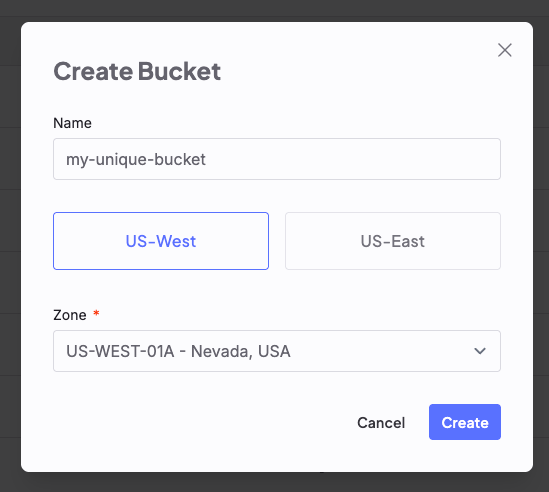
-
Click Create.
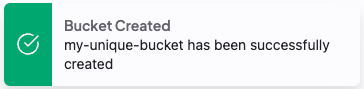
-
Click More options to view information in Grafana, or to delete the bucket.
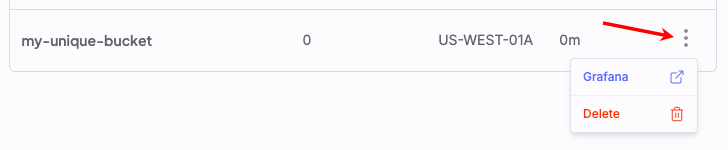
Create a bucket with CLI clients
CoreWeave AI Object Storage is compatible with S3-compatible clients, including S3cmd, the AWS CLI, Boto3, and the CoreWeave fork of s5cmd.Use the CoreWeave fork of
s5cmd with AI Object StorageThe upstream s5cmd uses path-style addressing with custom endpoint URLs. AI Object Storage doesn’t support path-style addressing and requires virtual-hosted style URLs. Use the CoreWeave fork of s5cmd, which is compatible with AI Object Storage and can safely replace any existing s5cmd installation. For setup and usage, see Migrate data to AI Object Storage.https://cwobject.com, requires TLS v1.3. Make sure your S3-compatible tools and OpenSSL use TLS v1.3.
The following sections describe how to create a bucket with each supported CLI client. Replace these placeholders in the examples:
-
[BUCKET-NAME]: A globally unique name for your bucket. Follow the naming rules:Bucket naming rules
Bucket names must be globally unique and adhere to the following rules:- Length: 3 to 63 characters.
- Characters: Only lowercase letters (
a-z), numbers (0-9), and hyphens (-). No dots, uppercase letters, underscores, spaces, or other special characters. - Start and end: Must begin and end with a letter or number. Cannot start or end with a hyphen (
-). - Prohibited patterns: Cannot start with
xn--. - Reserved: Must not begin with
cw-,vip-, orlog-stitcher-ch-. Must not be the exact nameint. CoreWeave reserves these for internal use.
-
[AVAILABILITY-ZONE]: A CoreWeave Availability Zone that supports AI Object Storage (for example,US-EAST-04A). S3-compatible tools use the term “region” to define the location of the storage service, but at CoreWeave, Regions are larger constructs organized into Availability Zones. Use a CoreWeave Availability Zone that supports AI Object Storage:Availability Zones that support AI Object Storage
Learn more about Regions and Availability Zones.- US-CENTRAL
- US-EAST
- US-WEST
- CA-EAST
- EU-NORTH
- EU-SOUTH
US-CENTRAL-05AUS-CENTRAL-06AUS-CENTRAL-07AUS-CENTRAL-08AUS-CENTRAL-08B
Bucket creation delayWhen you create a bucket with an S3-compatible client, it takes about one minute before the bucket becomes available due to DNS caching. You might see the following error immediately after bucket creation:
An error occurred (InvalidRegion) when calling the ListObjects operation: Region does not match. Wait one minute, then try again.This delay doesn’t occur when you create buckets in the Cloud Console.- AWS CLI
- s3cmd
- Boto3
- s5cmd
To create a bucket with AWS CLI, use the If you need to install or configure the AWS CLI for AI Object Storage, see Manage buckets with AWS CLI.
aws s3api command. The LocationConstraint parameter is required.Create a bucket with AWS CLI
Versioned buckets
New AI Object Storage buckets have versioning disabled. TheCreateBucket operation doesn’t accept a versioning configuration, so creating a versioned bucket requires two operations: first CreateBucket, then PutBucketVersioning.
To version every object from its first upload, enable versioning immediately after creating the bucket and before uploading any objects. If the bucket already contains objects, versioning applies to new writes after you enable it. Existing objects retain their current single version until you overwrite or re-upload them.
To enable and manage versioning, see Versioned buckets.