

--segment can be rejected.
Concepts
The Slurm Topology/Block Plugin adds new features for managing job placement within NVLink domains. Key concepts include Blocks, Segments, and the--exclusive=topo option.
Some of the behavior on this page depends on the Slurm version. By default, SUNK 8.0 and later run Slurm 25.11, and SUNK 7.x runs Slurm 25.05. For the full mapping, see SUNK to Slurm version mapping.
When SUNK auto-generates the topology file, it defines Blocks based on the ds.coreweave.com/nvlink.domain label on CKS Nodes. For GB200, GB300, and Vera Rubin NVL72-powered nodes, this label is a globally unique rack identifier, for example, DH4-016-US-EAST-02A.
In clusters with both NVLink-enabled multi-node systems and standard nodes, SUNK creates a topology.conf file that includes Block and switch definitions. This configuration doesn’t affect behavior unless you explicitly enable the Topology/Block Plugin, which ensures safe integration and runtime flexibility.
Blocks
A Block is a group of nodes in the same Slurm cluster, defined in thetopology.conf file. SUNK automatically generates this file, so you don’t need to create or manage it manually. It specifies which nodes belong to each Block and defines the Block size, the number of nodes in a Block.
Each Block has a unique ID and cannot overlap with others. CoreWeave dynamically updates the topology configuration to reflect changes in node availability. By default, each GB200, GB300, or Vera Rubin NVL72-based system corresponds to a Block containing 18 nodes in the same NVLink domain. A node that is drained or down stays in the Block, so the Block size is unchanged and the Block simply has fewer nodes available to schedule. Run scontrol show topology to see the current BlockSize and node list for each Block.
Segments
A Segment is a set of nodes within a Block that Slurm allocates together. Segments reduce resource fragmentation because they keep allocations intact. If a job spans multiple Blocks, Slurm schedules equal-sized Segments in each Block. A Block can hold multiple Segments if space allows. Whether a Segment can be larger than a Block depends on the Slurm version. On SUNK 7.x and earlier, Slurm rejects a segment size larger than the Block size. SUNK 8.0 and later accept the request, but SUNK generates a topology with one Block size. Slurm has no larger Block for an oversized Segment, so it places the Segment anywhere in the cluster. The job then loses the NVLink locality that Segments provide. Keep the segment size at or below the Block size on every version. If you don’t set a segment size, Slurm applies no segment constraint and places the job by its total node count. A job no larger than one Block must fit within a single Block. A larger job is placed anywhere in the cluster, without NVLink locality. This is true on every version. The following are best practices when configuring segment size:-
When you select a segment size for your job, default to
--segment=1. This makes your job more flexible because it can run on any available nodes across all Blocks, which improves scheduling efficiency. -
On GB200 NVL72 systems, don’t use a segment size larger than
--segment=16. This gives a buffer for nodes to fail on a rack before it becomes unusable for your job. - On GB200 NVL72 systems, balance segment sizes across jobs on your cluster with factors of 16 (8, 4, 2, 1). This minimizes the number of idle nodes on each rack left unavailable to your jobs.
- Always set the segment size explicitly. Without one, Slurm places the job by its total node count instead of by Segment. A small segment size constrains scheduling less.
sunk.coreweave.com/segment annotation on the Pod templates instead of --segment. See Configure topology segments.
All examples in this guide follow these best practices by specifying the segment size to ensure reliable scheduling.
Segment placement options in SUNK 8.0 and later
Slurm 25.11, which ships with SUNK 8.0, added two options that control how Slurm distributes a job’s Segments across Blocks. Both require the Topology/Block Plugin, and both work withsrun, sbatch, and salloc.
The --spread-segments option places each Segment on a separate Block. After Slurm places a Segment, it removes that Block from the candidates for the job’s remaining Segments. A job with four Segments therefore lands on four different racks. Use this option to limit how much of a job a single rack failure can disrupt:
--consolidate-segments option places all of a job’s Segments in one higher-level Block that aggregates several Blocks. That requires the topology configuration to define aggregate Block sizes, and SUNK generates a topology with one Block size. On a SUNK cluster, this option therefore has no aggregate Block to consolidate into once a job is larger than one rack.
For a job that requests a segment size, Slurm sets SLURM_JOB_SEGMENT_SIZE in the job environment to the segment size used for the allocation. Slurm doesn’t set the variable for jobs that don’t request a segment size.
To confirm which options a job uses, run scontrol show job [JOB-ID] and look for the SegmentSize field. The same line reports SpreadSegments=Yes and ConsolidateSegments=Yes when those options are set. A job that requested no segment size has no SegmentSize field.
Exclusive option
The--exclusive=topo option ensures that only the job being submitted runs in a Block. The job won’t share a Block with any other job, and no new jobs can be placed there until the original job completes. Unused nodes in the Block remain idle. Use this option for benchmarking or to avoid resource competition.
When srun --exclusive starts a new job and you set --ntasks, the job gets the whole node, but the job step gets only the CPUs those tasks request. A step started this way with --ntasks=1 and no --cpus-per-task runs on a single core. See Why does my exclusive Slurm job use only one CPU core?.
Example scenarios
The following scenarios show how to use the Topology/Block Plugin to optimize job placement within GB200, GB300, and Vera Rubin NVL72-based systems. Use them as reference patterns when sizing your own jobs and choosing segment sizes. Each diagram shows multiple 18-node NVL72 systems (Blocks). Node colors represent status:- Green: nodes running the requested job (light green indicates a second job or Segment)
- Gray: Unavailable: drained, down, or running unrelated jobs
- White: Idle
A job that fits in a Block
A job requests 10 nodes, which is less than the Block size. The segment size is set to 1, following best practice.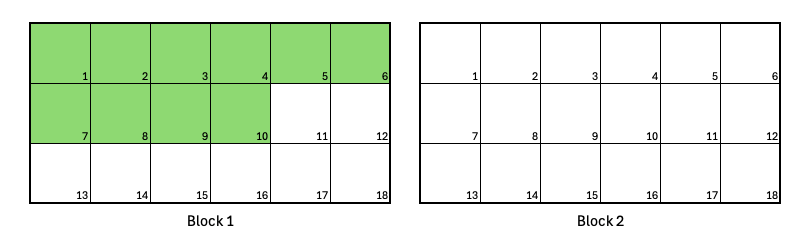
Job requests 10 nodes.
Jobs larger than the Block size
A job requests 20 nodes, which exceeds the Block size of 18. The segment size is set to 1, following best practice.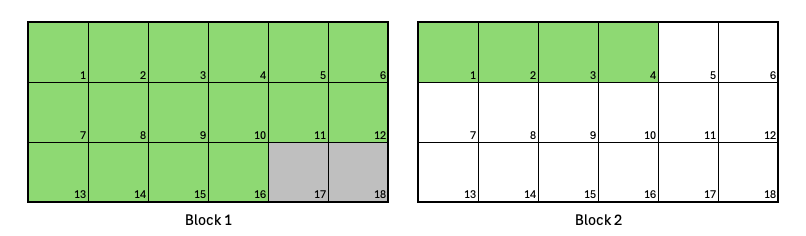
Job requests 20 nodes
Two jobs in a single Block
You submit two jobs. The first requests 8 nodes, and the second requests 4. The segment size is set to 1 for both jobs, following best practice.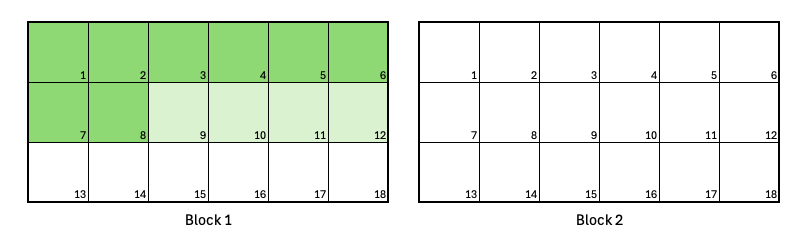
Two jobs can fit in a single Block
Realistic training example: A job with two Segments
A job requests 32 nodes, divided into two Segments of 16 nodes each.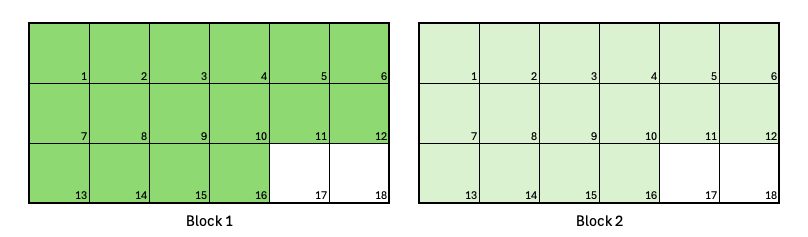
A job with two Segments
Exclusive jobs
A job requests 16 nodes with the--exclusive=topo option. The segment size is set to 1, following best practice.
--exclusive=topo prevents it from running in Block 1 while a competing job (light green) is active. The rest of Block 2 remains idle, and no other jobs can run there until this job completes.
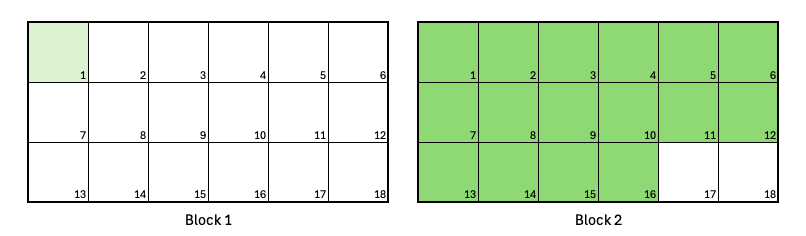
Exclusive jobs
Combining Segments and the exclusive option
A job requests 16 nodes, divided into two 8-node Segments, using--exclusive=topo.
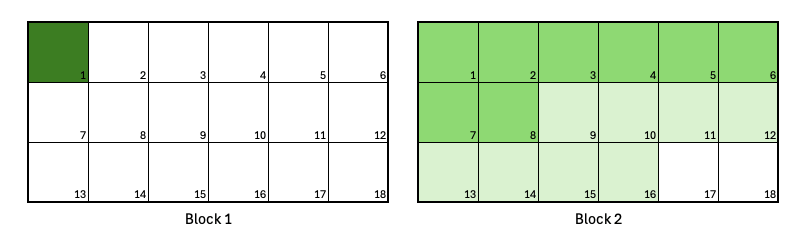
Combining Segments and Exclusive jobs
Identify idle nodes in a Block
Before you submit a job, you can check how many nodes are currently idle in each Block to choose a segment size that schedules promptly. Use the script at/usr/share/sunk/bin/segment-calc.sh on the Slurm login node to check for idle nodes within a Block. By default, it reports idle nodes per topology Block. You can optionally provide the --segment N argument to report only those Blocks with at least N idle nodes available.
Example usage
Troubleshoot “Requested node configuration is not available” with --segment
A job that uses --segment, often combined with --exclude, can be rejected at submission or stay PENDING with the reason Requested node configuration is not available. A job whose segment math can’t be satisfied gets a different message, Requested topology configuration is not available, so check for both strings. Either way, the usual cause is the request itself rather than a cluster that’s out of capacity.
Work through these causes in order:
-
You combined
--segmentwith--nodelist. On SUNK 7.x and earlier, Slurm rejects a job that requests both whenever the job has more than one Segment. On SUNK 8.0 and later, Slurm supports the combination as long as the requested node count is no larger than the number of unique nodes in the node list. On either version, you can steer a job toward particular hardware with--constraintinstead of a node list. See the--segmententry in the Slurmsrundocumentation. -
You requested GPUs with
--gpus-per-task.--gpus-per-taskcombined with--segmentis rejected even when enough nodes are idle. Use--gpus-per-nodeinstead. To confirm this is the cause, submit the same job three ways with--test-only: with no GPU flag, with--gpus-per-node, and with--gpus-per-task. Only the last one fails. -
The segment size is larger than the available nodes in any single Block. A drained or down node still counts toward the Block size, so drains don’t change whether Slurm accepts the segment size. They reduce how many nodes each Block has available. If no Block has as many available nodes as your segment size, the job stays
PENDINGuntil a Block has room. On SUNK 7.x and earlier, a segment size larger than the Block size itself is rejected at submission, as described in Segments. Check how many nodes are idle per Block with/usr/share/sunk/bin/segment-calc.shas shown in Identify idle nodes in a Block, then choose a segment size that fits. -
--excluderemoved nodes a Block needs to reach the segment size. Excluding specific nodes can drop a Block below the requested segment size, leaving no Block able to satisfy the request. Relax or remove the--excludelist, or lower the segment size to fit the remaining nodes. If you need nodes kept out of scheduling for longer, ask an administrator for a reservation or a drain, which works with--segmentwhere--excludestruggles. -
The total node count isn’t divisible by the segment size. Slurm applies this rule to every job that sets a segment size, even when the job fits in a single Block. Make sure
--nodesis a multiple of--segment. -
You omitted the segment size. Without
--segment, Slurm places the job by its total node count, so a job no larger than one Block needs a single Block with room for every node it requests. See Segments. Always set the segment size explicitly.