

Link an artifact to a collection
Choose a workflow based on whether you want to create the artifact during a run, create it without a run, or link an existing artifact version.Before you start, check the following:
- The types of artifacts that collection permits. For more information about collection types, see “Collection types” within Create a collection.
- The registry that the collection belongs to already exists. To check that the registry exists, navigate to the Registry App and search for the name of the registry.
- W&B Python SDK
- Registry
- Artifact browser
Programmatically link an artifact version to a collection with
wandb.Run.link_artifact() or
wandb.Artifact.link()The following table summarizes the methods you can use to link an artifact version to a collection and what W&B records when you use each method.Pass the destination collection path to the
target_path parameter. The path consists of the wandb-registry- prefix, the registry name, and the collection name:Link an artifact from a run
Usewandb.Run.link_artifact() to create and link an artifact version during an active run. W&B logs draft artifacts as outputs of the run before linking them.To create and link an artifact version:- Initialize a run with
wandb.init(). - Create an
Artifactobject and add one or more files. - Call
wandb.Run.link_artifact()and specify the destination collection.
<>) with your own values:Create and link an artifact
Usewandb.Artifact.link() to create and link a draft artifact without explicitly initializing a run. W&B creates an automatic run if needed to save the artifact before linking it.To create and link an artifact version:- Create an
Artifactobject and add one or more files. - Call
wandb.Artifact.link()and specify the destination collection.
<>) with your own:Link an existing artifact
Usewandb.Artifact.link() on an artifact fetched with wandb.Api().artifact() to link an existing committed artifact version without creating a new run.- Create a Public API client with
wandb.Api(). - Retrieve the artifact version with
wandb.Api.artifact(). - Call
wandb.Artifact.link()and specify the destination collection.
Unlink an artifact version from a collection
Use the W&B Python SDK or the Registry to unlink an artifact version from a collection. Unlinking removes the artifact version from the collection but does not delete the source artifact version or its files.- W&B Python SDK
- Registry
To unlink an artifact version with the W&B Python SDK:Replace the placeholder values with your own values:
- Create a Public API client with
wandb.Api(). - Retrieve the linked artifact version with
wandb.Api.artifact(). - Call
wandb.Artifact.unlink()to unlink the artifact version from the collection.
View linked artifacts in a registry
View the metadata, usage, files, lineage, and deployment information for an artifact version linked to a Registry collection. Each linked artifact version includes the following tabs:
To view linked artifacts in a registry:
- Navigate to Registry.
- Select a registry.
- Select a collection. This expands the list of artifact versions within the collection.
- Select a version.
The information displayed for a linked artifact differs from that for a linked prompt.
Troubleshooting
Below are some common things to check if you are not able to link an artifact.Logging artifacts from a personal account
Artifacts logged to W&B with a personal entity can not be linked to the registry. Make sure that you log artifacts using a team entity within your organization. Only artifacts logged within an organization’s team can be linked to the organization’s registry.Ensure that you log an artifact with a team entity if you want to link that artifact to a registry.
Find your team entity
W&B uses the name of your team as the team’s entity. For example, if your team is called team-awesome, your team entity isteam-awesome.
You can confirm the name of your team by:
- Navigate to your team’s W&B profile page.
- Copy the site’s URL. It has the form of
https://wandb.ai/<team>. Where<team>is both the name of your team and the team’s entity.
Log from a team entity
-
Specify the team as the entity when you initialize a run with
wandb.init(). If you do not specify theentitywhen you initialize a run, the run uses your default entity which may or may not be your team entity. -
Log the artifact to the run either with
wandb.Run.log_artifact()or by creating an Artifact object and then adding files to it with:To log artifacts, see Construct artifacts. - If an artifact is logged to your personal entity, you will need to re-log it to an entity within your organization.
Confirm the path of a registry in the W&B App UI
Create an empty collection to confirm the path of the registry in the W&B App UI. To do so, follow the steps below:- Navigate to Registry.
- Click the registry you want to link an artifact to.
- Click on the empty collection. If an empty collection does not exist, create a new collection.
- Within the code snippet that appears, identify the
target_path=field within.link_artifact(). - (Optional) Delete the collection.
target_path parameter:
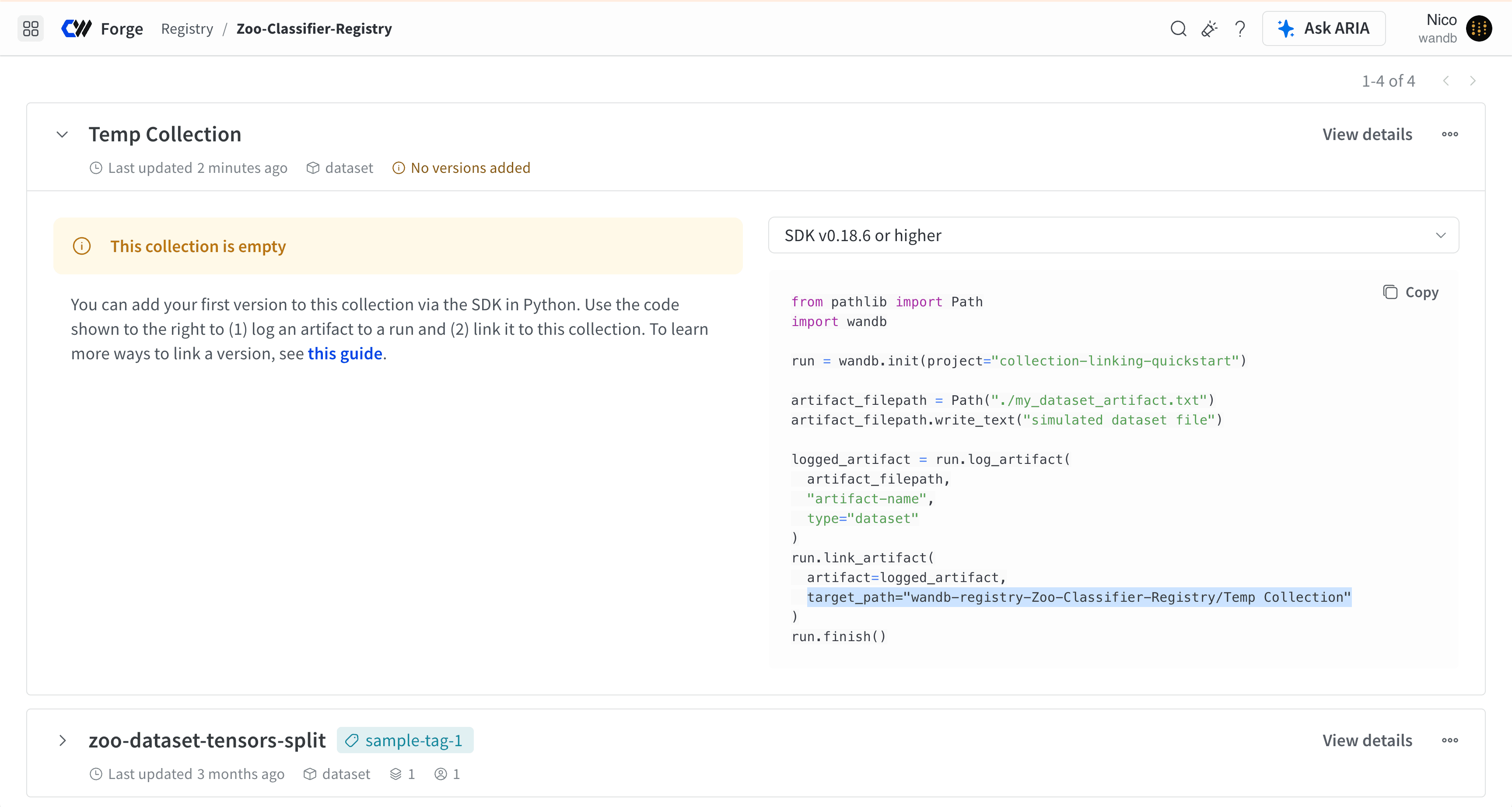
Ensure that you replace the name of the collection from the temporary collection with the name of the collection that you want to link your artifact to.