

Are you looking for information on W&B Weave? See the Weave Python SDK quickstart or Weave TypeScript SDK quickstart.
Create an account
The first time you sign in, a short setup flow creates your account and connects you to an organization. Which steps you see depends on how you arrive.1
Choose a sign-in method
Select Continue with Google, Continue with GitHub, Continue with Apple, or Continue with Microsoft, or sign up with an email address and password.If you already have Weights & Biases credentials, they work here. Select Log in instead of Sign up.
2
Verify your email
Check the inbox of the email address on your account for a verification link. If it doesn’t arrive, check your spam folder or select Resend email.
3
Sign up for an account
Enter your full name, your organization or institution, and a username. Your username becomes your profile URL, so it must be unique. A username can use only letters, numbers, underscores, and hyphens.For How will you use Forge?, select Professional for personal or business projects, or Academic for research or education.To continue, accept the Terms of Service and Privacy Policy.
4
Join your team
If your email domain matches an organization whose teams are open to you, you can join one of those teams.If you arrived through a team invitation or already belong to a team, you don’t see this step.
5
Create your organization
Name your organization. The name becomes part of its URL, as in
forge.coreweave.com/my-organization.If you joined a team in the previous step, arrived through a team invitation, or already belong to a team, you don’t see this step.6
Choose what you're working on
Select one of Train and fine-tune models, Build and evaluate agents, Run inference at scale, or I’m exploring. Your choice determines which page you see next, but it doesn’t restrict which products you can use.
Create an API key
To authenticate your machine, create an API key. To create an API key, select the Personal API key or Service Account API key tab for details.- Personal API key
- Service account API key
To create a personal API key owned by your user ID:
- Log in to Forge, then click your user profile icon and select User settings.
- Within API keys, select New key.
- Provide a descriptive name for your API key.
- Click Create API key.
- Copy the displayed API key immediately and store it securely.
Install the wandb library and log in
- Command line
- Python
- Python notebook
-
Set the
WANDB_API_KEYenvironment variable. ReplaceYOUR_API_KEYwith the API key you created. -
Install the
wandblibrary and log in:
Initialize a run and track hyperparameters
In your Python script or notebook, initialize a W&B run object withwandb.init(). Use a dictionary for the config parameter
to specify hyperparameter names and values. Within the with statement, you can log metrics and other information to Weights & Biases.
A run is a core element of Weights & Biases. You use runs to track metrics, create logs, and track artifacts.
Create a machine learning training experiment
This mock training script logs simulated accuracy and loss metrics to Weights & Biases. Copy and paste the following code into a Python script or notebook cell and run it: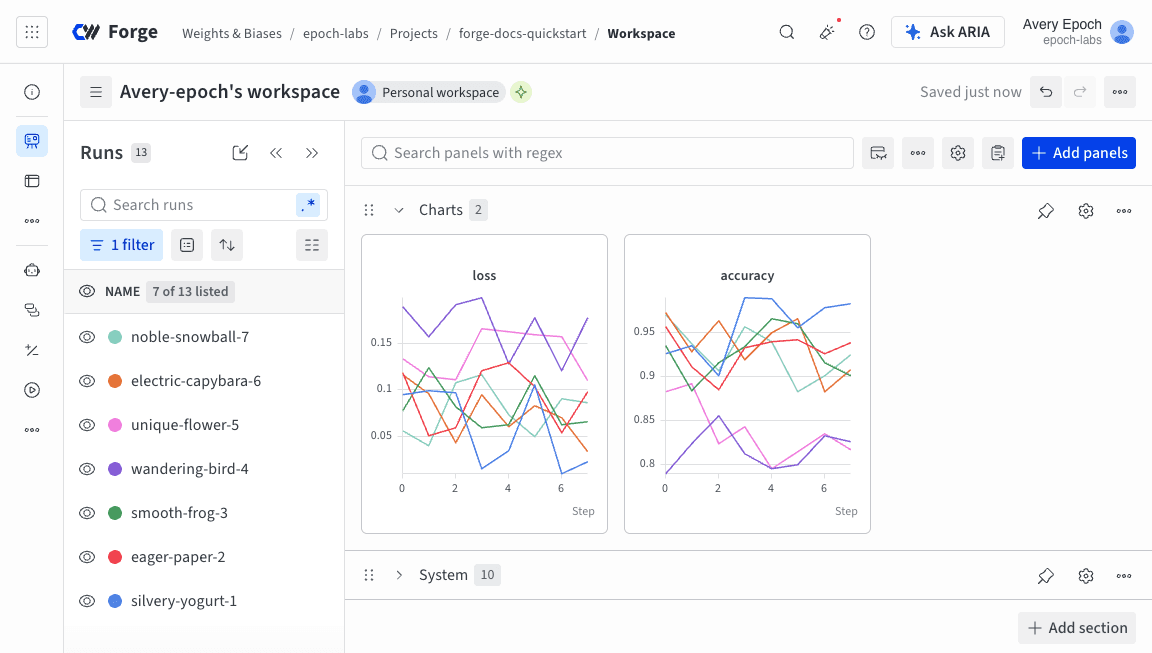
Next steps
Explore more Weights & Biases features:- Learn about and create your first run.
- Track models, datasets, and other files with W&B Artifacts.
- Automate hyperparameter searches and optimize models with W&B Sweeps.
- Share models, prompts, and datasets with Registry.
- Analyze runs, visualize model predictions, and view artifacts in your project’s dashboard.
- Summarize findings and share updates with collaborators with W&B Reports.
- Trace and evaluate LLM applications with W&B Weave.