

Enable Straggler Detection
SUNK v8.0.0 and later install and enable the Straggler Detection plugin by default. On SUNK v7.4.x, you turn it on with a cluster configuration update. On any version, jobs that run outside a container set one environment variable so NCCL loads the plugin. Once enabled, CoreWeave Grafana dashboards surface NCCL telemetry for distributed jobs running on Slurm. You can also disable NCCL telemetry collection and straggler detection at any time by updating your cluster configuration. For instructions, see Enable GPU straggler detection.Straggler detection in action
The following examples show how Straggler Detection surfaces information during a live training job, so you know what to expect before you enable it on your own clusters. When you run distributed training on CoreWeave, you gain real-time visibility into GPU communication behavior through a set of NCCL performance metrics and purpose-built Grafana dashboards. The Slurm Job Metrics dashboard surfaces these signals, including NCCL collective latency, bus bandwidth (BusBW), and message sizes, and uses algorithmic bandwidth (AlgoBW) to flag slow collectives. CoreWeave collects these metrics continuously from live jobs. The dashboards are designed for fast diagnosis and help you answer questions such as:- Is my job slowing down because of GPU-to-GPU communication issues?
- Which GPU or node is underperforming?
- Is NVLink bandwidth performing as expected?
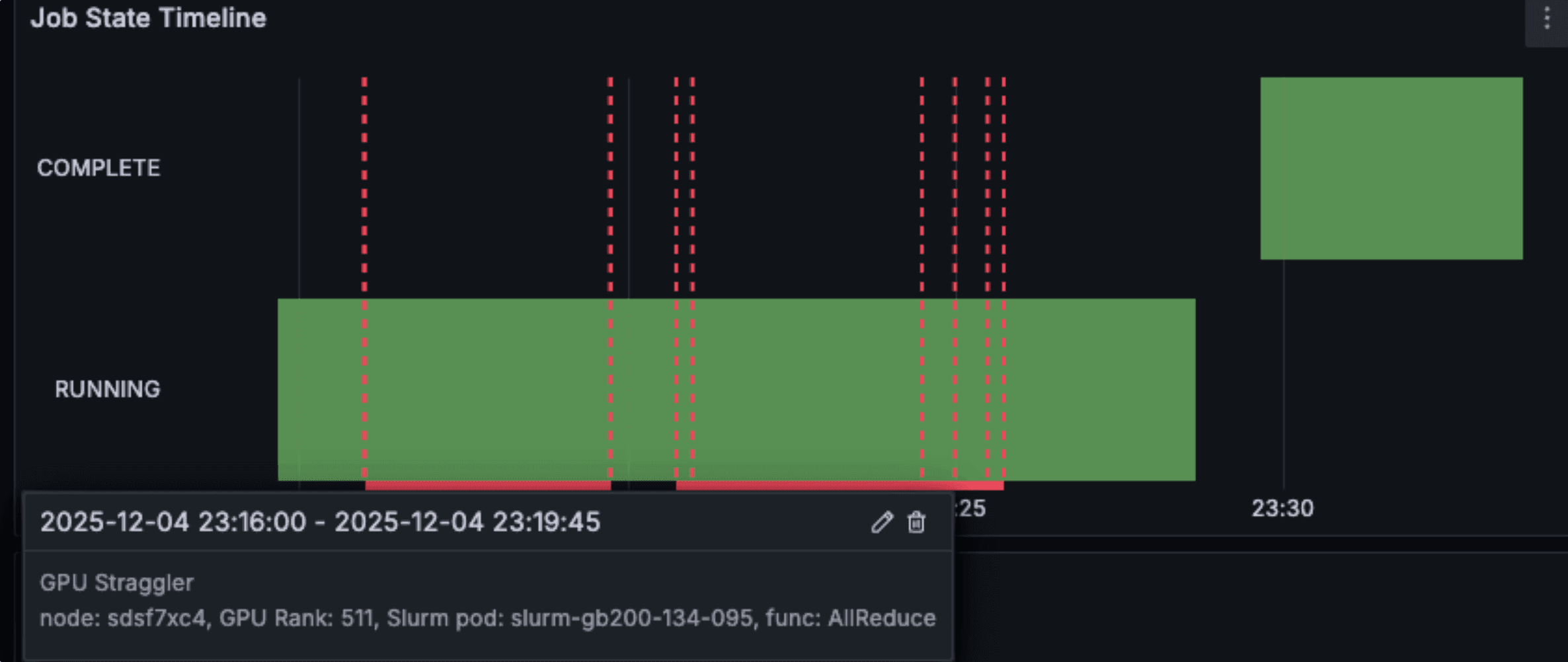
Straggler detection annotations overlaid on the job state timeline in the Slurm Job Metrics dashboard. The colored bars mark intervals where CoreWeave flagged a straggler, so you can quickly spot a problem before drilling into rank-level detail.
Locate a slow GPU in SUNK
When you run distributed training on CoreWeave using SUNK, you can correlate the timestamp of a detected straggler with your training logs and W&B job monitoring. This lets you match symptoms in your training code with rank-level NCCL telemetry. The GPU Straggler table identifies the exact GPU rank and node that fall behind. Each row links to detailed Node and Pod dashboards so you can continue investigating the health of the underlying resources. This reduces “job feels slow” debugging to pinpointing a specific GPU and node within seconds.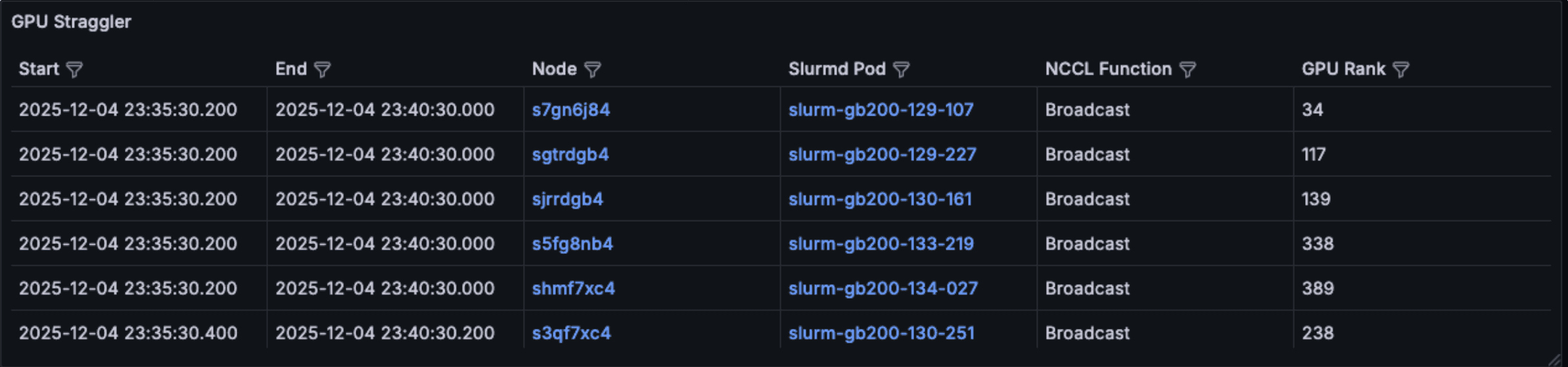
The GPU Straggler table from the Slurm Job Metrics dashboard, listing each rank flagged as a straggler with links to Node and Pod detail dashboards. The screenshot comes from an earlier build, so it shows more stragglers at once than a real job produces, and an NCCL Function column that the current table doesn't include. In a real job, you typically see a single straggler at a time.
Debug distributed training issues
When you investigate reduced MFU or distributed-configuration inefficiencies in otherwise healthy jobs, NCCL telemetry breaks communication down to the individual collective and communicator, which helps you find the root cause. Dashboards present bandwidth and latency by collective and communicator, split into a separate panel for each process-group size (for example, tensor parallel, pipeline parallel, and large data parallel groups). Each series averages across the ranks in its group. This helps you identify:- Collectives running noticeably slower in specific groups.
- Communicators whose
AllReduce,AllGather, orBroadcastlatency stays consistently above their peers in the same process-group size. - Imbalances between small and large parallel groups.
nccl-tests, which left expensive GPUs idle. With Straggler Detection, the same panels populate continuously from the live job, so you can diagnose bottlenecks without restarting workloads or paying the cost of idle GPUs.
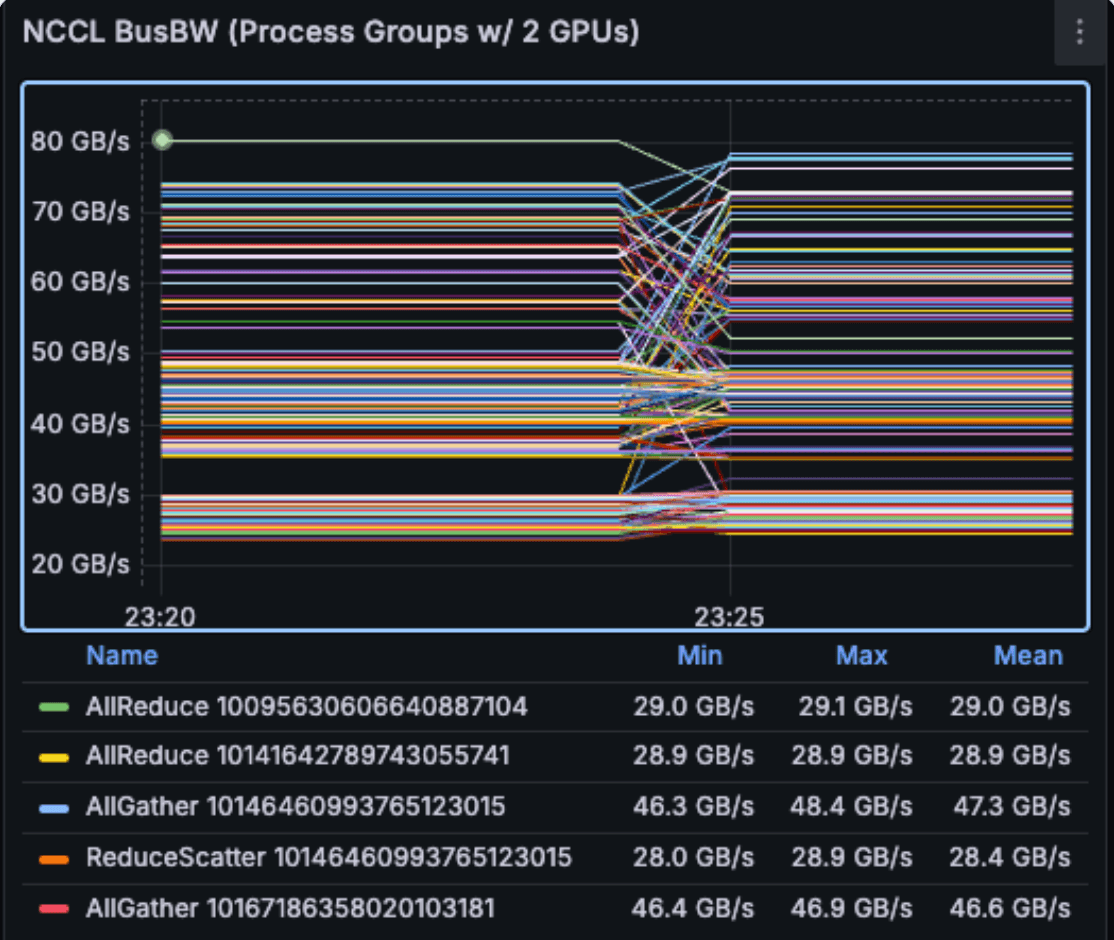
NCCL bus bandwidth (BusBW) for the collectives running in 2-GPU process groups during a live job. Each series is one collective on one communicator, named in the legend by collective and communicator hash. A series that sits well below its peers points to a communication-bound bottleneck in that group.
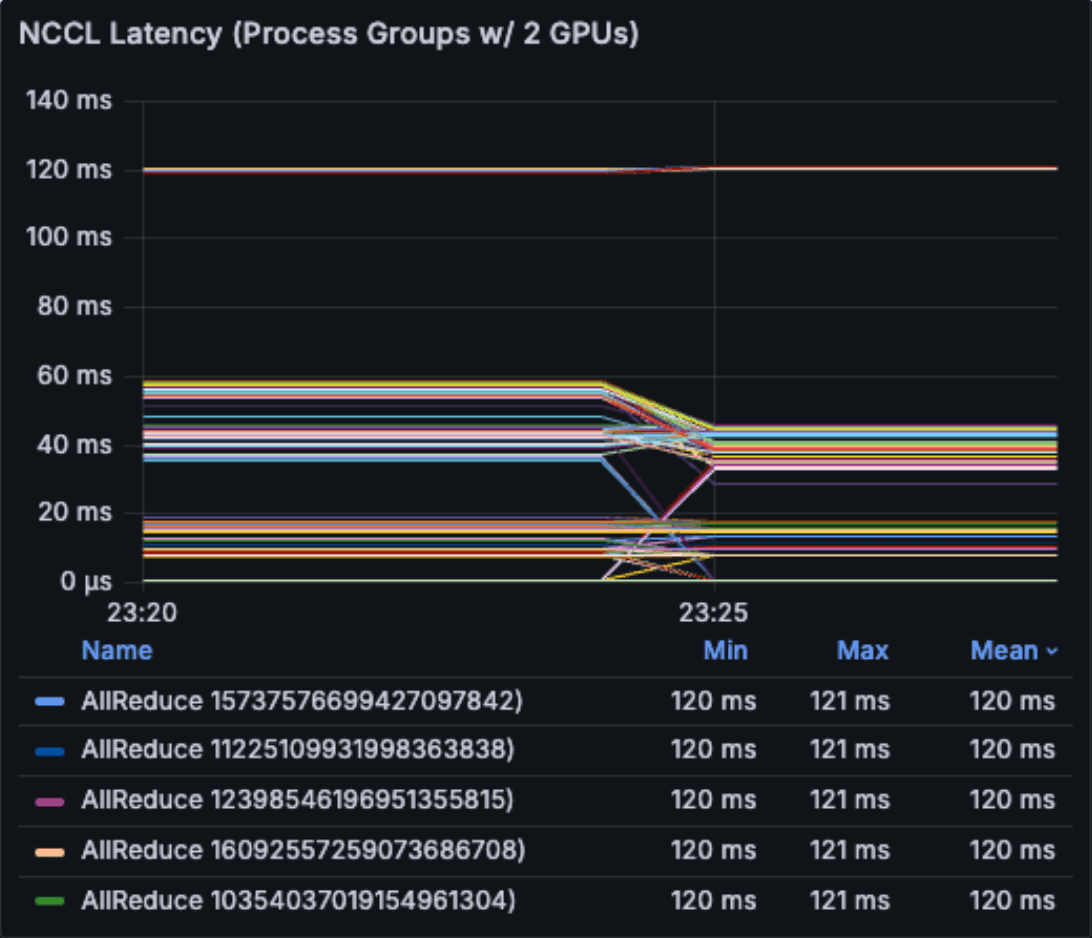
NCCL collective latency for the same process groups, with the slowest collectives sorted to the top of the legend. A series that stays consistently higher than the others is a strong straggler candidate. Use the GPU Straggler table to find the rank behind it.
Next steps
- Enable GPU straggler detection to turn the plugin on for a SUNK v7.4.x cluster, or to confirm it loaded on a newer one.
- Slurm Job Metrics dashboard for a panel-by-panel description of the NCCL Metrics row.