

Available only in W&B Multi-tenant Cloud.
How ARIA uses a granted secret
When you grant ARIA access to a personal secret, ARIA’s sandbox receives an environment variable named exactly as the secret, starting with the next message you send in a conversation. You don’t need to start a new chat. Revoking access works the same way: the variable is gone from the sandbox starting with your next message. Keep in mind:- The secret’s value is redacted from the sandbox output that appears in the chat.
- A granted secret can’t replace a managed environment variable, such as
WANDB_API_KEY. A secret whose name collides with a managed variable, or isn’t a valid environment variable name, is skipped and doesn’t reach the sandbox. - ARIA can use only the secrets you grant, in the organization the conversation belongs to.
Create a personal secret
To create a personal secret and let ARIA use it:- Click the account selector in the upper-right corner, then select User settings.
- Scroll to the Personal secrets section.
- Click New secret. If you don’t have any personal secrets yet, click Create new secret instead.
-
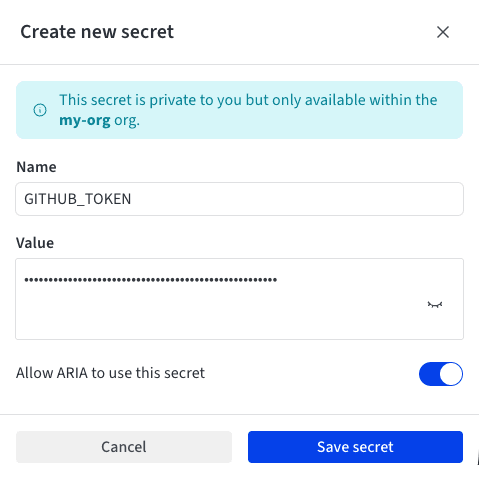
Enter a Name for the secret, in environment variable form: letters, digits, and underscores (
_), not starting with a digit. For example,GITHUB_TOKEN. If a team secret with the same name exists, the drawer says so. Your personal secret takes precedence over the team secret. - Paste the sensitive value into the Value field.
- Leave Allow ARIA to use this secret turned on, the default, to grant ARIA access as soon as the secret exists. Turn it off to store the secret without granting ARIA access.
- Click Save secret.
Grant or revoke ARIA’s access
You can change which of your personal secrets ARIA can use at any time, from your user settings or from the ARIA panel. Either way, the change takes effect with your next message in a conversation.From your user settings
In the Personal secrets section of your user settings, each secret’s row includes an ARIA access switch. Turn it on to grant ARIA access to that secret, or off to revoke it.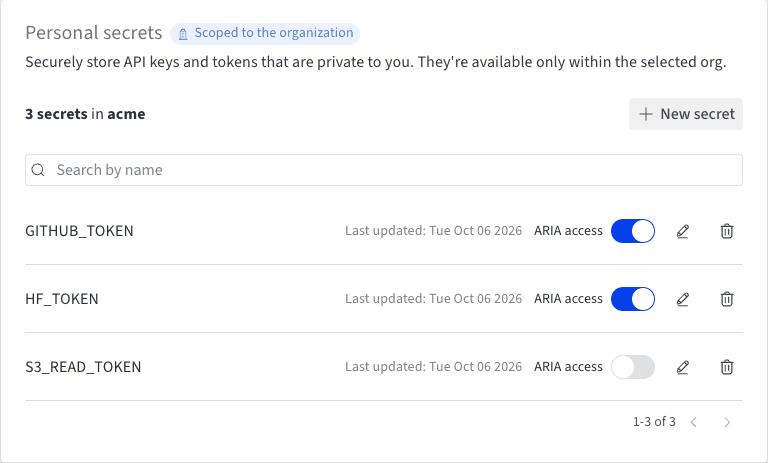
From the ARIA panel
- In the ARIA chat window, open the chat history sidebar if it’s hidden: click (Reveal chat history).
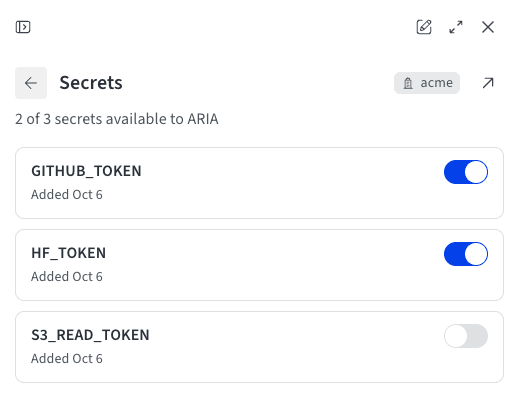
- In the Customize section, click Secrets. The pane lists your personal secrets in the current organization, and the summary shows how many are available to ARIA.
- Turn a secret’s switch on to grant ARIA access, or off to revoke it.
Connect a GitHub repository
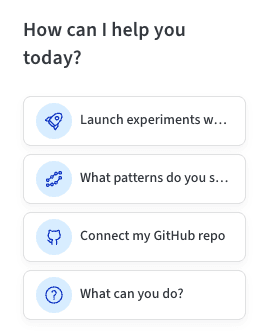
The most common use for secrets in ARIA is connecting GitHub. With a GitHub personal access token stored as a personal secret, ARIA can read code from your repositories and, when the token allows it, commit to a branch and open pull requests. Nothing is installed or authorized on GitHub’s side beyond the token, so what ARIA can do is decided by the token you create. To get started, click the Connect my GitHub repo suggestion chip in the chat window, or send/connect-github. The chip appears on most pages, such as a project’s workspace, but not in the standalone ARIA view. ARIA asks which repository you want to connect and whether it should be able to write to it, then walks you through the following steps.
1. Create a GitHub personal access token
In GitHub, go to Settings > Developer settings > Personal access tokens and create a token:- Fine-grained token (recommended): Set the resource owner to your account or to the organization that owns the repository, limit Repository access to the repositories you want to connect, and set Repository permissions based on what ARIA should do: Contents Read-only for reading, or Read and write for committing, and Pull requests Read and write for opening pull requests. GitHub adds read-only Metadata access automatically. An organization owner might need to approve the token before it works.
- Classic token: The
reposcope covers reading, committing, branches, and pull requests on private repositories;public_repocovers public ones. In an organization that uses SAML SSO, also authorize the token for that organization with Configure SSO.
2. Save the token as a personal secret and grant ARIA access
Follow the steps in Create a personal secret to store the token. Name itGITHUB_TOKEN, the conventional name, or any valid environment variable name, and make sure ARIA’s access to it is turned on.
The token arrives in ARIA’s sandbox as an environment variable with the name you chose, starting with your next message.
3. Approve network access to GitHub
By default, the sandbox where ARIA runs code can reach Weights & Biases services but blocks most other domains, so reaching GitHub also requires a network access grant. When ARIA needs to reach GitHub, it asks in the chat for access to the domains the task needs, explains why, and waits for your answer:api.github.com for GitHub API calls, and github.com to clone or push. Click Grant access to approve, or Deny to decline. A grant applies for the rest of the current chat session, not just the message that prompted it, and it doesn’t carry over to your other chats. See Grant network access.
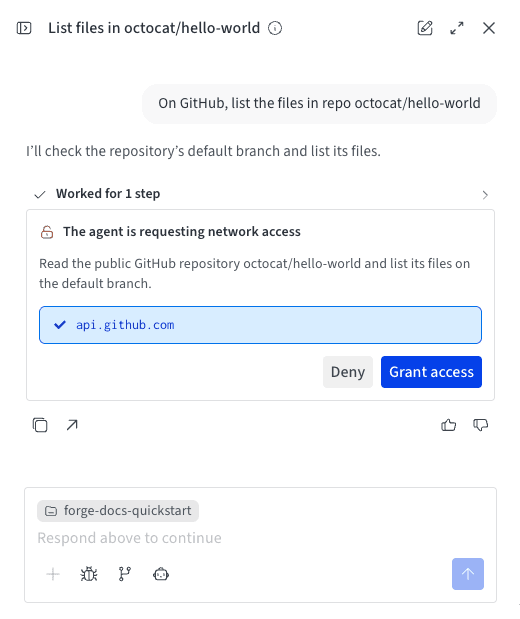
What ARIA can do once connected
With the token granted and network access approved, ask ARIA to work with the repository in plain language. Depending on the token’s permissions, ARIA can:- Read and analyze code, such as cloning a repository or fetching specific files.
- Commit changes to a branch and push them.
- Open a pull request with its changes.
User prompt
Troubleshoot the connection
If a GitHub request fails, ARIA reports the error from GitHub and suggests a fix. Common causes:401 Bad credentials: GitHub rejected the token. It might be mistyped, expired, or revoked. Create a new token, update the secret’s value in Personal secrets, and send your request again.404 Not Foundfor a repository you know exists: GitHub returns 404, not 403, when a token can’t see a private repository. Check that the token can reach it:- For a fine-grained token, the resource owner is the account or organization that owns the repository, the repository is included under Repository access, and an organization owner has approved the token if the organization requires approval.
- For a classic token, it has the
reposcope and, in an organization that uses SAML SSO, is authorized for that organization.
403 Forbiddenwhen committing or opening a pull request: The token can read the repository but lacks write permission. Grant Contents Read and write, and Pull requests Read and write, or use a classic token with thereposcope.- ARIA says the secret isn’t set: Turn on the secret’s ARIA access switch, then send another message. A secret granted after your last message isn’t visible to ARIA until your next one.