

Weights & Biases supports a major W&B Server release for 12 months from its initial release date. Customers with Self-Managed instances are responsible for upgrading in time to maintain support. Avoid staying on an unsupported version. Weights & Biases recommends that customers with Self-Managed instances update their deployments with the latest release at least once per quarter to maintain support and to receive the latest features, performance improvements, and fixes.
Requirements
- W&B Kubernetes Operator
v1.13.0or newer - System Console
v2.12.2or newer, orv2.18.16or newer if your license is supplied through a Kubernetes secret rather than set inline
version values for the operator-wandb and system-console components.
Your deployment must also be assigned to a release channel, which determines the versions you can pin to. Weights & Biases assigns new deployments to the stable channel automatically. If your deployment predates July 2026, it might not have a channel yet.
Disable automatic updates
To disable automatic updates, use the System Console to pin W&B Server to a specific version, then check the Operator reconciliation logs to confirm that version pinning is active.-
Log in to Forge as a user with the
adminrole. - Click the user icon at the top, then click System Console.
- Go to Settings > Advanced, then select the Other tab.
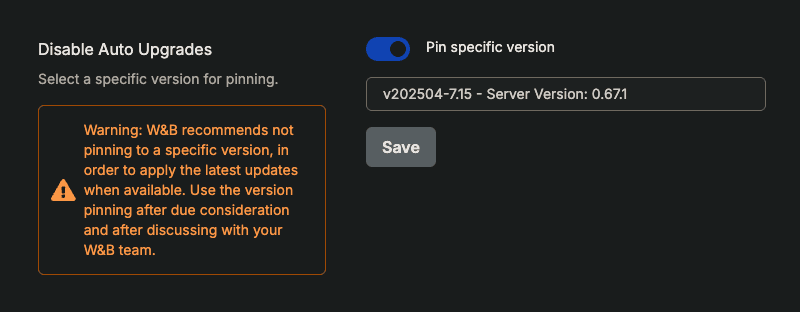
- In the Disable Auto Upgrades section, turn on Pin specific version.
- Click the Select a version drop-down list, then select a W&B Server version.
-
Click Save.
Automatic upgrades are turned off and W&B Server is pinned at the version you selected.
-
Verify that automatic upgrades are turned off. Go to the Operator tab and search the reconciliation logs for the string
Version pinning is enabled.
Troubleshooting
If the Disable Auto Upgrades section reports an error instead of letting you select a version, match the message below.”Please provide a valid license, check your license key and try again”
The System Console can’t read your license. If you supply the license through a Kubernetes secret (global.licenseSecret) instead of setting global.license inline, upgrade System Console to v2.18.16 or newer. Earlier versions read only the inline value, so they send an empty license when they request the list of available releases.