

View insights
To view insights in Agent Lens:- Navigate to CoreWeave Forge and select Agent Lens from the product menu.
- Select your project. Agent Lens opens the project you used most recently. To switch projects, use the project selector at the top of the side menu.
- In the Agent Lens side menu, select Insights.
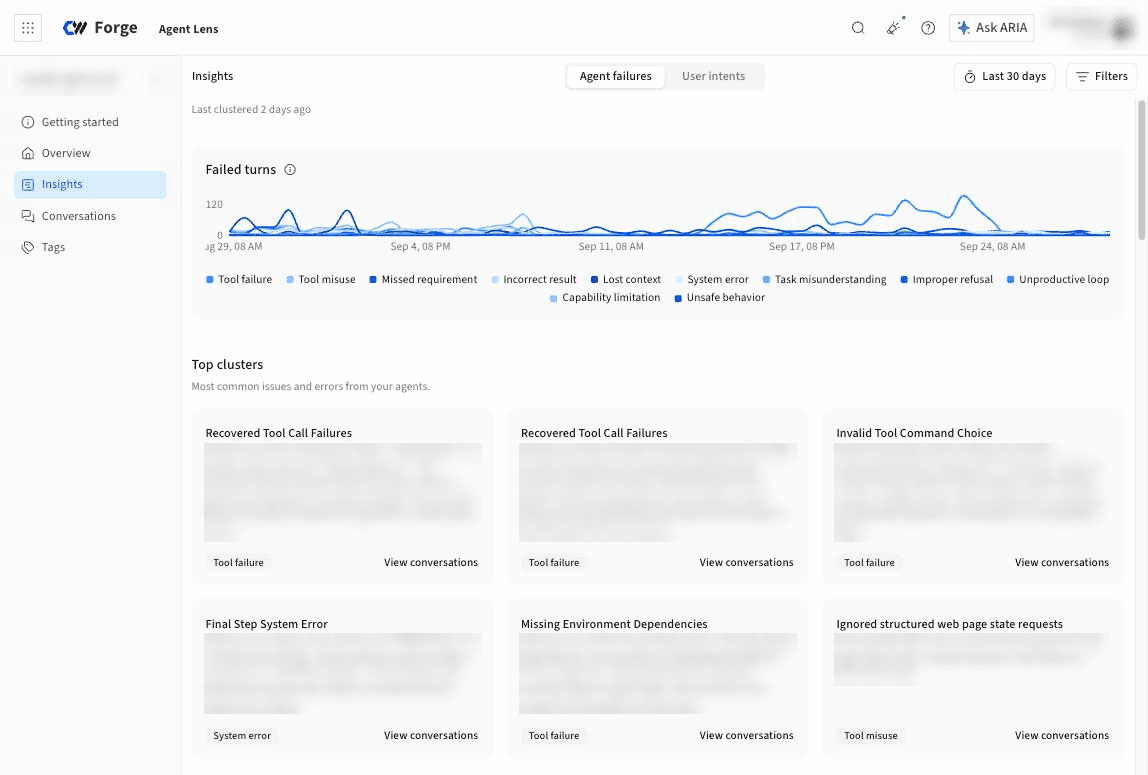
- A chart of turns over time, stacked by category, so you can see whether a spike came from one category or from all of them at once.
- Top clusters, a set of cards for the most common clusters of similar turns. Each card has a generated name for the cluster, a written description of the pattern it represents, the category it belongs to, and a View conversations link that opens the matching conversations. This section appears after Agent Lens has clustered enough turns in the selected time range.
- A list of categories, each with its share of turns. Select a category to see its details and to expand it into the clusters it contains.
-
An Impact card for the selected category, with the following metrics:
- Example turns for the selected category, grouped by cluster.
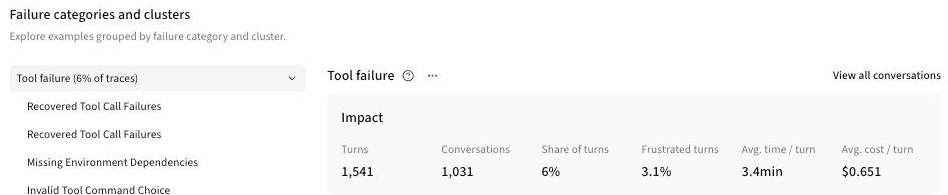
The category list labels each category’s share as a percentage of traces. A trace in Insights is one turn: one user message and the agent’s complete response. A single turn can be assigned to more than one intent category and more than one failure category.
Agent failures
The Agent failures report groups turns in which Agent Lens detected an issue or failure. Turns with no failure are excluded from the report. The chart is titled Failed turns, and its categories are the failure types described in Failure categories.Failure categories
Agent Lens assigns failing turns to the following fixed categories.
Categories such as Tool failure and System error point at problems outside your prompt, while Tool misuse, Missed requirement, and Lost context usually point at the agent’s instructions or its tool definitions.
User intents
The User intents report groups turns by what the user was trying to do, so you can see what your agent is actually used for and what types of requests go poorly. All turns are categorized, not only failing ones. The chart is titled User turns, and its categories are described in Intent categories. The Impact card on this report adds a Failed turns metric. A high failure rate on a common intent is the most direct signal that a change could help users.Intent categories
Agent Lens assigns turns to the following fixed categories.
A rising share of Clarification or correction, Issue report, or Negative feedback turns usually means the agent’s first responses are missing the mark, even when the failures report looks quiet.