> ## Documentation Index
> Fetch the complete documentation index at: https://docs.coreweave.com/llms.txt
> Use this file to discover all available pages before exploring further.
# IAM Access Policies
> CoreWeave IAM Access Policies for assigning permissions to users and groups across platform services
CoreWeave IAM Access Policies let administrators and privileged users define which principals (CoreWeave IAM users or groups) can perform specific actions across CoreWeave services. You create a policy once, and CoreWeave evaluates it wherever authorization is required, which enforces consistent, least-privilege access across the Cloud Platform.
IAM Access Policies don't govern actions for the following services, which host their own authorization infrastructure:
* The [CoreWeave AI Object Storage S3-compatible API](/products/storage/object-storage/reference/object-storage-s3), which is governed by [organization and bucket access policies](/products/storage/object-storage/auth-access/policies).
* [Kubernetes Roles and RoleBindings](/products/cks/auth-access/managed-auth/kubeconfig) within CoreWeave Kubernetes Service (CKS) clusters, which use Kubernetes RBAC.
## Core concepts
The following terms are central to how IAM Access Policies work:
| Term | Description |
| --------- | ----------------------------------------------------------------------------------------------------------------------------------------------------------------------------------- |
| Principal | A CoreWeave IAM identity (either a user or a group) that can be referenced in a policy. |
| Role | A permission string enabling a set of actions that, when assigned to a principal, are permitted. |
| Rule | An assignment of a role or set of roles to a principal. |
| Policy | A collection of rules that assign entitlements to a set of principals. When a principal is referenced in a policy, that principal can perform the actions the policy assigns to it. |
CoreWeave IAM operates on a default-deny posture. Without an access policy that grants privileges to a principal, that principal can't perform an action.
### How groups, policies, and roles relate
If you're new to CoreWeave IAM, the following plain-language summary describes how the pieces fit together:
* A **role** is a named bundle of permissions. Each role grants a specific set of actions, such as viewing clusters or managing billing data. You don't grant individual actions directly. You grant a role.
* A **group** is a named set of users. Instead of assigning roles to people one at a time, you put related users in a group and assign roles to the group. Anyone you add to the group gains the roles the group has. An IAM Admin creates and manages groups and their memberships.
* A **policy** ties everything together. A policy holds one or more rules, and each rule assigns one or more roles to a principal (a user or a group). The policy is where access is granted.
In short: roles define what someone can do, groups collect the people who should be able to do it, and a policy connects roles to users or groups through its rules. To grant access, you add a rule to a policy that assigns the right role to the right principal.
For a typical ML team, a common starting point is:
* Put platform administrators in a group and assign it the admin roles they need, such as IAM Admin and CKS Admin.
* Put engineers who run workloads in a group and assign it the roles for the services they use, such as CKS Admin and Inference Admin.
* Assign read-only roles, such as CKS Viewer or Observability Viewer, to anyone who needs visibility but shouldn't make changes.
For concrete examples built from the following roles, see [Recommended role combinations](#recommended-role-combinations).
Structurally, the policy contains one or more rules, and each rule assigns a role to a principal. For example:
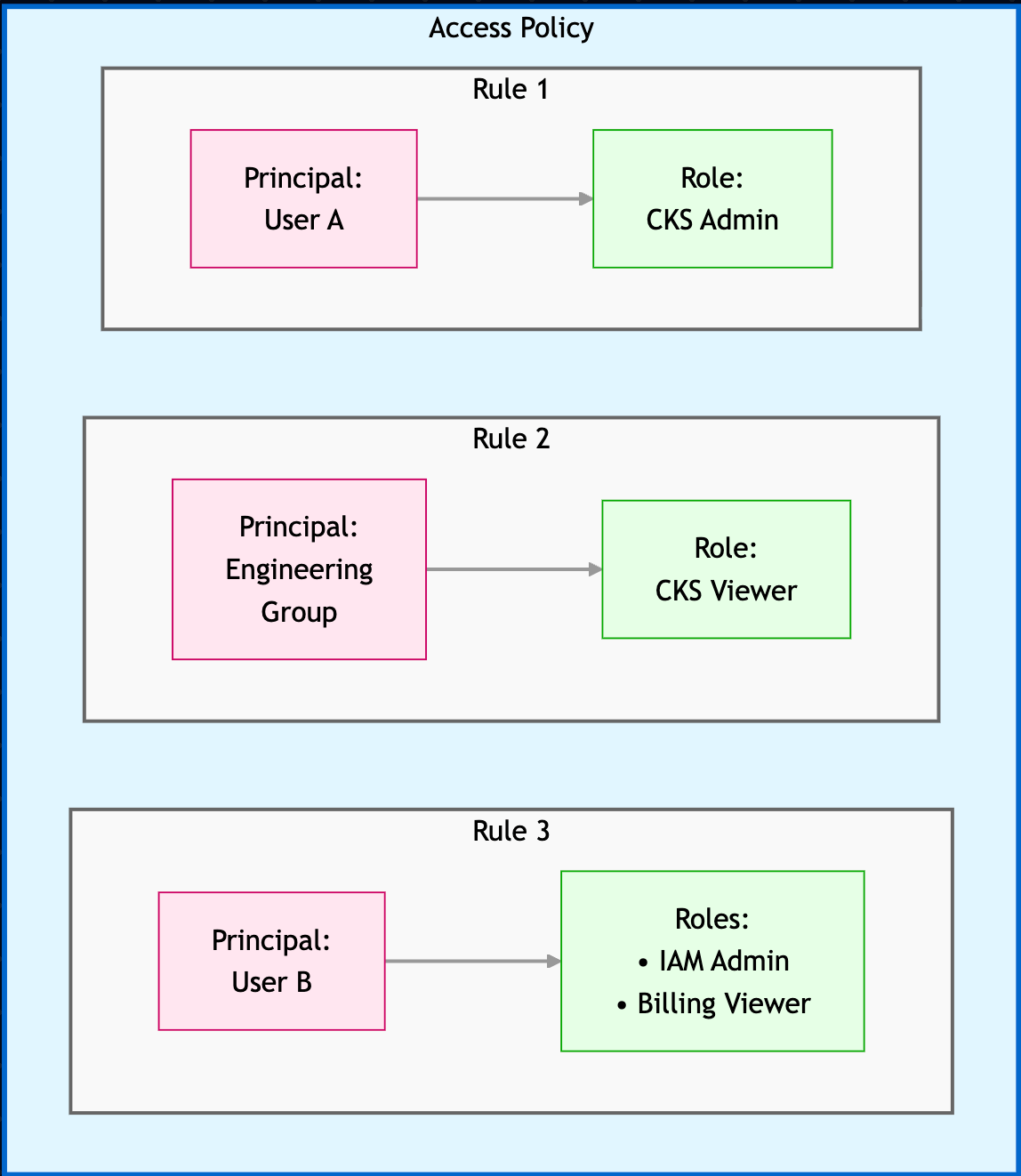 In this example, the policy grants the following permissions:
* User A has the CKS Admin role, which lets them manage Kubernetes resources.
* User B has the IAM Admin and Billing Viewer roles, which let them manage IAM resources and view billing data.
* Engineering Group has the CKS Viewer role, which lets them view Kubernetes resources.
## Roles
A role is the unit of access you assign in a policy rule. Each role grants a fixed set of actions. Most services have a Viewer role for read-only access and an Admin role for full management. Assign the least privileged role that lets a principal do their job.
The following roles are grouped by functional area to help you pick the right one. The description states what the role grants. The "When to assign" column suggests who typically needs it.
### Access control and IAM
These roles manage identities, groups, access policies, and personal access tokens.
| Name | Role description | When to assign |
| ----------------------- | ------------------------------------------------------------------------------------------------------------------------------------------------------------------------------------------------------- | -------------------------------------------------------------------------------------------------------------------------------------------------------------------------------------------------------------------------------------- |
| IAM Viewer | Read-only visibility across IAM configuration (for example, view organization user permitted actions, SAML configuration, AUP provisioning, API tokens, groups and memberships). | Assign to anyone who needs to review users, groups, and access policies without changing them. |
| IAM Admin | Administrative control over IAM: invite and revoke users, create, delete, and update groups and memberships, and configure identity integrations (for example, SAML SSO, AUP provisioning, API tokens). | Assign to administrators who manage users, groups, and identity integrations for the organization. |
| Access Token Viewer | Read-only visibility into personal access tokens (list and view). | Assign to users who need to see their personal access tokens but not create or delete them. |
| Access Token Admin | Full management of personal access tokens: create and delete tokens for the current user as permitted by org policy. | Assign to users who need to create and delete their own API access tokens. |
| Access Request Approver | Approves or denies privileged access requests. Can view the list of pending Service Account Management access requests. | Assign to people who approve support and privileged access requests. Because [approved access expires after 8 hours](/security/support-access-management), assign the role to multiple approvers so requests can be reviewed promptly. |
### CKS clusters
These roles manage CoreWeave Kubernetes Service clusters and VPC resources.
| Name | Role description | When to assign |
| ---------- | -------------------------------------------------------------------------------------------------------- | --------------------------------------------------------------------------------------- |
| CKS Viewer | Read-only visibility into Kubernetes resources: list and view clusters and VPC resources. | Assign to engineers who need to inspect clusters and VPC resources but not change them. |
| CKS Admin | Administrative control over Kubernetes resources: create, update, and delete clusters and VPC resources. | Assign to engineers who create and manage clusters and VPC resources. |
### Inference
These roles manage inference gateways, deployments, and capacity claims.
| Name | Role description | When to assign |
| ---------------- | -------------------------------------------------------------------------------------------------------------------------------------------------------------- | ------------------------------------------------------------------------------ |
| Inference Viewer | Read-only visibility into inference resources: list and view gateways, deployments, and capacity claims. | Assign to users who need to monitor inference resources without changing them. |
| Inference Admin | Administrative control over inference resources: create, update, and delete gateways, deployments, and capacity claims. Includes Inference Viewer permissions. | Assign to engineers who deploy and manage inference workloads. |
### Object storage
This role administers CoreWeave AI Object Storage control plane resources. Access to bucket data (buckets and objects) through the S3-compatible API is governed separately by [organization and bucket access policies](/products/storage/object-storage/auth-access/policies), not by this role.
| Name | Role description | When to assign |
| -------------------- | ------------------------------------------------------------------------------------------------------------------------------------------------------------------------------------------------------------------------------ | ------------------------------------------------------------------------------------------- |
| Object Storage Admin | Full administration for AI Object Storage: create and delete buckets, manage organization access policies, and create, revoke, and list access keys. Includes listing buckets and ensuring and setting bucket access policies. | Assign to administrators who manage buckets, access keys, and organization access policies. |
### Observability and telemetry
These roles cover observability data and Telemetry Relay configuration.
| Name | Role description | When to assign |
| ---------------------- | -------------------------------------------------------------------------------------------------------------------------------------------------------- | ------------------------------------------------------------------------------------------------- |
| Observability Viewer | Read-only access to observability data (for example, cluster metrics and dashboards) for troubleshooting and performance monitoring. | Assign to engineers who monitor metrics and dashboards to troubleshoot workloads. |
| Telemetry Relay Reader | Read-only visibility into Telemetry Relay: list and view forwarding endpoints, pipelines, and telemetry streams. | Assign to users who need to review Telemetry Relay endpoints and pipelines without changing them. |
| Telemetry Relay Admin | Administrative control over Telemetry Relay: create, update, and delete forwarding endpoints and pipelines. Includes Telemetry Relay Reader permissions. | Assign to engineers who configure log forwarding to external endpoints. |
### Billing
This role grants read-only access to billing data.
| Name | Role description | When to assign |
| -------------- | --------------------------------------------------------------------------------------------------------------------------------- | --------------------------------------------------------- |
| Billing Viewer | Read-only access to billing data, including viewing the billing dashboard, current balance, and listing and downloading invoices. | Assign to users who need to review balances and invoices. |
### Notifications and integrations
These roles manage alert subscriptions and the destinations that receive them.
| Name | Role description | When to assign |
| -------------------- | -------------------------------------------------------------------------------------------------------------------------------------------------------------------------------------------------------- | --------------------------------------------------------------------------------------------- |
| Notifications Viewer | Read-only access to alert history, notification delivery statuses, and the alert configuration page. | Assign to users who need to review alerts and delivery status without changing subscriptions. |
| Notifications Admin | Manage which alerts the organization receives and where they are delivered: subscribe and unsubscribe alerts per destination on the alert configuration page. Includes Notifications Viewer permissions. | Assign to users who manage which alerts the organization receives and where they go. |
| Integrations Viewer | Read-only visibility into notification destinations and credentials, including the Integrations page and the destinations list on the alert configuration page. | Assign to users who need to review notification destinations without changing them. |
| Integrations Admin | Full management of notification destinations and credentials: create, update, and delete Slack and webhook integrations. Includes Integrations Viewer permissions. | Assign to users who configure Slack and webhook destinations for alerts. |
### Support
This role grants read-only access to support records.
| Name | Role description | When to assign |
| -------------- | --------------------------------------------------------------------------------------------- | ---------------------------------------------------------------------- |
| Support Viewer | Read-only access to support tickets and records in the integrated support system (Freshdesk). | Assign to users who need to review the organization's support tickets. |
Administrators can manage resources in the Cloud Console, the API, and with infrastructure-as-code (IaC) tools like Terraform.
### Recommended role combinations
The following combinations are starting points for common roles on an ML team. Each one uses only the roles defined in the preceding sections. Adjust them to match your organization's needs, and prefer the least privileged role that still lets a principal do their job.
| Archetype | Recommended roles | What it enables |
| ---------------------- | ------------------------------------------------ | ---------------------------------------------------------------------------------------------- |
| Platform engineer | IAM Admin, CKS Admin, Object Storage Admin | Manage users and groups, create and manage clusters and VPC resources, and administer buckets. |
| AI engineer | CKS Admin, Inference Admin, Observability Viewer | Run workloads on clusters, deploy and manage inference, and monitor performance. |
| Billing admin | Billing Viewer | Review balances and download invoices without access to infrastructure. |
| Observability engineer | Observability Viewer, Telemetry Relay Admin | Monitor metrics and dashboards and configure log forwarding to external endpoints. |
### Legacy group role assignments
Before IAM Access Policies, user permissions were determined by the legacy group a user belonged to. The following table shows how each legacy group maps to the new IAM roles:
| CoreWeave legacy group | Corresponding IAM roles |
| ---------------------- | --------------------------------------------------------------------------------------- |
| `admin` | IAM Admin, CKS Admin, Object Storage Admin, Access Token Admin, Access Request Approver |
| `write` | CKS Admin, Object Storage Admin, Access Token Admin |
| `read` | IAM Viewer, CKS Viewer, Access Token Viewer |
| `metrics` | Observability Viewer |
| `billing_viewer` | Billing Viewer |
Roles added for newer platform features may not be automatically included in legacy admin policies. If you expect access to a feature but can't reach it, check your organization's access policies and add the relevant role if it's missing.
You can review and modify these role assignments or create new groups with different role combinations using [IAM Access Policy management](/security/iam/access-policies/manage).
## Default Access Policies
CoreWeave creates and maintains Default Access Policies. The Cloud Console marks each default policy with a **Default** badge next to its name. Default policies bundle the roles required for a common access pattern. For example, the Administrator default policy includes all available roles, and CoreWeave adds new roles to it as they become available.
Default policies behave differently from policies you create yourself:
* **CoreWeave manages the roles.** The role set of a default policy is immutable: you can't add, remove, or otherwise edit its roles. As CoreWeave ships new products and actions, or introduces more fine-grained permissions for existing roles, CoreWeave adds the relevant roles to the applicable default policies automatically. Roles are rarely removed.
* **You manage the principals.** You can add and remove principals (users and groups) on a default policy to control who it applies to.
* **They can't be deleted.** Default policies don't offer a delete option.
This keeps a default policy current with the platform: principals assigned to it gain access to new capabilities as they ship, without an administrator needing to track and add each new role, closing the gap described in [Legacy group role assignments](#legacy-group-role-assignments).
You may see a duplicate-looking policy. When CoreWeave introduces a new default policy, it's added alongside your existing policies rather than replacing them. Because CoreWeave never removes a policy you already have, a new default policy can look substantially similar to one already in your organization. This is expected behavior.
Review the principals on each policy to decide how to proceed. Your existing non-default policies remain fully under your control: you can edit or delete them. The default policy itself can't be deleted.
## Next steps
* Create an [IAM Access Policy](/security/iam/access-policies/manage).
* Learn about [CoreWeave IAM](/security/iam).
In this example, the policy grants the following permissions:
* User A has the CKS Admin role, which lets them manage Kubernetes resources.
* User B has the IAM Admin and Billing Viewer roles, which let them manage IAM resources and view billing data.
* Engineering Group has the CKS Viewer role, which lets them view Kubernetes resources.
## Roles
A role is the unit of access you assign in a policy rule. Each role grants a fixed set of actions. Most services have a Viewer role for read-only access and an Admin role for full management. Assign the least privileged role that lets a principal do their job.
The following roles are grouped by functional area to help you pick the right one. The description states what the role grants. The "When to assign" column suggests who typically needs it.
### Access control and IAM
These roles manage identities, groups, access policies, and personal access tokens.
| Name | Role description | When to assign |
| ----------------------- | ------------------------------------------------------------------------------------------------------------------------------------------------------------------------------------------------------- | -------------------------------------------------------------------------------------------------------------------------------------------------------------------------------------------------------------------------------------- |
| IAM Viewer | Read-only visibility across IAM configuration (for example, view organization user permitted actions, SAML configuration, AUP provisioning, API tokens, groups and memberships). | Assign to anyone who needs to review users, groups, and access policies without changing them. |
| IAM Admin | Administrative control over IAM: invite and revoke users, create, delete, and update groups and memberships, and configure identity integrations (for example, SAML SSO, AUP provisioning, API tokens). | Assign to administrators who manage users, groups, and identity integrations for the organization. |
| Access Token Viewer | Read-only visibility into personal access tokens (list and view). | Assign to users who need to see their personal access tokens but not create or delete them. |
| Access Token Admin | Full management of personal access tokens: create and delete tokens for the current user as permitted by org policy. | Assign to users who need to create and delete their own API access tokens. |
| Access Request Approver | Approves or denies privileged access requests. Can view the list of pending Service Account Management access requests. | Assign to people who approve support and privileged access requests. Because [approved access expires after 8 hours](/security/support-access-management), assign the role to multiple approvers so requests can be reviewed promptly. |
### CKS clusters
These roles manage CoreWeave Kubernetes Service clusters and VPC resources.
| Name | Role description | When to assign |
| ---------- | -------------------------------------------------------------------------------------------------------- | --------------------------------------------------------------------------------------- |
| CKS Viewer | Read-only visibility into Kubernetes resources: list and view clusters and VPC resources. | Assign to engineers who need to inspect clusters and VPC resources but not change them. |
| CKS Admin | Administrative control over Kubernetes resources: create, update, and delete clusters and VPC resources. | Assign to engineers who create and manage clusters and VPC resources. |
### Inference
These roles manage inference gateways, deployments, and capacity claims.
| Name | Role description | When to assign |
| ---------------- | -------------------------------------------------------------------------------------------------------------------------------------------------------------- | ------------------------------------------------------------------------------ |
| Inference Viewer | Read-only visibility into inference resources: list and view gateways, deployments, and capacity claims. | Assign to users who need to monitor inference resources without changing them. |
| Inference Admin | Administrative control over inference resources: create, update, and delete gateways, deployments, and capacity claims. Includes Inference Viewer permissions. | Assign to engineers who deploy and manage inference workloads. |
### Object storage
This role administers CoreWeave AI Object Storage control plane resources. Access to bucket data (buckets and objects) through the S3-compatible API is governed separately by [organization and bucket access policies](/products/storage/object-storage/auth-access/policies), not by this role.
| Name | Role description | When to assign |
| -------------------- | ------------------------------------------------------------------------------------------------------------------------------------------------------------------------------------------------------------------------------ | ------------------------------------------------------------------------------------------- |
| Object Storage Admin | Full administration for AI Object Storage: create and delete buckets, manage organization access policies, and create, revoke, and list access keys. Includes listing buckets and ensuring and setting bucket access policies. | Assign to administrators who manage buckets, access keys, and organization access policies. |
### Observability and telemetry
These roles cover observability data and Telemetry Relay configuration.
| Name | Role description | When to assign |
| ---------------------- | -------------------------------------------------------------------------------------------------------------------------------------------------------- | ------------------------------------------------------------------------------------------------- |
| Observability Viewer | Read-only access to observability data (for example, cluster metrics and dashboards) for troubleshooting and performance monitoring. | Assign to engineers who monitor metrics and dashboards to troubleshoot workloads. |
| Telemetry Relay Reader | Read-only visibility into Telemetry Relay: list and view forwarding endpoints, pipelines, and telemetry streams. | Assign to users who need to review Telemetry Relay endpoints and pipelines without changing them. |
| Telemetry Relay Admin | Administrative control over Telemetry Relay: create, update, and delete forwarding endpoints and pipelines. Includes Telemetry Relay Reader permissions. | Assign to engineers who configure log forwarding to external endpoints. |
### Billing
This role grants read-only access to billing data.
| Name | Role description | When to assign |
| -------------- | --------------------------------------------------------------------------------------------------------------------------------- | --------------------------------------------------------- |
| Billing Viewer | Read-only access to billing data, including viewing the billing dashboard, current balance, and listing and downloading invoices. | Assign to users who need to review balances and invoices. |
### Notifications and integrations
These roles manage alert subscriptions and the destinations that receive them.
| Name | Role description | When to assign |
| -------------------- | -------------------------------------------------------------------------------------------------------------------------------------------------------------------------------------------------------- | --------------------------------------------------------------------------------------------- |
| Notifications Viewer | Read-only access to alert history, notification delivery statuses, and the alert configuration page. | Assign to users who need to review alerts and delivery status without changing subscriptions. |
| Notifications Admin | Manage which alerts the organization receives and where they are delivered: subscribe and unsubscribe alerts per destination on the alert configuration page. Includes Notifications Viewer permissions. | Assign to users who manage which alerts the organization receives and where they go. |
| Integrations Viewer | Read-only visibility into notification destinations and credentials, including the Integrations page and the destinations list on the alert configuration page. | Assign to users who need to review notification destinations without changing them. |
| Integrations Admin | Full management of notification destinations and credentials: create, update, and delete Slack and webhook integrations. Includes Integrations Viewer permissions. | Assign to users who configure Slack and webhook destinations for alerts. |
### Support
This role grants read-only access to support records.
| Name | Role description | When to assign |
| -------------- | --------------------------------------------------------------------------------------------- | ---------------------------------------------------------------------- |
| Support Viewer | Read-only access to support tickets and records in the integrated support system (Freshdesk). | Assign to users who need to review the organization's support tickets. |
Administrators can manage resources in the Cloud Console, the API, and with infrastructure-as-code (IaC) tools like Terraform.
### Recommended role combinations
The following combinations are starting points for common roles on an ML team. Each one uses only the roles defined in the preceding sections. Adjust them to match your organization's needs, and prefer the least privileged role that still lets a principal do their job.
| Archetype | Recommended roles | What it enables |
| ---------------------- | ------------------------------------------------ | ---------------------------------------------------------------------------------------------- |
| Platform engineer | IAM Admin, CKS Admin, Object Storage Admin | Manage users and groups, create and manage clusters and VPC resources, and administer buckets. |
| AI engineer | CKS Admin, Inference Admin, Observability Viewer | Run workloads on clusters, deploy and manage inference, and monitor performance. |
| Billing admin | Billing Viewer | Review balances and download invoices without access to infrastructure. |
| Observability engineer | Observability Viewer, Telemetry Relay Admin | Monitor metrics and dashboards and configure log forwarding to external endpoints. |
### Legacy group role assignments
Before IAM Access Policies, user permissions were determined by the legacy group a user belonged to. The following table shows how each legacy group maps to the new IAM roles:
| CoreWeave legacy group | Corresponding IAM roles |
| ---------------------- | --------------------------------------------------------------------------------------- |
| `admin` | IAM Admin, CKS Admin, Object Storage Admin, Access Token Admin, Access Request Approver |
| `write` | CKS Admin, Object Storage Admin, Access Token Admin |
| `read` | IAM Viewer, CKS Viewer, Access Token Viewer |
| `metrics` | Observability Viewer |
| `billing_viewer` | Billing Viewer |
Roles added for newer platform features may not be automatically included in legacy admin policies. If you expect access to a feature but can't reach it, check your organization's access policies and add the relevant role if it's missing.
You can review and modify these role assignments or create new groups with different role combinations using [IAM Access Policy management](/security/iam/access-policies/manage).
## Default Access Policies
CoreWeave creates and maintains Default Access Policies. The Cloud Console marks each default policy with a **Default** badge next to its name. Default policies bundle the roles required for a common access pattern. For example, the Administrator default policy includes all available roles, and CoreWeave adds new roles to it as they become available.
Default policies behave differently from policies you create yourself:
* **CoreWeave manages the roles.** The role set of a default policy is immutable: you can't add, remove, or otherwise edit its roles. As CoreWeave ships new products and actions, or introduces more fine-grained permissions for existing roles, CoreWeave adds the relevant roles to the applicable default policies automatically. Roles are rarely removed.
* **You manage the principals.** You can add and remove principals (users and groups) on a default policy to control who it applies to.
* **They can't be deleted.** Default policies don't offer a delete option.
This keeps a default policy current with the platform: principals assigned to it gain access to new capabilities as they ship, without an administrator needing to track and add each new role, closing the gap described in [Legacy group role assignments](#legacy-group-role-assignments).
You may see a duplicate-looking policy. When CoreWeave introduces a new default policy, it's added alongside your existing policies rather than replacing them. Because CoreWeave never removes a policy you already have, a new default policy can look substantially similar to one already in your organization. This is expected behavior.
Review the principals on each policy to decide how to proceed. Your existing non-default policies remain fully under your control: you can edit or delete them. The default policy itself can't be deleted.
## Next steps
* Create an [IAM Access Policy](/security/iam/access-policies/manage).
* Learn about [CoreWeave IAM](/security/iam).