> ## Documentation Index
> Fetch the complete documentation index at: https://docs.coreweave.com/llms.txt
> Use this file to discover all available pages before exploring further.
# Organizations and users
> Understand organizations, Org IDs, and the two primary user types within the CoreWeave platform
## Organizations
In CoreWeave, an **organization** is your entire CoreWeave Cloud Console account, including all users and resources within it. Billing, user management, and infrastructure management all take place at the organization level.
### Organization IDs
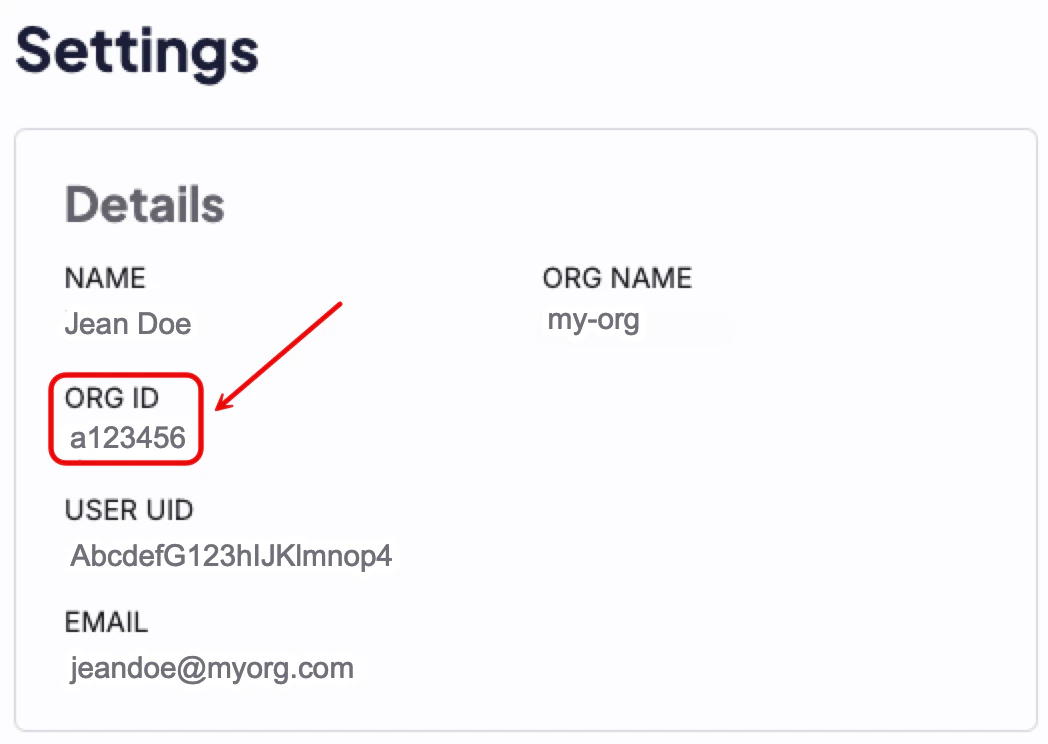
CoreWeave associates every customer with an Organization ID, or "Org ID." Each organization has a unique Org ID, which takes the form of a short hexadecimal string (for example, `ab1cd2`). You can find your Org ID on the [Settings page](https://console.coreweave.com/account/settings) of your Cloud Console account.
 CoreWeave uses Org IDs in many contexts to manage customer resources. Org IDs also enforce tenant isolation, because each user can belong to only one organization. All service interactions filter users by their Org ID.
## User types
For more information about the permissions associated with each user type, see [IAM Access Policies](/security/iam/access-policies) and [Legacy User Permissions](/security/iam/access-policies/legacy-permissions). To learn how to manage users, see [Manage users](/security/authn-authz/manage-users).
CoreWeave defines two primary user types: administrators and users.
### Administrators
**Administrators** have access to a broad set of actions and controls and can see more information about the resources their organization creates.
### Users
**Users** have more limited permissions that administrators allocate. Users can perform only the actions assigned to them.
To learn how user roles map to specific CoreWeave products, see [Organizational identity in CKS](/products/cks/auth-access/organizational-identity).
CoreWeave uses Org IDs in many contexts to manage customer resources. Org IDs also enforce tenant isolation, because each user can belong to only one organization. All service interactions filter users by their Org ID.
## User types
For more information about the permissions associated with each user type, see [IAM Access Policies](/security/iam/access-policies) and [Legacy User Permissions](/security/iam/access-policies/legacy-permissions). To learn how to manage users, see [Manage users](/security/authn-authz/manage-users).
CoreWeave defines two primary user types: administrators and users.
### Administrators
**Administrators** have access to a broad set of actions and controls and can see more information about the resources their organization creates.
### Users
**Users** have more limited permissions that administrators allocate. Users can perform only the actions assigned to them.
To learn how user roles map to specific CoreWeave products, see [Organizational identity in CKS](/products/cks/auth-access/organizational-identity).