> ## Documentation Index
> Fetch the complete documentation index at: https://docs.coreweave.com/llms.txt
> Use this file to discover all available pages before exploring further.
# Login methods
> Control how users authenticate to your CoreWeave organization by configuring login methods and per-user overrides
Login methods control how users can authenticate to your CoreWeave organization. Organization administrators can enable or turn off each method organization-wide and configure per-user overrides to customize access for individual users.
To manage login methods, you need the `IAM Admin` role. For more information, see [IAM Access Policies](/security/iam/access-policies).
**Limited availability**
Login methods is in limited availability. To request access, [contact the CoreWeave Support team](/support).
## Available login methods
CoreWeave supports four login methods:
| Login method | Description |
| ------------------ | --------------------------------------------------------------------------------------------------------------------------------- |
| Email and password | Authenticate with the email address and password associated with your CoreWeave account. |
| Google | Authenticate with a Google Workspace account that shares the same email address as your CoreWeave account. |
| GitHub | Authenticate with a GitHub account that shares the same email address as your CoreWeave account. |
| SAML SSO | Authenticate through an identity provider (IdP) using [SAML-based single sign-on](/security/authn-authz/saml-sso/intro-saml-sso). |
## Manage organization defaults
Each login method has an organization-wide **Enabled by default** setting. When a method is enabled by default, users can use it to sign in unless a per-user override turns it off. When a method is turned off by default, users can't use it unless a per-user override enables it.
SAML SSO is enabled by default. You can enable or turn off any other method based on your organization's policy requirements.
At least one login method must remain enabled by default. You can't turn off all login methods for your organization.
To update the organization defaults:
1. Sign in to the [Cloud Console](https://console.coreweave.com) as an administrator.
2. Go to the [Login methods](https://console.coreweave.com/organization/iam/login-methods) page, or navigate to **Administration** > **Login and identity** > **Login methods**.
3. For each method, toggle the **Enabled by default** setting on or off.
4. A dialog message appears in the lower right corner of the page to confirm your selection.
The updated defaults apply to all users in your organization who don't have a per-user override.
## Set per-user overrides
You can override the organization default for individual users. An override lets you enable a login method for a user even when that method is turned off by default. It also lets you turn off a method for a user when it's enabled by default. Common uses include maintaining emergency administrator access and restricting sign-in options for guest users.
To set a per-user override:
1. Sign in to the [Cloud Console](https://console.coreweave.com) as an administrator.
2. Go to the [Users](https://console.coreweave.com/organization/users) page, or navigate to **Administration** > **Users and groups** > **Users**.
3. Select the user to edit, and open the vertical menu by clicking the three dots (⋮) to the right of the user's name:
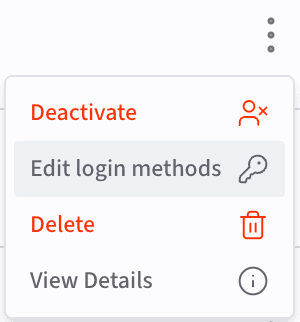 4. Select **Edit login methods**. The **Edit login methods** dialog appears with a toggle to override the organization default for each login method:
 5. Click the toggle to display checkboxes for the login methods. Check the boxes for the login methods you want to enable or disable for the user:
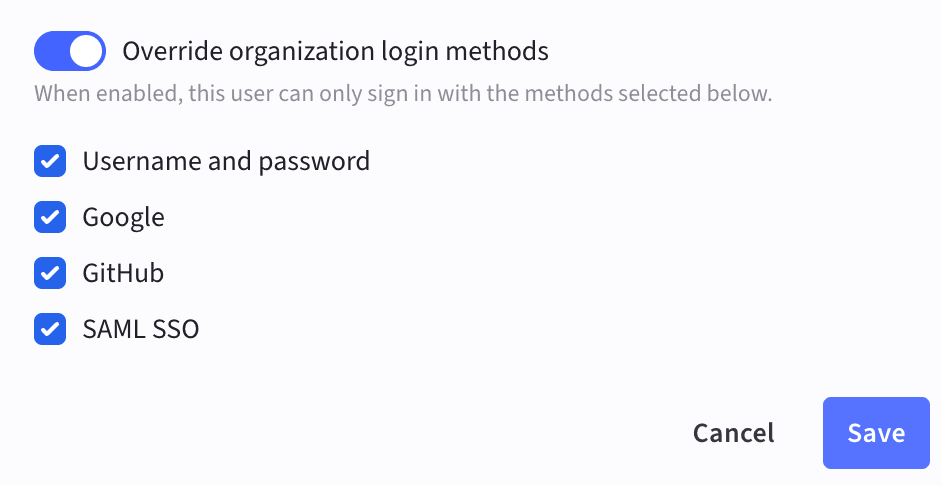 6. Click **Save** to apply the changes. A dialog message appears in the lower right corner of the page to confirm your selection.
The override applies to the selected user regardless of the organization defaults.
## Related pages
* [Configure SAML SSO](/security/authn-authz/saml-sso/configure-saml-sso): Set up SAML-based single sign-on before enabling it as a login method for your organization.
* [Manage users](/security/authn-authz/manage-users): Invite users, configure account settings, and deactivate accounts.
* [Organizations and users](/security/authn-authz/orgs-users): Understand organizations and user types in CoreWeave.
6. Click **Save** to apply the changes. A dialog message appears in the lower right corner of the page to confirm your selection.
The override applies to the selected user regardless of the organization defaults.
## Related pages
* [Configure SAML SSO](/security/authn-authz/saml-sso/configure-saml-sso): Set up SAML-based single sign-on before enabling it as a login method for your organization.
* [Manage users](/security/authn-authz/manage-users): Invite users, configure account settings, and deactivate accounts.
* [Organizations and users](/security/authn-authz/orgs-users): Understand organizations and user types in CoreWeave.