> ## Documentation Index
> Fetch the complete documentation index at: https://docs.coreweave.com/llms.txt
> Use this file to discover all available pages before exploring further.
> Add, verify, and delete the email addresses on your Forge account, and choose your primary email.
# Manage email settings
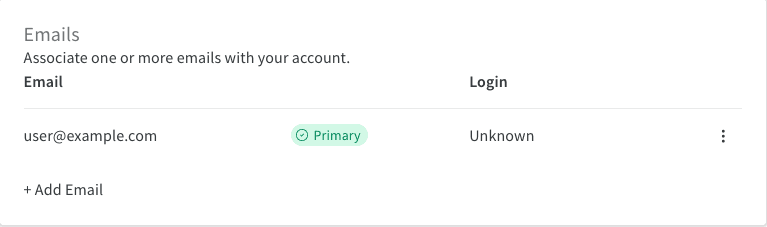
In your Forge **User settings**, the **Emails** section lets you add, delete, and verify the email addresses associated with your account, and choose your primary email.
Each user manages their own email addresses. Organization admins can't add, change, or delete another user's email addresses.
To open the **Emails** section:
1. In the upper-right corner, click your user profile icon.
2. Click **User settings**.
3. Scroll down to **Emails**.
You can also go directly to [forge.coreweave.com/settings](https://forge.coreweave.com/settings).
 ## Manage primary email
A **Primary** badge marks your primary email. Your primary email defaults to the address you provided when you created your account.
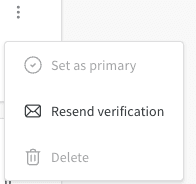
To make a different email primary, click the **action ()** menu next to it and choose **Set as primary**.
You can only set verified emails as primary.
## Manage primary email
A **Primary** badge marks your primary email. Your primary email defaults to the address you provided when you created your account.
To make a different email primary, click the **action ()** menu next to it and choose **Set as primary**.
You can only set verified emails as primary.
 ## Add emails
To add an email, click **+ Add Email**. The CoreWeave sign-in page opens, where you sign in with the new email address or connect it using single sign-on (SSO).
## Delete emails
To delete an email from your account, click the **action ()** menu next to it and choose **Delete**.
You can't delete a primary email. Set a different email as primary before deleting.
## Verify emails
When you add an email, a verification email is sent to that address. The email stays unverified until you verify it.
If you no longer have the verification email, click the **action ()** menu next to the address and choose **Resend verification**.
## Login methods
The **Login** column shows the login method associated with each email address.
For account login issues, contact [forge-support@coreweave.com](mailto:forge-support@coreweave.com).
## Add emails
To add an email, click **+ Add Email**. The CoreWeave sign-in page opens, where you sign in with the new email address or connect it using single sign-on (SSO).
## Delete emails
To delete an email from your account, click the **action ()** menu next to it and choose **Delete**.
You can't delete a primary email. Set a different email as primary before deleting.
## Verify emails
When you add an email, a verification email is sent to that address. The email stays unverified until you verify it.
If you no longer have the verification email, click the **action ()** menu next to the address and choose **Resend verification**.
## Login methods
The **Login** column shows the login method associated with each email address.
For account login issues, contact [forge-support@coreweave.com](mailto:forge-support@coreweave.com).