> ## Documentation Index
> Fetch the complete documentation index at: https://docs.coreweave.com/llms.txt
> Use this file to discover all available pages before exploring further.
# Manage organization access policies
> Control access to all principals and resources across the entire organization
AI Object Storage organization access policies enforce permissions across your entire organization. They sit at the top of the policy hierarchy and take effect before any bucket-level rules. Written in JSON with the same syntax as bucket access policies, they apply to both the S3-compatible API and the AI Object Storage API.
These policies automatically cover every resource, bucket, and user in your account. By centralizing access rules, you ensure that global security standards and compliance requirements apply consistently. Because organization access policies override bucket access policies, they're the first check applied to every request in your AI Object Storage environment.
## Prerequisites
You must have the `Object Storage Admin` IAM role (assigned through CoreWeave [IAM Access Policies](/security/iam/access-policies)), or equivalent permissions to create and manage organization access policies:
* `cwobject:EnsureAccessPolicy` to create or edit an organization access policy.
* `cwobject:ListAccessPolicy` to view existing organization access policies.
* `cwobject:DeleteAccessPolicy` to delete an organization access policy.
The first person in a new CoreWeave organization automatically has the `Object Storage Admin` IAM role assigned to them. They can create and manage organization access policies, and grant the same permissions to other users and groups (through either IAM Access Policies or AI Object Storage organization access policies).
## Set an organization access policy
This section walks you through how to create an organization access policy so it starts to enforce permissions across your organization. You can set an organization access policy with the Cloud Console, the AI Object Storage API, or the CoreWeave Terraform provider. Choose the workflow that best matches how you manage your other CoreWeave resources.
To create an organization access policy in the Cloud Console:
1. Navigate to the [Organization Access Policies](https://console.coreweave.com/object-storage/access-policies) page.
2. Click the **Create Policy** button.
3. In the **Create Policy** page, enter the **Policy Name**.
4. Within the policy, add one or more statements. In the **Statement** section, enter a descriptive **Name** for the statement. For example, "grant-read-access-to-test-bucket".
5. For **Access**, select either **Allow access** or **Deny access**.
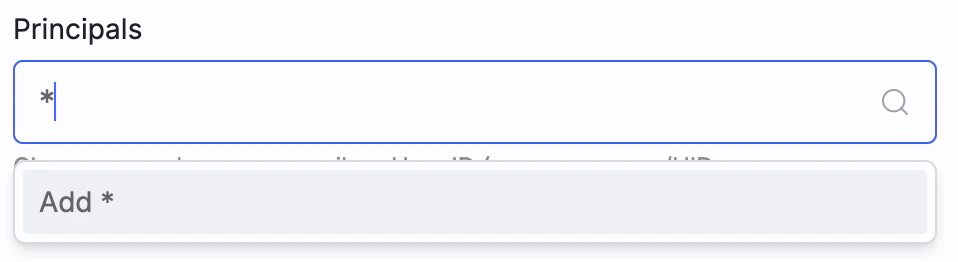
6. For **Principals**, enter one or more principals to which the statement applies. The search field shows available principals (users and groups) in your organization. Select the principals you want to add, or enter `*` to allow access to all principals:
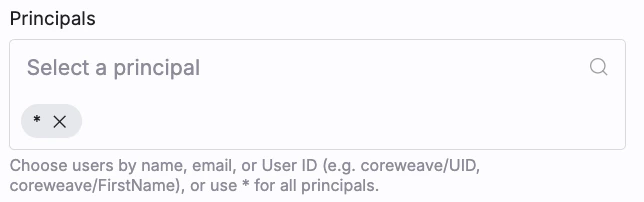
 After you select the principals, they appear in the **Principals** section:
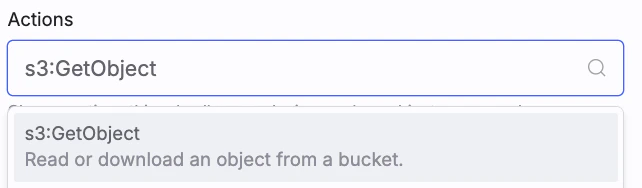
 7. For **Actions**, enter one or more actions to which the statement applies. The search field shows you available actions. Select the actions you want to add, or enter `*` to allow access to all actions. This example grants read access by allowing the actions `s3:GetObject` and `s3:ListBucket`:
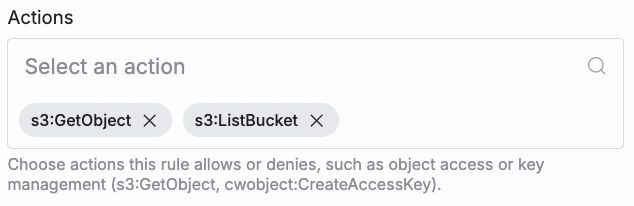
 After you select the actions, they appear in the **Actions** section:
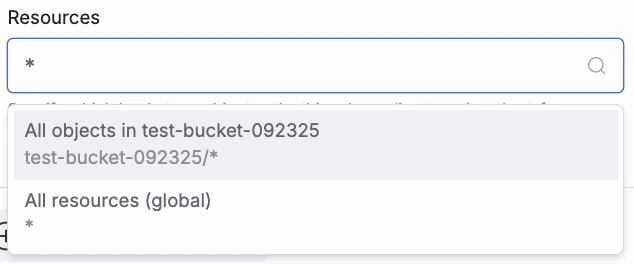
 8. For **Resources**, enter one or more resources to which the statement applies. The search field shows you available resources. Select the resources you want to add, or enter `*` to allow access to all resources. This example scopes the policy statement to the bucket `test-bucket` and all objects within it:
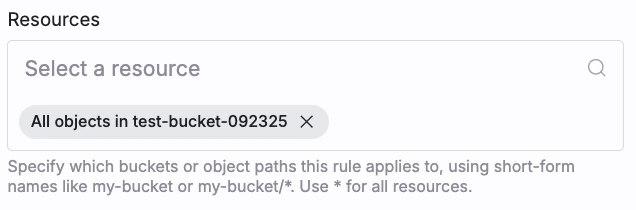
 After you select the resources, they appear in the **Resources** section:
 9. Add another statement by clicking **Add Statement**, or click **Submit** to create the policy.
After you submit, the new organization access policy appears in the **Organization Access Policies** list and immediately enforces the statements you defined across your organization.
The **Organization Access Policies** section also lets you search, edit, and delete existing policies:
* Use the Search function to find policies by name.
* To view an existing policy, click the policy name.
* To edit or delete a policy, click the **More** icon next to the policy, then select **Edit** or **Delete**.
9. Add another statement by clicking **Add Statement**, or click **Submit** to create the policy.
After you submit, the new organization access policy appears in the **Organization Access Policies** list and immediately enforces the statements you defined across your organization.
The **Organization Access Policies** section also lets you search, edit, and delete existing policies:
* Use the Search function to find policies by name.
* To view an existing policy, click the policy name.
* To edit or delete a policy, click the **More** icon next to the policy, then select **Edit** or **Delete**.
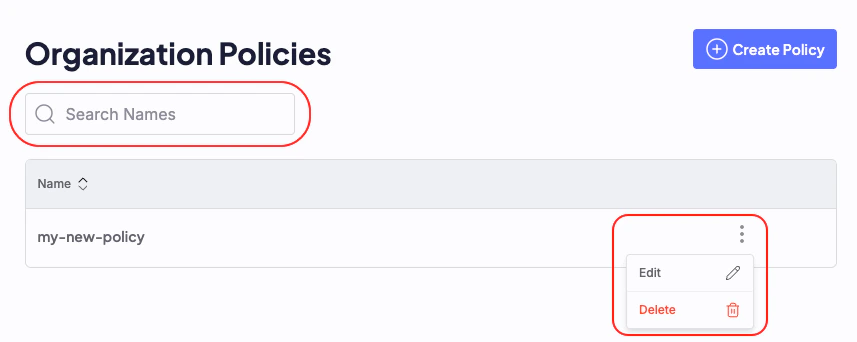 **Edit** returns you to the policy editor.
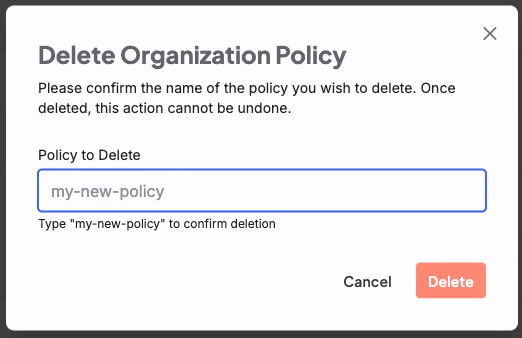
**Delete** requires confirmation:
**Edit** returns you to the policy editor.
**Delete** requires confirmation:
 To create an organization access policy using the AI Object Storage API:
1. Locate your API Access Token in the [Cloud Console](https://console.coreweave.com/tokens), or create a new one if needed. An API Access Token has two components:
* **Token name:** identifies the token; starts with `cwtoken-`.
* **Token secret:** used for authentication; starts with `CW-SECRET-`.
These differ from Object Storage access keys, which have a Key ID starting with `CW`, a key secret starting with `cw`, and a human-readable, user-specified key name.
Once you have it, create an environment variable for your token secret. Replace `[TOKEN-SECRET]` with your token secret:
```bash theme={"system"}
export API_ACCESS_TOKEN=[TOKEN-SECRET]
```
2. Prepare a JSON file (for example, `policy.json`) with your organization access policy, adapting from the [example policies](/products/storage/object-storage/auth-access/organization-policies/examples).
3. Send the JSON document to `https://api.coreweave.com/v1/cwobject/access-policy` with an HTTP client such as `curl`.
4. To create the organization access policy, run the following command:
```bash theme={"system"}
curl -X POST https://api.coreweave.com/v1/cwobject/access-policy \
-H "Content-Type: application/json" \
-H "Authorization: Bearer $API_ACCESS_TOKEN" \
-d @policy.json
```
On success, the endpoint returns an empty object `{}` as the response.
5. To verify the policy was created, list the organization access policies:
```bash theme={"system"}
curl -X GET https://api.coreweave.com/v1/cwobject/access-policy \
-H "Content-Type: application/json" \
-H "Authorization: Bearer $API_ACCESS_TOKEN"
```
A successful response returns a list of all organization access policies, including the newly created policy.
For full request and response schemas, see the [AI Object Storage API reference](/products/storage/object-storage/reference/object-storage-api-ref/cwobject/apply-or-update-access-policy).
To use the CoreWeave Terraform provider to create an organization access policy,
you must first [configure the Terraform provider](/products/storage/object-storage/use-terraform-aws-provider).
Then, use the [`coreweave_object_storage_organization_access_policy` resource](https://registry.terraform.io/providers/coreweave/coreweave/latest/docs/resources/object_storage_organization_access_policy) to create the policy.
```hcl theme={"system"}
resource "coreweave_object_storage_organization_access_policy" "test" {
name = "full-s3-api-access"
statements = [
{
name = "allow-full-s3-api-access-to-all"
effect = "Allow"
resources = ["*"]
principals = ["*"]
actions = [
"s3:*",
"cwobject:*",
]
}
]
}
```
[This resource is also available in OpenTofu](https://search.opentofu.org/provider/coreweave/coreweave/latest/docs/resources/object_storage_organization_access_policy). See [Use Terraform to manage CoreWeave AI Object Storage infrastructure as code](/products/storage/object-storage/use-terraform-aws-provider) for more information.
See [examples of organization access policies](/products/storage/object-storage/auth-access/organization-policies/examples).
## Structure of organization access policies
The rest of this page is a reference for the JSON fields that make up an organization access policy. Use it when you author or review a policy document, whether you create it through the Cloud Console, the API, or Terraform.
Organization access policies use JSON objects with three top-level fields: `version`, `name`, and `statements`. The statements field is an array of objects. Each statement includes the following:
| Field | Description |
| ------------ | ----------------------------------------------------------------------------------------- |
| `name` | A unique identifier for the policy statement. |
| `effect` | Indicates whether the policy allows or denies access. Must be either `Allow` or `Deny`. |
| `principals` | The users, roles, or groups to which the policy applies. |
| `actions` | The specific actions that the policy allows or denies. |
| `resources` | The resources to which the policy applies, specified in short-form names (not full ARNs). |
### Version
The `version` specifies the policy language version and is mandatory. For organization access policies, set `"version": "v1alpha1"`. This internal CoreWeave identifier is not the same as the date-based format (for example, "2012-10-17") used in standard S3 bucket access policies.
Replace `[BUCKET-NAME]` in the policy with the name of the bucket you want to grant access to.
```json title="Example policy" highlight={3} theme={"system"}
{
"policy": {
"version": "v1alpha1",
"name": "example-org-policy",
"statements": [
{
"name": "allow-s3-get-object",
"effect": "Allow",
"principals": ["*"],
"actions": ["s3:GetObject"],
"resources": ["[BUCKET-NAME]/*"]
}
]
}
}
```
### Name
At the top level, within the `policy` object, `name` is required. It provides a human-readable identifier for the overall organization access policy.
```json highlight={4} theme={"system"}
{
"policy": {
"version": "v1alpha1",
"name": "my-organization-wide-policy",
"statements": [
{
"name": "allow-all-s3",
"effect": "Allow",
"principals": ["*"],
"actions": ["s3:*"],
"resources": ["*"]
}
]
}
}
```
### Statements
The `statements` element is required, and acts as the main container for access rules. It can contain a single policy statement or an array of multiple statements, with each statement enclosed in curly braces.
Replace `[USER-UID]` in the policy with the UID of the user you want to grant access to.
```json highlight={5-20} theme={"system"}
{
"policy": {
"version": "v1alpha1",
"name": "multi-statement-policy",
"statements": [
{
"name": "allow-s3-api-access",
"effect": "Allow",
"actions": ["s3:*"],
"resources": ["*"],
"principals": ["*"]
},
{
"name": "allow-cwobject-api-actions",
"effect": "Allow",
"actions": ["cwobject:CreateAccessKey", "cwobject:ListAccessPolicy"],
"resources": ["*"],
"principals": ["coreweave/[USER-UID]"]
}
]
}
}
```
### Name (within statement)
Within each statement, `name` is required. It serves as a short, human-readable identifier for that policy statement, similar to `Sid` in bucket access policies.
Each `name` must be unique within the JSON policy.
```json highlight={7} theme={"system"}
{
"policy": {
"version": "v1alpha1",
"name": "my-policy",
"statements": [
{
"name": "MyUniqueStatementIdentifier",
"effect": "Allow",
"principals": ["*"],
"actions": ["*"],
"resources": ["*"]
}
]
}
}
```
### Effect
The `Effect` field is mandatory and must be either `Allow` or `Deny` (case-sensitive). It determines whether the statement grants or denies the specified actions on the listed resources for the designated principals. By default, all access is denied.
Setting `Effect` to `Allow` grants permission; setting it to `Deny` explicitly rejects the request and overrides any `Allow`. During policy evaluation, an explicit `Deny` in an organization access policy immediately rejects the request.
Replace `[USER-UID]` in the policy with the UID of the user you want to deny access to.
```json highlight={8} theme={"system"}
{
"policy": {
"version": "v1alpha1",
"name": "deny-specific-deletion",
"statements": [
{
"name": "prevent-object-deletion",
"effect": "Deny",
"principals": ["coreweave/[USER-UID]"],
"actions": ["s3:DeleteObject"],
"resources": ["[BUCKET-NAME]/*"]
}
]
}
}
```
### Principals
The `principals` field is required. It defines which users, roles, or groups the policy applies to.
For organization access policies, only short-form identifiers are supported. If you use a full ARN, the policy fails with an error.
* Cloud Console users: Use the user's `UID`, found in the user's **Settings** in the Cloud Console, prefixed with `coreweave/`. For example, `coreweave/UserUID`.
* SAML users or groups: When you use SAML with an Identity Provider (IdP), reference users or groups with the format `role/GroupName`. The `GroupName` must match the `PrincipalName` attribute in the SAML assertion.
* OIDC users: When you use OIDC with an Identity Provider (IdP), reference users with the format `role/[JWT-ISSUER-URL]:[JWT-SUBJECT-USER-ID]` where `[JWT-ISSUER-URL]` is the issuer of the JWT token and `[JWT-SUBJECT-USER-ID]` is the subject of the JWT token.
Groups created in the Cloud Console (like admin) can't be used in organization access policies. To assign policies to groups, use a SAML-enabled Identity Provider (IdP).
```json highlight={9,16,23} theme={"system"}
{
"policy": {
"version": "v1alpha1",
"name": "principal-access-examples",
"statements": [
{
"name": "allow-specific-user",
"effect": "Allow",
"principals": ["coreweave/[USER-UID]"],
"actions": ["s3:*"],
"resources": ["[BUCKET-NAME]", "[BUCKET-NAME]/*"]
},
{
"name": "allow-saml-admin-group",
"effect": "Allow",
"principals": ["role/[SAML-GROUP-NAME]"],
"actions": ["s3:*", "cwobject:*"],
"resources": ["*"]
},
{
"name": "allow-all-users-read-access",
"effect": "Allow",
"principals": ["*"],
"actions": ["s3:GetObject", "s3:ListBucket"],
"resources": ["[BUCKET-NAME]", "[BUCKET-NAME]/*"]
}
]
}
}
```
### Actions
The `actions` field is required. It defines which operations the policy allows or denies. You can use wildcards (like `s3:*` or `cwobject:*`) to cover multiple actions at once. Organization access policies can include actions from two APIs:
* S3 API: Use `s3:*` to reference all S3 actions.
* AI Object Storage API: Use `cwobject:*` for all CoreWeave-specific storage actions.
Recommendation: Keep S3 and `cwobject:` actions in separate policy statements. This makes the policy easier to read and understand.
```json highlight={10-14,21-25} theme={"system"}
{
"policy": {
"version": "v1alpha1",
"name": "action-set-example",
"statements": [
{
"name": "allow-s3-read-actions",
"effect": "Allow",
"principals": ["*"],
"actions": [
"s3:List*",
"s3:Get*",
"s3:Head*"
],
"resources": ["[BUCKET-NAME]", "[BUCKET-NAME]/*"]
},
{
"name": "allow-cwobject-key-management",
"effect": "Allow",
"principals": ["coreweave/[USER-UID]"],
"actions": [
"cwobject:CreateAccessKey",
"cwobject:RevokeAccessKeyByAccessKey",
"cwobject:ListAccessKeyInfo"
],
"resources": ["*"]
}
]
}
}
```
### Resources
The `resources` field is required. It defines which resources the policy applies to. Important guidelines for defining resources:
* Use short names: Use short resource names like `my-bucket`.
* Don't use full ARNs (such as `arn:aws:s3:::my-bucket`). Full ARNs cause errors.
* Specify both bucket and object levels: If a policy affects both bucket-level and object-level operations, list both:
* `"my-bucket"` for bucket-level actions
* `"my-bucket/*"` for object-level actions
* Use `"*"` for global operations: Actions like `cwobject:*` and `s3:ListAllMyBuckets` are global and not tied to a single resource. They require `"resources": ["*"]` to be allowed.
* Special case for `s3:PutBucketPolicy`: This action is treated as global. To allow it, include `"s3:PutBucketPolicy"` in the `actions` and set `resources` to either `"*"` or the specific bucket name (for example, `"my-bucket"`).
```json highlight={11-14,21} theme={"system"}
{
"policy": {
"version": "v1alpha1",
"name": "resource-scope-examples",
"statements": [
{
"name": "allow-access-to-specific-bucket",
"effect": "Allow",
"principals": ["*"],
"actions": ["s3:GetObject", "s3:PutObject"],
"resources": [
"[BUCKET-NAME]",
"[BUCKET-NAME]/*"
]
},
{
"name": "allow-global-s3-and-cwobject-actions",
"effect": "Allow",
"principals": ["*"],
"actions": ["s3:ListAllMyBuckets", "cwobject:ListBucketInfo"],
"resources": ["*"]
}
]
}
}
```
## Allowed AI Object Storage API actions
Use this list when you populate the `actions` field of a statement to confirm that a `cwobject:` action is permitted in an organization access policy. The following AI Object Storage API (`cwobject:`) actions are allowed in organization access policies:
* `cwobject:CreateAccessKey`
* `cwobject:CreateAccessKeySAML`
* `cwobject:ListAccessKeyInfo`
* `cwobject:GetAccessKeyInfo`
* `cwobject:UpdateAccessKeyStatus`
* `cwobject:RevokeAccessKeyByAccessKey`
* `cwobject:RevokeAccessKeysByPrincipal`
* `cwobject:EnsureAccessPolicy`
* `cwobject:ListAccessPolicy`
* `cwobject:DeleteAccessPolicy`
* `cwobject:ListBucketInfo`
* `cwobject:GetBucketInfo`
* `cwobject:EnableBucketAuditLogging`
* `cwobject:DisableBucketAuditLogging`
* `cwobject:EnableBucketAuditLoggingDefault`
* `cwobject:DisableBucketAuditLoggingDefault`
* `cwobject:EnableControlPlaneAuditLogging`
* `cwobject:DisableControlPlaneAuditLogging`
**Please note:** `cwobject` actions must use `"*"` as the resource value.
These actions are specific to the AI Object Storage API and manage access keys, policies, and audit logging for your organization.
## Examples
See [examples of organization access policies](/products/storage/object-storage/auth-access/organization-policies/examples).
To create an organization access policy using the AI Object Storage API:
1. Locate your API Access Token in the [Cloud Console](https://console.coreweave.com/tokens), or create a new one if needed. An API Access Token has two components:
* **Token name:** identifies the token; starts with `cwtoken-`.
* **Token secret:** used for authentication; starts with `CW-SECRET-`.
These differ from Object Storage access keys, which have a Key ID starting with `CW`, a key secret starting with `cw`, and a human-readable, user-specified key name.
Once you have it, create an environment variable for your token secret. Replace `[TOKEN-SECRET]` with your token secret:
```bash theme={"system"}
export API_ACCESS_TOKEN=[TOKEN-SECRET]
```
2. Prepare a JSON file (for example, `policy.json`) with your organization access policy, adapting from the [example policies](/products/storage/object-storage/auth-access/organization-policies/examples).
3. Send the JSON document to `https://api.coreweave.com/v1/cwobject/access-policy` with an HTTP client such as `curl`.
4. To create the organization access policy, run the following command:
```bash theme={"system"}
curl -X POST https://api.coreweave.com/v1/cwobject/access-policy \
-H "Content-Type: application/json" \
-H "Authorization: Bearer $API_ACCESS_TOKEN" \
-d @policy.json
```
On success, the endpoint returns an empty object `{}` as the response.
5. To verify the policy was created, list the organization access policies:
```bash theme={"system"}
curl -X GET https://api.coreweave.com/v1/cwobject/access-policy \
-H "Content-Type: application/json" \
-H "Authorization: Bearer $API_ACCESS_TOKEN"
```
A successful response returns a list of all organization access policies, including the newly created policy.
For full request and response schemas, see the [AI Object Storage API reference](/products/storage/object-storage/reference/object-storage-api-ref/cwobject/apply-or-update-access-policy).
To use the CoreWeave Terraform provider to create an organization access policy,
you must first [configure the Terraform provider](/products/storage/object-storage/use-terraform-aws-provider).
Then, use the [`coreweave_object_storage_organization_access_policy` resource](https://registry.terraform.io/providers/coreweave/coreweave/latest/docs/resources/object_storage_organization_access_policy) to create the policy.
```hcl theme={"system"}
resource "coreweave_object_storage_organization_access_policy" "test" {
name = "full-s3-api-access"
statements = [
{
name = "allow-full-s3-api-access-to-all"
effect = "Allow"
resources = ["*"]
principals = ["*"]
actions = [
"s3:*",
"cwobject:*",
]
}
]
}
```
[This resource is also available in OpenTofu](https://search.opentofu.org/provider/coreweave/coreweave/latest/docs/resources/object_storage_organization_access_policy). See [Use Terraform to manage CoreWeave AI Object Storage infrastructure as code](/products/storage/object-storage/use-terraform-aws-provider) for more information.
See [examples of organization access policies](/products/storage/object-storage/auth-access/organization-policies/examples).
## Structure of organization access policies
The rest of this page is a reference for the JSON fields that make up an organization access policy. Use it when you author or review a policy document, whether you create it through the Cloud Console, the API, or Terraform.
Organization access policies use JSON objects with three top-level fields: `version`, `name`, and `statements`. The statements field is an array of objects. Each statement includes the following:
| Field | Description |
| ------------ | ----------------------------------------------------------------------------------------- |
| `name` | A unique identifier for the policy statement. |
| `effect` | Indicates whether the policy allows or denies access. Must be either `Allow` or `Deny`. |
| `principals` | The users, roles, or groups to which the policy applies. |
| `actions` | The specific actions that the policy allows or denies. |
| `resources` | The resources to which the policy applies, specified in short-form names (not full ARNs). |
### Version
The `version` specifies the policy language version and is mandatory. For organization access policies, set `"version": "v1alpha1"`. This internal CoreWeave identifier is not the same as the date-based format (for example, "2012-10-17") used in standard S3 bucket access policies.
Replace `[BUCKET-NAME]` in the policy with the name of the bucket you want to grant access to.
```json title="Example policy" highlight={3} theme={"system"}
{
"policy": {
"version": "v1alpha1",
"name": "example-org-policy",
"statements": [
{
"name": "allow-s3-get-object",
"effect": "Allow",
"principals": ["*"],
"actions": ["s3:GetObject"],
"resources": ["[BUCKET-NAME]/*"]
}
]
}
}
```
### Name
At the top level, within the `policy` object, `name` is required. It provides a human-readable identifier for the overall organization access policy.
```json highlight={4} theme={"system"}
{
"policy": {
"version": "v1alpha1",
"name": "my-organization-wide-policy",
"statements": [
{
"name": "allow-all-s3",
"effect": "Allow",
"principals": ["*"],
"actions": ["s3:*"],
"resources": ["*"]
}
]
}
}
```
### Statements
The `statements` element is required, and acts as the main container for access rules. It can contain a single policy statement or an array of multiple statements, with each statement enclosed in curly braces.
Replace `[USER-UID]` in the policy with the UID of the user you want to grant access to.
```json highlight={5-20} theme={"system"}
{
"policy": {
"version": "v1alpha1",
"name": "multi-statement-policy",
"statements": [
{
"name": "allow-s3-api-access",
"effect": "Allow",
"actions": ["s3:*"],
"resources": ["*"],
"principals": ["*"]
},
{
"name": "allow-cwobject-api-actions",
"effect": "Allow",
"actions": ["cwobject:CreateAccessKey", "cwobject:ListAccessPolicy"],
"resources": ["*"],
"principals": ["coreweave/[USER-UID]"]
}
]
}
}
```
### Name (within statement)
Within each statement, `name` is required. It serves as a short, human-readable identifier for that policy statement, similar to `Sid` in bucket access policies.
Each `name` must be unique within the JSON policy.
```json highlight={7} theme={"system"}
{
"policy": {
"version": "v1alpha1",
"name": "my-policy",
"statements": [
{
"name": "MyUniqueStatementIdentifier",
"effect": "Allow",
"principals": ["*"],
"actions": ["*"],
"resources": ["*"]
}
]
}
}
```
### Effect
The `Effect` field is mandatory and must be either `Allow` or `Deny` (case-sensitive). It determines whether the statement grants or denies the specified actions on the listed resources for the designated principals. By default, all access is denied.
Setting `Effect` to `Allow` grants permission; setting it to `Deny` explicitly rejects the request and overrides any `Allow`. During policy evaluation, an explicit `Deny` in an organization access policy immediately rejects the request.
Replace `[USER-UID]` in the policy with the UID of the user you want to deny access to.
```json highlight={8} theme={"system"}
{
"policy": {
"version": "v1alpha1",
"name": "deny-specific-deletion",
"statements": [
{
"name": "prevent-object-deletion",
"effect": "Deny",
"principals": ["coreweave/[USER-UID]"],
"actions": ["s3:DeleteObject"],
"resources": ["[BUCKET-NAME]/*"]
}
]
}
}
```
### Principals
The `principals` field is required. It defines which users, roles, or groups the policy applies to.
For organization access policies, only short-form identifiers are supported. If you use a full ARN, the policy fails with an error.
* Cloud Console users: Use the user's `UID`, found in the user's **Settings** in the Cloud Console, prefixed with `coreweave/`. For example, `coreweave/UserUID`.
* SAML users or groups: When you use SAML with an Identity Provider (IdP), reference users or groups with the format `role/GroupName`. The `GroupName` must match the `PrincipalName` attribute in the SAML assertion.
* OIDC users: When you use OIDC with an Identity Provider (IdP), reference users with the format `role/[JWT-ISSUER-URL]:[JWT-SUBJECT-USER-ID]` where `[JWT-ISSUER-URL]` is the issuer of the JWT token and `[JWT-SUBJECT-USER-ID]` is the subject of the JWT token.
Groups created in the Cloud Console (like admin) can't be used in organization access policies. To assign policies to groups, use a SAML-enabled Identity Provider (IdP).
```json highlight={9,16,23} theme={"system"}
{
"policy": {
"version": "v1alpha1",
"name": "principal-access-examples",
"statements": [
{
"name": "allow-specific-user",
"effect": "Allow",
"principals": ["coreweave/[USER-UID]"],
"actions": ["s3:*"],
"resources": ["[BUCKET-NAME]", "[BUCKET-NAME]/*"]
},
{
"name": "allow-saml-admin-group",
"effect": "Allow",
"principals": ["role/[SAML-GROUP-NAME]"],
"actions": ["s3:*", "cwobject:*"],
"resources": ["*"]
},
{
"name": "allow-all-users-read-access",
"effect": "Allow",
"principals": ["*"],
"actions": ["s3:GetObject", "s3:ListBucket"],
"resources": ["[BUCKET-NAME]", "[BUCKET-NAME]/*"]
}
]
}
}
```
### Actions
The `actions` field is required. It defines which operations the policy allows or denies. You can use wildcards (like `s3:*` or `cwobject:*`) to cover multiple actions at once. Organization access policies can include actions from two APIs:
* S3 API: Use `s3:*` to reference all S3 actions.
* AI Object Storage API: Use `cwobject:*` for all CoreWeave-specific storage actions.
Recommendation: Keep S3 and `cwobject:` actions in separate policy statements. This makes the policy easier to read and understand.
```json highlight={10-14,21-25} theme={"system"}
{
"policy": {
"version": "v1alpha1",
"name": "action-set-example",
"statements": [
{
"name": "allow-s3-read-actions",
"effect": "Allow",
"principals": ["*"],
"actions": [
"s3:List*",
"s3:Get*",
"s3:Head*"
],
"resources": ["[BUCKET-NAME]", "[BUCKET-NAME]/*"]
},
{
"name": "allow-cwobject-key-management",
"effect": "Allow",
"principals": ["coreweave/[USER-UID]"],
"actions": [
"cwobject:CreateAccessKey",
"cwobject:RevokeAccessKeyByAccessKey",
"cwobject:ListAccessKeyInfo"
],
"resources": ["*"]
}
]
}
}
```
### Resources
The `resources` field is required. It defines which resources the policy applies to. Important guidelines for defining resources:
* Use short names: Use short resource names like `my-bucket`.
* Don't use full ARNs (such as `arn:aws:s3:::my-bucket`). Full ARNs cause errors.
* Specify both bucket and object levels: If a policy affects both bucket-level and object-level operations, list both:
* `"my-bucket"` for bucket-level actions
* `"my-bucket/*"` for object-level actions
* Use `"*"` for global operations: Actions like `cwobject:*` and `s3:ListAllMyBuckets` are global and not tied to a single resource. They require `"resources": ["*"]` to be allowed.
* Special case for `s3:PutBucketPolicy`: This action is treated as global. To allow it, include `"s3:PutBucketPolicy"` in the `actions` and set `resources` to either `"*"` or the specific bucket name (for example, `"my-bucket"`).
```json highlight={11-14,21} theme={"system"}
{
"policy": {
"version": "v1alpha1",
"name": "resource-scope-examples",
"statements": [
{
"name": "allow-access-to-specific-bucket",
"effect": "Allow",
"principals": ["*"],
"actions": ["s3:GetObject", "s3:PutObject"],
"resources": [
"[BUCKET-NAME]",
"[BUCKET-NAME]/*"
]
},
{
"name": "allow-global-s3-and-cwobject-actions",
"effect": "Allow",
"principals": ["*"],
"actions": ["s3:ListAllMyBuckets", "cwobject:ListBucketInfo"],
"resources": ["*"]
}
]
}
}
```
## Allowed AI Object Storage API actions
Use this list when you populate the `actions` field of a statement to confirm that a `cwobject:` action is permitted in an organization access policy. The following AI Object Storage API (`cwobject:`) actions are allowed in organization access policies:
* `cwobject:CreateAccessKey`
* `cwobject:CreateAccessKeySAML`
* `cwobject:ListAccessKeyInfo`
* `cwobject:GetAccessKeyInfo`
* `cwobject:UpdateAccessKeyStatus`
* `cwobject:RevokeAccessKeyByAccessKey`
* `cwobject:RevokeAccessKeysByPrincipal`
* `cwobject:EnsureAccessPolicy`
* `cwobject:ListAccessPolicy`
* `cwobject:DeleteAccessPolicy`
* `cwobject:ListBucketInfo`
* `cwobject:GetBucketInfo`
* `cwobject:EnableBucketAuditLogging`
* `cwobject:DisableBucketAuditLogging`
* `cwobject:EnableBucketAuditLoggingDefault`
* `cwobject:DisableBucketAuditLoggingDefault`
* `cwobject:EnableControlPlaneAuditLogging`
* `cwobject:DisableControlPlaneAuditLogging`
**Please note:** `cwobject` actions must use `"*"` as the resource value.
These actions are specific to the AI Object Storage API and manage access keys, policies, and audit logging for your organization.
## Examples
See [examples of organization access policies](/products/storage/object-storage/auth-access/organization-policies/examples).