> ## Documentation Index
> Fetch the complete documentation index at: https://docs.coreweave.com/llms.txt
> Use this file to discover all available pages before exploring further.
# Import models from Hugging Face Hub
> Import pretrained models from Hugging Face Hub into Registry by using sandbox compute.
Import a pretrained model from Hugging Face Hub into a Registry collection. Registry runs each import in a sandbox. The sandbox retrieves the selected model revision, and W\&B logs the imported files as an [artifact](/products/wandb/artifacts).
W\&B logs the artifact in the team and project you select, then [links the artifact version to the specified collection](/products/registry/link_version). The team and project define the artifact's location in W\&B. The registry and collection determine where the model appears in Registry.
Model imports consume sandbox compute and count against your organization's sandbox quota. Imports don't require GPU-enabled sandboxes.
Registry automatically creates and stops the import sandbox. You don't need to configure or manage it.
You can import a specific Hugging Face revision by specifying a commit, branch, or tag. If you don't specify a revision, Registry imports the repository's default branch. Importing a different revision of the same model into the same collection creates a new model version.
## Permissions
To import a model from Hugging Face Hub, you must have the following:
* A [Registry role with create and write access](/products/registry/configure_registry#details-about-registry-roles) for the destination registry.
* A [Full Models seat](/products/wandb/platform/hosting/iam/access-management/manage-organization#seats-and-pricing) in the organization.
* A [Member or Admin role in the team](/products/wandb/platform/app/settings-page/teams#team-roles-and-permissions) where W\&B logs the artifact.
* Access to CoreWeave [Sandboxes](/products/sandboxes) and sufficient sandbox compute quota.
* [Sufficient artifact storage](/products/registry/registry_huggingface#import-limits-and-failures) for the imported model files.
## Import limits and failures
Model imports have a 90 GB size limit based on the import sandbox's disk capacity.
An import can fail at different stages:
* If your organization doesn't have sufficient sandbox quota, Registry can't create the import sandbox and the import fails before the model transfer begins.
* If your organization doesn't have sufficient artifact storage, the import can fail after the model transfer begins.
You can't cancel an import after it starts. To determine whether an import [completed or failed, check its import status](/products/registry/registry_huggingface#check-import-status).
## Import a model
1. Navigate to **Registry**.
2. Select **Import model**.
3. In the **Repository link** field, enter the Hugging Face Hub model URL or repository ID. For example, to import `bert-base-uncased`, enter [https://huggingface.co/google-bert/bert-base-uncased](https://huggingface.co/google-bert/bert-base-uncased) or `google-bert/bert-base-uncased`.
4. Optional: From **Version**, specify the commit, branch, or tag to import.
5. Select **Next**.
6. Enter the name of the team and project where you want to log the imported model.
7. From **Registry**, select the destination registry.
8. From **Collection**, select the destination collection.
9. Select **Next**.
10. Optional: Add aliases to help organize and find the imported model.
11. Review the import settings, then select **Import**.
Models imported from Hugging Face Hub are assigned a `model` collection type.
## Check import status
To check the status of an import:
1. Navigate to **Registry**.
2. Select the action menu (), then select **View import activity**.
The import activity displays one of the following statuses:
| Status | Description |
| - | - |
| **Importing** | Registry is importing the model. |
| **Completed** | Registry imported the model successfully. |
| **Failed** | Registry couldn't import the model. |
## View an imported model
After the import completes, the imported model version appears in the destination collection. Registry adds an [alias](/products/registry/aliases) in the format `hf-`, where `` is the resolved commit hash of the source repository.
To view an imported model:
1. Navigate to **Registry**.
2. Select the destination registry.
3. Select the destination collection.
4. Select the imported model version.
5. Select the **Metadata** tab.
### Imported model metadata
In addition to the [standard metadata available for linked artifact versions](/products/registry/link_version#view-linked-artifacts-in-a-registry), imported model versions include the following fields:
| Field | Description |
| - | - |
| `artifact type` | The type of the imported artifact. This value is typically `model`. |
| `file_count` | The number of files imported into the artifact. |
| `import_id` | A unique identifier for the import operation. Use this value when troubleshooting an import. It does not identify the artifact version, model, or artifact digest. |
| `import_spec_hash` | A fingerprint of the source repository, requested revision, and import options that Registry uses to compare import requests. It is not a file checksum; the artifact digest identifies the imported content. |
| `repo_id` | The identifier of the model repository on Hugging Face Hub. |
| `repo_type` | The type of Hugging Face Hub repository that was imported. This value is typically `model`. |
| `requested_revision` | The branch, tag, or commit hash requested during the import. |
| `resolved_revision` | The Hugging Face commit hash to which the requested revision resolved. |
| `size_bytes` | The total size of the imported files, in bytes. |
| `source` | The source of the imported model. This value is `huggingface`. |
For example, suppose you import the [YOLOS small model from Hugging Face Hub](https://huggingface.co/hustvl/yolos-small). After the import completes, its metadata might look like the following:
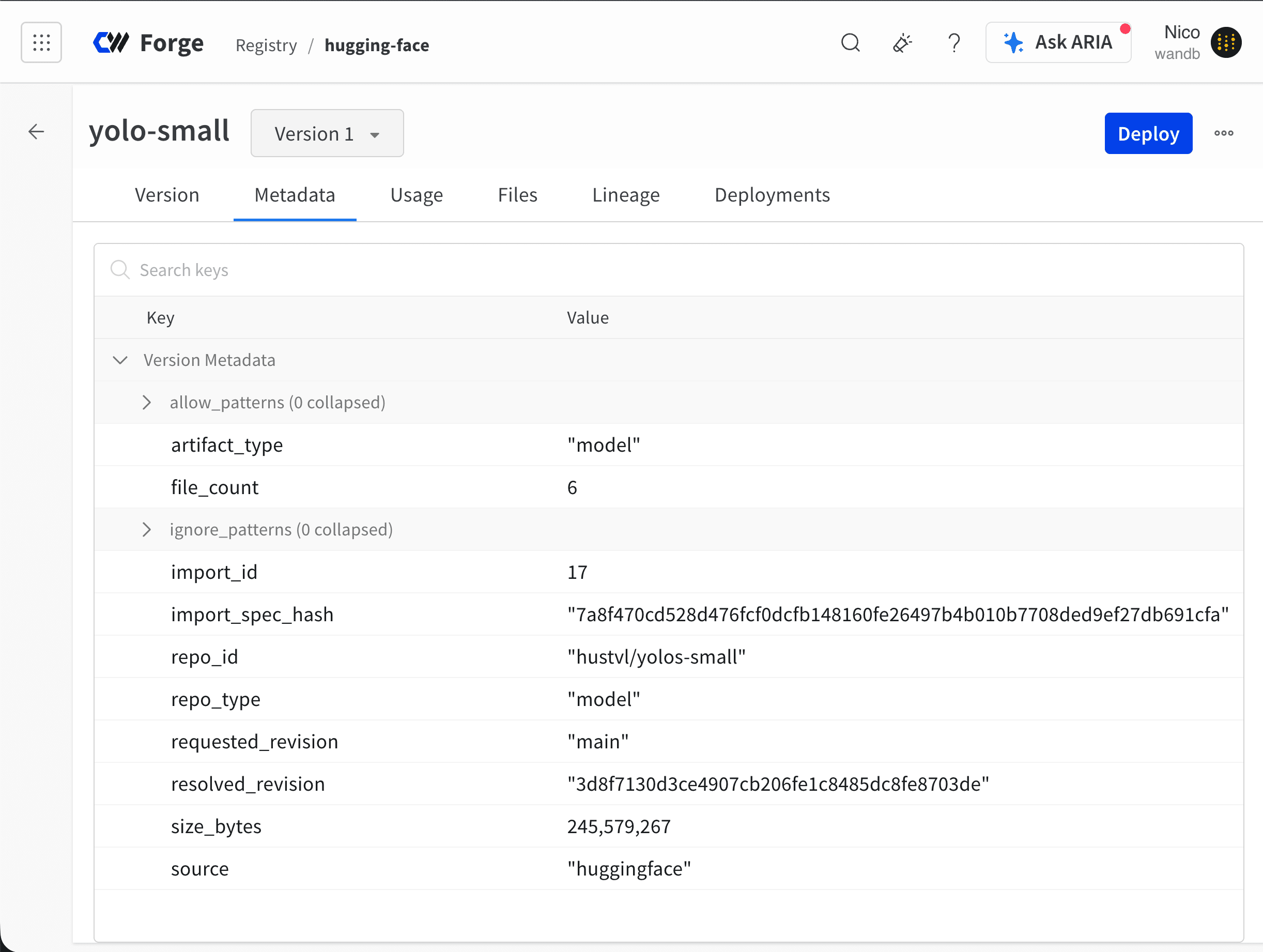 In this example:
* `repo_id` is `hustvl/yolos-small`.
* `resolved_revision` is `3d8f7130d3ce4907`, the commit to which `main` resolved at the time of import.
* `size_bytes` is 245,569,443 bytes, or approximately 245.6 MB or 234.2 MiB.
* `source` is `huggingface`.
In this example:
* `repo_id` is `hustvl/yolos-small`.
* `resolved_revision` is `3d8f7130d3ce4907`, the commit to which `main` resolved at the time of import.
* `size_bytes` is 245,569,443 bytes, or approximately 245.6 MB or 234.2 MiB.
* `source` is `huggingface`.