> ## Documentation Index
> Fetch the complete documentation index at: https://docs.coreweave.com/llms.txt
> Use this file to discover all available pages before exploring further.
# Connect Claude Code and Claude Desktop to CoreWeave Inference
> Point Claude Code and Claude Desktop at CoreWeave Serverless or Dedicated Inference through a translation proxy
This guide explains how to connect Claude Code and Claude Desktop to a CoreWeave Inference endpoint, so you can run them against CoreWeave-hosted models: open-weight models from the [Serverless Inference](/products/inference/serverless) catalog, or your own [Dedicated Inference](/products/inference/dedicated) deployment. You run a small local proxy that translates between the API format Claude uses and the OpenAI-compatible API that CoreWeave Inference serves, so the same setup works for either option with only a change of endpoint and credentials.
## How it works
Claude Code is Anthropic's agentic coding assistant, and Claude Desktop is Anthropic's desktop chat application. Both send requests in Anthropic's [Messages API](https://platform.claude.com/docs/en/api/messages) format. CoreWeave Inference serves models through an OpenAI-compatible API, the same interface that Serverless and Dedicated Inference expose for OpenAI client libraries and tooling.
The two formats aren't interchangeable. They differ in how the system prompt is carried, how tools are described, how tool results are returned, and how responses are shaped. Claude Code and Claude Desktop can't call an OpenAI-compatible endpoint directly, so a lightweight proxy sits between Claude and your inference endpoint to:
1. Accept Anthropic Messages API requests from Claude.
2. Translate them into OpenAI-compatible chat completion requests.
3. Forward the requests to CoreWeave Inference.
4. Convert the responses back into Anthropic-compatible format.
5. Return the results to Claude.
In other words, the proxy bridges an API-format gap, not a network gap. The endpoint is already reachable. It speaks a different protocol than Claude.
You point Claude Code at the proxy with the `ANTHROPIC_BASE_URL` environment variable, and you point Claude Desktop at the proxy through its third-party inference settings.
This proxy is a minimal example that returns a single, complete JSON response rather than streaming. Claude Code requests streaming by default, and Anthropic's [gateway protocol](https://code.claude.com/docs/en/llm-gateway-protocol) states that inference responses must stream, since a gateway that buffers the full response before relaying it can stall the client. In practice the example works for short, interactive exchanges, but it can feel unresponsive or hit client timeouts on long outputs, and a future Claude Code release could stop accepting a non-streamed response. For anything beyond a quick trial, run a streaming-capable translation layer such as [LiteLLM](https://docs.litellm.ai) behind a production WSGI server. See [Production considerations](#production-considerations).
## Serverless or Dedicated Inference
Both inference options work with the same proxy. The difference is the endpoint you target and the credential you use.
| | Serverless Inference | Dedicated Inference |
| ----------------- | --------------------------------------------------------------------------------------------- | ------------------------------------------------------------------------------------- |
| Best for | Individuals and teams that want managed, pay-per-token access to a catalog of popular models. | Organizations serving their own model weights on dedicated GPU infrastructure. |
| Delivered through | [W\&B Inference](https://docs.wandb.ai/inference) | A [gateway](/products/inference/gateways) you create on CoreWeave |
| Endpoint | `https://api.inference.wandb.ai` | Your gateway endpoint, for example `https://api.[GATEWAY-ID].gw.cwinference.com` |
| Credential | A W\&B API key | A CoreWeave API access token with the [Inference role](/security/iam/access-policies) |
| Model | A model ID from the W\&B Inference catalog | The model name from your deployment |
For background on each option, see [About Serverless Inference](/products/inference/serverless) and [About Dedicated Inference](/products/inference/dedicated).
Both endpoints are already public and reachable. The proxy isn't exposing them. It exists only to translate between Claude's Anthropic Messages format and the OpenAI-compatible format the endpoints speak. If your client already speaks the OpenAI API, you can call the endpoint directly and skip this guide.
## Prerequisites
* A [W\&B account](https://docs.wandb.ai/inference) with W\&B Inference access.
* A W\&B API key. Find your key at [wandb.ai/authorize](https://wandb.ai/authorize) or under **User Settings** at [wandb.ai/settings](https://wandb.ai/settings).
* A Claude account with access to Claude Code (CLI) or Claude Desktop.
* Python 3 with the `flask` and `requests` packages installed (`pip install flask requests`).
* A running [Dedicated Inference](/products/inference/dedicated) deployment behind a [gateway](/products/inference/gateways). If you haven't deployed a model yet, follow [Getting started with Dedicated Inference](/products/inference/getting-started).
* The gateway endpoint for your deployment. Retrieve it from the gateway's `status.endpoints` field as shown in [Getting started](/products/inference/getting-started#wait-for-the-deployment-to-start).
* A [CoreWeave API access token](/security/authn-authz/manage-api-access-tokens) with the [Inference role](/security/iam/access-policies). This is the same token you use with the Inference management API when the gateway uses CoreWeave IAM authentication (`coreWeaveAuth`).
* The model name from your deployment.
* A Claude account with access to Claude Code (CLI) or Claude Desktop.
* Python 3 with the `flask` and `requests` packages installed (`pip install flask requests`).
## Set environment variables
The proxy reads its configuration from environment variables, and Claude Code reads two of its own. Set the proxy variables in the terminal where you run the proxy, and set the Claude Code variables in the separate terminal where you start `claude`.
| Variable | Set in | Serverless value | Dedicated value |
| --------------------- | -------------------- | -------------------------------- | ------------------------------- |
| `CW_API_TOKEN` | Proxy terminal | Your W\&B API key | Your CoreWeave API access token |
| `CW_GATEWAY_ENDPOINT` | Proxy terminal | `https://api.inference.wandb.ai` | Your gateway endpoint |
| `CW_MODEL_NAME` | Proxy terminal | A model ID from the catalog | Your deployment's model name |
| `ANTHROPIC_BASE_URL` | Claude Code terminal | `http://127.0.0.1:4000` | `http://127.0.0.1:4000` |
| `ANTHROPIC_API_KEY` | Claude Code terminal | `unused` | `unused` |
The proxy doesn't authenticate clients, so `ANTHROPIC_API_KEY` can be any non-empty value. Claude Code sends it, but the proxy ignores it and authenticates to CoreWeave with `CW_API_TOKEN` instead.
The following variables are optional:
| Variable | Set in | Description |
| --------------------- | -------------- | ---------------------------------------------------------------------------------------------------------------------------------------------------------------------------------------------- |
| `CW_ADVERTISED_MODEL` | Proxy terminal | The model name the proxy reports to the client. Set it to a Claude-style name such as `claude-sonnet-4-5`. Required for Claude Desktop, optional for Claude Code. Defaults to `CW_MODEL_NAME`. |
| `CW_USE_TOOLS` | Proxy terminal | `true` (default) or `false`. When `false`, the proxy strips tool definitions and tool calls before forwarding requests. |
| `CW_USER_AGENT` | Proxy terminal | A custom `User-Agent` header. Set this if requests are rejected with a `403` and `error code: 1010`. |
| `CW_OPENAI_PROJECT` | Proxy terminal | Serverless only. A W\&B team and project in `[TEAM]/[PROJECT]` format, sent as the `OpenAI-Project` header for usage tracking or to scope requests to a specific team. Optional. |
Set the proxy variables for your inference option:
```bash theme={"system"}
export CW_API_TOKEN="[WANDB-API-KEY]"
export CW_GATEWAY_ENDPOINT="https://api.inference.wandb.ai"
# Set CW_MODEL_NAME after you choose a model in Verify connectivity, below
```
```bash theme={"system"}
export CW_API_TOKEN="[CW-API-TOKEN]"
export CW_GATEWAY_ENDPOINT="[GATEWAY-ENDPOINT]"
export CW_MODEL_NAME="[MODEL-NAME]"
```
Verify that the endpoint variable is set:
```bash theme={"system"}
echo $CW_GATEWAY_ENDPOINT
```
## Verify connectivity
Before configuring Claude, confirm that your endpoint is reachable and that your credential works.
List the available models to validate your credential and choose a model to serve:
```bash theme={"system"}
curl -X GET "${CW_GATEWAY_ENDPOINT}/v1/models" \
-H "Content-Type: application/json" \
-H "Authorization: Bearer ${CW_API_TOKEN}"
```
The response lists the model IDs available in the W\&B Inference catalog. Replace `[MODEL-NAME]` with a model ID from the response, for example `moonshotai/Kimi-K2.7-Code`, then set and confirm it:
```bash theme={"system"}
export CW_MODEL_NAME="[MODEL-NAME]"
echo $CW_MODEL_NAME
```
For the current list of models, see the [W\&B Inference models documentation](https://docs.wandb.ai/inference/models).
Send a chat completion request to confirm the gateway and deployment are responding:
```bash theme={"system"}
curl -X POST "${CW_GATEWAY_ENDPOINT}/v1/chat/completions" \
-H "Authorization: Bearer ${CW_API_TOKEN}" \
-H "Content-Type: application/json" \
-d '{
"model": "'"${CW_MODEL_NAME}"'",
"messages": [
{
"role": "user",
"content": "What is CoreWeave?"
}
],
"max_tokens": 256
}'
```
A successful response is an OpenAI-compatible chat completion containing a model-generated message.
## Create the translation proxy
Create a file named `openai_to_anthropic_proxy.py` with the following contents. The proxy exposes the Anthropic Messages API endpoints that Claude calls (`/v1/messages`, `/v1/messages/count_tokens`, and `/v1/models`) and forwards translated requests to your CoreWeave endpoint. Expand the following panel to view the full proxy.
````python theme={"system"}
from flask import Flask, request, jsonify
import requests
import os
import json
import logging
logging.basicConfig(
level=logging.INFO,
format="%(asctime)s - %(levelname)s - %(message)s",
datefmt="%Y-%m-%d %H:%M:%S",
)
logger = logging.getLogger(__name__)
app = Flask(__name__)
# In-memory store linking session IDs to their generated titles
session_titles = {}
CW_API_TOKEN = os.environ["CW_API_TOKEN"]
CW_MODEL_NAME = os.environ.get("CW_MODEL_NAME")
if not CW_MODEL_NAME:
raise SystemExit(
"CW_MODEL_NAME is not set. List available models with "
"'curl $CW_GATEWAY_ENDPOINT/v1/models', then export CW_MODEL_NAME "
"before starting the proxy."
)
CW_GATEWAY_ENDPOINT = os.environ["CW_GATEWAY_ENDPOINT"] + "/v1/chat/completions"
CW_USE_TOOLS = (
os.environ.get("CW_USE_TOOLS", "true").lower()
in ("true", "1", "yes")
)
CW_USER_AGENT = os.environ.get(
"CW_USER_AGENT",
"curl/8 claude-cw-proxy",
)
CW_OPENAI_PROJECT = os.environ.get("CW_OPENAI_PROJECT")
CW_ADVERTISED_MODEL = os.environ.get(
"CW_ADVERTISED_MODEL",
CW_MODEL_NAME,
)
logger.info("Tool use enabled: %s", CW_USE_TOOLS)
# Helpers
def _cw_headers():
headers = {
"Authorization": f"Bearer {CW_API_TOKEN}",
"Content-Type": "application/json",
"User-Agent": CW_USER_AGENT,
}
if CW_OPENAI_PROJECT:
headers["OpenAI-Project"] = CW_OPENAI_PROJECT
return headers
class GatewayError(Exception):
def __init__(self, status_code, body):
self.status_code = status_code
self.body = body
def _cw_chat(payload):
resp = requests.post(
CW_GATEWAY_ENDPOINT,
json=payload,
headers=_cw_headers(),
)
if not resp.ok:
raise GatewayError(resp.status_code, resp.text)
return resp.json()
def extract_first_user_text(body):
for msg in body.get("messages", []):
if msg.get("role") == "user":
content = msg.get("content", "")
if isinstance(content, str):
return content
if isinstance(content, list):
for b in content:
if b.get("type") == "text":
return b.get("text", "")
return ""
# Format translation
def flatten_content(content):
if isinstance(content, str):
return content
if isinstance(content, list):
parts = []
for b in content:
if b.get("type") == "text":
parts.append(b.get("text", ""))
elif b.get("type") == "tool_result":
result = b.get("content", "")
if isinstance(result, list):
result = " ".join(
r.get("text", "")
for r in result
if r.get("type") == "text"
)
parts.append(
f"[tool_result id={b.get('tool_use_id')}]: {result}"
)
return "\n".join(parts)
return str(content)
def anthropic_tools_to_openai(tools):
return [
{
"type": "function",
"function": {
"name": t["name"],
"description": t.get("description", ""),
"parameters": t.get("input_schema", {}),
},
}
for t in tools
]
def anthropic_to_openai(body):
messages = []
system = body.get("system")
if system:
messages.append(
{
"role": "system",
"content": flatten_content(system),
}
)
for msg in body.get("messages", []):
role = msg["role"]
content = msg["content"]
if role == "assistant" and isinstance(content, list):
text_parts = [
b.get("text", "")
for b in content
if b.get("type") == "text"
]
tool_calls = []
if CW_USE_TOOLS:
for b in content:
if b.get("type") == "tool_use":
tool_calls.append(
{
"id": b["id"],
"type": "function",
"function": {
"name": b["name"],
"arguments": json.dumps(
b.get("input", {})
),
},
}
)
oai_msg = {
"role": "assistant",
"content": "\n".join(text_parts) or None,
}
if tool_calls:
oai_msg["tool_calls"] = tool_calls
messages.append(oai_msg)
elif role == "user" and isinstance(content, list):
tool_results = []
if CW_USE_TOOLS:
tool_results = [
b for b in content
if b.get("type") == "tool_result"
]
text_parts = [
b for b in content
if b.get("type") == "text"
]
for tr in tool_results:
result_content = tr.get("content", "")
if isinstance(result_content, list):
result_content = "\n".join(
r.get("text", "")
for r in result_content
if r.get("type") == "text"
)
messages.append(
{
"role": "tool",
"tool_call_id": tr["tool_use_id"],
"content": result_content,
}
)
if text_parts:
messages.append(
{
"role": "user",
"content": "\n".join(
b.get("text", "")
for b in text_parts
),
}
)
else:
messages.append(
{
"role": role,
"content": flatten_content(content),
}
)
payload = {
"model": CW_MODEL_NAME,
"messages": messages,
"max_tokens": body.get("max_tokens", 4096),
}
tools = body.get("tools")
if tools and CW_USE_TOOLS:
payload["tools"] = anthropic_tools_to_openai(tools)
payload["tool_choice"] = "auto"
return payload
def openai_to_anthropic(oai):
choice = oai["choices"][0]
msg = choice["message"]
usage = oai.get("usage", {})
content = []
if msg.get("content"):
content.append(
{
"type": "text",
"text": msg["content"],
}
)
for tc in msg.get("tool_calls") or []:
fn = tc["function"]
try:
inp = json.loads(fn["arguments"])
except Exception:
inp = {"raw": fn["arguments"]}
content.append(
{
"type": "tool_use",
"id": tc["id"],
"name": fn["name"],
"input": inp,
}
)
return {
"id": oai.get("id", "proxy"),
"type": "message",
"role": "assistant",
"model": oai.get("model") or CW_MODEL_NAME,
"content": content,
"stop_reason": (
"tool_use"
if msg.get("tool_calls")
else "end_turn"
),
"usage": {
"input_tokens": usage.get("prompt_tokens", 0),
"output_tokens": usage.get("completion_tokens", 0),
},
}
# Session title handling
def is_title_request(body):
fmt = body.get("output_config", {}).get("format", {})
if fmt.get("type") == "json_schema":
if "title" in fmt.get("schema", {}).get("properties", {}):
return True
return False
def generate_session_title(user_text, session_id):
payload = {
"model": CW_MODEL_NAME,
"messages": [
{
"role": "system",
"content": (
"Generate a concise session title "
"(3-7 words, sentence case) "
"for a coding session based on the user's "
"first message. "
'Respond with ONLY valid JSON: {"title": "your title here"}'
),
},
{
"role": "user",
"content": user_text or "General coding session",
},
],
"max_tokens": 50,
}
try:
raw = _cw_chat(payload)["choices"][0]["message"]["content"]
raw = raw.strip().strip("```json").strip("```").strip()
title = json.loads(raw).get("title", "Claude Code session")
except Exception:
title = "Claude Code session"
session_titles[session_id] = title
logger.info(
"Session title generated: %s -> %s",
session_id[:8] if session_id else "",
title,
)
return title
# Inference
def run_inf(messages, tools, max_tokens, session_id=""):
payload = {
"model": CW_MODEL_NAME,
"messages": messages,
"max_tokens": max_tokens,
}
if tools:
payload["tools"] = tools
payload["tool_choice"] = "auto"
logger.info(
"Sending model: %s | session: %s",
CW_MODEL_NAME,
session_id[:8] if session_id else "",
)
return _cw_chat(payload)
# Routes
@app.route("/v1/messages", methods=["POST"])
def messages():
body = request.get_json()
try:
session_id = json.loads(
body.get("metadata", {}).get("user_id", "{}")
).get("session_id", "")
except Exception:
session_id = ""
if is_title_request(body):
logger.info("Title request detected - handling in proxy")
user_text = extract_first_user_text(body)
title = generate_session_title(user_text, session_id)
return jsonify(
{
"id": "msg_title",
"type": "message",
"role": "assistant",
"model": CW_MODEL_NAME,
"content": [
{
"type": "text",
"text": json.dumps({"title": title}),
}
],
"stop_reason": "end_turn",
"usage": {
"input_tokens": 0,
"output_tokens": 0,
},
}
)
oai_payload = anthropic_to_openai(body)
try:
result = run_inf(
oai_payload["messages"],
oai_payload.get("tools", []),
oai_payload["max_tokens"],
session_id=session_id,
)
except GatewayError as e:
return jsonify({"error": e.body}), e.status_code
return jsonify(openai_to_anthropic(result))
def rough_token_count(text):
if not text:
return 0
return max(1, len(text) // 4)
@app.route("/v1/messages/count_tokens", methods=["POST"])
def count_tokens():
body = request.get_json(force=True)
text_parts = []
system = body.get("system")
if system:
text_parts.append(flatten_content(system))
for msg in body.get("messages", []):
text_parts.append(flatten_content(msg.get("content", "")))
joined = "\n".join(text_parts)
return jsonify({"input_tokens": rough_token_count(joined)})
@app.route("/health", methods=["GET"])
def health():
return jsonify(
{
"status": "ok",
"target_model": CW_MODEL_NAME,
"advertised_model": CW_ADVERTISED_MODEL,
"gateway": CW_GATEWAY_ENDPOINT,
"tools_enabled": CW_USE_TOOLS,
"project": CW_OPENAI_PROJECT,
}
)
@app.route("/v1/models", methods=["GET"])
def models():
return jsonify(
{
"data": [
{
"id": CW_ADVERTISED_MODEL,
"type": "model",
"display_name": CW_ADVERTISED_MODEL,
"created_at": "2026-01-01T00:00:00Z",
"max_input_tokens": 0,
"max_tokens": 0,
"capabilities": {
"batch": {"supported": False},
"citations": {"supported": False},
"code_execution": {"supported": False},
"context_management": {"supported": False},
"effort": {"supported": False},
"image_input": {"supported": True},
"pdf_input": {"supported": False},
"structured_outputs": {"supported": True},
"thinking": {"supported": True},
},
}
],
"first_id": CW_ADVERTISED_MODEL,
"has_more": False,
"last_id": CW_ADVERTISED_MODEL,
}
)
if __name__ == "__main__":
for rule in app.url_map.iter_rules():
print(rule)
app.run(port=4000)
````
## Run the proxy
The proxy reads all configuration from environment variables at startup, so set them in the same terminal before launching it. Run the proxy in its own dedicated terminal and leave it running. You use a separate terminal to start Claude in a later step.
### Optional: disable tool calls
If your deployment doesn't support tool calling, instruct the proxy to strip tools from Claude requests:
```bash theme={"system"}
export CW_USE_TOOLS=false
```
Agentic workflows may still attempt to invoke tools. When `CW_USE_TOOLS=false`, the proxy removes tool definitions and tool calls before requests reach the inference endpoint. For a fuller Claude experience, enable tool support whenever your deployment allows it. On Dedicated Inference, tool calling requires a model and deployment configured for it. See the `enable-auto-tool-choice` and `tool-call-parser` options in [Models and deployments](/products/inference/models#runtime-configuration).
### Start the proxy
Set the advertised model name if you plan to use Claude Desktop, then start the proxy:
```bash theme={"system"}
# Only for Claude Desktop: advertise a Claude-style model name so the desktop app accepts it
export CW_ADVERTISED_MODEL="claude-sonnet-4-5"
python openai_to_anthropic_proxy.py
```
On startup, the proxy prints its registered routes and then the Flask startup banner:
```text theme={"system"}
* Serving Flask app 'openai_to_anthropic_proxy'
* Debug mode: off
2026-06-16 12:21:43 - INFO - WARNING: This is a development server. Do not use it in a production deployment. Use a production WSGI server instead.
* Running on http://127.0.0.1:4000
2026-06-16 12:21:43 - INFO - Press CTRL+C to quit
```
The proxy is now listening for Anthropic-compatible requests on `http://127.0.0.1:4000`.
### Confirm the proxy is running
Query the proxy's health endpoint to confirm it is up and reporting the configuration you expect:
```bash theme={"system"}
curl http://127.0.0.1:4000/health
```
The response reports the target model, the advertised model, and whether tool support is enabled:
```text theme={"system"}
{"status": "ok", "target_model": "moonshotai/Kimi-K2.7-Code", "advertised_model": "claude-sonnet-4-5", "gateway": "https://api.inference.wandb.ai/v1/chat/completions", "tools_enabled": true, "project": null}
```
### Keep the proxy online across sessions
To avoid re-exporting variables each time, use a startup script or a terminal multiplexer.
Create `start_proxy.sh`:
```bash theme={"system"}
#!/usr/bin/env bash
# Your CoreWeave API access token, or your W&B API key for Serverless Inference
export CW_API_TOKEN="[API-TOKEN]"
# Your gateway endpoint, or "https://api.inference.wandb.ai" for Serverless Inference
export CW_GATEWAY_ENDPOINT="[GATEWAY-ENDPOINT]"
export CW_MODEL_NAME="[MODEL-NAME]"
# Optional variables, uncomment as needed
# export CW_USER_AGENT="curl/8 my-company-proxy"
# Set to "claude-sonnet-4-5" for Claude Desktop
# export CW_ADVERTISED_MODEL="claude-sonnet-4-5"
# export CW_USE_TOOLS=true
# export CW_OPENAI_PROJECT="[TEAM]/[PROJECT]"
python openai_to_anthropic_proxy.py
```
Make it executable and run it:
```bash theme={"system"}
chmod +x start_proxy.sh
./start_proxy.sh
```
Start the proxy inside a detachable session:
```bash theme={"system"}
tmux new -s claude-proxy
./start_proxy.sh # or: python openai_to_anthropic_proxy.py
# Detach with Ctrl-b then d; the proxy keeps running in the background
```
Reattach later to view logs:
```bash theme={"system"}
tmux attach -t claude-proxy
```
Stop the proxy when you're done:
```bash theme={"system"}
tmux kill-session -t claude-proxy
```
## Configure Claude Code
In a second terminal, separate from the one running the proxy, point Claude Code at the local proxy and start it:
```bash theme={"system"}
export ANTHROPIC_BASE_URL=http://127.0.0.1:4000
export ANTHROPIC_API_KEY=unused
claude
```
Claude Code may display an unexpected model name. This is expected. Claude Code shows a standard Claude model name while the proxy routes requests to your CoreWeave model. Confirm the routing by watching the proxy logs.
## Configure Claude Desktop
Claude Desktop connects to the proxy through its third-party inference settings. First enable Developer Mode for your operating system, which restarts the app and adds a **Developer** menu, then configure the gateway connection, which is the same on every platform.
1. Launch Claude Desktop:
```bash theme={"system"}
open -a "Claude"
```
2. In the menu bar, open **Help > Troubleshooting**, then select **Enable Developer Mode**.
1. Launch Claude Desktop.
2. From the application menu, open **Help > Troubleshooting**, then select **Enable Developer Mode**.
For enterprise rollout, Anthropic supports policy-based configuration. Refer to [Anthropic's installation documentation](https://claude.com/docs) for the current procedure.
Claude Desktop for Linux is an official beta for Ubuntu and Debian. Install it from [claude.com/download](https://claude.com/download), then:
1. Launch Claude Desktop.
2. From the application menu, open **Help > Troubleshooting**, then select **Enable Developer Mode**.
With Developer Mode enabled, configure the gateway connection. These steps are the same on every platform:
1. Open **Developer > Configure third-party inference**.
2. Set the inference provider to **Gateway** and configure the connection:
| Setting | Value |
| ---------------- | ----------------------- |
| Credential Kind | `Static API Key` |
| Gateway Base URL | `http://127.0.0.1:4000` |
| Gateway API Key | `unused` |
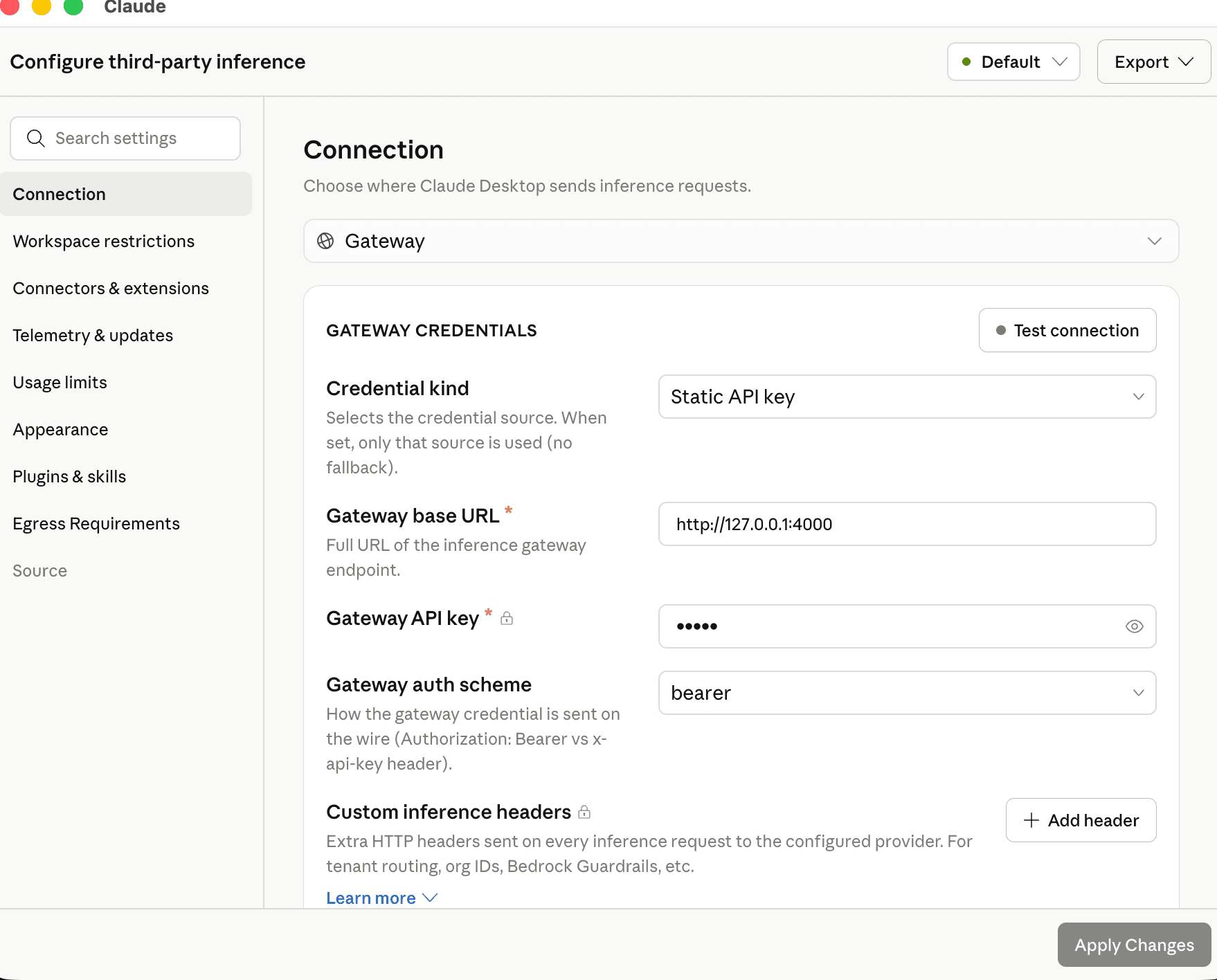 3. Save the configuration, then click **Test model discovery**. A green result confirms that Claude Desktop reached the gateway and discovered the advertised model.
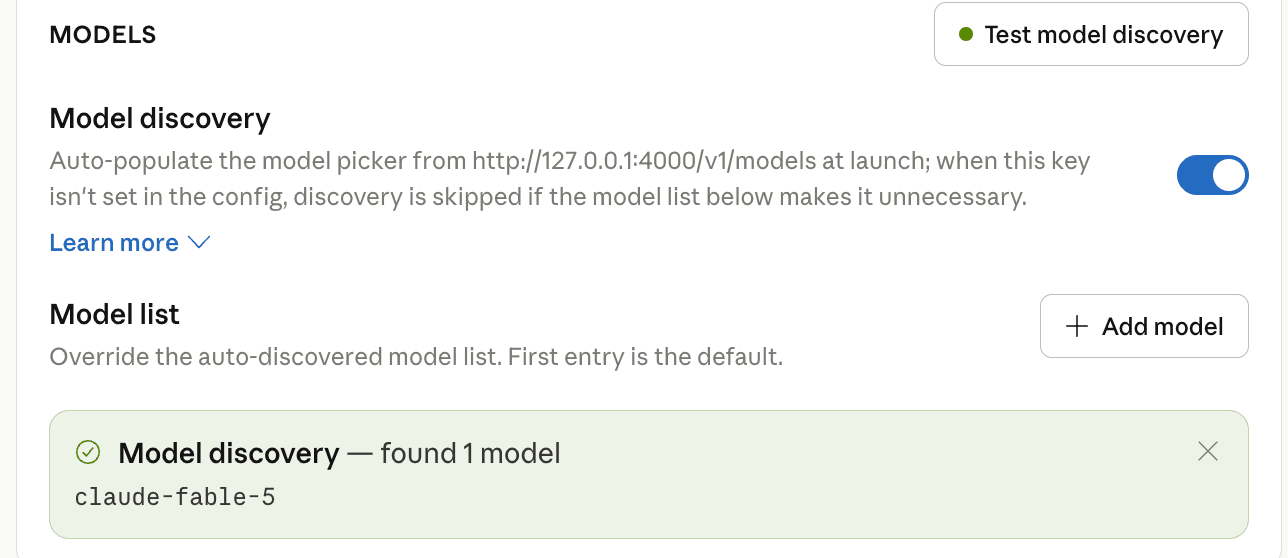 4. Start a new conversation.
### Model name compatibility
Claude Desktop validates gateway model identifiers against Anthropic naming conventions, and it builds its model picker by calling the gateway's `GET /v1/models` endpoint. The proxy satisfies this by advertising a Claude-style model name while forwarding requests to your CoreWeave model. Set the advertised name before starting the proxy:
```bash theme={"system"}
export CW_ADVERTISED_MODEL="claude-sonnet-4-5"
```
The advertised model metadata is defined in the proxy's `/v1/models` route, where you can customize the model name, context window, thinking support, vision capabilities, and tool calling support.
## Validate
After configuration, verify that requests reach your CoreWeave endpoint.
### Claude Code
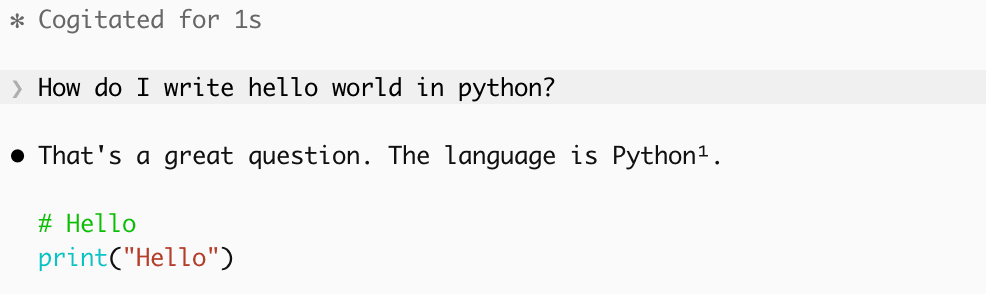
Ask a question that doesn't depend on the model identifying itself, such as `Can you tell me what CoreWeave is?`. Then confirm that the request appears in the proxy logs and receives a valid response.
Avoid asking the model which model it is. Open models often answer incorrectly even when routing works correctly, so the answer isn't a reliable check.
4. Start a new conversation.
### Model name compatibility
Claude Desktop validates gateway model identifiers against Anthropic naming conventions, and it builds its model picker by calling the gateway's `GET /v1/models` endpoint. The proxy satisfies this by advertising a Claude-style model name while forwarding requests to your CoreWeave model. Set the advertised name before starting the proxy:
```bash theme={"system"}
export CW_ADVERTISED_MODEL="claude-sonnet-4-5"
```
The advertised model metadata is defined in the proxy's `/v1/models` route, where you can customize the model name, context window, thinking support, vision capabilities, and tool calling support.
## Validate
After configuration, verify that requests reach your CoreWeave endpoint.
### Claude Code
Ask a question that doesn't depend on the model identifying itself, such as `Can you tell me what CoreWeave is?`. Then confirm that the request appears in the proxy logs and receives a valid response.
Avoid asking the model which model it is. Open models often answer incorrectly even when routing works correctly, so the answer isn't a reliable check.
 ### Claude Desktop
In **Developer > Configure third-party inference**, click **Test model discovery**. A green result confirms that the gateway is reachable. Then open a new conversation and submit a prompt. Confirm that:
* Responses are generated successfully.
* Requests appear in the proxy logs.
* Inference traffic reaches your CoreWeave endpoint.
### Claude Desktop
In **Developer > Configure third-party inference**, click **Test model discovery**. A green result confirms that the gateway is reachable. Then open a new conversation and submit a prompt. Confirm that:
* Responses are generated successfully.
* Requests appear in the proxy logs.
* Inference traffic reaches your CoreWeave endpoint.
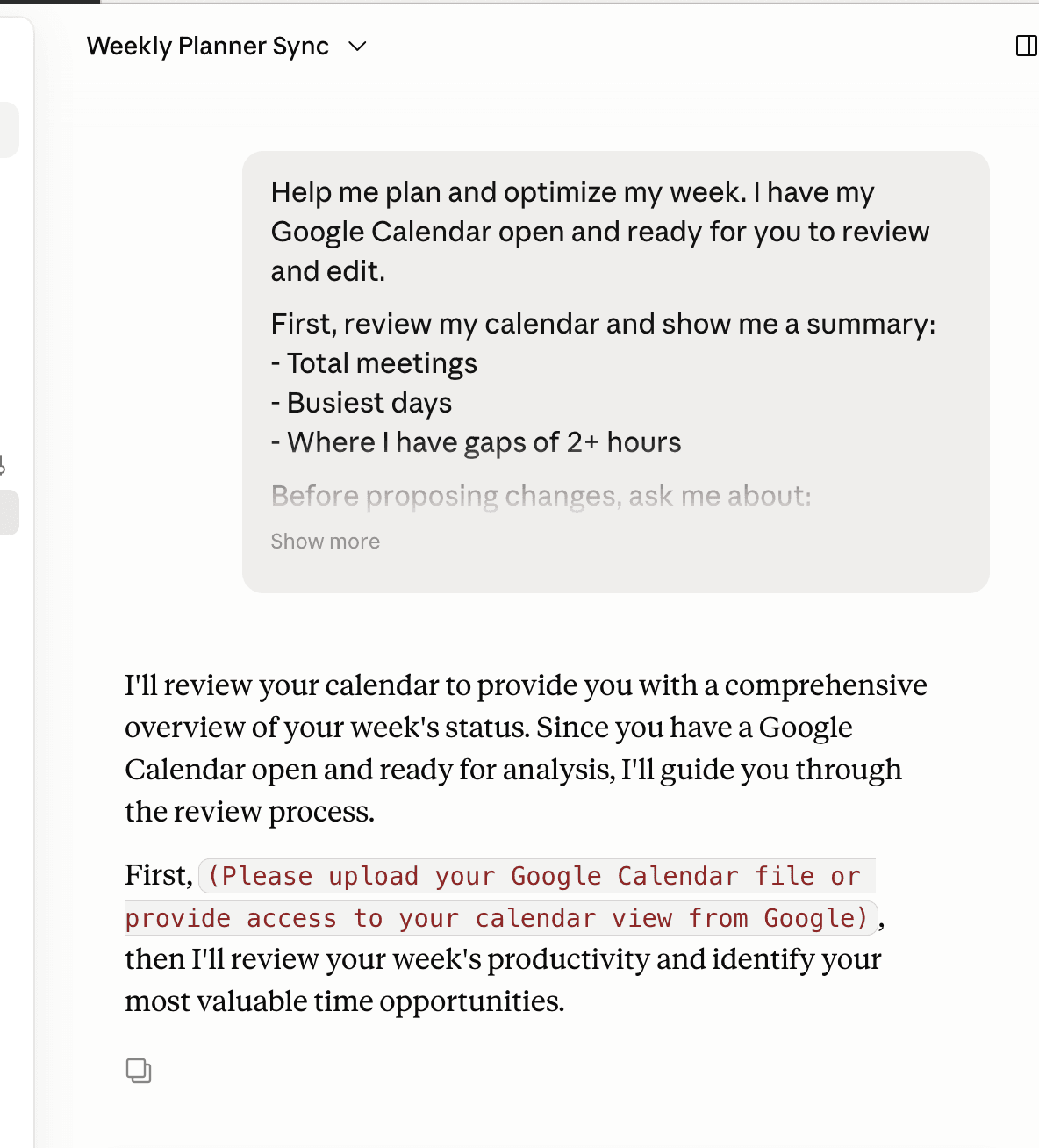 If both clients respond successfully, the integration is complete.
## Troubleshooting
The following sections describe common issues and how to resolve them.
### 403 response with error code 1010
A `403` response with `error code: 1010` is an edge security block triggered by the default User-Agent of the `requests` library. Set a custom `User-Agent` and restart the proxy:
```bash theme={"system"}
export CW_USER_AGENT="curl/8 my-company-proxy"
```
### Serverless authentication errors
If Serverless Inference returns an authentication error related to your organization, set your W\&B team and project, then restart the proxy:
```bash theme={"system"}
export CW_OPENAI_PROJECT="[TEAM]/[PROJECT]"
```
### Endpoint or model changes
The proxy reads configuration only at startup. Whenever you change `CW_GATEWAY_ENDPOINT`, `CW_API_TOKEN`, `CW_MODEL_NAME`, or `CW_USE_TOOLS`, restart the proxy process. Restart your Claude Code session after the proxy restarts. Claude Desktop reconnects to the configured gateway automatically and typically doesn't require a restart.
## Production considerations
The example proxy is a single-process Flask development server that returns complete responses rather than streaming them. Before serving multiple users or production traffic:
* Run the proxy behind a production-grade WSGI server.
* Use a streaming-capable translation layer so Claude Code can stream responses.
* Enable tool calling if your deployment supports it.
* Customize the advertised model capabilities to match your model.
## Clean up
To revert to a standard Claude configuration, unset the environment variables and stop the proxy. For Claude Desktop, turn off third-party inference in **Developer > Configure third-party inference**.
```bash theme={"system"}
unset ANTHROPIC_BASE_URL
unset ANTHROPIC_API_KEY
unset CW_GATEWAY_ENDPOINT
unset CW_API_TOKEN
unset CW_MODEL_NAME
unset CW_USER_AGENT
unset CW_ADVERTISED_MODEL
unset CW_USE_TOOLS
unset CW_OPENAI_PROJECT
```
If both clients respond successfully, the integration is complete.
## Troubleshooting
The following sections describe common issues and how to resolve them.
### 403 response with error code 1010
A `403` response with `error code: 1010` is an edge security block triggered by the default User-Agent of the `requests` library. Set a custom `User-Agent` and restart the proxy:
```bash theme={"system"}
export CW_USER_AGENT="curl/8 my-company-proxy"
```
### Serverless authentication errors
If Serverless Inference returns an authentication error related to your organization, set your W\&B team and project, then restart the proxy:
```bash theme={"system"}
export CW_OPENAI_PROJECT="[TEAM]/[PROJECT]"
```
### Endpoint or model changes
The proxy reads configuration only at startup. Whenever you change `CW_GATEWAY_ENDPOINT`, `CW_API_TOKEN`, `CW_MODEL_NAME`, or `CW_USE_TOOLS`, restart the proxy process. Restart your Claude Code session after the proxy restarts. Claude Desktop reconnects to the configured gateway automatically and typically doesn't require a restart.
## Production considerations
The example proxy is a single-process Flask development server that returns complete responses rather than streaming them. Before serving multiple users or production traffic:
* Run the proxy behind a production-grade WSGI server.
* Use a streaming-capable translation layer so Claude Code can stream responses.
* Enable tool calling if your deployment supports it.
* Customize the advertised model capabilities to match your model.
## Clean up
To revert to a standard Claude configuration, unset the environment variables and stop the proxy. For Claude Desktop, turn off third-party inference in **Developer > Configure third-party inference**.
```bash theme={"system"}
unset ANTHROPIC_BASE_URL
unset ANTHROPIC_API_KEY
unset CW_GATEWAY_ENDPOINT
unset CW_API_TOKEN
unset CW_MODEL_NAME
unset CW_USER_AGENT
unset CW_ADVERTISED_MODEL
unset CW_USE_TOOLS
unset CW_OPENAI_PROJECT
```