> ## Documentation Index
> Fetch the complete documentation index at: https://docs.coreweave.com/llms.txt
> Use this file to discover all available pages before exploring further.
# Use JAX with marimo notebooks
> Run JAX workloads in interactive marimo notebooks on CKS GPU nodes
[JAX](https://docs.jax.dev/en/latest/) is Google's high-performance numerical computing library that brings composable function transformations, JIT compilation, automatic differentiation, and vectorization to NumPy-style code. It runs identically on CPU and GPU without any changes to your model.
This tutorial deploys a JAX example notebook to CKS with a single command. The notebook trains a small identity network using [Flax](https://flax.readthedocs.io/en/stable/) and [Optax](https://optax.readthedocs.io/en/latest/), and streams a live loss chart to the browser as training progresses, an example of the interactive capabilities marimo unlocks for GPU workloads.
In this tutorial, you:
1. **Download the JAX example notebook** from the marimo-operator repository.
2. **Deploy it to CKS** with a single CLI command.
3. **Run training interactively** and watch results update live in the browser.
Before you start, you must have:
* A CKS cluster with at least one GPU Node.
* The [marimo operator installed](/products/cks/tutorials/marimo-notebooks) on your cluster.
* `kubectl` installed and configured to access your cluster.
* [`kubectl-marimo`](https://pypi.org/project/kubectl-marimo/) installed (`uv tool install kubectl-marimo`).
You'll use these tools and libraries:
* [**JAX**](https://docs.jax.dev/en/latest/): High-performance numerical computing with GPU acceleration.
* [**Flax**](https://flax.readthedocs.io/en/stable/): Neural network library built on JAX.
* [**Optax**](https://optax.readthedocs.io/en/latest/): Gradient processing and optimization for JAX.
* [**marimo-operator**](https://github.com/marimo-team/marimo-operator): Manages notebook deployments on Kubernetes.
* [**kubectl-marimo**](https://pypi.org/project/kubectl-marimo/): CLI plugin for running notebooks on Kubernetes.
**About the container image**
This example uses the standard `ghcr.io/marimo-team/marimo:latest` image, no custom Dockerfile needed. The `jax[cuda12]` package bundles its own CUDA runtime, so GPU support is installed automatically as a dependency when the notebook first starts.
## Get the example notebook
Download the JAX example notebook from the marimo-operator repository:
```bash theme={"system"}
curl -O https://raw.githubusercontent.com/marimo-team/marimo-operator/main/examples/jax/jax_example.py
```
The notebook embeds its Kubernetes configuration and pinned dependencies in a [PEP 723](https://peps.python.org/pep-0723/) header. This means the notebook is fully self-contained: the `kubectl-marimo` plugin reads the header to configure GPU resources and storage, while marimo uses the dependency list to provision an isolated environment on first run.
```python title="jax_example.py (header)" theme={"system"}
# /// script
# requires-python = ">=3.11"
# dependencies = [
# "flax>=0.10.0",
# "jax[cuda12]>=0.4.0",
# "marimo>=0.21.1",
# "matplotlib==3.10.8",
# "mofresh",
# "optax>=0.2.0",
# "polars>=1.0",
# ]
#
# [tool.marimo.k8s]
# storage = "5Gi"
#
# [tool.marimo.k8s.resources]
# limits."nvidia.com/gpu" = 1
#
# [tool.marimo.k8s.nodeSelector]
# "gpu.nvidia.com/class" = "L40"
# ///
```
Because dependencies are pinned in the file itself, marimo recreates the environment exactly on every pod start, including after a spot instance preemption. The same notebook runs equally well as a standalone script (`marimo edit jax_example.py` locally), as a deployed pod on CKS, or checked into a larger project alongside other notebooks and source files.
The preceding `nodeSelector` targets L40 Nodes as a concrete example. Adjust or remove it to match the GPU class available in your cluster. Run `kubectl get nodes --show-labels` to see what's available.
## Deploy the notebook
Deploy to your cluster with a single command:
```bash theme={"system"}
kubectl marimo edit jax_example.py --namespace [NAMESPACE]
```
Replace `[NAMESPACE]` with the namespace you want to deploy into.
The plugin parses the header, generates and applies the `MarimoNotebook` manifest, waits for the pod to be ready, and opens a port-forward:
```text theme={"system"}
Waiting for jax-example to be ready...
Opening http://localhost:2718?access_token=
Press Ctrl+C to stop port-forward and sync changes
```
**First-run install time**
`jax[cuda12]` bundles CUDA libraries (about 700 MB). The initial pod startup takes 2 to 3 minutes while marimo installs packages. The 5 Gi PVC caches the environment, so subsequent restarts skip the download.
## Run the notebook
The notebook uses `auto_instantiate = false`, so cells don't run automatically on load. Click **Run all** to start training.
The notebook opens in a two-column layout: a live loss chart on the left streams updates from the GPU as training progresses, with the training code visible on the right.
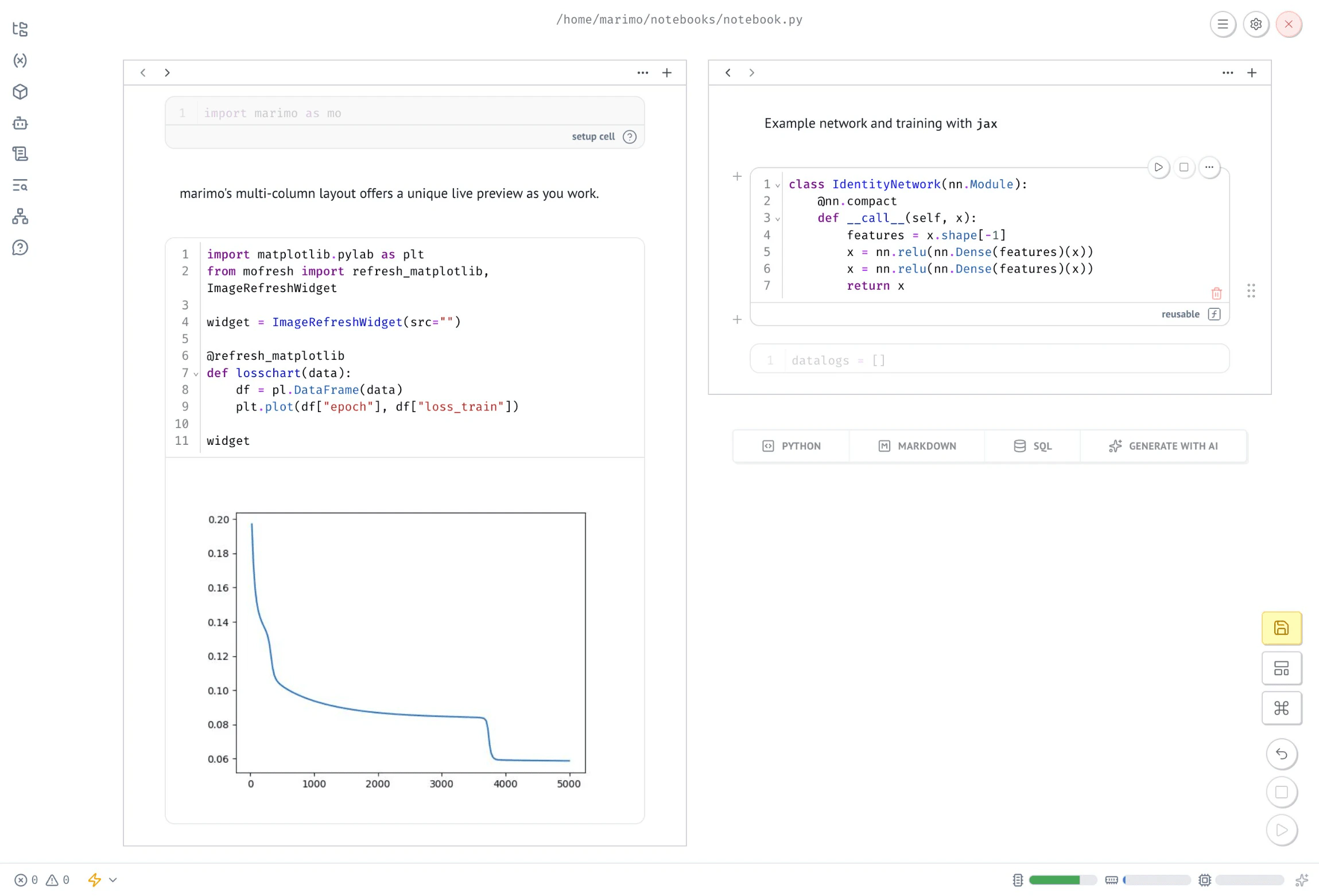 Because the notebook runs interactively on the cluster, you can edit cells, adjust hyperparameters, and re-run without leaving the browser. Changes sync back to your local file when you close the session.
At this point, you have a working JAX notebook training on a GPU Node in your cluster, with results streaming live to your browser.
## Clean up
When you're done with the notebook, clean up the cluster resources to avoid consuming GPU capacity.
Press `Ctrl-C` to stop the port-forward. The plugin syncs any edits back to your local `jax_example.py` before exiting.
To delete the cluster resources:
```bash theme={"system"}
kubectl marimo delete jax_example.py --namespace [NAMESPACE]
```
The PVC is retained by default to preserve the cached package environment. To remove it as well:
```bash theme={"system"}
kubectl marimo delete jax_example.py --namespace [NAMESPACE] --delete-pvc
```
## Additional resources
* [marimo-operator JAX example](https://github.com/marimo-team/marimo-operator/tree/main/examples/jax): Notebook source and frontmatter configuration.
* [Run marimo notebooks on CKS](/products/cks/tutorials/marimo-notebooks): General setup guide for the marimo operator and CLI plugin.
* [JAX documentation](https://docs.jax.dev/en/latest/): Getting started, GPU setup, and transformation reference.
* [Flax documentation](https://flax.readthedocs.io/en/stable/): Neural network modules and parameter management.
* [Optax documentation](https://optax.readthedocs.io/en/latest/): Optimizers and gradient processing.
Because the notebook runs interactively on the cluster, you can edit cells, adjust hyperparameters, and re-run without leaving the browser. Changes sync back to your local file when you close the session.
At this point, you have a working JAX notebook training on a GPU Node in your cluster, with results streaming live to your browser.
## Clean up
When you're done with the notebook, clean up the cluster resources to avoid consuming GPU capacity.
Press `Ctrl-C` to stop the port-forward. The plugin syncs any edits back to your local `jax_example.py` before exiting.
To delete the cluster resources:
```bash theme={"system"}
kubectl marimo delete jax_example.py --namespace [NAMESPACE]
```
The PVC is retained by default to preserve the cached package environment. To remove it as well:
```bash theme={"system"}
kubectl marimo delete jax_example.py --namespace [NAMESPACE] --delete-pvc
```
## Additional resources
* [marimo-operator JAX example](https://github.com/marimo-team/marimo-operator/tree/main/examples/jax): Notebook source and frontmatter configuration.
* [Run marimo notebooks on CKS](/products/cks/tutorials/marimo-notebooks): General setup guide for the marimo operator and CLI plugin.
* [JAX documentation](https://docs.jax.dev/en/latest/): Getting started, GPU setup, and transformation reference.
* [Flax documentation](https://flax.readthedocs.io/en/stable/): Neural network modules and parameter management.
* [Optax documentation](https://optax.readthedocs.io/en/latest/): Optimizers and gradient processing.