> ## Documentation Index
> Fetch the complete documentation index at: https://docs.coreweave.com/llms.txt
> Use this file to discover all available pages before exploring further.
# Deploy vLLM for inference
> Deploy and scale vLLM inference workloads on CoreWeave Kubernetes Service (CKS)
This tutorial walks you through how to deploy a production-ready vLLM inference service on CoreWeave Kubernetes Service (CKS). By the end, you have a scalable LLM inference endpoint that runs the Llama 3.1 8B Instruct model on GPU Nodes. The endpoint is fronted by TLS-secured ingress and instrumented with Prometheus and Grafana for monitoring, plus KEDA for autoscaling.
This tutorial is intended for platform engineers, ML engineers, and infrastructure operators who are comfortable with Kubernetes and want to serve large language models on CoreWeave GPU infrastructure.
## Tutorial outline
This long-form tutorial comprises the pages underneath this section. Follow them in the order they are numbered, because each page builds on the resources deployed in the previous one.
In this tutorial, you:
1. [Set up infrastructure dependencies](/products/cks/tutorials/deploy-vllm-inference/1-set-up-infrastructure).
2. [Configure monitoring and observability](/products/cks/tutorials/deploy-vllm-inference/2-set-up-monitoring).
3. [Deploy vLLM inference service](/products/cks/tutorials/deploy-vllm-inference/3-deploy-vllm).
4. [Monitor performance and test autoscaling](/products/cks/tutorials/deploy-vllm-inference/4-monitor-and-test).
Before you start, you must have:
* A working [CKS cluster](/products/cks/clusters/create) with GPU and CPU Nodes.
* The following tools installed on your local machine:
* [Kubectl](https://kubernetes.io/docs/reference/kubectl/), connected to your cluster.
* [Helm](https://helm.sh/docs/intro/install/) version 3.8 or later.
* Git.
* Access to Hugging Face models (with tokens if required for gated models).
In this tutorial, you'll use the following tools and services:
* **vLLM**: High-performance LLM inference engine.
* **Traefik**: Ingress controller for external traffic routing.
* **cert-manager**: Automatic TLS certificate management.
* **Prometheus and Grafana**: Monitoring and observability stack.
* **KEDA**: Kubernetes Event-driven Autoscaling.
* **CoreWeave Helm charts**: Preconfigured deployment templates.
## Architecture overview
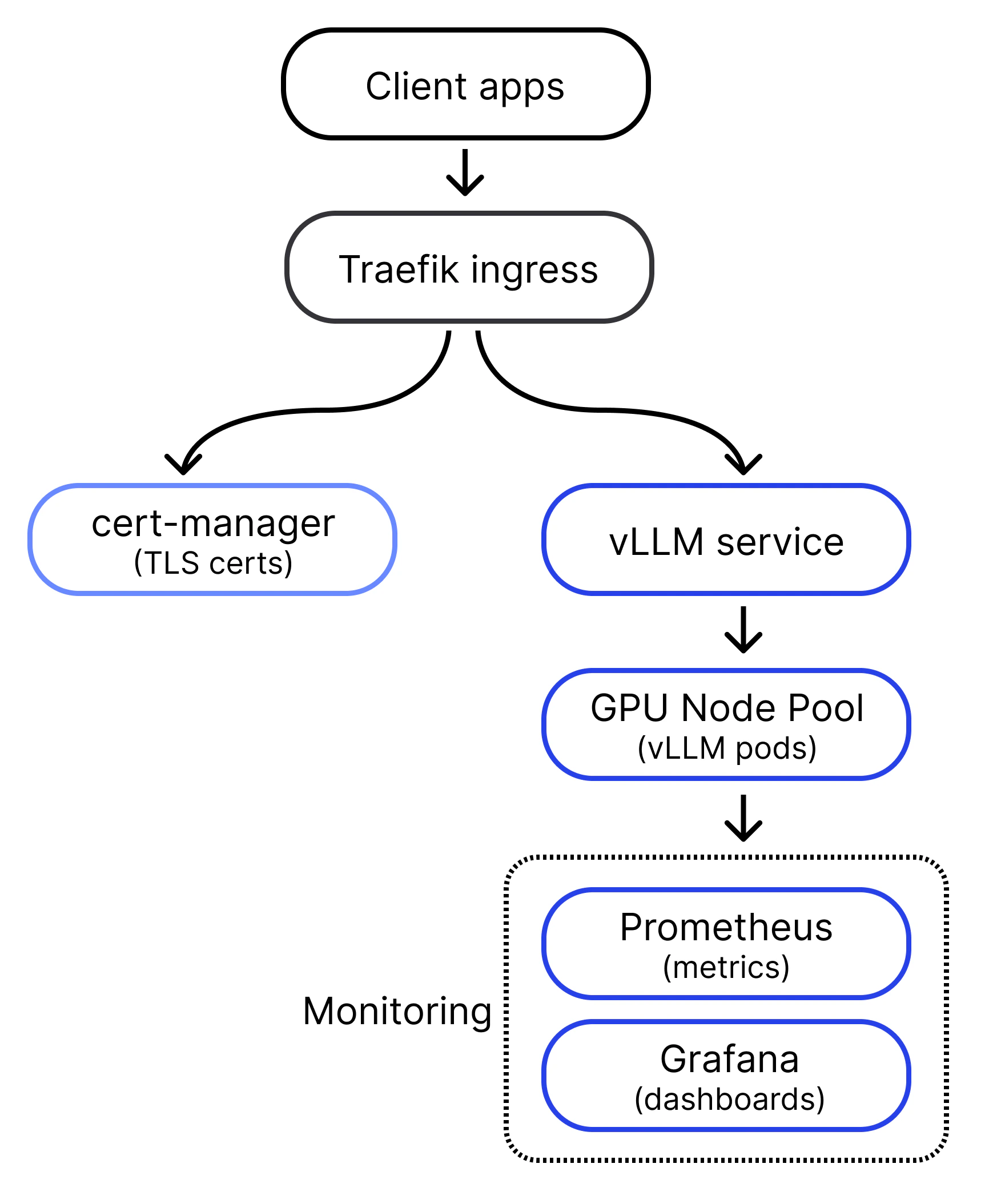
Before you start the procedures, it helps to understand how the pieces fit together. The complete vLLM inference solution consists of several components working together:
* **vLLM service**: The main inference engine that runs your language model.
* **Traefik ingress**: Handles external traffic routing and TLS termination.
* **cert-manager**: Manages automatic SSL certificate generation and renewal.
* **Prometheus**: Collects metrics from vLLM and other components.
* **Grafana**: Provides dashboards that monitor inference performance.
* **KEDA**: Enables autoscaling based on custom metrics like request queue depth.
 ## Prerequisites
Before you begin the tutorial, verify that your environment meets the following requirements. Each check confirms a capability that later steps depend on.
* You can access your cluster using `kubectl`.
For example, run the following command:
```bash theme={"system"}
kubectl cluster-info
```
You should see something similar to the following:
```text theme={"system"}
Kubernetes control plane is running at...
CoreDNS is running at...
node-local-dns is running at...
```
* Your cluster has at least one CPU Node.
For example, run the following command:
```bash theme={"system"}
kubectl get nodes -o=custom-columns="NAME:metadata.name,CLASS:metadata.labels['node\.coreweave\.cloud\/class']"
```
You should see something similar to the following:
```text theme={"system"}
NAME CLASS
g137a10 gpu
g5424e0 cpu
g77575e cpu
gd926d4 gpu
```
* Your CKS cluster must have GPU Nodes with at least 16 GB of GPU memory, which is required by the Llama 3.1 8B Instruct model used in this tutorial.
For example, run the following command:
```bash theme={"system"}
kubectl get nodes -o=custom-columns="NAME:metadata.name,IP:status.addresses[?(@.type=='InternalIP')].address,TYPE:metadata.labels['node\.coreweave\.cloud\/type'],RESERVED:metadata.labels['node\.coreweave\.cloud\/reserved'],NODEPOOL:metadata.labels['compute\.coreweave\.com\/node-pool'],READY:status.conditions[?(@.type=='Ready')].status,GPU:metadata.labels['gpu\.nvidia\.com/model'],VRAM:metadata.labels['gpu\.nvidia\.com/vram']"
```
You should see something similar to the following:
```text theme={"system"}
NAME IP TYPE RESERVED NODEPOOL READY GPU VRAM
g80eac0 10.176.212.195 gd-1xgh200 cw9a2f infer-gpu True GH200_480GB 97
gf2809a 10.176.244.33 turin-gp-l cw9a2f infer-cpu True
```
Under `VRAM`, the number should be 16 or greater.
To further debug and diagnose cluster problems, use `kubectl cluster-info dump`.
After these checks pass, you're ready to begin the first page of the tutorial.
## Additional resources and information
You don't need to install the following tools yourself. They are **preinstalled** on CKS **worker Nodes**:
* **Docker**: Container runtime for running vLLM inference Pods.
* **NVIDIA drivers**: GPU drivers for CUDA acceleration.
* **CoreWeave CSI drivers**: Storage drivers for persistent volumes.
* **CoreWeave CNI**: Network plugins for Pod communication.
To learn more about vLLM and inference on CoreWeave, see the following resources:
* [vLLM documentation](https://docs.vllm.ai/en/latest/)
* [CoreWeave CKS documentation](/products/cks)
* [Kubernetes autoscaling guide](https://kubernetes.io/docs/concepts/workloads/autoscaling/)
* [OpenAI API reference](https://developers.openai.com/api/reference/overview)
## Prerequisites
Before you begin the tutorial, verify that your environment meets the following requirements. Each check confirms a capability that later steps depend on.
* You can access your cluster using `kubectl`.
For example, run the following command:
```bash theme={"system"}
kubectl cluster-info
```
You should see something similar to the following:
```text theme={"system"}
Kubernetes control plane is running at...
CoreDNS is running at...
node-local-dns is running at...
```
* Your cluster has at least one CPU Node.
For example, run the following command:
```bash theme={"system"}
kubectl get nodes -o=custom-columns="NAME:metadata.name,CLASS:metadata.labels['node\.coreweave\.cloud\/class']"
```
You should see something similar to the following:
```text theme={"system"}
NAME CLASS
g137a10 gpu
g5424e0 cpu
g77575e cpu
gd926d4 gpu
```
* Your CKS cluster must have GPU Nodes with at least 16 GB of GPU memory, which is required by the Llama 3.1 8B Instruct model used in this tutorial.
For example, run the following command:
```bash theme={"system"}
kubectl get nodes -o=custom-columns="NAME:metadata.name,IP:status.addresses[?(@.type=='InternalIP')].address,TYPE:metadata.labels['node\.coreweave\.cloud\/type'],RESERVED:metadata.labels['node\.coreweave\.cloud\/reserved'],NODEPOOL:metadata.labels['compute\.coreweave\.com\/node-pool'],READY:status.conditions[?(@.type=='Ready')].status,GPU:metadata.labels['gpu\.nvidia\.com/model'],VRAM:metadata.labels['gpu\.nvidia\.com/vram']"
```
You should see something similar to the following:
```text theme={"system"}
NAME IP TYPE RESERVED NODEPOOL READY GPU VRAM
g80eac0 10.176.212.195 gd-1xgh200 cw9a2f infer-gpu True GH200_480GB 97
gf2809a 10.176.244.33 turin-gp-l cw9a2f infer-cpu True
```
Under `VRAM`, the number should be 16 or greater.
To further debug and diagnose cluster problems, use `kubectl cluster-info dump`.
After these checks pass, you're ready to begin the first page of the tutorial.
## Additional resources and information
You don't need to install the following tools yourself. They are **preinstalled** on CKS **worker Nodes**:
* **Docker**: Container runtime for running vLLM inference Pods.
* **NVIDIA drivers**: GPU drivers for CUDA acceleration.
* **CoreWeave CSI drivers**: Storage drivers for persistent volumes.
* **CoreWeave CNI**: Network plugins for Pod communication.
To learn more about vLLM and inference on CoreWeave, see the following resources:
* [vLLM documentation](https://docs.vllm.ai/en/latest/)
* [CoreWeave CKS documentation](/products/cks)
* [Kubernetes autoscaling guide](https://kubernetes.io/docs/concepts/workloads/autoscaling/)
* [OpenAI API reference](https://developers.openai.com/api/reference/overview)