> ## Documentation Index
> Fetch the complete documentation index at: https://docs.coreweave.com/llms.txt
> Use this file to discover all available pages before exploring further.
# Create a Node Pool
> Create a Node Pool to manage Nodes as a single entity
To add Nodes to CKS clusters, you must first create and deploy a Node Pool to associate with a given cluster.
Node Pools are deployed as Kubernetes Custom Resources (CRs), which allocate the number, type, and regional placement of Nodes for use by a specified CKS cluster.
Node Pools can be deployed either directly [using Kubernetes](#create-a-node-pool-using-kubernetes), or on the Cloud Console using [the Node Pools dashboard](#create-a-node-pool-using-the-cloud-console).
## Prerequisites
* An active CoreWeave account
* A [CKS cluster](/products/cks/clusters/create)
* `kubectl` installed locally
* An active [API Access Token](/security/authn-authz/managed-auth/api-access), with an associated Kubeconfig
## Create a Node Pool using the Cloud Console
To create a Node Pool from the Cloud Console, complete the following steps:
1. In Cloud Console, navigate to [Node Pools](https://console.coreweave.com/node-pools). If you don't yet have any CKS clusters, you need to [create a cluster](/products/cks/clusters/create) first.
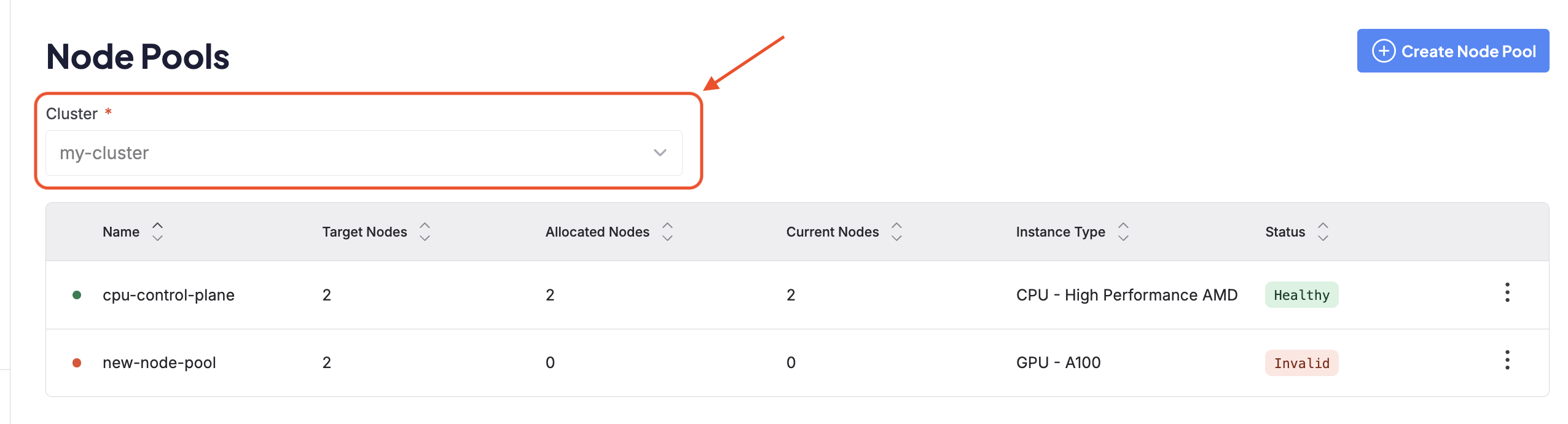
2. Select the CKS cluster to which the Node Pool should be added from the drop-down menu at the top of the page.
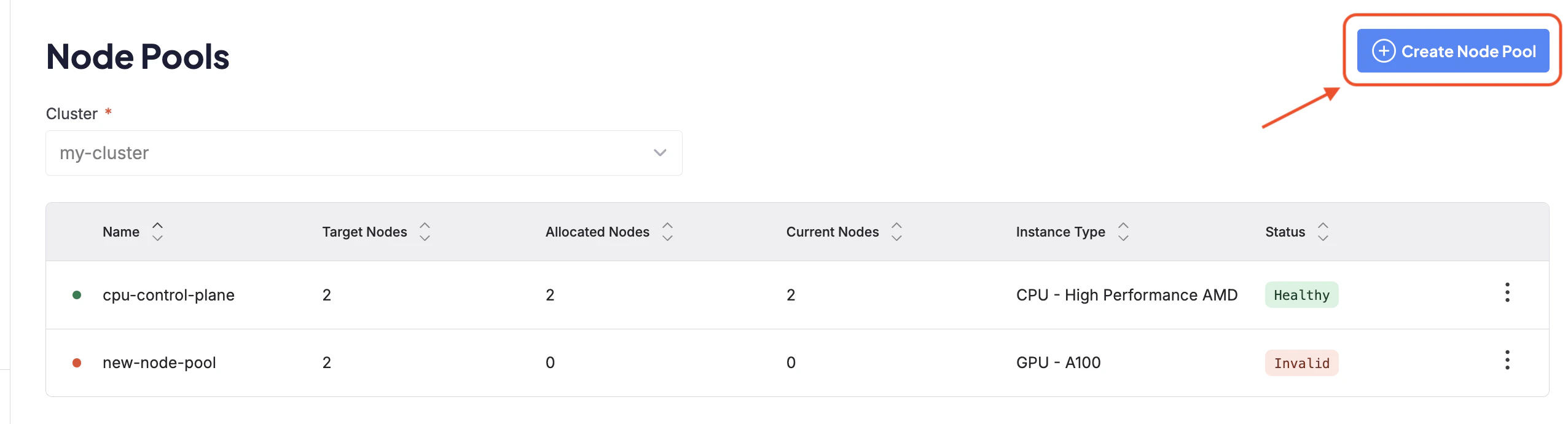
 3. Click the **Create Node Pool** button at the top right corner of the dashboard.
 4. The creation page features a YAML editor alongside a corresponding GUI.
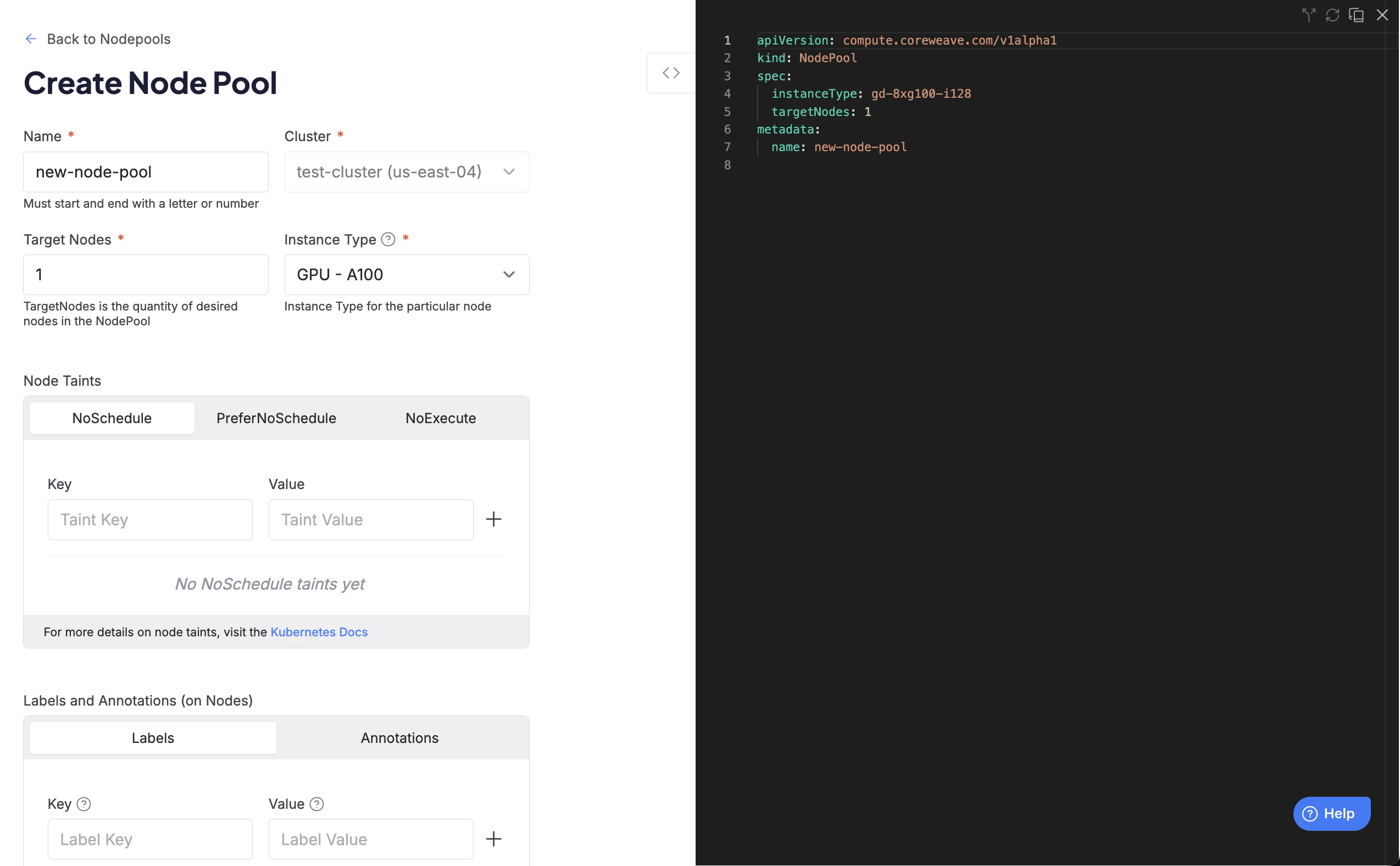 5. Configure the Node Pool:
| Field | Type | YAML Field | Description |
| ----------------- | ------- | ------------------- | ----------------------------------------------------------------------------------------------------------------------------- |
| **Name** | String | `metadata.name` | The name of the Node Pool |
| **Cluster** | String | `spec.cluster` | The cluster to which the Node Pool is added |
| **Compute Class** | String | `spec.computeClass` | The compute class of the Node Pool. |
| **Target Nodes** | Integer | `spec.targetNodes` | The number of desired Nodes in the Node Pool (minimum: `0`). Mutually exclusive with `targetRacks`. |
| **Target Racks** | Integer | `spec.targetRacks` | The quantity of desired racks for [rack-based instance types](#rack-based-node-pools). Mutually exclusive with `targetNodes`. |
| **Instance Type** | String | `spec.instanceType` | The instance type for the Node Pool |
### Node Pool quotas
Every time `targetNodes` is set, whether you're creating a new Node Pool or scaling an existing one, CKS checks the organization's quota. If the total request exceeds the organization's quota for that instance type and zone, the Node Pool is filled up to the allowed quota. The output of `kubectl describe` on the `nodepool` resource displays error messages:
```text theme={"system"}
Type Reason Age From Message
---- ------ ---- ---- -------
Warning CWOverQuota 2m6s (x21 over 47m) nodePoolOperator TargetNodes pushes org over quota by . Quota limit is for instance type in zone
Warning CWNodePoolQuotaCheckFailed 2m6s (x21 over 47m) nodePoolOperator Internal quota error
```
Quota enforcement applies to both new and existing Node Pools. If `targetNodes` exceeds the organization's quota, the Node Pool is filled only up to the allowed quota. For example, if the quota maximum is `10` and `targetNodes` is set to `15`, the Node Pool requests only 10 nodes.
To check the current quota status for a Node Pool, run `kubectl get nodepool` and look at the `QUOTA` column. An `Over` status means the Node Pool's `targetNodes` exceeds the organization's quota.
For more information, see the [Node Pool reference page](/products/cks/reference/node-pool#events).
For more details about your organization's quota, contact your CoreWeave representative.
### Configure taints, labels, and annotations
At the bottom of the creation page, configure any taints, annotations, or labels for the Node Pool.
5. Configure the Node Pool:
| Field | Type | YAML Field | Description |
| ----------------- | ------- | ------------------- | ----------------------------------------------------------------------------------------------------------------------------- |
| **Name** | String | `metadata.name` | The name of the Node Pool |
| **Cluster** | String | `spec.cluster` | The cluster to which the Node Pool is added |
| **Compute Class** | String | `spec.computeClass` | The compute class of the Node Pool. |
| **Target Nodes** | Integer | `spec.targetNodes` | The number of desired Nodes in the Node Pool (minimum: `0`). Mutually exclusive with `targetRacks`. |
| **Target Racks** | Integer | `spec.targetRacks` | The quantity of desired racks for [rack-based instance types](#rack-based-node-pools). Mutually exclusive with `targetNodes`. |
| **Instance Type** | String | `spec.instanceType` | The instance type for the Node Pool |
### Node Pool quotas
Every time `targetNodes` is set, whether you're creating a new Node Pool or scaling an existing one, CKS checks the organization's quota. If the total request exceeds the organization's quota for that instance type and zone, the Node Pool is filled up to the allowed quota. The output of `kubectl describe` on the `nodepool` resource displays error messages:
```text theme={"system"}
Type Reason Age From Message
---- ------ ---- ---- -------
Warning CWOverQuota 2m6s (x21 over 47m) nodePoolOperator TargetNodes pushes org over quota by . Quota limit is for instance type in zone
Warning CWNodePoolQuotaCheckFailed 2m6s (x21 over 47m) nodePoolOperator Internal quota error
```
Quota enforcement applies to both new and existing Node Pools. If `targetNodes` exceeds the organization's quota, the Node Pool is filled only up to the allowed quota. For example, if the quota maximum is `10` and `targetNodes` is set to `15`, the Node Pool requests only 10 nodes.
To check the current quota status for a Node Pool, run `kubectl get nodepool` and look at the `QUOTA` column. An `Over` status means the Node Pool's `targetNodes` exceeds the organization's quota.
For more information, see the [Node Pool reference page](/products/cks/reference/node-pool#events).
For more details about your organization's quota, contact your CoreWeave representative.
### Configure taints, labels, and annotations
At the bottom of the creation page, configure any taints, annotations, or labels for the Node Pool.
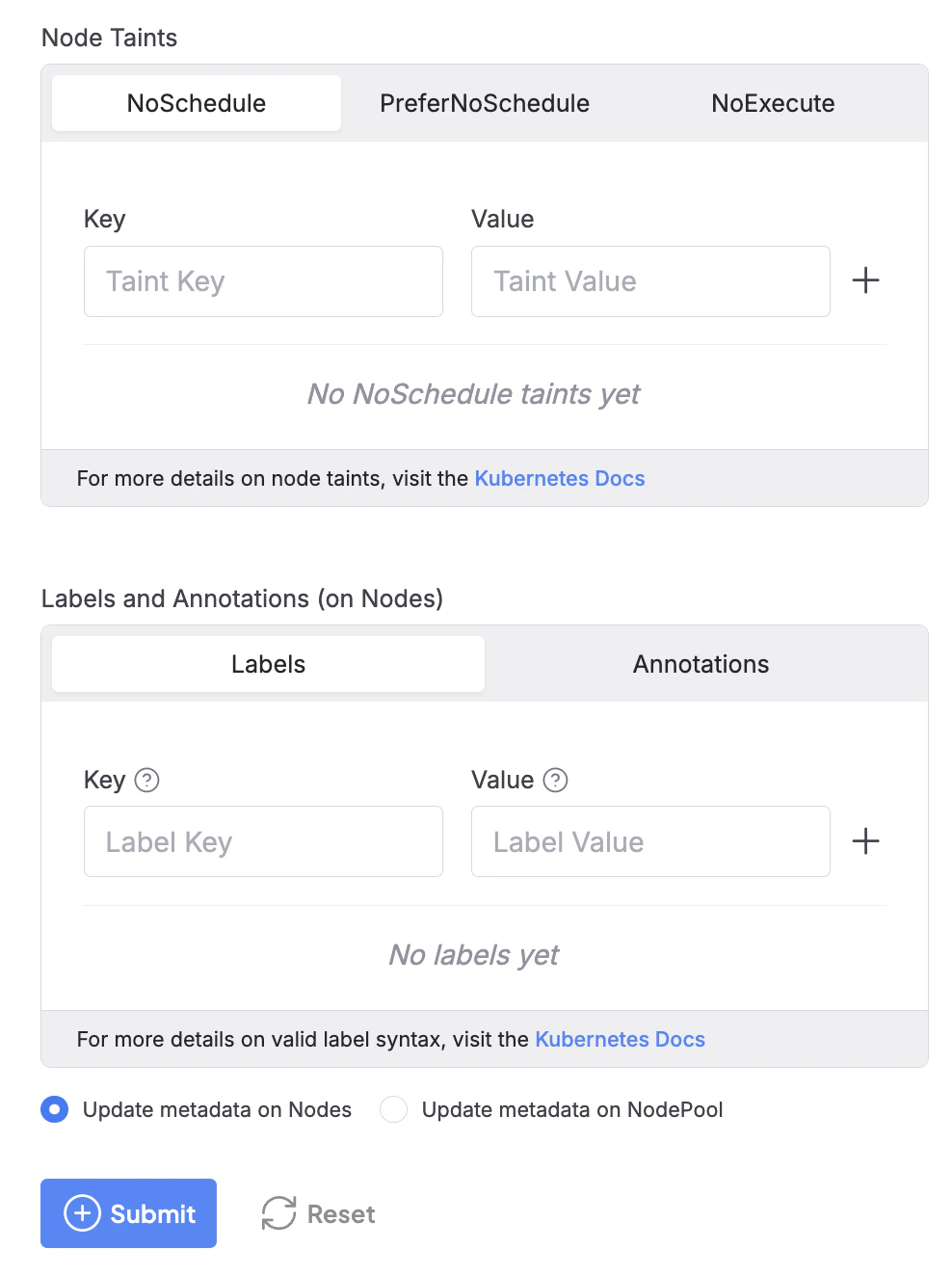 For more information about Node taint scheduling, see [Taints and Tolerations](https://kubernetes.io/docs/concepts/scheduling-eviction/taint-and-toleration) in the official Kubernetes documentation. For information about the valid syntax for labels and annotations in CKS and vanilla Kubernetes, see [Labels and Selectors](https://kubernetes.io/docs/concepts/overview/working-with-objects/labels) in the official Kubernetes documentation.
### Deploy the Node Pool
1. When the Node Pool is ready, click the **Submit** button to deploy it. If you need to make changes, click the **Reset** button to clear all fields and start over.
2. After you click the **Submit** button, Cloud Console directs you back to the Node Pools dashboard. The new Node Pool is listed in a `Pending` state until deployment completes, when its status changes to `Healthy`.
For more information about Node taint scheduling, see [Taints and Tolerations](https://kubernetes.io/docs/concepts/scheduling-eviction/taint-and-toleration) in the official Kubernetes documentation. For information about the valid syntax for labels and annotations in CKS and vanilla Kubernetes, see [Labels and Selectors](https://kubernetes.io/docs/concepts/overview/working-with-objects/labels) in the official Kubernetes documentation.
### Deploy the Node Pool
1. When the Node Pool is ready, click the **Submit** button to deploy it. If you need to make changes, click the **Reset** button to clear all fields and start over.
2. After you click the **Submit** button, Cloud Console directs you back to the Node Pools dashboard. The new Node Pool is listed in a `Pending` state until deployment completes, when its status changes to `Healthy`.
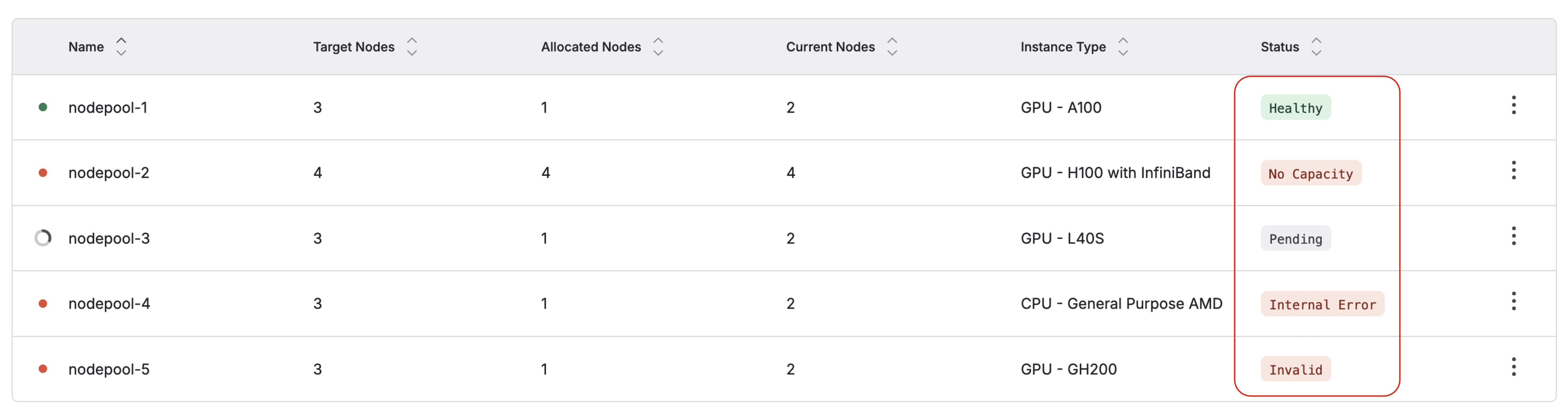 To learn more about other Node Pool conditions, see the [Node Pool reference on conditions](/products/cks/reference/node-pool#conditions).
## Create a Node Pool using Kubernetes
The following sections describe how to define a Node Pool manifest, apply it to your cluster, and verify the result.
First, configure a Node Pool manifest. Here's an example of a `default` Node Pool:
```yaml title="example-nodepool.yaml" theme={"system"}
apiVersion: compute.coreweave.com/v1alpha1
kind: NodePool
metadata:
name: example-nodepool
spec:
computeClass: default
autoscaling: false
instanceType: gd-8xh100ib-i128
maxNodes: 0
minNodes: 0
targetNodes: 2
nodeLabels:
my-label/node: "true"
nodeAnnotations:
my-annotation/node: "true"
nodeTaints:
- key: node-taint
value: "true"
effect: NoSchedule
```
The fields in this manifest map to the following values:
| Field | Type | Description | Default |
| -------------- | ------- | ----------------------------------------------------------------------------------------------------------------------------------------- | --------- |
| `computeClass` | String | The compute class of the Node Pool. | `default` |
| `instanceType` | String | [GPU Instance](/platform/instances/gpu-instances) or [CPU Instance](/platform/instances/cpu-instances) type | N/A |
| `autoscaling` | Boolean | Whether a cluster has [autoscaling](/products/cks/nodes/autoscaling) enabled. Not supported for rack-based instance types (GB200, GB300). | `false` |
| `targetNodes` | Integer | The number of desired Nodes in the Node Pool (Optional, minimum `0`). Mutually exclusive with `targetRacks`. | N/A |
| `targetRacks` | Integer | The quantity of desired racks for [rack-based instance types](#rack-based-node-pools) (Optional). Mutually exclusive with `targetNodes`. | N/A |
| `minNodes` | Integer | The minimum number of Nodes in the cluster (Optional if `autoscaling: false`) | `0` |
| `maxNodes` | Integer | The maximum number of Nodes in the cluster (Optional if `autoscaling: false`) | `0` |
| `nodeLabels` | Map | Labels to apply to the Nodes in the Node Pool, to organize Nodes for specific purposes and Pod scheduling (Optional) | N/A |
| `nodeTaints` | Map | Taints to apply to the Nodes in the Node Pool, to schedule only Pods with matching tolerations (Optional) | N/A |
In this example, the Node Pool manifest creates a Node Pool with the following characteristics:
| Key | Example value | Description |
| -------------- | ----------------------------------------------------------------- | ----------------------------------------------------------------------------------------------------------------------------------------------------- |
| `name` | `example-nodepool` | The name of the Node Pool |
| `computeClass` | `default` | The compute class of the Node Pool, in this case a default Node Pool for Reserved and On-Demand instances |
| `autoscaling` | `false` | [Autoscaling](/products/cks/nodes/autoscaling) is not enabled |
| `instanceType` | `gd-8xh100ib-i128` | The type of instances to include in the Node Pool, in this case 8 GPU-count H100s with InfiniBand (`gd-8xh100ib-i128`) |
| `minNodes` | `0` | The minimum number of Nodes that must be in the Node Pool. In this case, that number is not set (set to `0`) |
| `maxNodes` | `0` | The maximum number of Nodes that can be in the Node Pool. In this case, that number is not set (set to `0`) |
| `targetNodes` | `2` | The number of desired Nodes that should be in the Node Pool, in this case `2` |
| `nodeLabels` | `my-label/node: "true"` | The [label](https://kubernetes.io/docs/concepts/scheduling-eviction/assign-pod-node/#built-in-node-labels) to place on all Nodes within the Node Pool |
| `nodeTaints` | `[{ key: "my-label/node", value: "true", effect: "NoSchedule" }]` | The [taint](https://kubernetes.io/docs/concepts/scheduling-eviction/taint-and-toleration/) to place on all Nodes in the Node Pool |
### Autoscaling
To enable autoscaling for a Node Pool, set `autoscaling: true`. The autoscaler then adjusts `targetNodes` based on workload demand, keeping it between `minNodes` and `maxNodes`.
Autoscaling is not supported for rack-based instance types such as GB200 and GB300. See [Autoscale Node Pools](/products/cks/nodes/autoscaling) for details.
### Rack-based Node Pools
For rack-based instance types, such as GB200 and GB300, `targetRacks` can be used instead of `targetNodes`. Each rack contains 18 Nodes, so setting `targetRacks` requests Nodes in multiples of 18 without having to calculate the Node count yourself. For example, `targetRacks: 5` requests 5 racks, or 90 Nodes.
`targetRacks` and `targetNodes` are mutually exclusive: a Node Pool spec must set exactly one of the two.
```yaml title="example-rack-nodepool.yaml" theme={"system"}
apiVersion: compute.coreweave.com/v1alpha1
kind: NodePool
metadata:
name: example-rack-nodepool
spec:
computeClass: default
autoscaling: false
instanceType: gb200-4x
targetRacks: 1
```
For full deployment guidance for rack-based instances, including Pod affinity and NVLink domain placement, see [NVL72-powered instances](/platform/instances/nvl72).
### Apply the manifest
After you configure the manifest, apply it with `kubectl`:
```bash theme={"system"}
kubectl apply -f example-nodepool.yaml
```
When you apply the manifest, CKS provisions the cluster with a Node Pool composed of Nodes that match the manifest's specifications.
### Verify the Node Pool
Verify that CKS created the Node Pool resource by using `kubectl get` on the `nodepool` resource. For example:
```bash title="Example command" theme={"system"}
kubectl get nodepool example-nodepool
```
The output displays details about the Node Pool name, including the type and number of instances it contains:
```text title="Example output" theme={"system"}
NAME INSTANCE TYPE TARGET QUEUED INPROGRESS CURRENT VALIDATED CAPACITY QUOTA AGE
example-nodepool gd-8xh100ib-i128 2 0 0 0 Valid Sufficient Under 24h
```
### List all available Node Pools
To view all available Node Pools in a cluster, use `kubectl get nodepool`. This returns a list of all current Node Pools in the cluster, as well as their current condition. For example:
```bash title="Example command" theme={"system"}
kubectl get nodepool
```
```text title="Example output" theme={"system"}
NAME INSTANCE TYPE TARGET QUEUED INPROGRESS CURRENT VALIDATED CAPACITY QUOTA AGE
example-nodepool gd-8xh100ib-i128 2 0 0 0 Valid Sufficient Under 24h
NodePool-2 cd-hp-a96-genoa 2 1 0 1 Valid QueuedAwaitingCapacity Under 2d22h
NodePool-3 gd-8xh100ib-i128 3 0 1 2 Valid Sufficient Under 2d15h
```
### View the Node Pool
To see additional details on any Node Pool, target the Node Pool with `kubectl describe`.
For example, where the Node Pool's `metadata.name` is `example-nodepool`:
```bash title="Example command" theme={"system"}
kubectl describe nodepool example-nodepool
```
```yaml title="Example output" theme={"system"}
Name: example-nodepool
Namespace:
Labels:
Annotations:
API Version: compute.coreweave.com/v1alpha1
Kind: NodePool
Metadata:
Creation Timestamp: 2025-06-09T14:48:54Z
Generation: 1
Resource Version: 857370
UID: 9311678d-4064-45b8-8439-b943250e5852
Spec:
Autoscaling: false
Instance Type: gd-8xa100-i128
Lifecycle:
Disable Unhealthy Node Eviction: true
Scale Down Strategy: IdleOnly
Max Nodes: 0
Min Nodes: 0
Target Nodes: 1
Status:
Conditions:
Last Transition Time: 2025-05-30T17:36:00Z
Message: NodePool configuration is valid.
Reason: Valid
Status: True
Type: Validated
Last Transition Time: 2025-05-30T17:36:00Z
Message: Sufficient capacity available for the requested instance type.
Reason: Sufficient
Status: True
Type: Capacity
Last Transition Time: 2025-05-30T17:36:00Z
Message: NodePool is within instance type quota.
Reason: Under
Status: True
Type: Quota
Last Transition Time: 2025-05-30T17:36:00Z
Message: NodePool has reached its target node count.
Reason: TargetMet
Status: True
Type: AtTarget
Current Nodes: 1
In Progress: 0
Queued Nodes: 0
Events:
```
For more information about Node Pool `conditions`, see [Node Pool reference: `conditions`](/products/cks/reference/node-pool#conditions).
| Field name | Description |
| --------------- | ------------------------------------------------------------------- |
| `INSTANCE TYPE` | The instance type of all Nodes in the Node Pool. |
| `TARGET` | The number of Nodes in the Node Pool spec being requested. |
| `QUEUED` | The count of queued Nodes waiting to be assigned. |
| `INPROGRESS` | The count of Nodes assigned and progressing into the Node Pool. |
| `CURRENT` | The count of Nodes in-cluster associated with the Node Pool. |
| `VALIDATED` | Displays the result of Node Pool validation. |
| `CAPACITY` | Displays the last result for capacity checks for the instance type. |
| `QUOTA` | Displays the last result for quota checks for the instance type. |
| `AGE` | Indicates how long ago the Node Pool was created. |
For more information about Node Pool creation, see the [Node Pool reference page](/products/cks/reference/node-pool).
To learn more about other Node Pool conditions, see the [Node Pool reference on conditions](/products/cks/reference/node-pool#conditions).
## Create a Node Pool using Kubernetes
The following sections describe how to define a Node Pool manifest, apply it to your cluster, and verify the result.
First, configure a Node Pool manifest. Here's an example of a `default` Node Pool:
```yaml title="example-nodepool.yaml" theme={"system"}
apiVersion: compute.coreweave.com/v1alpha1
kind: NodePool
metadata:
name: example-nodepool
spec:
computeClass: default
autoscaling: false
instanceType: gd-8xh100ib-i128
maxNodes: 0
minNodes: 0
targetNodes: 2
nodeLabels:
my-label/node: "true"
nodeAnnotations:
my-annotation/node: "true"
nodeTaints:
- key: node-taint
value: "true"
effect: NoSchedule
```
The fields in this manifest map to the following values:
| Field | Type | Description | Default |
| -------------- | ------- | ----------------------------------------------------------------------------------------------------------------------------------------- | --------- |
| `computeClass` | String | The compute class of the Node Pool. | `default` |
| `instanceType` | String | [GPU Instance](/platform/instances/gpu-instances) or [CPU Instance](/platform/instances/cpu-instances) type | N/A |
| `autoscaling` | Boolean | Whether a cluster has [autoscaling](/products/cks/nodes/autoscaling) enabled. Not supported for rack-based instance types (GB200, GB300). | `false` |
| `targetNodes` | Integer | The number of desired Nodes in the Node Pool (Optional, minimum `0`). Mutually exclusive with `targetRacks`. | N/A |
| `targetRacks` | Integer | The quantity of desired racks for [rack-based instance types](#rack-based-node-pools) (Optional). Mutually exclusive with `targetNodes`. | N/A |
| `minNodes` | Integer | The minimum number of Nodes in the cluster (Optional if `autoscaling: false`) | `0` |
| `maxNodes` | Integer | The maximum number of Nodes in the cluster (Optional if `autoscaling: false`) | `0` |
| `nodeLabels` | Map | Labels to apply to the Nodes in the Node Pool, to organize Nodes for specific purposes and Pod scheduling (Optional) | N/A |
| `nodeTaints` | Map | Taints to apply to the Nodes in the Node Pool, to schedule only Pods with matching tolerations (Optional) | N/A |
In this example, the Node Pool manifest creates a Node Pool with the following characteristics:
| Key | Example value | Description |
| -------------- | ----------------------------------------------------------------- | ----------------------------------------------------------------------------------------------------------------------------------------------------- |
| `name` | `example-nodepool` | The name of the Node Pool |
| `computeClass` | `default` | The compute class of the Node Pool, in this case a default Node Pool for Reserved and On-Demand instances |
| `autoscaling` | `false` | [Autoscaling](/products/cks/nodes/autoscaling) is not enabled |
| `instanceType` | `gd-8xh100ib-i128` | The type of instances to include in the Node Pool, in this case 8 GPU-count H100s with InfiniBand (`gd-8xh100ib-i128`) |
| `minNodes` | `0` | The minimum number of Nodes that must be in the Node Pool. In this case, that number is not set (set to `0`) |
| `maxNodes` | `0` | The maximum number of Nodes that can be in the Node Pool. In this case, that number is not set (set to `0`) |
| `targetNodes` | `2` | The number of desired Nodes that should be in the Node Pool, in this case `2` |
| `nodeLabels` | `my-label/node: "true"` | The [label](https://kubernetes.io/docs/concepts/scheduling-eviction/assign-pod-node/#built-in-node-labels) to place on all Nodes within the Node Pool |
| `nodeTaints` | `[{ key: "my-label/node", value: "true", effect: "NoSchedule" }]` | The [taint](https://kubernetes.io/docs/concepts/scheduling-eviction/taint-and-toleration/) to place on all Nodes in the Node Pool |
### Autoscaling
To enable autoscaling for a Node Pool, set `autoscaling: true`. The autoscaler then adjusts `targetNodes` based on workload demand, keeping it between `minNodes` and `maxNodes`.
Autoscaling is not supported for rack-based instance types such as GB200 and GB300. See [Autoscale Node Pools](/products/cks/nodes/autoscaling) for details.
### Rack-based Node Pools
For rack-based instance types, such as GB200 and GB300, `targetRacks` can be used instead of `targetNodes`. Each rack contains 18 Nodes, so setting `targetRacks` requests Nodes in multiples of 18 without having to calculate the Node count yourself. For example, `targetRacks: 5` requests 5 racks, or 90 Nodes.
`targetRacks` and `targetNodes` are mutually exclusive: a Node Pool spec must set exactly one of the two.
```yaml title="example-rack-nodepool.yaml" theme={"system"}
apiVersion: compute.coreweave.com/v1alpha1
kind: NodePool
metadata:
name: example-rack-nodepool
spec:
computeClass: default
autoscaling: false
instanceType: gb200-4x
targetRacks: 1
```
For full deployment guidance for rack-based instances, including Pod affinity and NVLink domain placement, see [NVL72-powered instances](/platform/instances/nvl72).
### Apply the manifest
After you configure the manifest, apply it with `kubectl`:
```bash theme={"system"}
kubectl apply -f example-nodepool.yaml
```
When you apply the manifest, CKS provisions the cluster with a Node Pool composed of Nodes that match the manifest's specifications.
### Verify the Node Pool
Verify that CKS created the Node Pool resource by using `kubectl get` on the `nodepool` resource. For example:
```bash title="Example command" theme={"system"}
kubectl get nodepool example-nodepool
```
The output displays details about the Node Pool name, including the type and number of instances it contains:
```text title="Example output" theme={"system"}
NAME INSTANCE TYPE TARGET QUEUED INPROGRESS CURRENT VALIDATED CAPACITY QUOTA AGE
example-nodepool gd-8xh100ib-i128 2 0 0 0 Valid Sufficient Under 24h
```
### List all available Node Pools
To view all available Node Pools in a cluster, use `kubectl get nodepool`. This returns a list of all current Node Pools in the cluster, as well as their current condition. For example:
```bash title="Example command" theme={"system"}
kubectl get nodepool
```
```text title="Example output" theme={"system"}
NAME INSTANCE TYPE TARGET QUEUED INPROGRESS CURRENT VALIDATED CAPACITY QUOTA AGE
example-nodepool gd-8xh100ib-i128 2 0 0 0 Valid Sufficient Under 24h
NodePool-2 cd-hp-a96-genoa 2 1 0 1 Valid QueuedAwaitingCapacity Under 2d22h
NodePool-3 gd-8xh100ib-i128 3 0 1 2 Valid Sufficient Under 2d15h
```
### View the Node Pool
To see additional details on any Node Pool, target the Node Pool with `kubectl describe`.
For example, where the Node Pool's `metadata.name` is `example-nodepool`:
```bash title="Example command" theme={"system"}
kubectl describe nodepool example-nodepool
```
```yaml title="Example output" theme={"system"}
Name: example-nodepool
Namespace:
Labels:
Annotations:
API Version: compute.coreweave.com/v1alpha1
Kind: NodePool
Metadata:
Creation Timestamp: 2025-06-09T14:48:54Z
Generation: 1
Resource Version: 857370
UID: 9311678d-4064-45b8-8439-b943250e5852
Spec:
Autoscaling: false
Instance Type: gd-8xa100-i128
Lifecycle:
Disable Unhealthy Node Eviction: true
Scale Down Strategy: IdleOnly
Max Nodes: 0
Min Nodes: 0
Target Nodes: 1
Status:
Conditions:
Last Transition Time: 2025-05-30T17:36:00Z
Message: NodePool configuration is valid.
Reason: Valid
Status: True
Type: Validated
Last Transition Time: 2025-05-30T17:36:00Z
Message: Sufficient capacity available for the requested instance type.
Reason: Sufficient
Status: True
Type: Capacity
Last Transition Time: 2025-05-30T17:36:00Z
Message: NodePool is within instance type quota.
Reason: Under
Status: True
Type: Quota
Last Transition Time: 2025-05-30T17:36:00Z
Message: NodePool has reached its target node count.
Reason: TargetMet
Status: True
Type: AtTarget
Current Nodes: 1
In Progress: 0
Queued Nodes: 0
Events:
```
For more information about Node Pool `conditions`, see [Node Pool reference: `conditions`](/products/cks/reference/node-pool#conditions).
| Field name | Description |
| --------------- | ------------------------------------------------------------------- |
| `INSTANCE TYPE` | The instance type of all Nodes in the Node Pool. |
| `TARGET` | The number of Nodes in the Node Pool spec being requested. |
| `QUEUED` | The count of queued Nodes waiting to be assigned. |
| `INPROGRESS` | The count of Nodes assigned and progressing into the Node Pool. |
| `CURRENT` | The count of Nodes in-cluster associated with the Node Pool. |
| `VALIDATED` | Displays the result of Node Pool validation. |
| `CAPACITY` | Displays the last result for capacity checks for the instance type. |
| `QUOTA` | Displays the last result for quota checks for the instance type. |
| `AGE` | Indicates how long ago the Node Pool was created. |
For more information about Node Pool creation, see the [Node Pool reference page](/products/cks/reference/node-pool).