> ## Documentation Index
> Fetch the complete documentation index at: https://docs.coreweave.com/llms.txt
> Use this file to discover all available pages before exploring further.
# Delete a CKS cluster
> Learn how to delete a CKS cluster using the Cloud Console, including state requirements and precautions
This guide explains how to delete a CoreWeave Kubernetes Service (CKS) cluster using the Cloud Console. Delete a cluster when you no longer need its compute resources, so you can stop incurring costs and free up project quota.
## Prerequisites
This guide assumes you have an active CoreWeave account.
## Delete a cluster with the Cloud Console
The cluster dashboard displays the cluster status. A cluster must be in a `Healthy` state before you can delete it. To delete a cluster, follow these steps:
1. Navigate to the [Clusters](https://console.coreweave.com/clusters) page.
2. Confirm the cluster is in a `Healthy` state.
3. Click the ellipsis on the far right of the screen next to the cluster.
4. To confirm deletion, enter the name of the cluster.
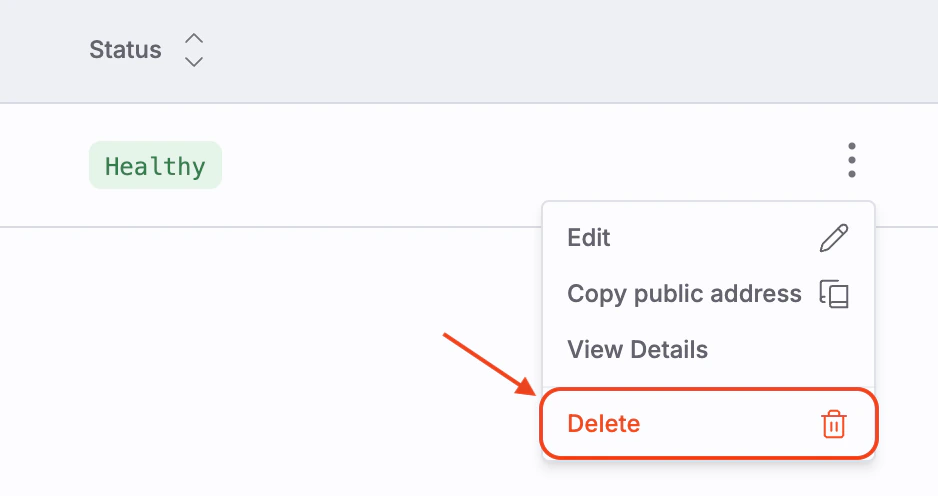 You can only delete a cluster that is in a `Healthy` state. Attempts to delete `Unhealthy` or `Provisioning` clusters fail.