> ## Documentation Index
> Fetch the complete documentation index at: https://docs.coreweave.com/llms.txt
> Use this file to discover all available pages before exploring further.
# Tailscale Operator
> Deploy CoreWeave's Tailscale Operator Helm chart on CKS with Tailnet and DERP map configuration
| Chart reference | Description |
| ------------------------------ | ----------------------------------------------------------------------- |
| `coreweave/tailscale-operator` | CoreWeave's Helm chart for deploying Tailscale Operator on CKS clusters |
This page describes how to deploy and configure the CoreWeave `tailscale-operator` Helm chart on a CKS cluster, including the Tailnet policy changes recommended for CKS and the procedures for exposing in-cluster services to your Tailnet. This page is for cluster administrators who want to provide secure, private access to in-cluster resources and the Kubernetes API server without exposing them publicly.
## About Tailscale
[Tailscale](https://tailscale.com/docs/concepts/what-is-tailscale) is a mesh network VPN service that powers encrypted peer-to-peer private network communication. With native support for [Kubernetes](https://tailscale.com/docs/kubernetes) and a [Kubernetes Operator](https://tailscale.com/docs/kubernetes-operator), Tailscale is a popular choice for securely accessing in-cluster resources and the Kubernetes API server without exposing them publicly.
To work well in the CKS environment, CoreWeave packages a customized version of the tailscale-operator [Helm chart](https://tailscale.com/docs/kubernetes-operator#helm) and a CoreWeave-specific [container image](https://github.com/coreweave/tailscale).
## Usage
Before you install the Helm chart, update your Tailnet so it is compatible with CKS networking. The following sections outline the policy changes required to avoid IP overlap with CKS control-plane services and to take advantage of CoreWeave-hosted relays.
### Tailnet configuration
Edit your [Tailnet policy JSON](https://tailscale.com/docs/features/tailnet-policy-file/manage-tailnet-policies) for use with CKS. The following sections outline the recommended changes to your Tailnet configuration.
#### Tailnet `ipPool`
Tailscale's default configuration assigns an IP address from the [`100.64.0.0/10`](https://tailscale.com/docs/concepts/tailscale-ip-addresses) range to each device joined to a [Tailnet](https://tailscale.com/docs/concepts/tailnet). Because CKS operates some control-plane services in the `100.124.0.0/18` address range, a Tailnet used with CKS should allocate addresses from a smaller, non-overlapping pool.
Tailscale supports configurable [IP Pools](https://tailscale.com/docs/reference/ip-pool) for this purpose. The largest contiguous non-overlapping address pool for use with CKS is `100.64.0.0/13`.
```json title="Example policy JSON using the 100.64.0.0/13 CIDR range" theme={"system"}
{
"nodeAttrs": [
{
"ipPool": ["100.64.0.0/13"],
},
],
}
```
CoreWeave's `tailscale-operator` chart and container image provide the customizations needed to support a non-overlapping `ipPool` out of the box.
#### Tailnet `derpMap`
Tailscale runs relay servers worldwide to help establish direct connections to endpoints on your Tailnet. When direct connections are [impossible](https://tailscale.com/blog/how-nat-traversal-works), the relays forward traffic to your endpoints.
To complement the Tailscale-hosted [relays](https://login.tailscale.com/derpmap/default), CoreWeave hosts [its own relays](https://raw.githubusercontent.com/coreweave/tailscale-derp/main/derpmap/derpmap.json) in select regions to provide a last-mile hop to your CKS workloads.
To consume CoreWeave hosted relays, you must [add them to Tailnet's configuration](https://tailscale.com/docs/reference/derp-servers/custom-derp-servers#step-2-adding-derp-servers-to-your-tailnet).
By default, the Tailscale client chooses a relay closest to connection origin, which isn't always a CoreWeave hosted relay. To ensure exclusive consumption of CoreWeave relays, enable `OmitDefaultRegions` in your Tailnet configuration. This configuration may not be optimal when connecting to endpoints outside a CoreWeave Region.
This example outlines all the recommended objects for your Tailnet's Policy JSON.
```json theme={"system"}
{
// Included in the default Tailscale Policy file
"acls": [
{"action": "accept", "src": ["*"], "dst": ["*:*"]},
],
"ssh": [
{
"action": "check",
"src": ["autogroup:member"],
"dst": ["autogroup:self"],
"users": ["autogroup:nonroot", "root"],
},
],
// nodeAttrs for tailnet ipPool
"nodeAttrs": [
{
"ipPool": ["100.64.0.0/13"],
},
],
// derpMap for Tailscale relays on CoreWeave
"derpMap": {
// Disable default Tailscale relays
"OmitDefaultRegions": true,
"Regions": {
// To find an up-to-date, complete list of CoreWeave relays
// https://raw.githubusercontent.com/coreweave/tailscale-derp/main/derpmap/derpmap.json
"904": {
"RegionID": 904,
"RegionCode": "us-east-04",
"RegionName": "US-EAST-04",
"Nodes": [
{
"Name": "904a",
"RegionID": 904,
"HostName": "derp.us-east-04.coreweave.com",
},
],
},
},
},
// For the tailscale-operator to use its OAuth token for adding tailscale Nodes to the tailnet
"tagOwners": {
"tag:k8s-operator": [],
"tag:k8s": ["tag:k8s-operator"],
},
}
```
## Deploy the `tailscale-operator` chart
The CoreWeave Charts `tailscale-operator` chart is based on the [upstream Tailscale chart](https://tailscale.com/docs/kubernetes-operator#helm), with optimizations that work best with CKS.
The CoreWeave `tailscale-operator` Helm chart includes the following:
* A default [`ProxyClass`](https://tailscale.com/docs/kubernetes-operator/manage-and-configure#cluster-resource-customization-using-proxyclass-custom-resource) applied to all exposed services to configure proxy-specific settings.
* Support for CKS-specific `TS_CGNAT_OVERRIDE_RANGE`, to allow cluster-local communication in the `100.124.0.0/18` address range.
* Default resource limits.
* A post-install hook to declaratively expose existing in-cluster services to your Tailnet.
To install the Helm chart, first provide an OAuth client and modify your [Tailnet policy file](https://tailscale.com/docs/kubernetes-operator#prerequisites) so the `tailscale-operator` can communicate with the Tailscale Control Plane. You can find detailed information about OAuth clients in [Tailscale's documentation](https://tailscale.com/docs/features/oauth-clients).
```json title="Tailnet policy JSON to allow the operator" theme={"system"}
"tagOwners": {
"tag:k8s-operator": [],
"tag:k8s": ["tag:k8s-operator"],
}
```
After you update your Tailnet policy, install the `tailscale-operator` chart using one of the following methods. Both methods produce the same result. Choose the one that best fits how you manage secrets in your cluster.
### Install with the Secret pre-created
In this method, the `tailscale` namespace is pre-created, and the Kubernetes Secret `operator-oauth` is populated with the credentials that the `tailscale-operator` requires. Use this approach when you prefer to manage the OAuth Secret separately from the Helm release, for example when another workflow or sealed-secrets tool creates the Secret.
First, create the `tailscale` namespace.
```bash theme={"system"}
kubectl create namespace tailscale
```
Next, create a Secret from the OAuth secret generated in the admin console.
```bash theme={"system"}
kubectl create secret generic operator-oauth \
--namespace tailscale \
--from-literal=client_id=[CLIENT-ID] \
--from-literal=client_secret=[CLIENT-SECRET]
```
After adding the Secret to the namespace, install the Helm chart.
```bash theme={"system"}
helm upgrade --install tailscale-operator \
--namespace tailscale coreweave/tailscale-operator
```
### Install by setting the OAuth secret in Helm values
This method installs the Secrets, and creates the `tailscale` namespace, during the Helm chart installation. Use this approach when you want a single Helm command to handle namespace creation and OAuth credentials in one step.
```bash theme={"system"}
helm upgrade --install \
--create-namespace tailscale-operator \
--namespace tailscale \
--set tailscale-operator.oauth.clientId=[CLIENT-ID] \
--set tailscale-operator.oauth.clientSecret=[CLIENT-SECRET] \
coreweave/tailscale-operator
```
## Verify the installation
After the installation is complete, verify that the `tailscale-operator` is running in the `tailscale` namespace.
```bash theme={"system"}
kubectl get pods -n tailscale
```
Output:
```text theme={"system"}
NAME READY STATUS RESTARTS AGE
operator-54f98f5c6f-jwjmr 1/1 Running 0 9m18s
```
Check the Tailscale admin console to see the connected clients.
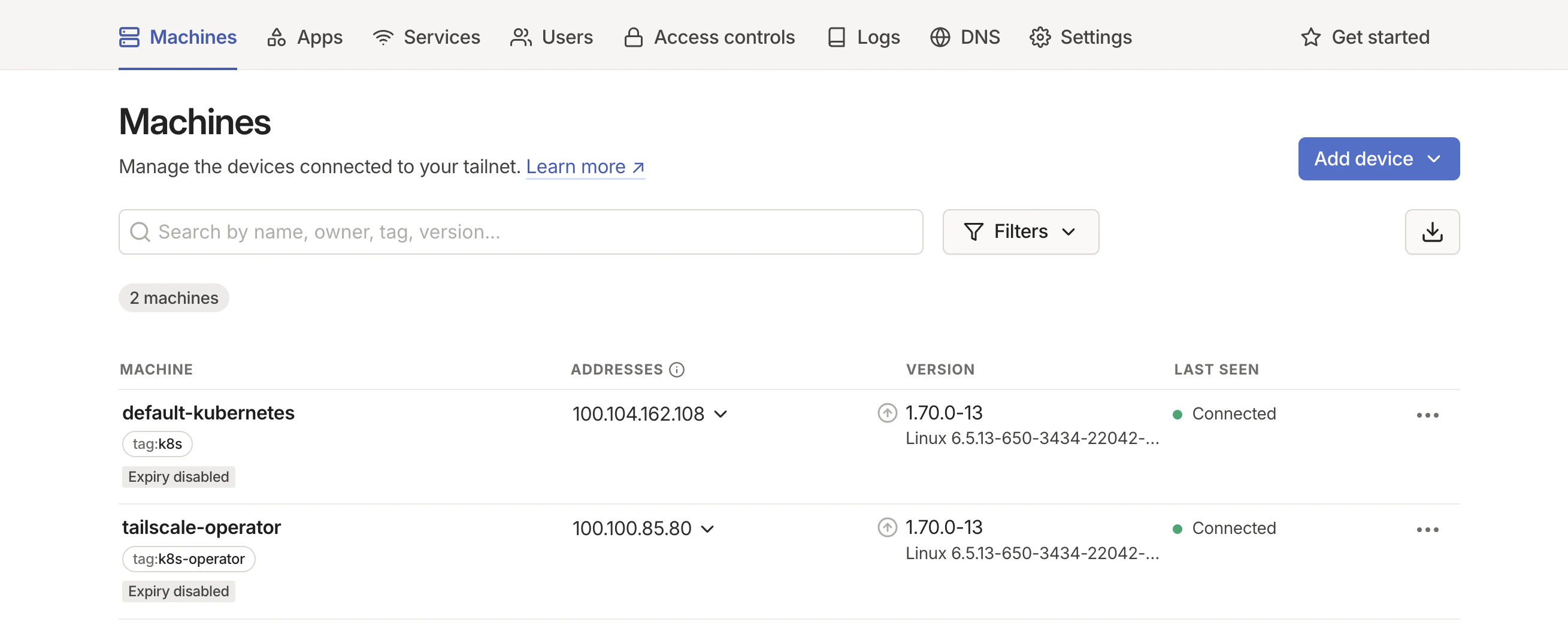 At this point, the operator is running in the cluster and registered with your Tailnet. You can now expose in-cluster services to your Tailnet so they are reachable from other Tailscale devices.
## Expose services
To expose Kubernetes services to Tailnet, you can annotate a Kubernetes service, or configure the services in Helm values. Choose annotations for one-off or ad-hoc exposures, and Helm values when you want exposed services tracked declaratively with the chart release.
### Annotate a Kubernetes service
To expose a service to Tailnet, annotate the service with the `tailscale.com/expose: true` annotation.
```bash theme={"system"}
kubectl annotate service kubernetes tailscale.com/expose="true" -n default
```
After the service is exposed, a new Pod is created in the `tailscale` namespace.
```bash theme={"system"}
kubectl get pods -n tailscale
```
Output, with the newly created Pod highlighted:
```text highlight={3} theme={"system"}
NAME READY STATUS RESTARTS AGE
operator-54f98f5c6f-jwjmr 1/1 Running 6 (55m ago) 59m
ts-kubernetes-6f9dq-0 1/1 Running 0 8m7s
```
You can access the service through the Tailscale IP address or MagicDNS hostname. By default, MagicDNS names are formatted as `[NAMESPACE]-[SERVICE-NAME].[MAGICDNS-HOSTNAME]`.
### Configure services in Helm
To expose a service to Tailnet, modify your Helm values to include the service.
```bash theme={"system"}
helm upgrade -i tailscale-operator -n tailscale coreweave/tailscale-operator \
--set exposedServices.[0].name=kubernetes \
--set exposedServices.[0].namespace=default
```
This uses a [Helm post-install or upgrade hook](https://helm.sh/docs/topics/charts_hooks/) during upgrade or installation.
For additional information on Tailscale usage, see:
* [Tailscale documentation: Using the Tailscale Kubernetes Operator](https://tailscale.com/docs/kubernetes-operator).
* [Tailscale documentation: Managing egress traffic](https://tailscale.com/docs/kubernetes-operator/egress) and [managing ingress traffic](https://tailscale.com/docs/kubernetes-operator/ingress) from your cluster with Tailscale.
At this point, the operator is running in the cluster and registered with your Tailnet. You can now expose in-cluster services to your Tailnet so they are reachable from other Tailscale devices.
## Expose services
To expose Kubernetes services to Tailnet, you can annotate a Kubernetes service, or configure the services in Helm values. Choose annotations for one-off or ad-hoc exposures, and Helm values when you want exposed services tracked declaratively with the chart release.
### Annotate a Kubernetes service
To expose a service to Tailnet, annotate the service with the `tailscale.com/expose: true` annotation.
```bash theme={"system"}
kubectl annotate service kubernetes tailscale.com/expose="true" -n default
```
After the service is exposed, a new Pod is created in the `tailscale` namespace.
```bash theme={"system"}
kubectl get pods -n tailscale
```
Output, with the newly created Pod highlighted:
```text highlight={3} theme={"system"}
NAME READY STATUS RESTARTS AGE
operator-54f98f5c6f-jwjmr 1/1 Running 6 (55m ago) 59m
ts-kubernetes-6f9dq-0 1/1 Running 0 8m7s
```
You can access the service through the Tailscale IP address or MagicDNS hostname. By default, MagicDNS names are formatted as `[NAMESPACE]-[SERVICE-NAME].[MAGICDNS-HOSTNAME]`.
### Configure services in Helm
To expose a service to Tailnet, modify your Helm values to include the service.
```bash theme={"system"}
helm upgrade -i tailscale-operator -n tailscale coreweave/tailscale-operator \
--set exposedServices.[0].name=kubernetes \
--set exposedServices.[0].namespace=default
```
This uses a [Helm post-install or upgrade hook](https://helm.sh/docs/topics/charts_hooks/) during upgrade or installation.
For additional information on Tailscale usage, see:
* [Tailscale documentation: Using the Tailscale Kubernetes Operator](https://tailscale.com/docs/kubernetes-operator).
* [Tailscale documentation: Managing egress traffic](https://tailscale.com/docs/kubernetes-operator/egress) and [managing ingress traffic](https://tailscale.com/docs/kubernetes-operator/ingress) from your cluster with Tailscale.