> ## Documentation Index
> Fetch the complete documentation index at: https://docs.coreweave.com/llms.txt
> Use this file to discover all available pages before exploring further.
# View agent insights
> Review your agent's failures and user intents by category, with metrics and example turns for each.
CoreWeave Agent Lens classifies every turn your agent handles and groups the results into two reports on the **Insights** tab: **Agent failures** and **User intents**. Each report charts how turns in each category trended over the selected time range, summarizes the most common clusters of similar turns, shows impact metrics for each category, and lists real example turns for every category and cluster.
Use Insights to find out what your users ask for most, where your agent fails, and whether a change you shipped made things better or worse, without reading conversations one at a time.
## View insights
To view insights in Agent Lens:
1. Navigate to [CoreWeave Forge](https://forge.coreweave.com) and select Agent Lens from the product menu.
2. Select your project. Agent Lens opens the project you used most recently. To switch projects, use the project selector at the top of the side menu.
3. In the Agent Lens side menu, select **Insights**.
The **Insights** tab displays one report at a time. Use the **Agent failures** and **User intents** toggle at the top of the page to switch between the reports. By default, a report covers the last 30 days. To change the range, select the time range control in the upper right and choose a preset, from **Last hour** to **Last 30 days**, or select **Choose date range**. To narrow a report further, select **Filters**.
Agent Lens groups similar turns into clusters periodically. The line under the page title shows when it last did, for example **Last clustered 2 days ago**. Until the first clustering run completes, it shows **No completed clustering run**.
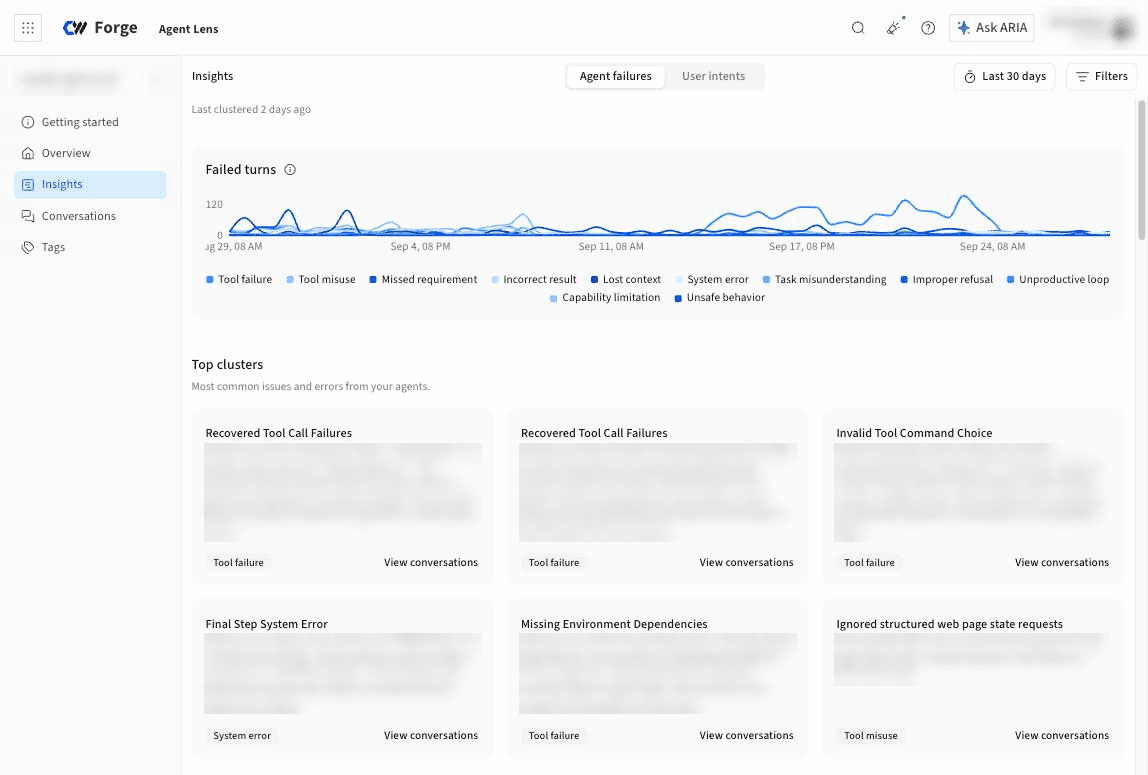 Each report has the same layout:
* **A chart of turns over time**, stacked by category, so you can see whether a spike came from one category or from all of them at once.
* **Top clusters**, a set of cards for the most common clusters of similar turns. Each card has a generated name for the cluster, a written description of the pattern it represents, the category it belongs to, and a **View conversations** link that opens the matching conversations. This section appears after Agent Lens has clustered enough turns in the selected time range.
* **A list of categories**, each with its share of turns. Select a category to see its details and to expand it into the clusters it contains.
* **An Impact card for the selected category**, with the following metrics:
| Metric | Description |
| - | - |
| **Turns** | The number of turns assigned to the category. |
| **Conversations** | The number of conversations that contain those turns. |
| **Share of turns** | The category's turns as a percentage of all classified turns. |
| **Frustrated turns** | The percentage of the category's turns in which the user appears frustrated. |
| **Failed turns** | On the **User intents** report only, the percentage of the category's turns in which Agent Lens detected an issue or failure. |
| **Avg. time / turn** | The average time the agent took to complete a turn in the category. |
| **Avg. cost / turn** | The average estimated cost of a turn in the category. |
* **Example turns** for the selected category, grouped by cluster.
Each report has the same layout:
* **A chart of turns over time**, stacked by category, so you can see whether a spike came from one category or from all of them at once.
* **Top clusters**, a set of cards for the most common clusters of similar turns. Each card has a generated name for the cluster, a written description of the pattern it represents, the category it belongs to, and a **View conversations** link that opens the matching conversations. This section appears after Agent Lens has clustered enough turns in the selected time range.
* **A list of categories**, each with its share of turns. Select a category to see its details and to expand it into the clusters it contains.
* **An Impact card for the selected category**, with the following metrics:
| Metric | Description |
| - | - |
| **Turns** | The number of turns assigned to the category. |
| **Conversations** | The number of conversations that contain those turns. |
| **Share of turns** | The category's turns as a percentage of all classified turns. |
| **Frustrated turns** | The percentage of the category's turns in which the user appears frustrated. |
| **Failed turns** | On the **User intents** report only, the percentage of the category's turns in which Agent Lens detected an issue or failure. |
| **Avg. time / turn** | The average time the agent took to complete a turn in the category. |
| **Avg. cost / turn** | The average estimated cost of a turn in the category. |
* **Example turns** for the selected category, grouped by cluster.
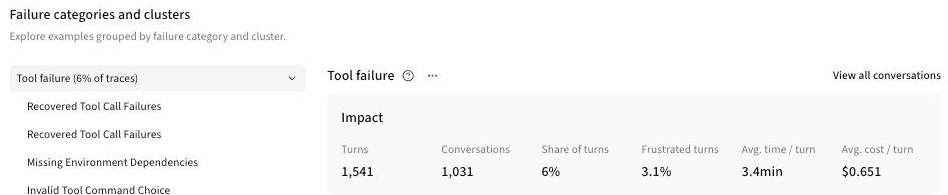 To open the **Conversations** tab filtered to the selected category, select **View all conversations**. To create a tag that finds turns like the ones in a category, select the category's actions menu (**...**) and then select **Tag conversations like these**. For more about tags, see [Create a custom tag](/products/agent-lens/tags/create-tag).
The category list labels each category's share as a percentage of *traces*. A trace in Insights is one turn: one user message and the agent's complete response. A single turn can be assigned to more than one intent category and more than one failure category.
## Agent failures
The **Agent failures** report groups turns in which Agent Lens detected an issue or failure. Turns with no failure are excluded from the report. The chart is titled **Failed turns**, and its categories are the failure types described in [Failure categories](#failure-categories).
### Failure categories
Agent Lens assigns failing turns to the following fixed categories.
| Category | Definition |
| - | - |
| **Tool misuse** | The agent calls a tool incorrectly, chooses an inappropriate tool, or mishandles a tool's result. |
| **Tool failure** | A correctly formed tool call fails or returns an error that prevents the task from succeeding. |
| **Incorrect result** | The agent understands the task but produces an incorrect, incomplete, or otherwise unusable result. |
| **Missed requirement** | The agent ignores or violates an explicit constraint or requirement from the user. |
| **Task misunderstanding** | The agent misinterprets the user's goal and works on the wrong problem or outcome. |
| **Lost context** | The agent forgets or contradicts relevant information established earlier in the conversation. |
| **Unproductive loop** | The agent repeats actions, retries, or reasoning without making meaningful progress toward the user's goal. |
| **Improper refusal** | The agent refuses a request that it could and should safely complete. |
| **Capability limitation** | The task requires a capability, integration, permission, or resource that the agent does not have. |
| **System error** | A platform or infrastructure problem outside the agent's control prevents successful completion. |
| **Unsafe behavior** | The agent produces or attempts behavior that violates applicable safety expectations. |
Categories such as **Tool failure** and **System error** point at problems outside your prompt, while **Tool misuse**, **Missed requirement**, and **Lost context** usually point at the agent's instructions or its tool definitions.
## User intents
The **User intents** report groups turns by what the user was trying to do, so you can see what your agent is actually used for and what types of requests go poorly. All turns are categorized, not only failing ones. The chart is titled **User turns**, and its categories are described in [Intent categories](#intent-categories).
The Impact card on this report adds a **Failed turns** metric. A high failure rate on a common intent is the most direct signal that a change could help users.
### Intent categories
Agent Lens assigns turns to the following fixed categories.
| Category | Definition |
| - | - |
| **Task request** | The user asks the agent to create, change, remove, or perform something, including fixing a reported problem. |
| **Question** | The user asks for information, an explanation, instructions, analysis, or a comparison. |
| **Clarification or correction** | The user adds detail to an existing request or corrects the agent's understanding, output, or prior instructions. |
| **Approval** | The user agrees to or authorizes an action proposed by the agent. |
| **Decline or cancellation** | The user declines a proposed action or asks to stop or cancel one already underway. |
| **Issue report** | The user reports broken or incorrect behavior without asking for a specific remedy. |
| **Negative feedback** | The user expresses dissatisfaction with an existing result or behavior without requesting a change or stopping an action. |
| **Positive feedback** | The user expresses satisfaction with an existing result or behavior without authorizing a new action. |
A rising share of **Clarification or correction**, **Issue report**, or **Negative feedback** turns usually means the agent's first responses are missing the mark, even when the failures report looks quiet.
To open the **Conversations** tab filtered to the selected category, select **View all conversations**. To create a tag that finds turns like the ones in a category, select the category's actions menu (**...**) and then select **Tag conversations like these**. For more about tags, see [Create a custom tag](/products/agent-lens/tags/create-tag).
The category list labels each category's share as a percentage of *traces*. A trace in Insights is one turn: one user message and the agent's complete response. A single turn can be assigned to more than one intent category and more than one failure category.
## Agent failures
The **Agent failures** report groups turns in which Agent Lens detected an issue or failure. Turns with no failure are excluded from the report. The chart is titled **Failed turns**, and its categories are the failure types described in [Failure categories](#failure-categories).
### Failure categories
Agent Lens assigns failing turns to the following fixed categories.
| Category | Definition |
| - | - |
| **Tool misuse** | The agent calls a tool incorrectly, chooses an inappropriate tool, or mishandles a tool's result. |
| **Tool failure** | A correctly formed tool call fails or returns an error that prevents the task from succeeding. |
| **Incorrect result** | The agent understands the task but produces an incorrect, incomplete, or otherwise unusable result. |
| **Missed requirement** | The agent ignores or violates an explicit constraint or requirement from the user. |
| **Task misunderstanding** | The agent misinterprets the user's goal and works on the wrong problem or outcome. |
| **Lost context** | The agent forgets or contradicts relevant information established earlier in the conversation. |
| **Unproductive loop** | The agent repeats actions, retries, or reasoning without making meaningful progress toward the user's goal. |
| **Improper refusal** | The agent refuses a request that it could and should safely complete. |
| **Capability limitation** | The task requires a capability, integration, permission, or resource that the agent does not have. |
| **System error** | A platform or infrastructure problem outside the agent's control prevents successful completion. |
| **Unsafe behavior** | The agent produces or attempts behavior that violates applicable safety expectations. |
Categories such as **Tool failure** and **System error** point at problems outside your prompt, while **Tool misuse**, **Missed requirement**, and **Lost context** usually point at the agent's instructions or its tool definitions.
## User intents
The **User intents** report groups turns by what the user was trying to do, so you can see what your agent is actually used for and what types of requests go poorly. All turns are categorized, not only failing ones. The chart is titled **User turns**, and its categories are described in [Intent categories](#intent-categories).
The Impact card on this report adds a **Failed turns** metric. A high failure rate on a common intent is the most direct signal that a change could help users.
### Intent categories
Agent Lens assigns turns to the following fixed categories.
| Category | Definition |
| - | - |
| **Task request** | The user asks the agent to create, change, remove, or perform something, including fixing a reported problem. |
| **Question** | The user asks for information, an explanation, instructions, analysis, or a comparison. |
| **Clarification or correction** | The user adds detail to an existing request or corrects the agent's understanding, output, or prior instructions. |
| **Approval** | The user agrees to or authorizes an action proposed by the agent. |
| **Decline or cancellation** | The user declines a proposed action or asks to stop or cancel one already underway. |
| **Issue report** | The user reports broken or incorrect behavior without asking for a specific remedy. |
| **Negative feedback** | The user expresses dissatisfaction with an existing result or behavior without requesting a change or stopping an action. |
| **Positive feedback** | The user expresses satisfaction with an existing result or behavior without authorizing a new action. |
A rising share of **Clarification or correction**, **Issue report**, or **Negative feedback** turns usually means the agent's first responses are missing the mark, even when the failures report looks quiet.