> ## Documentation Index
> Fetch the complete documentation index at: https://docs.coreweave.com/llms.txt
> Use this file to discover all available pages before exploring further.
# Node details
> Grafana dashboard for viewing an individual Node's telemetry, GPUs, network, and Slurm metrics
To view the dashboard, go to the [Node Details dashboard](https://cks-grafana.coreweave.com/d/ddbdicm9sw7c5x/node-details).
For instructions about accessing CoreWeave Grafana dashboards, see [Access and use CoreWeave Grafana dashboards](/observability/managed-grafana/access).
The **Node Details** dashboard is your single-pane view for everything happening on a specific compute Node in your cluster, from kernel-level events and GPU thermals to Slurm queue metrics and Kubernetes Pod allocations. Use it to troubleshoot anomalies, validate hardware, and verify that each Node meets workload expectations.
## Example view
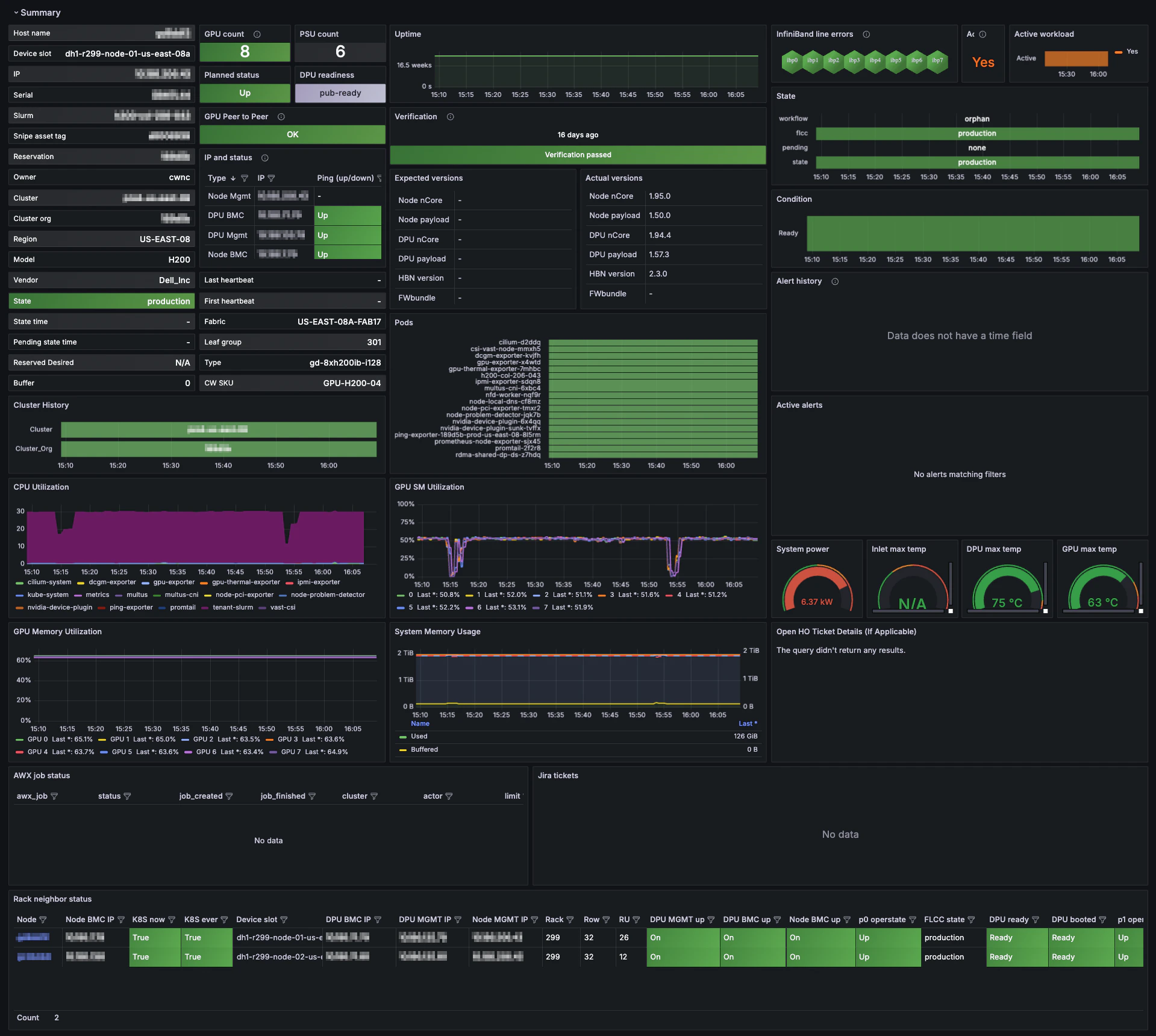
The following example shows what you see when you first open the dashboard, so you know what to expect before exploring the other panel groups. When the dashboard first loads, the **Summary** panel group expands by default. This example shows the **Summary** section.
 ## Panel groups
The dashboard has several expandable panel groups. Each focuses on a different aspect of Node telemetry. When you view the dashboard, click these group headings to collapse or expand that section. Use the following reference to decide which groups to expand for the kind of troubleshooting or validation you're doing.
| Section | What you'll find |
| ---------------- | -------------------------------------------------------------------------------------------------------------------------------------------------------------------------------------------- |
| **Summary** | High-level "at-a-glance" cards for host identity, CPU and GPU utilization, network traffic, active alerts, and HPC verification status. |
| **Logs** | A rolling log view that merges Kubernetes events, kernel messages, Node Problem Detector findings, and recent alert annotations. Ideal for pinpointing the root cause of spikes or failures. |
| **Network** | End-to-end connectivity metrics, including ICMP loss from the Ping Exporter, conntrack table usage, interface throughput, packet error rates, and more. |
| **Resources** | Capacity and utilization for CPU, GPU, memory, NFS mounts, and local disk I/O, plus historical usage charts to identify resource pressure. |
| **GPUs** | Everything GPU-related, including ECC errors, power draw, clock speeds, memory usage, thermal headroom, fan RPM, and NVSwitch and NVLink health. |
| **Temperatures** | Real-time thermal data for GPU cores, HBM memory, motherboard sensors, and per-Pod thermal impact. Helpful for identifying cooling hot spots. |
| **InfiniBand** | Port state, link speed, retransmit counts, and congestion indicators for Nodes equipped with InfiniBand adapters. |
| **Slurm Info** | Node state within your Slurm cluster (idle, alloc, drain), running jobs, and allocation timelines. Useful for mixed Kubernetes and Slurm environments. |
| **Kubernetes** | Pod allocation breakdowns, taints, Reservation status, CPU-hours per job, memory by namespace, and Calico network policy statistics. |
| **Verification** | Results from the latest HPC verification suite, including GPU compute benchmarks, stress tests, and smoke tests. |
| **Hardware** | Low-level chassis data, including IPMI power readings, fan speeds, serial numbers, PCIe link status, and NVLink bandwidth graphs. |
| **Unsorted** | Additional metrics that do not yet belong to a dedicated group. Check here for new or experimental panels. |
## When to use this dashboard
The **Node Details** dashboard lets you correlate sections quickly. For example, expand multiple groups at a time to observe how a GPU thermal event in **Temperatures** aligns with throttling in **GPUs** and related alerts in **Logs**. Grafana's time-range controls also enable time-shift analysis, so you can rewind and inspect historical Node behavior during an incident window.
## Panel groups
The dashboard has several expandable panel groups. Each focuses on a different aspect of Node telemetry. When you view the dashboard, click these group headings to collapse or expand that section. Use the following reference to decide which groups to expand for the kind of troubleshooting or validation you're doing.
| Section | What you'll find |
| ---------------- | -------------------------------------------------------------------------------------------------------------------------------------------------------------------------------------------- |
| **Summary** | High-level "at-a-glance" cards for host identity, CPU and GPU utilization, network traffic, active alerts, and HPC verification status. |
| **Logs** | A rolling log view that merges Kubernetes events, kernel messages, Node Problem Detector findings, and recent alert annotations. Ideal for pinpointing the root cause of spikes or failures. |
| **Network** | End-to-end connectivity metrics, including ICMP loss from the Ping Exporter, conntrack table usage, interface throughput, packet error rates, and more. |
| **Resources** | Capacity and utilization for CPU, GPU, memory, NFS mounts, and local disk I/O, plus historical usage charts to identify resource pressure. |
| **GPUs** | Everything GPU-related, including ECC errors, power draw, clock speeds, memory usage, thermal headroom, fan RPM, and NVSwitch and NVLink health. |
| **Temperatures** | Real-time thermal data for GPU cores, HBM memory, motherboard sensors, and per-Pod thermal impact. Helpful for identifying cooling hot spots. |
| **InfiniBand** | Port state, link speed, retransmit counts, and congestion indicators for Nodes equipped with InfiniBand adapters. |
| **Slurm Info** | Node state within your Slurm cluster (idle, alloc, drain), running jobs, and allocation timelines. Useful for mixed Kubernetes and Slurm environments. |
| **Kubernetes** | Pod allocation breakdowns, taints, Reservation status, CPU-hours per job, memory by namespace, and Calico network policy statistics. |
| **Verification** | Results from the latest HPC verification suite, including GPU compute benchmarks, stress tests, and smoke tests. |
| **Hardware** | Low-level chassis data, including IPMI power readings, fan speeds, serial numbers, PCIe link status, and NVLink bandwidth graphs. |
| **Unsorted** | Additional metrics that do not yet belong to a dedicated group. Check here for new or experimental panels. |
## When to use this dashboard
The **Node Details** dashboard lets you correlate sections quickly. For example, expand multiple groups at a time to observe how a GPU thermal event in **Temperatures** aligns with throttling in **GPUs** and related alerts in **Logs**. Grafana's time-range controls also enable time-shift analysis, so you can rewind and inspect historical Node behavior during an incident window.