> ## Documentation Index
> Fetch the complete documentation index at: https://docs.coreweave.com/llms.txt
> Use this file to discover all available pages before exploring further.
# Cabinet visualizer
> Monitor the aggregate statistics of full cabinets with Grafana
To view the dashboard, go to the [Cabinet Visualizer dashboard](https://cks-grafana.coreweave.com/d/de3qwk31ucpvkf/cabinet-visualizer).
For instructions about accessing CoreWeave Grafana dashboards, see [Access and use CoreWeave Grafana dashboards](/observability/managed-grafana/access).
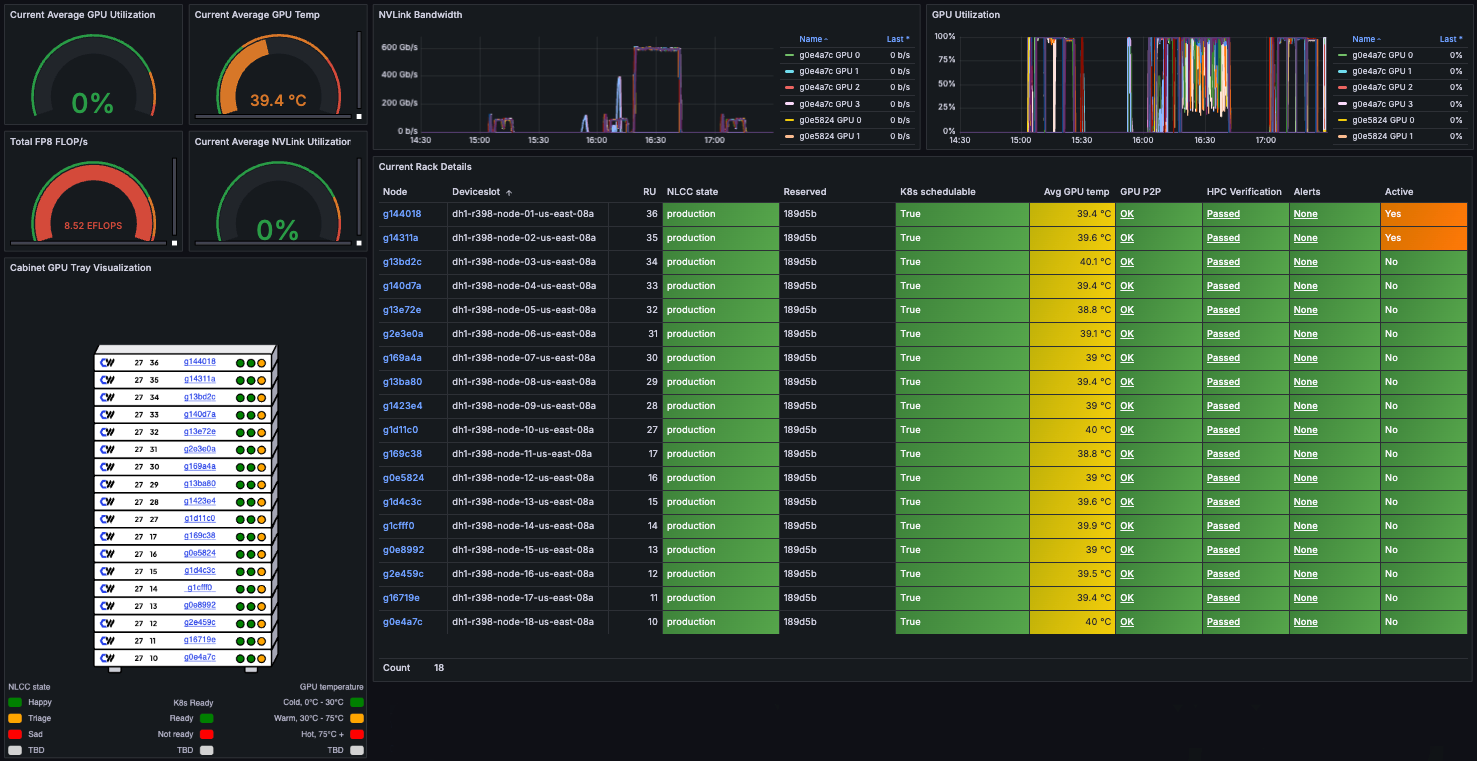
The Cabinet Visualizer dashboard displays statistics and historical data for each cabinet, including its cooling system and enclosed rack. You can monitor overall cabinet health and view detailed information about each Node to identify issues and track performance trends over time.
This dashboard is useful for monitoring the health of [GB200 and GB300 NVL72-powered](/platform/instances/nvl72) Node Pools and their individual Nodes, since they're deployed only as full racks in dedicated cabinets.
## Dashboard panel overview
The Cabinet Visualizer dashboard includes sections for aggregate statistics, GPU tray visualization, time-series graphs, and rack details. Each section provides different insights into the cabinet's performance and health.
 ### Aggregate statistics
These panels on the upper left show the most recent high-level metrics for all Nodes in the cabinet.
| **Metric** | **Description** |
| -------------------------------------- | ------------------------------------------------------------- |
| **Current Average GPU Utilization** | Average percentage of GPU resources currently in use. |
| **Current Average NVLink Utilization** | Average percentage of NVLink bandwidth currently in use. |
| **Total FP8 FLOP/s** | Total FP8-format floating-point operations per second. |
| **Current Average GPU Temperature** | Average GPU temperature across all Nodes, in degrees Celsius. |
### GPU tray visualization
This panel on the lower left shows a visual layout of the enclosed rack, with each Node labeled by name. Color coding indicates the Node's [NLCC state](/platform/fleet-management/node-lifecycle), Kubernetes state, and GPU temperature. Hover over any indicator for more details, or click a Node to view its full status.
Refer to the legend at the bottom of the panel to interpret the color codes.
### Time-series graphs
These panels on the upper right show time-series graphs for aggregate NVLink bandwidth and GPU utilization across the cabinet. Use them to monitor performance trends and detect anomalies. Hover over any graph to view detailed data points. Use the list of Nodes beside each graph to filter the data by individual Node.
### Rack details
This panel on the lower right provides detailed information about each Node in the rack.
| **Column** | **Description** | **Values** |
| -------------------- | ---------------------------------------------------------------------------------------------------------------------------------------------------------------- | -------------------------------------------------------------------------------------------------------------------------------------------------------------------------------------------------------------------------------------------------------------------------------------------------------------------- |
| **Node** | The name of the Node. | |
| **Deviceslot** | The Deviceslot where the Node is installed. | |
| **RU** | The Rack Unit where the Node is physically located in the cabinet. | |
| **NLCC State** | The current [Node lifecycle](/platform/fleet-management/node-lifecycle) state. | Any valid Node lifecycle state. |
| **Reserved** | The organization ID for this Node. | |
| **K8s ready** | Whether the Node is online in Kubernetes. |
### Aggregate statistics
These panels on the upper left show the most recent high-level metrics for all Nodes in the cabinet.
| **Metric** | **Description** |
| -------------------------------------- | ------------------------------------------------------------- |
| **Current Average GPU Utilization** | Average percentage of GPU resources currently in use. |
| **Current Average NVLink Utilization** | Average percentage of NVLink bandwidth currently in use. |
| **Total FP8 FLOP/s** | Total FP8-format floating-point operations per second. |
| **Current Average GPU Temperature** | Average GPU temperature across all Nodes, in degrees Celsius. |
### GPU tray visualization
This panel on the lower left shows a visual layout of the enclosed rack, with each Node labeled by name. Color coding indicates the Node's [NLCC state](/platform/fleet-management/node-lifecycle), Kubernetes state, and GPU temperature. Hover over any indicator for more details, or click a Node to view its full status.
Refer to the legend at the bottom of the panel to interpret the color codes.
### Time-series graphs
These panels on the upper right show time-series graphs for aggregate NVLink bandwidth and GPU utilization across the cabinet. Use them to monitor performance trends and detect anomalies. Hover over any graph to view detailed data points. Use the list of Nodes beside each graph to filter the data by individual Node.
### Rack details
This panel on the lower right provides detailed information about each Node in the rack.
| **Column** | **Description** | **Values** |
| -------------------- | ---------------------------------------------------------------------------------------------------------------------------------------------------------------- | -------------------------------------------------------------------------------------------------------------------------------------------------------------------------------------------------------------------------------------------------------------------------------------------------------------------- |
| **Node** | The name of the Node. | |
| **Deviceslot** | The Deviceslot where the Node is installed. | |
| **RU** | The Rack Unit where the Node is physically located in the cabinet. | |
| **NLCC State** | The current [Node lifecycle](/platform/fleet-management/node-lifecycle) state. | Any valid Node lifecycle state. |
| **Reserved** | The organization ID for this Node. | |
| **K8s ready** | Whether the Node is online in Kubernetes. | - **True**: online
- **False**: not online
|
| **Avg GPU Temp** | Average temperature of all GPUs on the Node. | |
| **GPU P2P** | GPU P2P shows the peer-to-peer communication status between GPUs on the Node. This is required for any form of NVLink communication, both intra- and inter-tray. | - **OK**: The GPUs peer correctly.
- **X**: The GPU peers with itself. This is ignored.
- **NS**: not supported
|
| **HPC Verification** | Result of the most recent HPC (High Performance Computing) validation checks run on the Node. | - **Passed**: The most recent run completed successfully.
- **Failed**: The most recent run failed.
- **Not Run**: A check hasn't run yet. This is common for newly delivered Nodes in a CKS cluster, since the verification data is stored on the Kubernetes host, not the Node itself.
|
| **Alerts** | Alert status for the Node. | - **None**
- **Pending**
- **Firing**
|
| **Active** | Whether the Node is currently running a workload Pod that is neither interruptible nor part of a DaemonSet. | - **Yes**: The Node is running a workload.
- **No**: The Node isn't running a workload.
|