> ## Documentation Index
> Fetch the complete documentation index at: https://docs.coreweave.com/llms.txt
> Use this file to discover all available pages before exploring further.
# 코드 트레이싱하기
> 실행 중인 코드를 계측하여 실행 과정을 W&B Weave에서 상세한 트레이스로 확인하세요.
이 가이드에서는 애플리케이션을 계측하여 실행 과정을 W\&B Weave에서 상세한 트레이스로 확인하는 방법을 설명합니다. 트레이스는 입력, 출력, 각 오퍼레이션의 구조를 Call로 캡처하므로 LLM 기반 코드를 디버깅, 평가, 모니터링하는 데 유용합니다.
실행 중인 코드를 Weave에서 상세한 트레이스로 확인하려면 Call을 생성해야 합니다. 다음 섹션에서는 Call을 생성하는 세 가지 주요 방법을 수동 작업이 적은 순서대로 설명합니다.
* LLM 라이브러리 Call 자동 추적
* `weave.op`을 사용한 맞춤형 함수 추적
* API를 직접 사용한 수동 Call 추적
트레이싱 대상을 얼마나 세밀하게 제어해야 하는지에 따라 적합한 방법을 선택하세요.
LLM 라이브러리 Call 자동 추적
Weave는 `openai`, `anthropic`, `cohere`, `mistral`, `LangChain` 등 널리 사용되는 여러 라이브러리 및 프레임워크와 자동으로 통합됩니다. LLM 또는 프레임워크 라이브러리를 임포트하고 Weave 프로젝트를 초기화하기만 하면 됩니다. 그러면 별도로 코드를 변경하지 않아도 Weave가 LLM 또는 플랫폼에 대한 모든 Call을 자동으로 트레이스하여 프로젝트에 기록합니다. 지원되는 라이브러리 인테그레이션의 전체 목록은 [인테그레이션 개요](/ko/products/wandb/weave/guides/integrations)를 참조하세요.
```python lines theme={"system"}
import weave
from openai import OpenAI
client = OpenAI()
# Weave 트레이싱 초기화
weave.init('intro-example')
response = client.chat.completions.create(
model="gpt-4",
messages=[
{
"role": "user",
"content": "How are you?"
}
],
temperature=0.8,
max_tokens=64,
top_p=1,
)
```
```typescript twoslash lines theme={"system"}
// @noErrors
import OpenAI from 'openai'
import * as weave from 'weave'
const client = new OpenAI()
// Weave 트레이싱 초기화
await weave.init('intro-example')
const response = await client.chat.completions.create({
model: 'gpt-4',
messages: [
{
role: 'user',
content: 'How are you?',
},
],
temperature: 0.8,
max_tokens: 64,
top_p: 1,
});
```
JavaScript 및 TypeScript 프로젝트의 전체 설정 가이드는 [TypeScript SDK: 서드파티 인테그레이션 가이드](/ko/products/wandb/weave/guides/integrations/js)를 참조하세요.
자동 동작을 더 세밀하게 제어하려면 [LLM Call 자동 추적 설정](/ko/products/wandb/weave/guides/integrations/autopatching)을 참조하세요.
맞춤형 함수 추적하기
LLM 애플리케이션에는 전처리와 후처리, 프롬프트 등 추적하고 싶은 추가 로직이 있는 경우가 많습니다. Weave가 자동으로 트레이스하는 LLM Call과 함께 직접 작성한 함수도 캡처하려면 이 방법을 사용하세요.
Weave에서는 [`@weave.op`](/ko/products/wandb/weave/reference/python-sdk#function-op) 데코레이터를 사용해 이러한 Call을 수동으로 추적할 수 있습니다. 예를 들면 다음과 같습니다.
```python lines theme={"system"}
import weave
# Weave 트레이싱 초기화
weave.init('intro-example')
# 함수에 데코레이터 적용
@weave.op
def my_function(name: str):
return f"Hello, {name}!"
# 함수 호출 -- Weave가 입력과 출력을 자동으로 추적합니다
print(my_function("World"))
```
[클래스의 메서드](#track-class-and-object-methods)도 추적할 수 있습니다.
Weave에서는 함수를 [`weave.op`](/ko/products/wandb/weave/reference/typescript-sdk/functions/op)로 래핑하여 이러한 Call을 수동으로 추적할 수 있습니다. 예를 들면 다음과 같습니다.
```typescript twoslash lines theme={"system"}
// @noErrors
import * as weave from 'weave'
await weave.init('intro-example')
function myFunction(name: string) {
return `Hello, ${name}!`
}
const myFunctionOp = weave.op(myFunction)
```
래핑을 인라인으로 정의할 수도 있습니다.
```typescript twoslash lines theme={"system"}
// @noErrors
const myFunctionOp = weave.op((name: string) => `Hello, ${name}!`)
```
이 방법은 함수와 클래스 메서드 모두에 적용할 수 있습니다.
```typescript twoslash lines theme={"system"}
// @noErrors
class MyClass {
constructor() {
this.myMethod = weave.op(this.myMethod)
}
myMethod(name: string) {
return `Hello, ${name}!`
}
}
```
클래스 및 객체 메서드 추적하기
독립 실행형 함수뿐만 아니라 클래스 및 객체 메서드도 추적할 수 있습니다. 클래스의 메서드에 `weave.op` 데코레이터를 적용하면 어떤 메서드든 추적할 수 있습니다.
```python lines theme={"system"}
import weave
# Weave 트레이싱 초기화
weave.init("intro-example")
class MyClass:
# 메서드에 데코레이터 적용
@weave.op
def my_method(self, name: str):
return f"Hello, {name}!"
instance = MyClass()
# 메서드 호출 -- Weave가 입력과 출력을 자동으로 추적합니다
print(instance.my_method("World"))
```
**TypeScript에서 데코레이터 사용하기**
TypeScript 코드에서 `@weave.op` 데코레이터를 사용하려면 환경이 올바르게 설정되어 있는지 확인하세요.
* **TypeScript v5.0 이상**: 데코레이터가 기본으로 지원되므로 추가 설정이 필요하지 않습니다.
* **TypeScript v5.0 미만**: 데코레이터에 대한 실험적 지원을 활성화하세요. 자세한 내용은 [데코레이터에 관한 TypeScript 공식 문서](https://www.typescriptlang.org/docs/handbook/decorators.html)를 참조하세요.
인스턴스 메서드에 `@weave.op`를 적용하여 트레이싱할 수 있습니다.
```typescript twoslash lines theme={"system"}
// @noErrors
class Foo {
@weave.op
async predict(prompt: string) {
return "bar"
}
}
```
정적 메서드에 `@weave.op`를 적용하여 클래스 내 유틸리티 함수를 모니터링할 수도 있습니다.
```typescript twoslash lines theme={"system"}
// @noErrors
class MathOps {
@weave.op
static square(n: number): number {
return n * n;
}
}
```
병렬(멀티스레드) 함수 호출 트레이스하기
기본적으로 병렬 Call은 Weave에서 모두 별도의 루트 Call로 표시되므로 트레이스 계층 구조를 파악하기 어렵습니다. 동일한 상위 Op 아래에 올바르게 중첩되도록 하려면 `ThreadPoolExecutor`를 사용하세요.
다음 코드 예제는 [`ThreadPoolExecutor`](/ko/products/wandb/weave/reference/python-sdk/trace/util#class-contextawarethreadpoolexecutor)를 사용하는 방법을 보여줍니다.
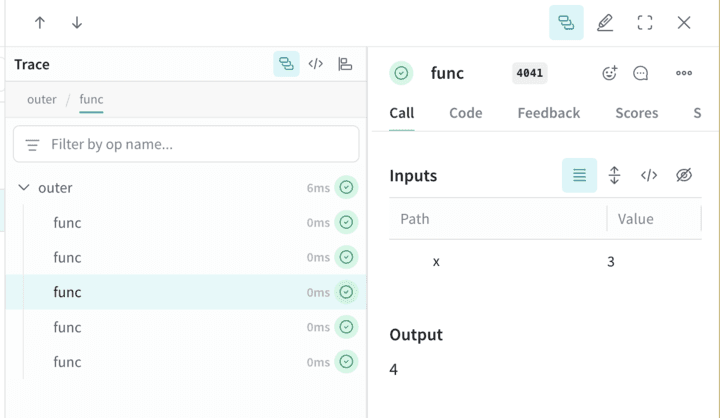
첫 번째 함수 `func`는 `x`를 받아 `x+1`을 반환하는 단순한 Op입니다. 두 번째 함수 `outer`는 입력 목록을 받는 또 다른 Op입니다.
`outer` 내부에서 `ThreadPoolExecutor`와 `exc.map(func, inputs)`를 사용하므로 `func`의 각 호출은 동일한 상위 트레이스 컨텍스트를 그대로 유지합니다.
```python lines theme={"system"}
import weave
@weave.op
def func(x):
return x+1
@weave.op
def outer(inputs):
with weave.ThreadPoolExecutor() as exc:
exc.map(func, inputs)
# Weave 프로젝트 이름을 업데이트하세요
client = weave.init('my-weave-project')
outer([1,2,3,4,5])
```
```text theme={"system"}
This feature is not available in the TypeScript SDK yet.
```
Weights & Biases UI에서는 하나의 상위 Call 아래에 5개의 하위 Call이 중첩되어 표시됩니다. 증분 연산이 병렬로 실행되더라도 완전한 계층 구조의 트레이스를 확인할 수 있습니다.
수동 Call 추적
자동 인테그레이션과 `weave.op` 데코레이터가 모두 워크플로에 맞지 않는다면 API를 직접 사용해 Call을 수동으로 생성할 수 있습니다. 이 방식은 보일러플레이트 코드가 늘어나는 대신 Call의 시작과 종료 시점을 완전히 제어할 수 있다는 장점이 있습니다.
```python lines theme={"system"}
import weave
# Weave 트레이싱 초기화
client = weave.init('intro-example')
def my_function(name: str):
# Call 시작
call = client.create_call(op="my_function", inputs={"name": name})
# ... 함수 코드 ...
# Call 종료
client.finish_call(call, output="Hello, World!")
# 함수 호출
print(my_function("World"))
```
```text theme={"system"}
이 기능은 아직 TypeScript SDK에서 사용할 수 없습니다.
```
* Call 시작: [POST `/call/start`](/ko/products/wandb/weave/reference/service-api/calls/call-start).
* Call 종료: [POST `/call/end`](/ko/products/wandb/weave/reference/service-api/calls/call-end).
```bash lines theme={"system"}
curl -L 'https://trace.wandb.ai/call/start' \
-H 'Content-Type: application/json' \
-H 'Accept: application/json' \
-d '{
"start": {
"project_id": "string",
"id": "string",
"op_name": "string",
"display_name": "string",
"trace_id": "string",
"parent_id": "string",
"started_at": "2024-09-08T20:07:34.849Z",
"attributes": {},
"inputs": {},
"wb_run_id": "string"
}
}
```
## Related topics
- [Weave Service API로 트레이싱하기](/ko/products/wandb/weave/cookbooks/weave_via_service_api.md)