> ## Documentation Index
> Fetch the complete documentation index at: https://docs.coreweave.com/llms.txt
> Use this file to discover all available pages before exploring further.
# MistralAI
> Weave의 자동 트레이싱으로 Chat Completion, 함수 호출, 모델 상호작용 등 MistralAI 모델 Call을 추적하고 모니터링하세요.
 Weave는 [MistralAI Python 라이브러리](https://github.com/mistralai/client-python)를 통한 LLM Call을 자동으로 추적하고 로깅합니다. 이 가이드에서는 MistralAI Call의 트레이스를 캡처하는 방법, 재현성을 위해 Call을 직접 정의한 Op로 래핑하는 방법, `Model` 클래스로 실험을 체계적으로 관리하는 방법을 설명합니다.
> Weave는 Mistral v1.0 SDK를 지원합니다. 업그레이드에 대한 자세한 내용은 [마이그레이션 가이드](https://github.com/mistralai/client-python/blob/main/MIGRATION.md)를 참조하세요.
Weave는 [MistralAI Python 라이브러리](https://github.com/mistralai/client-python)를 통한 LLM Call을 자동으로 추적하고 로깅합니다. 이 가이드에서는 MistralAI Call의 트레이스를 캡처하는 방법, 재현성을 위해 Call을 직접 정의한 Op로 래핑하는 방법, `Model` 클래스로 실험을 체계적으로 관리하는 방법을 설명합니다.
> Weave는 Mistral v1.0 SDK를 지원합니다. 업그레이드에 대한 자세한 내용은 [마이그레이션 가이드](https://github.com/mistralai/client-python/blob/main/MIGRATION.md)를 참조하세요.
트레이스
개발 중에도 프로덕션에서도 LLM 애플리케이션의 트레이스를 중앙 데이터베이스에 저장하는 것이 중요합니다. 이러한 트레이스는 디버깅에 사용하고, 애플리케이션을 개선하는 데 도움이 되는 데이터셋으로도 활용합니다.
Weave는 [mistralai](https://github.com/mistralai/client-python)의 트레이스를 자동으로 캡처합니다. 라이브러리를 평소처럼 사용하려면 먼저 `weave.init()`을 호출하세요:
```python lines theme={"system"}
import weave
weave.init("cheese_recommender")
# 그런 다음 평소처럼 mistralai 라이브러리를 사용하세요
import os
from mistralai import Mistral
api_key = os.environ["MISTRAL_API_KEY"]
model = "mistral-large-latest"
client = Mistral(api_key=api_key)
messages = [
{
"role": "user",
"content": "What is the best French cheese?",
},
]
chat_response = client.chat.complete(
model=model,
messages=messages,
)
```
이제 Weave는 MistralAI 라이브러리를 통해 이루어진 모든 LLM Call을 추적하고 로깅합니다. Weave 웹 인터페이스에서 트레이스를 확인할 수 있습니다.
[ ](https://forge.coreweave.com/wandb/capecape/mistralai_project/weave/calls)
직접 만든 Op으로 Call 래핑하기
기본 트레이싱이 작동하면 MistralAI Call을 Weave Op으로 래핑하여 여러 실험에서 재현할 수 있게 만들 수 있습니다. Weave Op은 실험하는 동안 코드 버전을 자동으로 관리하여 결과를 *재현 가능*하게 하고, 입력과 출력도 캡처합니다. [`mistralai.client.MistralClient.chat()`](https://docs.mistral.ai/capabilities/completion)을 호출하는 함수를 만들고 [`@weave.op()`](/ko/products/wandb/weave/guides/tracking/ops)로 데코레이트하면 Weave가 입력과 출력을 자동으로 추적합니다. 다음 예시는 치즈 추천기에 이를 적용하는 방법을 보여줍니다.
```python lines {1} theme={"system"}
@weave.op()
def cheese_recommender(region:str, model:str) -> str:
"Recommend the best cheese in a given region"
messages = [
{
"role": "user",
"content": f"What is the best cheese in {region}?",
},
]
chat_response = client.chat.complete(
model=model,
messages=messages,
)
return chat_response.choices[0].message.content
cheese_recommender(region="France", model="mistral-large-latest")
cheese_recommender(region="Spain", model="mistral-large-latest")
cheese_recommender(region="Netherlands", model="mistral-large-latest")
```
[ ](https://forge.coreweave.com/wandb/capecape/mistralai_project/weave/calls)
더 쉽게 실험할 수 있도록 `Model` 만들기
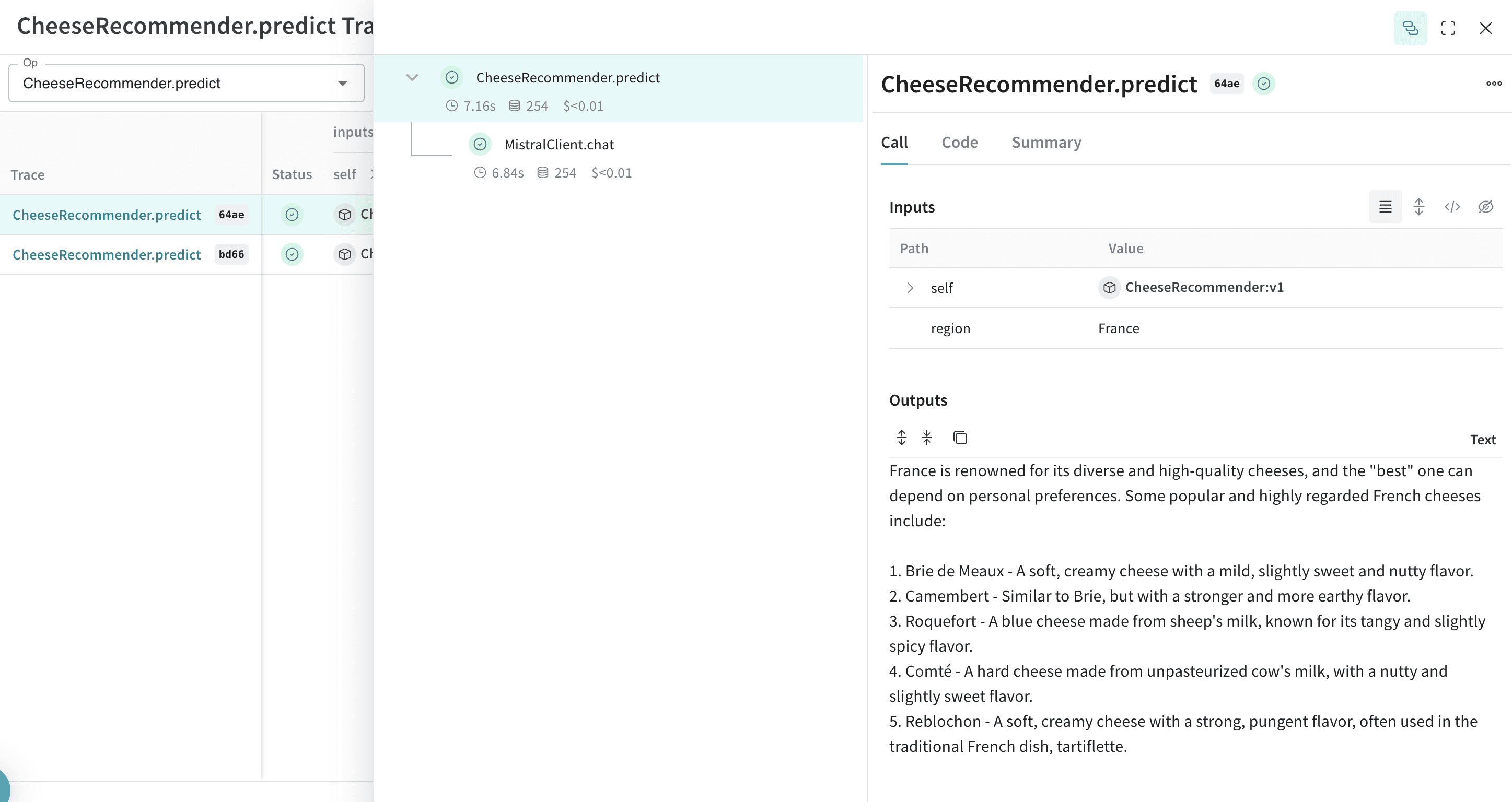
변동 요소가 많으면 실험을 체계적으로 관리하기 어렵습니다. [`Model`](/ko/products/wandb/weave/guides/core-types/models) 클래스를 사용하면 system 프롬프트나 사용 중인 모델과 같은 앱의 실험 세부 정보를 캡처하고 정리할 수 있습니다. 이를 통해 앱의 여러 반복 개발 버전을 정리하고 비교할 수 있습니다.
[`Model`](/ko/products/wandb/weave/guides/core-types/models)은 코드 버전 관리와 입력 및 출력 캡처뿐 아니라 애플리케이션의 동작을 제어하는 구조화된 매개변수도 캡처하므로, 어떤 매개변수가 가장 효과적이었는지 쉽게 찾을 수 있습니다. Weave 모델은 `serve` 및 [`Evaluation`](/ko/products/wandb/weave/guides/core-types/evaluations)과 함께 사용할 수도 있습니다.
다음 예시에서는 `model`과 `country`로 실험할 수 있습니다. 둘 중 하나를 변경할 때마다 `CheeseRecommender`의 새로운 *버전*이 생성됩니다.
```python lines theme={"system"}
import weave
from mistralai import Mistral
weave.init("mistralai_project")
class CheeseRecommender(weave.Model): # `weave.Model`로 변경하세요
model: str
temperature: float
@weave.op()
def predict(self, region:str) -> str: # `predict`로 변경하세요
"Recommend the best cheese in a given region"
client = Mistral(api_key=api_key)
messages = [
{
"role": "user",
"content": f"What is the best cheese in {region}?",
},
]
chat_response = client.chat.complete(
model=model,
messages=messages,
temperature=self.temperature
)
return chat_response.choices[0].message.content
cheese_model = CheeseRecommender(
model="mistral-medium-latest",
temperature=0.0
)
result = cheese_model.predict(region="France")
print(result)
```
[ ](https://forge.coreweave.com/wandb/capecape/mistralai_project/weave/models)