> ## Documentation Index
> Fetch the complete documentation index at: https://docs.coreweave.com/llms.txt
> Use this file to discover all available pages before exploring further.
# Cerebras
> Weave로 Cerebras Cloud SDK를 통한 LLM Call을 트레이스하고 로깅하세요
Weave는 [Cerebras Cloud SDK](https://inference-docs.cerebras.ai/introduction)를 통한 LLM Call을 자동으로 추적하고 로깅합니다.
트레이스
LLM Call을 추적하는 것은 디버깅과 성능 모니터링에 중요합니다. Weave는 Cerebras Cloud SDK에 대한 트레이스를 자동으로 캡처하여 이를 도와줍니다.
Cerebras와 함께 Weave를 사용하는 방법의 예시는 다음과 같습니다:
```python lines theme={"system"}
import os
import weave
from cerebras.cloud.sdk import Cerebras
# Weave 프로젝트 초기화
weave.init("cerebras_speedster")
# 평소처럼 Cerebras SDK 사용
api_key = os.environ["CEREBRAS_API_KEY"]
model = "llama3.1-8b" # Cerebras 모델
client = Cerebras(api_key=api_key)
response = client.chat.completions.create(
model=model,
messages=[{"role": "user", "content": "What's the fastest land animal?"}],
)
print(response.choices[0].message.content)
```
이제 Weave는 Cerebras SDK를 통해 이루어진 모든 LLM Call을 추적하고 로깅합니다. Weave 웹 인터페이스에서 토큰 사용량과 응답 시간 등의 세부 정보가 포함된 트레이스를 확인할 수 있습니다.
[ ](https://forge.coreweave.com/wandb/capecape/cerebras_speedster/weave/traces)
직접 만든 Op으로 래핑하기
Weave Op은 코드 버전을 자동으로 관리하고 입력과 출력을 캡처하여 실험의 재현성과 추적성을 높여 줍니다. 다음은 Cerebras SDK에서 Weave Op을 사용하는 예시입니다.
```python lines theme={"system"}
import os
import weave
from cerebras.cloud.sdk import Cerebras
# Weave 프로젝트를 초기화합니다
weave.init("cerebras_speedster")
client = Cerebras(api_key=os.environ["CEREBRAS_API_KEY"])
# Weave는 이 함수의 입력, 출력 및 코드를 추적합니다
@weave.op
def animal_speedster(animal: str, model: str) -> str:
"Find out how fast an animal can run"
response = client.chat.completions.create(
model=model,
messages=[{"role": "user", "content": f"How fast can a {animal} run?"}],
)
return response.choices[0].message.content
animal_speedster("cheetah", "llama3.1-8b")
animal_speedster("ostrich", "llama3.1-8b")
animal_speedster("human", "llama3.1-8b")
```
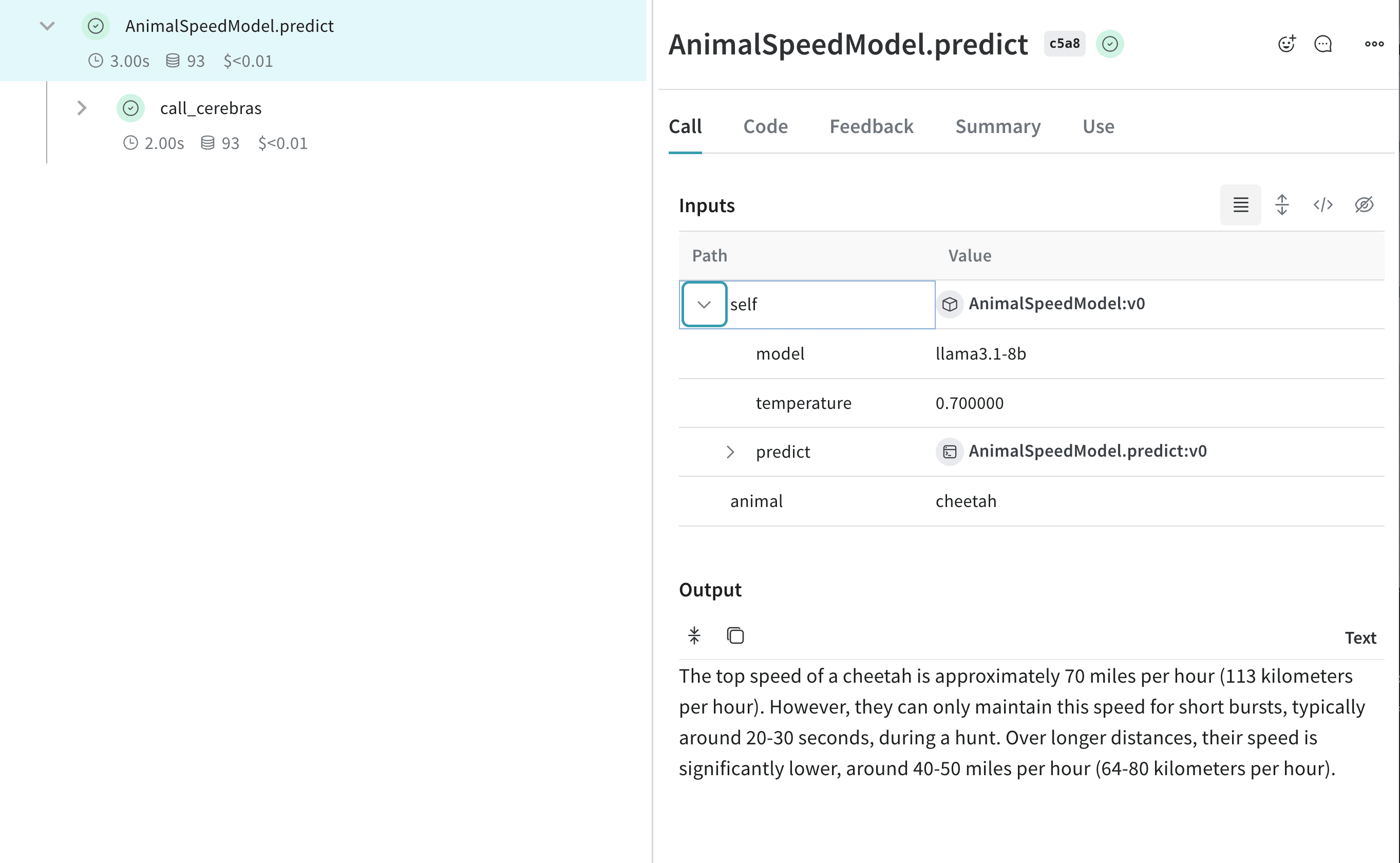
더 쉽게 실험할 수 있도록 `Model` 생성하기
Weave의 [Model](/ko/products/wandb/weave/guides/core-types/models) 클래스는 앱의 여러 버전을 정리하고 비교하는 데 도움이 됩니다. Cerebras 모델로 실험할 때 유용합니다. 다음은 예시입니다:
```python lines theme={"system"}
import os
import weave
from cerebras.cloud.sdk import Cerebras
# Weave 프로젝트 초기화
weave.init("cerebras_speedster")
client = Cerebras(api_key=os.environ["CEREBRAS_API_KEY"])
class AnimalSpeedModel(weave.Model):
model: str
temperature: float
@weave.op
def predict(self, animal: str) -> str:
"Predict the top speed of an animal"
response = client.chat.completions.create(
model=self.model,
messages=[{"role": "user", "content": f"What's the top speed of a {animal}?"}],
temperature=self.temperature
)
return response.choices[0].message.content
speed_model = AnimalSpeedModel(
model="llama3.1-8b",
temperature=0.7
)
result = speed_model.predict(animal="cheetah")
print(result)
```
이 설정을 통해 Cerebras 기반 추론을 추적하면서 다양한 모델과 매개변수를 실험할 수 있습니다.
[ ](https://forge.coreweave.com/wandb/capecape/cerebras_speedster/weave/traces)