> ## Documentation Index
> Fetch the complete documentation index at: https://docs.coreweave.com/llms.txt
> Use this file to discover all available pages before exploring further.

> 하이퍼파라미터 검색 및 W&B Sweeps를 사용한 모델 최적화

# Sweeps 개요

export const TryProductLink = ({url}) => <a href={url} target="_blank" rel="noopener noreferrer" className="github-source-link">
    <svg width="20" height="20" viewBox="0 0 24 24" fill="none" stroke="currentColor" strokeWidth="2" strokeLinecap="round" strokeLinejoin="round" xmlns="http://www.w3.org/2000/svg">
      <line x1="4" y1="21" x2="4" y2="14"></line>
      <line x1="4" y1="10" x2="4" y2="3"></line>
      <line x1="12" y1="21" x2="12" y2="12"></line>
      <line x1="12" y1="8" x2="12" y2="3"></line>
      <line x1="20" y1="21" x2="20" y2="16"></line>
      <line x1="20" y1="12" x2="20" y2="3"></line>
      <circle cx="4" cy="12" r="2"></circle>
      <circle cx="12" cy="10" r="2"></circle>
      <circle cx="20" cy="14" r="2"></circle>
    </svg>
    Try in W&amp;B
  </a>;

export const ColabLink = ({url}) => <a href={url} target="_blank" rel="noopener noreferrer" className="colab-link">
    <svg width="20" height="20" viewBox="0 0 24 24" fill="currentColor" xmlns="http://www.w3.org/2000/svg">
      <path d="M14.25.18l.9.2.73.26.59.3.45.32.34.34.25.34.16.33.1.3.04.26.02.2-.01.13V8.5l-.05.63-.13.55-.21.46-.26.38-.3.31-.33.25-.35.19-.35.14-.33.1-.3.07-.26.04-.21.02H8.77l-.69.05-.59.14-.5.22-.41.27-.33.32-.27.35-.2.36-.15.37-.1.35-.07.32-.04.27-.02.21v3.06H3.17l-.21-.03-.28-.07-.32-.12-.35-.18-.36-.26-.36-.36-.35-.46-.32-.59-.28-.73-.21-.88-.14-1.05-.05-1.23.06-1.22.16-1.04.24-.87.32-.71.36-.57.4-.44.42-.33.42-.24.4-.16.36-.1.32-.05.24-.01h.16l.06.01h8.16v-.83H6.18l-.01-2.75-.02-.37.05-.34.11-.31.17-.28.25-.26.31-.23.38-.2.44-.18.51-.15.58-.12.64-.1.71-.06.77-.04.84-.02 1.27.05zm-6.3 1.98l-.23.33-.08.41.08.41.23.34.33.22.41.09.41-.09.33-.22.23-.34.08-.41-.08-.41-.23-.33-.33-.22-.41-.09-.41.09zm13.09 3.95l.28.06.32.12.35.18.36.27.36.35.35.47.32.59.28.73.21.88.14 1.04.05 1.23-.06 1.23-.16 1.04-.24.86-.32.71-.36.57-.4.45-.42.33-.42.24-.4.16-.36.09-.32.05-.24.02-.16-.01h-8.22v.82h5.84l.01 2.76.02.36-.05.34-.11.31-.17.29-.25.25-.31.24-.38.2-.44.17-.51.15-.58.13-.64.09-.71.07-.77.04-.84.01-1.27-.04-1.07-.14-.9-.2-.73-.25-.59-.3-.45-.33-.34-.34-.25-.34-.16-.33-.1-.3-.04-.25-.02-.2.01-.13v-5.34l.05-.64.13-.54.21-.46.26-.38.3-.32.33-.24.35-.2.35-.14.33-.1.3-.06.26-.04.21-.02.13-.01h5.84l.69-.05.59-.14.5-.21.41-.28.33-.32.27-.35.2-.36.15-.36.1-.35.07-.32.04-.28.02-.21V6.07h2.09l.14.01.21.03zm-6.47 14.25l-.23.33-.08.41.08.41.23.33.33.23.41.08.41-.08.33-.23.23-.33.08-.41-.08-.41-.23-.33-.33-.23-.41-.08-.41.08z" />
    </svg>
    Try in Colab
  </a>;

<CardGroup cols={4}>
  <ColabLink url="https://colab.research.google.com/github/wandb/examples/blob/master/colabs/pytorch/Organizing_Hyperparameter_Sweeps_in_PyTorch_with_W%26B.ipynb" />

  <TryProductLink url="https://forge.coreweave.com/wandb/stacey/deep-drive/workspace?workspace=user-lavanyashukla" />
</CardGroup>

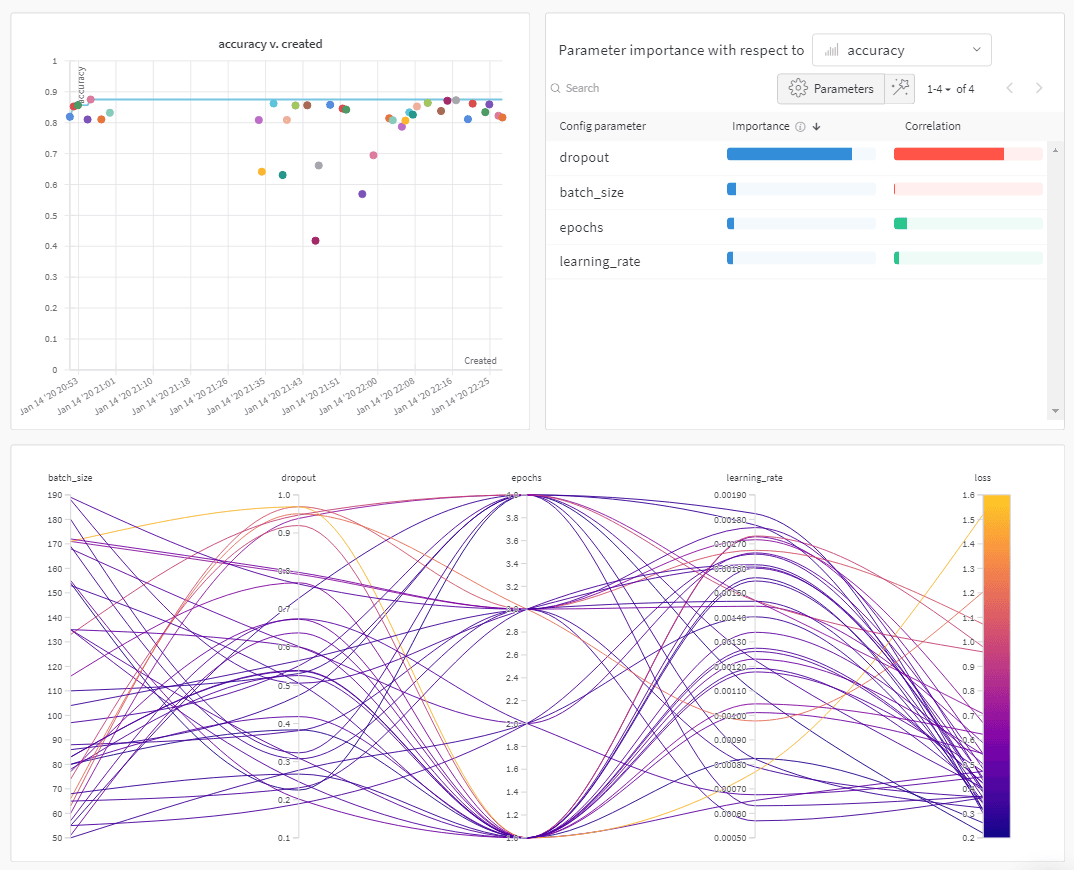
W\&B Sweeps를 사용해 하이퍼파라미터 검색을 자동화하고 풍부하고 대화형 실험 추적을 시각화하세요. 베이지안, 그리드 검색, 랜덤과 같은 인기 있는 검색 방법 중에서 선택하여 하이퍼파라미터 공간을 검색하세요. 하나 이상의 머신에서 스윕을 확장하고 병렬화하세요.

<Frame>
  <img src="https://mintcdn.com/coreweave-dbfa0e8d/3Dv_sw2eg8feUJlx/products/wandb/_media/intro_what_it_is.png?fit=max&auto=format&n=3Dv_sw2eg8feUJlx&q=85&s=ba08388f527cf31ca518354c1b04d832" alt="하이퍼파라미터 튜닝 인사이트" width="1074" height="870" data-path="products/wandb/_media/intro_what_it_is.png" />
</Frame>

<h2 id="how-it-works">
  작동 방식
</h2>

스윕을 두 개의 [W\&B CLI](/ko/products/wandb/ref/cli) 명령어로 생성하세요:

1. 스윕을 초기화하세요.

```bash theme={"system"}
  wandb sweep --project <project-name> <path-to-config file>
```

2. 스윕 에이전트를 시작하세요.

```bash theme={"system"}
  wandb agent <sweep-ID>
```

<Note>
  이전 코드 스니펫과 이 페이지에 링크된 colab은 W\&B CLI를 사용하여 스윕을 초기화하고 생성하는 방법을 보여줍니다. Python SDK를 사용하여 스윕을 설정하고, 초기화하고, 실행하는 방법은 [Sweeps 워크스루](/ko/products/wandb/sweeps/walkthrough)를 참조하세요.
</Note>

<h2 id="how-to-get-started">
  시작하기
</h2>

사용 사례에 따라 다음 리소스를 살펴보며 W\&B Sweeps를 시작해 보세요.

* [Sweeps 워크스루](/ko/products/wandb/sweeps/walkthrough)에서 스윕 설정 정의, 스윕 초기화, 스윕 시작에 사용하는 W\&B Python SDK 명령어를 단계별로 확인하세요.
* 이 장에서는 다음 방법을 알아볼 수 있습니다.
  * [코드에 W\&B 추가하기](/ko/products/wandb/sweeps/add-w-and-b-to-your-code)
  * [스윕 설정 정의하기](/ko/products/wandb/sweeps/define-sweep-configuration)
  * [스윕을 초기화](/ko/products/wandb/sweeps/initialize-sweeps)
  * [스윕 에이전트 시작하기](/ko/products/wandb/sweeps/start-sweep-agents)
  * [스윕 결과 시각화하기](/ko/products/wandb/sweeps/visualize-sweep-results)
* W\&B Sweeps로 하이퍼파라미터 최적화를 수행한 [엄선된 스윕 실험 목록](/ko/products/wandb/sweeps/useful-resources)을 살펴보세요. 결과는 W\&B Reports에 저장되어 있습니다.

단계별 비디오는 [Tune Hyperparameters Easily with W\&B Sweeps](https://www.youtube.com/watch?v=9zrmUIlScdY\&ab_channel=Weights%26Biases)를 참조하세요.

<h3 id="notebook-examples">
  노트북 예시
</h3>

다음 노트북 예시는 다양한 프레임워크와 사용 사례에서 W\&B Sweeps를 사용해 하이퍼파라미터 최적화를 수행하는 방법을 보여줍니다:

* [하이퍼파라미터 optimization with Sweeps](https://colab.research.google.com/github/wandb/examples/blob/master/colabs/tensorflow/Hyperparameter_Optimization_in_TensorFlow_using_W\&B_Sweeps.ipynb)
* [Using XGBoost with W\&B Sweeps](https://colab.research.google.com/github/wandb/examples/blob/master/colabs/boosting/Using_W\&B_Sweeps_with_XGBoost.ipynb)