> ## Documentation Index
> Fetch the complete documentation index at: https://docs.coreweave.com/llms.txt
> Use this file to discover all available pages before exploring further.
> Python 코드에서 트리거되는 알림을 Slack 또는 이메일로 보내기
# 알림 보내기
export const ColabLink = ({url}) =>
Try in Colab
;
Slack이나 이메일로 run이 크래시되거나 맞춤형 트리거로 알림을 만드세요. 예를 들어, 트레이닝 루프의 그라디언트가 폭발하기 시작하면(NaN을 보고) 알림을 만들 수 있습니다. 또는 ML 파이프라인의 단계가 완료되면 알림을 만들 수 있습니다. 알림은 run을 초기화하는 모든 프로젝트에 적용되며, 개인 및 팀 프로젝트를 모두 포함합니다.
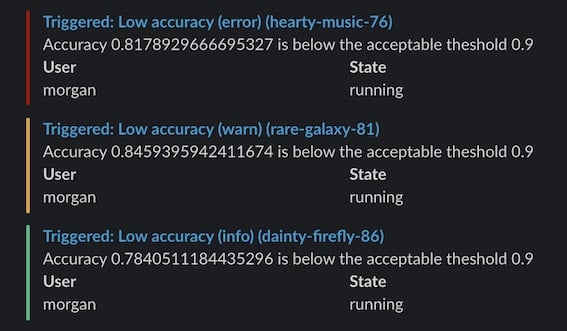
그리고 Slack(또는 이메일)에서 W\&B 알림 메시지를 확인하세요:
W\&B 알림을 사용하려면 코드에 `run.alert()`를 추가해야 합니다. 코드를 수정하지 않으면 [Automations](/ko/products/wandb/automations)에서 W\&B의 이벤트(예: [artifact](/ko/products/wandb/artifacts) 아티팩트 버전이 생성되거나 [run metric](/ko/products/wandb/runs)이 임계값을 충족하거나 변경될 때)를 기반으로 Slack에 알림을 보내는 또 다른 방법을 제공합니다.
예를 들어, 자동화는 새 버전이 생성될 때 Slack 채널에 알림을 보내거나, 아티팩트에 `production` 별칭이 추가될 때 자동화된 테스트 웹훅을 실행하거나, run의 `loss`가 허용 범위 내에 있을 때만 검증 작업을 시작할 수 있습니다.
[Automations 개요](/ko/products/wandb/automations)를 읽거나 [자동화 만들기](/ko/products/wandb/automations/create-automations)를 확인하세요.
다음 가이드는 Multi-tenant Cloud의 알림에만 적용됩니다.
Private Cloud 또는 W\&B Dedicated Cloud에서 [W\&B Server](/ko/products/wandb/platform/hosting)를 사용하는 경우 Slack 알림을 설정하려면 [W\&B Server에서 Slack 알림 구성](/ko/products/wandb/platform/hosting/monitoring-usage/slack-alerts)을 참고하세요.
자동화된 run 라이프사이클 알림
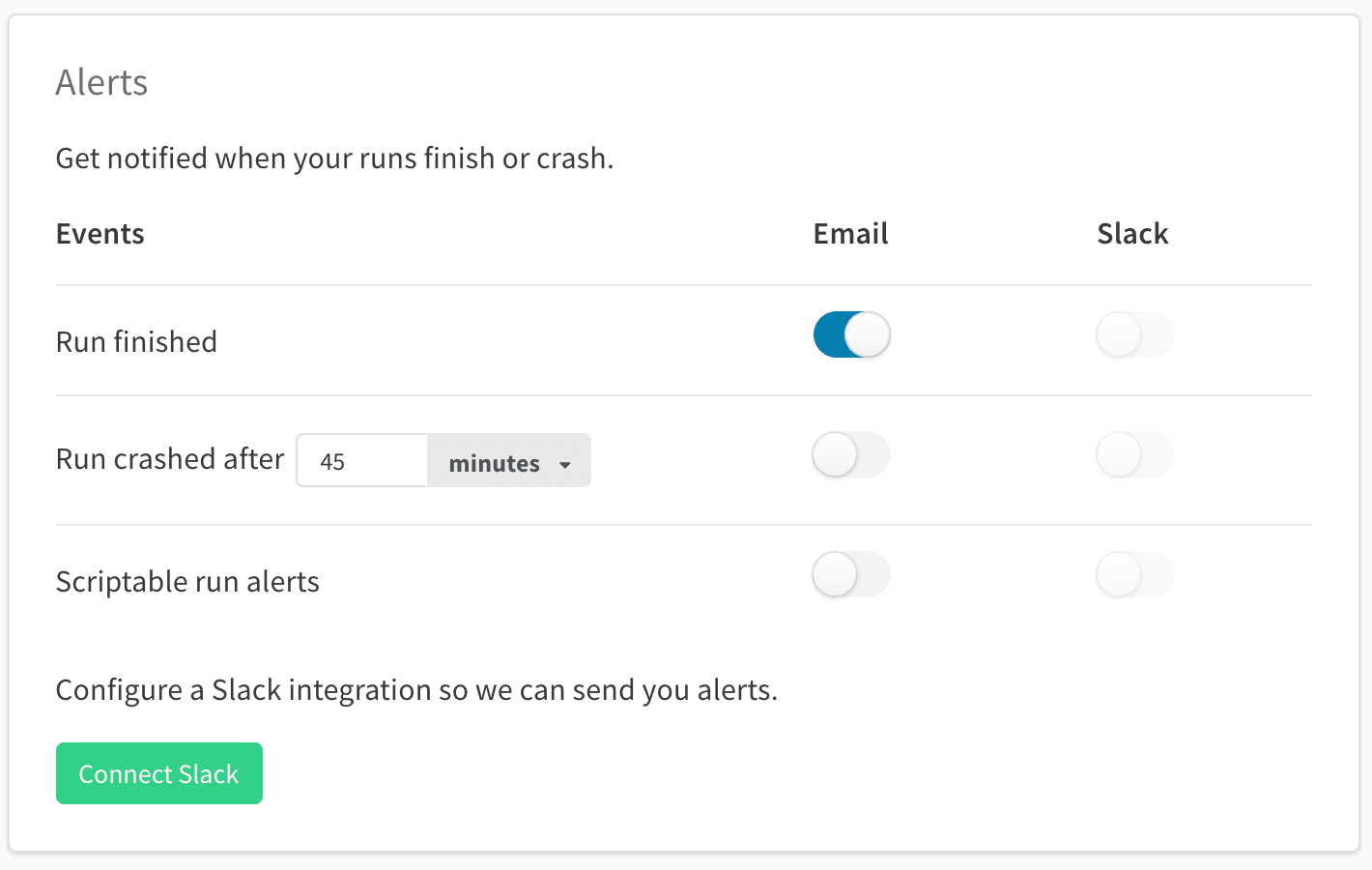
W\&B는 코드 변경 없이 run이 완료되거나 크래시될 때 알림을 보낼 수 있습니다. [User Settings](https://forge.coreweave.com/settings)에서 **Alerts** 섹션으로 스크롤한 다음 다음을 켜세요:
* **Run finished**: run이 성공적으로 완료되면 알림을 받습니다.
* **Run crashed**: [`run.finish()`](/ko/products/wandb/ref/python/experiments/run#finish)를 호출하지 않고 run이 종료될 때 알림을 받습니다.
이 토글은 사용자별입니다. **Run finished** 알림은 Jupyter 노트북의 run에는 적용되지 않습니다. 노트북에서는 완료 알림을 위해 `run.alert()`를 사용하세요.
알림은 이메일 또는 Slack으로 전달되며, 동일한 사용자 설정 패널에서 구성합니다. 전달 설정은 scriptable alerts와 공유되며, 다음 섹션에서 다루는 내용으로 metric 임계값이나 NaN loss와 같은 맞춤형 조건에서 알림을 트리거할 수 있게 합니다.
`run.alert()`로 scriptable alerts를 설정하려면 다음 단계를 따르세요. 이 단계는 다음 섹션에서 자세히 설명합니다:
1. W\&B [User Settings](https://forge.coreweave.com/settings)에서 Alerts를 켜세요.
2. 코드에 `run.alert()`를 추가하세요.
3. 구성을 테스트하세요.
1) W\&B User Settings에서 알림 켜기
[User Settings](https://forge.coreweave.com/settings)에서 다음을 수행하세요.
* **Alerts** 섹션까지 스크롤하세요.
* `run.alert()`에서 보내는 알림을 받으려면 **Scriptable run alerts**를 켜세요.
* **Connect Slack**을 사용하여 알림을 게시할 Slack 채널을 선택하세요. 알림을 비공개로 유지할 수 있는 **Slackbot** 채널을 권장합니다.
* **Email** 알림은 W\&B에 가입할 때 사용한 이메일 주소로 전송됩니다. 알림으로 받은편지함이 가득 차지 않도록 이메일 필터를 설정해 모든 알림이 한 폴더로 들어가게 하는 것이 좋습니다.
이 작업은 W\&B Alerts를 처음 설정할 때나 알림 수신 방식을 변경하려는 경우에만 하면 됩니다.
2. 코드에 `run.alert()` 추가하기
코드에 `run.alert()`를 추가하세요(노트북 또는 Python 스크립트에서). 트리거되기를 원하는 위치에
```python theme={"system"}
import wandb
with wandb.init() as run:
run.alert(title="High Loss", text="Loss is increasing rapidly")
```
3. 설정 테스트
Slack이나 이메일에서 알림 메시지를 확인하세요. 받지 못했다면 [User Settings](https://forge.coreweave.com/settings)에서 **Scriptable Alerts**에 대한 이메일이나 Slack 알림이 켜져 있는지 확인하세요.
예시
이 단순한 알림은 정확도가 임계값 미만으로 떨어지면 경고를 보냅니다. 이 예제에서는 최소 5분 간격으로만 알림을 보냅니다.
```python theme={"system"}
import wandb
from wandb import AlertLevel
with wandb.init() as run:
if acc < threshold:
run.alert(
title="Low accuracy",
text=f"Accuracy {acc} is below the acceptable threshold {threshold}",
level=AlertLevel.WARN,
wait_duration=300,
)
```
사용자 태그 또는 멘션
@ 기호 뒤에 Slack 사용자 ID를 붙여 알림의 제목이나 텍스트에서 자신이나 동료를 태그하세요. Slack 사용자 ID는 Slack 프로필 페이지에서 찾을 수 있습니다.
```python theme={"system"}
run.alert(title="Loss is NaN", text=f"Hey <@U1234ABCD> loss has gone to NaN")
```
팀 알림 설정
팀 관리자는 팀 설정 페이지에서 팀에 대한 알림을 설정할 수 있습니다: `wandb.ai/teams/your-team`.
팀 알림은 팀의 모든 사람에게 적용됩니다. W\&B는 알림을 비공개로 유지하기 때문에 **Slackbot** 채널을 사용하는 것을 권장합니다.
alerts를 보낼 Slack channel 변경
alerts를 보낼 channel을 변경하려면 **Disconnect Slack**을 클릭한 다음 다시 연결하세요. 다시 연결한 후 다른 Slack channel을 선택하세요.