> ## Documentation Index
> Fetch the complete documentation index at: https://docs.coreweave.com/llms.txt
> Use this file to discover all available pages before exploring further.
# 개요
> W&B 자동화를 만들고 관리하여 ML 워크플로를 간소화하세요
이 페이지에서는 W\&B에서 특정 이벤트가 발생할 때 시작되는 [자동화](/ko/products/wandb/automations)를 만들고 관리하는 방법을 설명합니다. 조직, 팀, 프로젝트, 레지스트리 또는 컬렉션에서 특정 이벤트가 발생하면 자동화가 Slack 채널에 알림을 보내거나, 웹훅을 실행하거나, ARIA에 프롬프트를 전송합니다. 이 개요에서 사전 요구 사항과 전체 워크플로를 파악한 다음, [Slack 자동화 만들기](/ko/products/wandb/automations/create-automations/slack), [웹훅 자동화 만들기](/ko/products/wandb/automations/create-automations/webhook) 또는 [ARIA 자동화 만들기](/ko/products/wandb/automations/create-automations/aria)의 자세한 안내를 따르세요.
자동화 관련 튜토리얼을 찾고 계신가요?
* [모델 평가 및 배포를 위해 GitHub Action을 자동으로 트리거하는 방법 알아보기](https://forge.coreweave.com/wandb/wandb/wandb-model-cicd/reports/Model-CI-CD-with-W-B--Vmlldzo0OTcwNDQw).
* [SageMaker 엔드포인트에 모델을 자동으로 배포하는 과정을 소개하는 비디오 보기](https://www.youtube.com/watch?v=s5CMj_w3DaQ).
* [자동화를 소개하는 비디오 시리즈 보기](https://youtube.com/playlist?list=PLD80i8An1OEGECFPgY-HPCNjXgGu-qGO6\&feature=shared).
요구 사항
자동화를 만들 때는 다음 요구 사항을 충족해야 합니다.
* 팀 Admin은 팀 프로젝트의 자동화뿐 아니라 웹훅, 시크릿, Slack 인테그레이션 등 자동화의 컴포넌트도 만들고 관리할 수 있습니다. [팀 설정](/ko/products/wandb/platform/app/settings-page/teams)을 참고하세요.
* 레지스트리 자동화를 만들려면 해당 레지스트리에 대한 액세스 권한이 있어야 합니다. [레지스트리 액세스 설정](/ko/products/registry/configure_registry#registry-roles)을 참고하세요.
* Slack 자동화를 만들려면 선택한 Slack 인스턴스와 채널에 메시지를 게시할 권한이 있어야 합니다.
자동화 만들기
자동화는 왼쪽 내비게이션의 글로벌 **Automations** 허브, 프로젝트 또는 레지스트리의 **Automations** 탭에서 만들 수 있으며, 워크스페이스의 선형 플롯 패널에서 바로 만들 수도 있습니다. 허브에서 자동화를 만들 때는 자동화의 범위(조직, 팀, 레지스트리, 레지스트리 컬렉션 또는 프로젝트)를 선택합니다. 자세한 내용은 [Automations 허브](/ko/products/wandb/automations#automations-hub)를 참조하세요.
Automations 탭에서 만들기
**Automations** 탭에서 자동화를 만드는 전체적인 과정은 다음과 같습니다.
1. 필요한 경우 액세스 토큰, 비밀번호, SSH 키 등 자동화에 필요한 민감한 문자열마다 [W\&B 시크릿을 만드세요](/ko/products/wandb/platform/secrets). 시크릿을 사용하면 민감한 문자열을 안전하게 재사용할 수 있고, 자동화 설정에 직접 노출하지 않아도 됩니다. 시크릿은 **팀 설정**에서 정의하세요. 시크릿은 주로 웹훅 자동화에서 사용합니다.
2. W\&B가 사용자를 대신해 Slack에 게시하거나 웹훅을 실행할 수 있도록 팀 수준의 웹훅 또는 Slack 인테그레이션을 설정하세요. 하나의 웹훅 또는 Slack 인테그레이션을 여러 자동화에서 함께 사용할 수 있습니다. 이러한 액션은 **팀 설정**에서 정의하세요.
3. 프로젝트 또는 레지스트리에서 자동화를 만드세요. 자동화에서는 감시할 이벤트와 수행할 액션(Slack에 게시, 웹훅 실행 등)을 지정합니다. 웹훅 자동화를 만들 때는 전송할 페이로드도 함께 설정합니다.
이 단계를 모두 완료하면 프로젝트 또는 레지스트리에서 지정한 이벤트가 발생할 때마다 자동화가 실행됩니다.
워크스페이스 패널에서 run 메트릭 자동화 만들기
워크스페이스의 선형 플롯에서 해당 플롯에 표시된 메트릭에 대한 [run 메트릭 자동화](/ko/products/wandb/automations/automation-events#run-events)를 바로 만들 수도 있습니다.
1. 패널에 마우스를 올린 다음, 패널 상단의 종 아이콘을 클릭하세요.
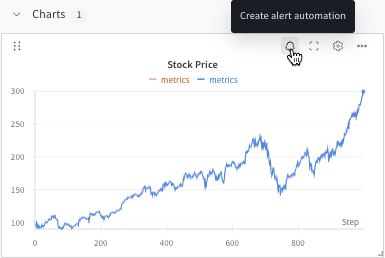 2. 기본 또는 고급 설정 컨트롤을 사용하여 자동화를 설정하세요. 예를 들어 run 필터를 적용해 자동화의 범위를 제한하거나 절대 임계값을 설정할 수 있습니다.
자세한 내용은 다음을 참고하세요.
* [Slack 자동화 만들기](/ko/products/wandb/automations/create-automations/slack)
* [웹훅 자동화 만들기](/ko/products/wandb/automations/create-automations/webhook)
* [ARIA 자동화 만들기](/ko/products/wandb/automations/create-automations/aria)
2. 기본 또는 고급 설정 컨트롤을 사용하여 자동화를 설정하세요. 예를 들어 run 필터를 적용해 자동화의 범위를 제한하거나 절대 임계값을 설정할 수 있습니다.
자세한 내용은 다음을 참고하세요.
* [Slack 자동화 만들기](/ko/products/wandb/automations/create-automations/slack)
* [웹훅 자동화 만들기](/ko/products/wandb/automations/create-automations/webhook)
* [ARIA 자동화 만들기](/ko/products/wandb/automations/create-automations/aria)
자동화 보기 및 관리
프로젝트 또는 레지스트리의 **Automations** 탭에서 자동화를 확인하고 관리할 수 있습니다.
* 자동화의 세부 정보를 보려면 자동화 이름을 클릭하세요.
* 자동화의 실행 이력(어떤 액션이 실행되었고 성공했는지)을 보려면 자동화 이름을 클릭한 다음 **History** 탭을 선택하세요. 자세한 내용은 [자동화 이력 보기](/ko/products/wandb/automations/view-automation-history)를 참조하세요.
* 자동화를 편집하려면 해당 자동화의 **액션()** 메뉴를 클릭한 다음 **Edit automation**을 클릭하세요.
* 자동화를 삭제하려면 해당 자동화의 **액션()** 메뉴를 클릭한 다음 **Delete automation**을 클릭하세요.
더 알아보기
자세한 내용은 다음 리소스를 참조하세요.
* [Automations 튜토리얼](/ko/products/wandb/automations/tutorial): W\&B App에서 [프로젝트 run 실패 알림](/ko/products/wandb/automations/project-automation-tutorial) 또는 [레지스트리 별칭 기반 웹훅 자동화](/ko/products/wandb/automations/registry-automation-tutorial)를 구축해 보세요.
* [자동화 이벤트 및 범위](/ko/products/wandb/automations/automation-events)
* [Slack 자동화 만들기](/ko/products/wandb/automations/create-automations/slack)
* [웹훅 자동화 만들기](/ko/products/wandb/automations/create-automations/webhook)
* [ARIA 자동화 만들기](/ko/products/wandb/automations/create-automations/aria)
* [시크릿 만들기](/ko/products/wandb/platform/secrets)