> ## Documentation Index
> Fetch the complete documentation index at: https://docs.coreweave.com/llms.txt
> Use this file to discover all available pages before exploring further.
> Create a new artifact version from a single run or from a distributed process.
# Create an artifact version
단일 [run](/ko/products/wandb/runs)으로 또는 분산 run 간 협업을 통해 새 아티팩트 버전을 생성하세요. 선택적으로 이전 버전을 기반으로 새 아티팩트 버전을 생성할 수도 있으며, 이를 [증분 아티팩트](#create-a-new-artifact-version-from-an-existing-version)라고 합니다.
원본 아티팩트의 크기가 훨씬 크고 아티팩트 내 일부 파일에만 변경 사항을 적용해야 하는 경우, 증분 아티팩트를 생성하는 것이 좋습니다.
새 아티팩트 버전을 처음부터 만들기
새 아티팩트 버전을 만드는 방법은 단일 run과 분산 run의 두 가지입니다. 각각의 정의는 다음과 같습니다:
* **단일 run**: 하나의 run이 새 버전에 필요한 모든 데이터를 제공합니다. 가장 일반적인 경우이며, run이 필요한 데이터를 모두 다시 생성할 때 가장 적합합니다. 예를 들어, 저장된 모델이나 모델 예측을 분석용 table로 출력하는 경우입니다.
* **분산 run**: 여러 run이 함께 새 버전에 필요한 모든 데이터를 제공합니다. 여러 run이 데이터를 생성하는 분산 작업에 가장 적합하며, 대개 병렬로 수행됩니다. 예를 들어, 분산 방식으로 모델을 평가하고 예측을 출력하는 경우입니다.
`wandb.Artifact` API에 프로젝트에 없는 이름을 전달하면 W\&B는 새 아티팩트를 만들고 `v0` 별칭을 부여합니다. 동일한 아티팩트에 다시 로깅하면 W\&B는 콘텐츠의 체크섬을 계산합니다. 아티팩트가 변경되었다면 W\&B는 새 버전 `v1`을 저장합니다.
`wandb.Artifact` API에 프로젝트의 기존 아티팩트와 일치하는 이름과 아티팩트 유형을 전달하면 W\&B는 기존 아티팩트를 가져옵니다. 가져온 아티팩트의 버전은 1보다 큽니다.
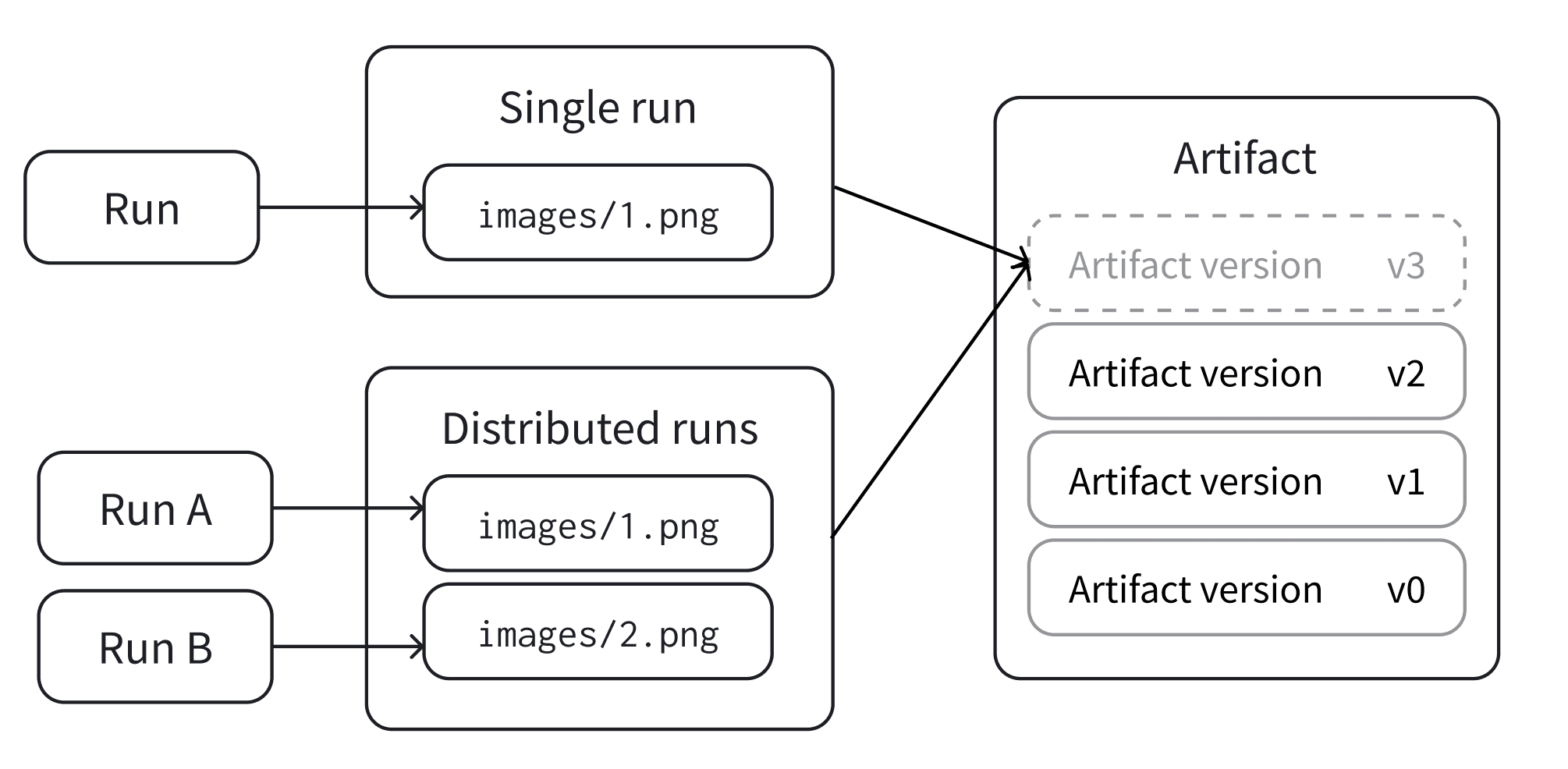
단일 run
단일 run으로 아티팩트의 새 버전을 로깅하세요. 이 경우 단일 run이 아티팩트의 모든 파일을 생성합니다.
사용 사례에 따라 아래 탭 중 하나를 선택하여 새 아티팩트 버전을 생성하세요:
`wandb.Run.log_artifact()`를 사용하여 run의 출력으로 아티팩트를 명시적으로 표시하세요.
`Artifact.save()`를 편의 방법으로 사용하세요. run이 활성 상태이면 W\&B가 아티팩트를 해당 run에 로깅합니다. 그렇지 않으면 W\&B가 자동 run을 생성하고 거기에 로깅합니다.
`wandb.Run.log_artifact()`를 사용하여 아티팩트를 run과 명시적으로 연결하세요:
1. `wandb.init()`으로 run을 생성하세요.
2. `wandb.Artifact`로 새 아티팩트를 생성하거나 기존 아티팩트를 검색하세요.
3. `wandb.Artifact.add_file()`로 아티팩트에 파일을 추가하세요.
4. `wandb.Run.log_artifact()`로 run에 아티팩트를 로깅하세요.
```python theme={"system"}
with wandb.init() as run:
artifact = wandb.Artifact("artifact_name", "artifact_type")
# Add Files and Assets to the artifact using
# `.add`, `.add_file`, `.add_dir`, and `.add_reference`
artifact.add_file("image1.png")
run.log_artifact(artifact)
```
`wandb.Artifact.save()`를 현재 컨텍스트에서 아티팩트를 저장하는 편의 방법으로 사용하세요:
1. `wandb.Artifact`로 새 아티팩트를 생성하거나 기존 아티팩트를 검색하세요.
2. `wandb.Artifact.add_file()`로 아티팩트에 파일을 추가하세요.
3. `wandb.Artifact.save()`로 아티팩트를 저장하세요.
```python theme={"system"}
artifact = wandb.Artifact("artifact_name", "artifact_type")
# Add Files and Assets to the artifact using
# `.add`, `.add_file`, `.add_dir`, and `.add_reference`
artifact.add_file("image1.png")
artifact.save()
```
분산 run
여러 run이 하나의 버전을 커밋하기 전에 함께 작업하도록 할 수 있습니다. 이는 하나의 run이 새 버전의 모든 데이터를 제공하는, 앞에서 설명한 단일 run 모드와는 다른 방식입니다.
1. 같은 버전에서 공동 작업하려면 컬렉션의 각 run이 동일한 고유 ID(`distributed_id`)를 알고 있어야 합니다. 기본적으로 W\&B는 `wandb.init(group=GROUP)`으로 설정된 run의 `group`이 있으면 이를 `distributed_id`로 사용합니다.
2. 버전을 "커밋"하여 해당 상태를 영구적으로 잠그는 최종 run이 있어야 합니다.
3. 공동 아티팩트에 추가하려면 `upsert_artifact`를 사용하고, 커밋을 완료하려면 `finish_artifact`를 사용하세요.
다음 예시를 살펴보세요. 서로 다른 run(아래에서 **run 1**, **run 2**, **run 3**으로 표시)이 `upsert_artifact`를 사용해 동일한 아티팩트에 각기 다른 이미지 파일을 추가합니다.
run 1
```python theme={"system"}
with wandb.init() as run:
artifact = wandb.Artifact("artifact_name", "artifact_type")
# 다음 메서드를 사용하여 아티팩트에 파일과 자산을 추가하세요
# `.add`, `.add_file`, `.add_dir`, `.add_reference`
artifact.add_file("image1.png")
run.upsert_artifact(artifact, distributed_id="my_dist_artifact")
```
run 2
```python theme={"system"}
with wandb.init() as run:
artifact = wandb.Artifact("artifact_name", "artifact_type")
# 아티팩트에 파일과 자산을 추가하려면
# `.add`, `.add_file`, `.add_dir` 및 `.add_reference`를 사용하세요
artifact.add_file("image2.png")
run.upsert_artifact(artifact, distributed_id="my_dist_artifact")
```
Run 3
Run 1과 Run 2가 완료된 후에 실행해야 합니다. `wandb.Run.finish_artifact()`를 호출하는 run은 아티팩트에 파일을 포함할 수 있지만, 반드시 포함할 필요는 없습니다.
```python theme={"system"}
with wandb.init() as run:
artifact = wandb.Artifact("artifact_name", "artifact_type")
# 아티팩트에 파일과 자산을 추가하세요
# `.add`, `.add_file`, `.add_dir`, 및 `.add_reference`
artifact.add_file("image3.png")
run.finish_artifact(artifact, distributed_id="my_dist_artifact")
```
기존 버전에서 새 아티팩트 버전 만들기
기존 아티팩트 버전에서 파일을 추가, 수정 또는 제거하여 새 아티팩트 버전을 만듭니다. W\&B는 변경된 파일만 다시 인덱싱합니다. 결과 버전은 *증분* 아티팩트로 알려져 있습니다.
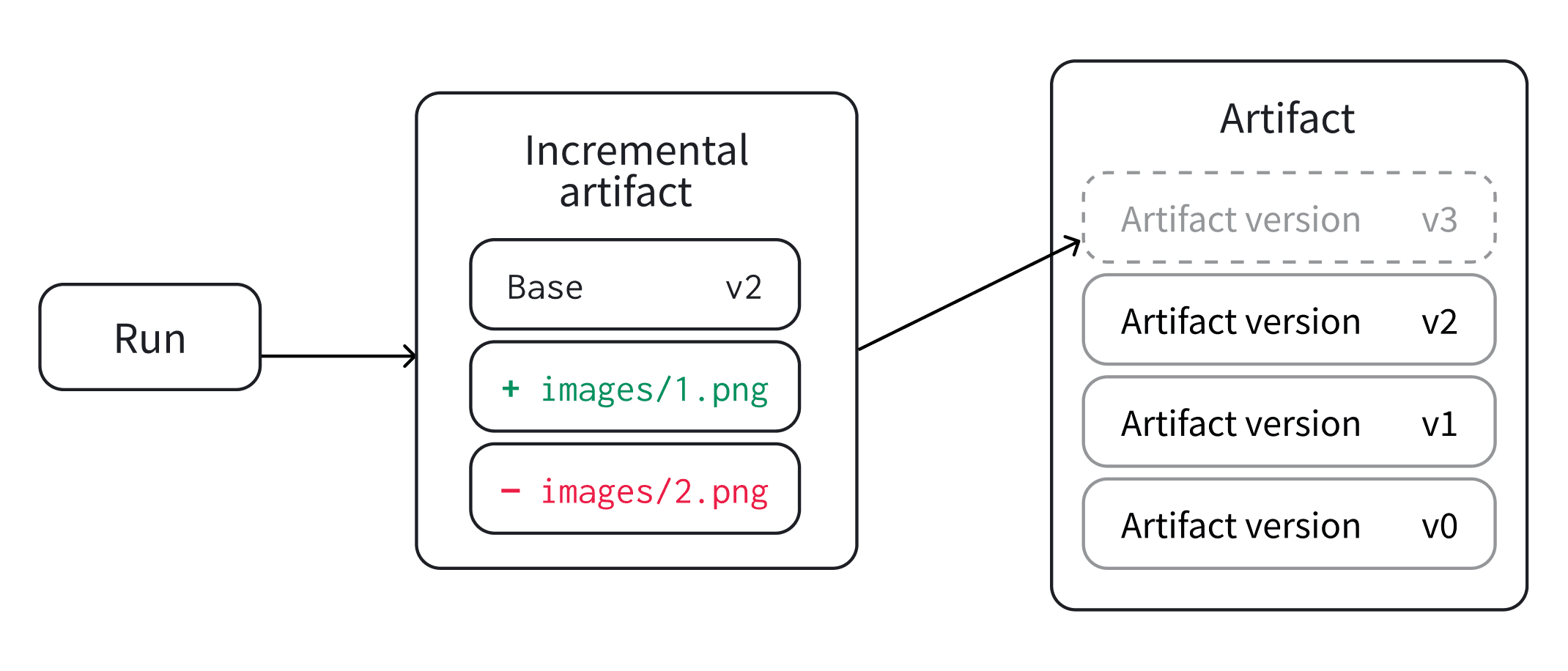 증분 아티팩트를 만들려면 이전에 커밋된 아티팩트 버전에서 *초안*을 만드세요. 그런 다음 `Artifact.add_file()`, `Artifact.add_dir()`, `Artifact.remove()`와 같은 방법을 사용하여 초안을 수정할 수 있습니다. 방법의 전체 목록은 [`Artifact` 레퍼런스 문서](/ko/products/wandb/ref/python/experiments/artifact)를 참조하세요.
초안 수정을 종료한 후 로깅하거나 저장하여 새 아티팩트 버전을 만듭니다.
증분 아티팩트를 만드는 대신 처음부터 새 아티팩트를 만들 수 있습니다. 그러나 이 접근 방식은 모든 아티팩트 파일이 로컬 디스크에 사용 가능해야 합니다. 증분 아티팩트를 사용하면 이전 아티팩트 버전의 변경되지 않은 파일을 재사용하면서 개별 파일을 추가, 제거 또는 수정할 수 있습니다.
증분 아티팩트는 단일 run을 사용하거나 새 버전에 기여하는 여러 run에 걸쳐 만들 수 있습니다. 다음 섹션에서는 각 경우에 증분 아티팩트를 만드는 방법을 설명합니다.
증분 아티팩트를 만들려면 이전에 커밋된 아티팩트 버전에서 *초안*을 만드세요. 그런 다음 `Artifact.add_file()`, `Artifact.add_dir()`, `Artifact.remove()`와 같은 방법을 사용하여 초안을 수정할 수 있습니다. 방법의 전체 목록은 [`Artifact` 레퍼런스 문서](/ko/products/wandb/ref/python/experiments/artifact)를 참조하세요.
초안 수정을 종료한 후 로깅하거나 저장하여 새 아티팩트 버전을 만듭니다.
증분 아티팩트를 만드는 대신 처음부터 새 아티팩트를 만들 수 있습니다. 그러나 이 접근 방식은 모든 아티팩트 파일이 로컬 디스크에 사용 가능해야 합니다. 증분 아티팩트를 사용하면 이전 아티팩트 버전의 변경되지 않은 파일을 재사용하면서 개별 파일을 추가, 제거 또는 수정할 수 있습니다.
증분 아티팩트는 단일 run을 사용하거나 새 버전에 기여하는 여러 run에 걸쳐 만들 수 있습니다. 다음 섹션에서는 각 경우에 증분 아티팩트를 만드는 방법을 설명합니다.
단일 run
현재 run이 아티팩트를 사용하는 경우 `wandb.Run.use_artifact()`를 사용하세요. W\&B는 아티팩트를 run의 입력으로 기록합니다.
1. `wandb.Run.use_artifact()`로 아티팩트 버전을 가져오세요.
2. `Artifact.new_draft()`로 초안을 생성하세요.
3. 초안의 항목을 추가, 제거 또는 수정하세요.
4. `wandb.Run.log_artifact()`로 초안을 로깅하여 새 아티팩트 버전을 생성하세요.
```python lines theme={"system"}
with wandb.init(job_type="modify dataset") as run:
saved_artifact = run.use_artifact(
"my_artifact:latest"
) # 아티팩트를 가져와 run의 입력으로 사용
draft_artifact = saved_artifact.new_draft() # 초안 버전 생성
# 초안 버전의 일부 파일 수정
draft_artifact.add_file("file_to_add.txt")
draft_artifact.remove("dir_to_remove/")
run.log_artifact(
draft_artifact
) # 변경 사항을 로깅하여 새 버전을 생성하고 run의 출력으로 표시
```
Public API를 사용하여 아티팩트를 run의 입력으로 기록하지 않고 가져오세요.
1. `wandb.Api.artifact()`로 아티팩트 버전을 가져오세요.
2. `Artifact.new_draft()`로 초안을 생성하세요.
3. 초안의 항목을 추가, 제거 또는 수정하세요.
4. `Artifact.save()`로 초안 버전을 저장하여 새 아티팩트 버전을 생성하세요.
```python theme={"system"}
client = wandb.Api()
saved_artifact = client.artifact("my_artifact:latest") # 아티팩트 불러오기
draft_artifact = saved_artifact.new_draft() # 초안 버전 생성
# 초안 버전의 일부 파일 수정
draft_artifact.remove("deleted_file.txt")
draft_artifact.add_file("modified_file.txt")
draft_artifact.save() # 초안의 변경 사항 커밋
```
분산 run
여러 run이 하나의 아티팩트 버전에 파일을 추가할 때는 `Artifact.upsert_artifact()`와 `Artifact.finish_artifact()`를 사용하세요.
다음 예시는 아티팩트를 [run의 입력으로 사용](/ko/products/wandb/artifacts/create-a-new-artifact-version#use-as-run-input)하는 경우 분산 run에서 새 아티팩트 버전을 생성하는 방법을 보여줍니다. Public API로 아티팩트를 [직접 가져오는](/ko/products/wandb/artifacts/create-a-new-artifact-version#fetch-directly) 경우에도 같은 방식이 적용됩니다.
```python theme={"system"}
import wandb
project = ""
artifact_name = ""
distributed_id = "dataset-build-001"
worker_files = [
("data/shards/worker-0.txt", "shards/worker-0.txt"),
("data/shards/worker-1.txt", "shards/worker-1.txt"),
]
for local_path, artifact_path in worker_files:
with wandb.init(project=project, group=distributed_id) as run:
artifact = wandb.Artifact(artifact_name, type="dataset")
artifact.add_file(local_path, name=artifact_path)
run.upsert_artifact(artifact, distributed_id=distributed_id)
with wandb.init(project=project, group=distributed_id) as run:
artifact = wandb.Artifact(artifact_name, type="dataset")
logged = run.finish_artifact(
artifact,
aliases=["latest"],
distributed_id=distributed_id,
)
logged.wait()
```
커밋된 아티팩트 버전을 수정할 때는 `Artifact.new_draft()`를 사용하세요.
여러 run이 하나의 아티팩트 버전이 확정되기 전에 공동으로 작업해야 할 때는 `Artifact.upsert_artifact()`와 `Artifact.finish_artifact()`를 사용하세요.
## Related topics
- [artifactVersion](/ko/products/wandb/ref/query-panel/artifact-version.md)