> ## Documentation Index
> Fetch the complete documentation index at: https://docs.coreweave.com/llms.txt
> Use this file to discover all available pages before exploring further.
> W&B Artifacts의 개요, 작동 방식 및 사용을 시작하는 방법입니다.
# Artifacts 개요
export const TryProductLink = ({url}) =>
Try in W&B
;
export const ColabLink = ({url}) =>
Try in Colab
;
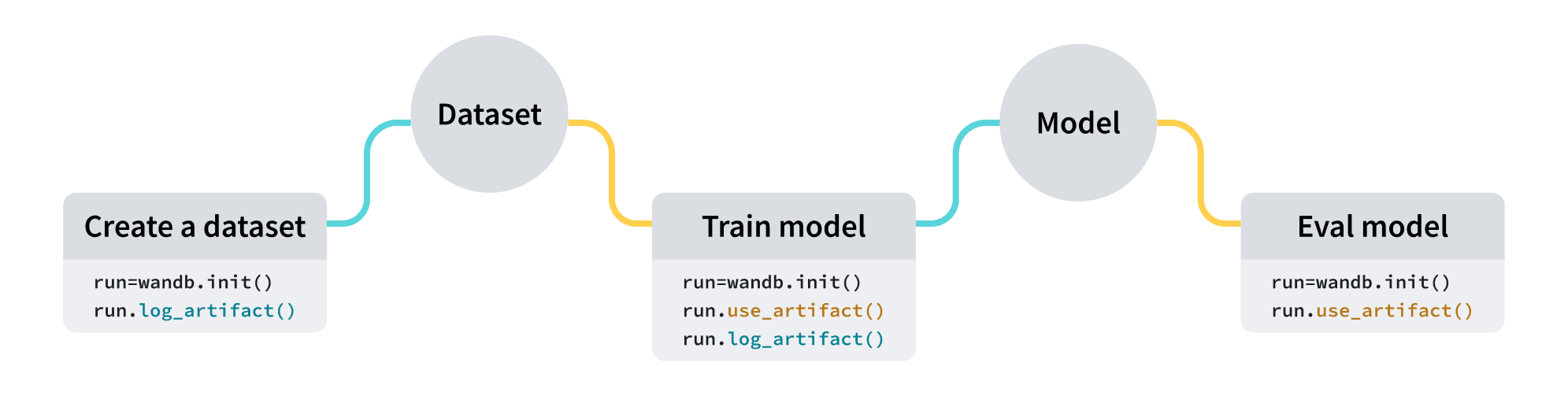
W\&B Artifacts를 사용하여 데이터의 입력과 출력으로 [W\&B Runs](/ko/products/wandb/runs)를 추적하고 버전 관리하세요. 예를 들어, 모델 트레이닝 run은 데이터셋을 입력으로 받아 트레이닝된 모델을 출력으로 생성할 수 있습니다. run에 하이퍼파라미터, 메타데이터, 메트릭을 로깅할 수 있으며, 아티팩트를 사용하여 모델 트레이닝에 사용된 데이터셋을 입력으로, 결과 모델 체크포인트를 출력으로 로깅, 추적 및 버전 관리할 수 있습니다.
사용 사례
전체 ML 워크플로에서 아티팩트를 [run](/ko/products/wandb/runs)의 입력과 출력으로 사용할 수 있습니다. 데이터셋, 모델 또는 다른 아티팩트를 처리할 입력으로 사용할 수 있습니다.
| 사용 사례 | 입력 | 출력 |
| - | - | - |
| 모델 트레이닝 | 데이터셋 (트레이닝 및 검증 데이터) | 트레이닝된 모델 |
| 데이터셋 전처리 | 데이터셋 (원시 데이터) | 데이터셋 (전처리된 데이터) |
| 모델 평가 | 모델 + 데이터셋 (테스트 데이터) | [W\&B Table](/ko/products/wandb/tables) |
| 모델 최적화 | 모델 | 최적화된 모델 |
다음 코드 스니펫은 순서대로 실행하도록 작성되었습니다.
아티팩트 만들기
네 줄의 코드로 아티팩트를 만드세요:
1. [W\&B run](/ko/products/wandb/runs)을 만드세요.
2. [`wandb.Artifact`](/ko/products/wandb/ref/python/experiments/artifact)로 아티팩트 객체를 만드세요.
3. `wandb.Artifact.add_file()`로 모델 파일이나 데이터셋 등의 파일을 하나 이상 아티팩트 객체에 추가하세요.
4. `wandb.Run.log_artifact()`로 아티팩트를 W\&B에 로깅하세요.
예를 들어, 다음 코드 스니펫은 `dataset.h5`라는 파일을 `example_artifact`라는 아티팩트에 로깅하는 방법을 보여줍니다:
```python theme={"system"}
import wandb
with wandb.init(project="artifacts-example", job_type="add-dataset") as run:
artifact = wandb.Artifact(name="example_artifact", type="dataset")
artifact.add_file(local_path="./dataset.h5", name="training_dataset")
run.log_artifact(artifact)
```
* 아티팩트의 `type`은 W\&B 플랫폼에서 아티팩트가 표시되는 방식에 영향을 줍니다. `type`을 지정하지 않으면 기본값인 `unspecified`로 설정됩니다.
* 드롭다운의 각 레이블은 서로 다른 `type` 매개변수 값을 나타냅니다. 위 코드 스니펫에서 아티팩트의 `type`은 `dataset`입니다.
Amazon S3 버킷과 같은 외부 객체 저장소에 저장된 파일이나 디렉터리에 대한 참조를 추가하는 방법은 [외부 파일 추적](/ko/products/wandb/artifacts/track-external-files) 페이지를 참조하세요.
아티팩트 다운로드
[`wandb.Run.use_artifact()`](/ko/products/wandb/ref/python/experiments/run#use_artifact) 방법을 사용하여 run에 입력으로 표시할 아티팩트를 지정하세요.
이전 코드 스니펫에 이어, 다음 코드 예시는 이전에 생성한 `example_artifact`라는 아티팩트를 사용하는 방법을 보여줍니다:
```python theme={"system"}
with wandb.init(project="artifacts-example", job_type="add-dataset") as run:
artifact = run.use_artifact("training_dataset:latest") # "my_data" 아티팩트를 사용하는 run 객체를 반환합니다
```
아티팩트 객체를 반환합니다.
다음으로, 반환된 객체를 사용하여 아티팩트의 모든 내용을 다운로드하세요:
```python theme={"system"}
datadir = artifact.download() # `my_data` 아티팩트 전체를 기본 디렉터리에 다운로드합니다.
```
`root` [매개변수](/ko/products/wandb/ref/python/experiments/artifact)에 맞춤형 경로를 전달하여 특정 디렉터리에 아티팩트를 다운로드할 수 있습니다. 아티팩트를 다운로드하는 다른 방법과 추가 매개변수는 [아티팩트 다운로드 및 사용](/ko/products/wandb/artifacts/download-and-use-an-artifact) 가이드를 참조하세요.
다음 단계
* 아티팩트의 [버전 관리](/ko/products/wandb/artifacts/create-a-new-artifact-version) 및 [업데이트](/ko/products/wandb/artifacts/update-an-artifact) 방법을 알아보세요.
* [자동화](/ko/products/wandb/automations)를 사용하여 아티팩트 변경에 따라 후속 워크플로를 트리거하거나 Slack 채널에서 알림 받기를 설정하는 방법을 알아보세요.
* 트레이닝된 모델을 보관하는 공간인 [레지스트리](/ko/products/registry)에 대해 알아보세요.
* [Python SDK](/ko/products/wandb/ref/python/experiments/artifact) 및 [CLI](/ko/products/wandb/ref/cli/wandb-artifact) 레퍼런스 가이드를 살펴보세요.
## Related topics
- [개요](/ko/products/wandb/runs.md)
 | 사용 사례 | 입력 | 출력 |
| - | - | - |
| 모델 트레이닝 | 데이터셋 (트레이닝 및 검증 데이터) | 트레이닝된 모델 |
| 데이터셋 전처리 | 데이터셋 (원시 데이터) | 데이터셋 (전처리된 데이터) |
| 모델 평가 | 모델 + 데이터셋 (테스트 데이터) | [W\&B Table](/ko/products/wandb/tables) |
| 모델 최적화 | 모델 | 최적화된 모델 |
| 사용 사례 | 입력 | 출력 |
| - | - | - |
| 모델 트레이닝 | 데이터셋 (트레이닝 및 검증 데이터) | 트레이닝된 모델 |
| 데이터셋 전처리 | 데이터셋 (원시 데이터) | 데이터셋 (전처리된 데이터) |
| 모델 평가 | 모델 + 데이터셋 (테스트 데이터) | [W\&B Table](/ko/products/wandb/tables) |
| 모델 최적화 | 모델 | 최적화된 모델 |