> ## Documentation Index
> Fetch the complete documentation index at: https://docs.coreweave.com/llms.txt
> Use this file to discover all available pages before exploring further.
# ネストされた関数をトレースする
> W&B のトレースで、深くネストされた Call 構造をトラッキングする方法を説明します
このチュートリアルでは、Weave でネストされた関数をトレースし、LLM を活用したアプリケーションの実行フロー全体を、サブ関数とその親子関係も含めて監視する方法を説明します。このチュートリアルを終えると、ネストされたトレースを取得・可視化し、Weave の **Traces** ページでメタデータを追加できるようになります。
LLM を活用したアプリケーションには、複数の LLM Call や追加のデータ処理、検証ロジックなど、監視すべき重要な処理が含まれることがあります。Weave では、`@weave.op()` デコレーター (Python) を使用するか、`weave.op()` でラップする (TypeScript) ことで、これらのネストされた関数とその親子関係をトラッキングできます。
アプリケーションの実行フロー全体を取得できるよう、関数とサブ関数にはできるだけ細かい粒度でデコレーターを適用してください。これにより、アプリケーションの動作をより深く理解し、改善しやすくなります。
ネストされた関数をトレースする
このセクションでは、関数とそのネストされたサブ関数をトレースする例を順を追って説明します。以下のコードは [クイックスタートの例](/ja/products/wandb/weave/quickstart) をベースに、LLM から返された項目の数をカウントするロジックを追加し、それらを上位の関数でラップしています。さらに、この例では `weave.op()` を使用して、すべての関数とその呼び出し順序、親子関係をトレースします。
```python {1,7,26,32,42} theme={"system"}
import weave
import json
from openai import OpenAI
client = OpenAI()
@weave.op()
def extract_dinos(sentence: str) -> dict:
response = client.chat.completions.create(
model="gpt-4o",
messages=[
{
"role": "system",
"content": """Extract any dinosaur `name`, their `common_name`, \
names and whether its `diet` is a herbivore or carnivore, in JSON format."""
},
{
"role": "user",
"content": sentence
}
],
response_format={ "type": "json_object" }
)
return response.choices[0].message.content
@weave.op()
def count_dinos(dino_data: dict) -> int:
# 返されたリスト内の項目数をカウントする
k = list(dino_data.keys())[0]
return len(dino_data[k])
@weave.op()
def dino_tracker(sentence: str) -> dict:
# LLM を使用して恐竜を抽出する
dino_data = extract_dinos(sentence)
# 返された恐竜の数をカウントする
dino_data = json.loads(dino_data)
n_dinos = count_dinos(dino_data)
return {"n_dinosaurs": n_dinos, "dinosaurs": dino_data}
weave.init('jurassic-park')
sentence = """I watched as a Tyrannosaurus rex (T. rex) chased after a Triceratops (Trike), \
both carnivore and herbivore locked in an ancient dance. Meanwhile, a gentle giant \
Brachiosaurus (Brachi) calmly munched on treetops, blissfully unaware of the chaos below."""
result = dino_tracker(sentence)
print(result)
```
**ネストされた関数**
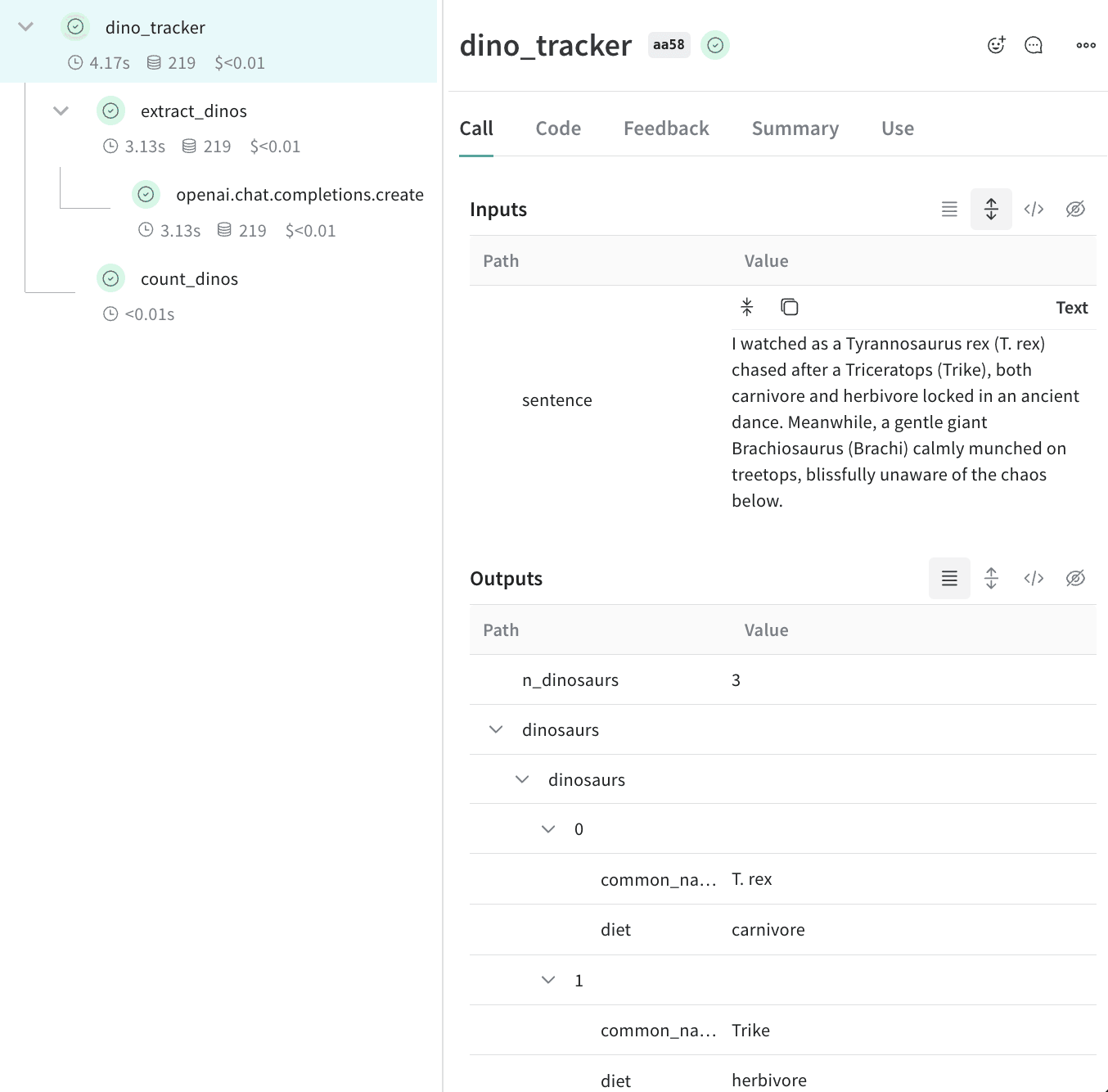
上記のコードを実行すると、**Traces** ページに、2 つのネストされた関数 (`extract_dinos` と `count_dinos`) の入力と出力に加えて、自動的にログされた OpenAI のトレースが表示されます。
 ```typescript twoslash theme={"system"}
// @noErrors
import OpenAI from 'openai';
import * as weave from 'weave';
const openai = new OpenAI();
const extractDinos = weave.op(async (sentence: string) => {
const response = await openai.chat.completions.create({
model: 'gpt-4o',
messages: [
{
role: 'system',
content:
'Extract any dinosaur `name`, their `common_name`, names and whether its `diet` is a herbivore or carnivore, in JSON format.',
},
{role: 'user', content: sentence},
],
response_format: {type: 'json_object'},
});
return response.choices[0].message.content;
});
const countDinos = weave.op(async (dinoData: string) => {
const parsed = JSON.parse(dinoData);
return Object.keys(parsed).length;
});
const dinoTracker = weave.op(async (sentence: string) => {
const dinoData = await extractDinos(sentence);
const nDinos = await countDinos(dinoData);
return {nDinos, dinoData};
});
async function main() {
await weave.init('jurassic-park');
const sentence = `I watched as a Tyrannosaurus rex (T. rex) chased after a Triceratops (Trike),
both carnivore and herbivore locked in an ancient dance. Meanwhile, a gentle giant
Brachiosaurus (Brachi) calmly munched on treetops, blissfully unaware of the chaos below.`;
const result = await dinoTracker(sentence);
console.log(result);
}
main();
```
**ネストされた関数**
上記のコードを実行すると、**Traces** ページに、2 つのネストされた関数 (`extract_dinos` と `count_dinos`) の入力と出力に加えて、自動的にログされた OpenAI のトレースが表示されます。
コードを実行すると、各関数の Call とそれらの相互関係を取得した完全なネスト構造のトレースが Weave に作成されます。
Weave でネストされた関数をトレースできるようになったので、次はユーザーや環境など、run に関する追加のコンテキストをトレースに付与できます。メタデータをトラッキングするには、`weave.attributes` コンテキストマネージャーを使用し、トラッキングするメタデータの辞書を呼び出し時に渡します。
前の例の続きです。
```python lines {1,10-11} theme={"system"}
import weave
weave.init('jurassic-park')
sentence = """I watched as a Tyrannosaurus rex (T. rex) chased after a Triceratops (Trike), \
both carnivore and herbivore locked in an ancient dance. Meanwhile, a gentle giant \
Brachiosaurus (Brachi) calmly munched on treetops, blissfully unaware of the chaos below."""
# 前に定義した関数と併せてメタデータをトラッキングする
with weave.attributes({'user_id': 'lukas', 'env': 'production'}):
result = dino_tracker(sentence)
```
```plaintext theme={"system"}
This feature is not available in TypeScript yet.
```
ユーザー ID や、コードの環境ステータス (開発、ステージング、本番) など、実行時に変わるメタデータをトラッキングできます。
システムプロンプトなどのシステム設定をトラッキングするには、[Weave モデル](/ja/products/wandb/weave/guides/core-types/models)を使用してください。
属性の使い方の詳細については、[属性を定義してログする](/ja/products/wandb/weave/guides/tools/attributes)を参照してください。
```typescript twoslash theme={"system"}
// @noErrors
import OpenAI from 'openai';
import * as weave from 'weave';
const openai = new OpenAI();
const extractDinos = weave.op(async (sentence: string) => {
const response = await openai.chat.completions.create({
model: 'gpt-4o',
messages: [
{
role: 'system',
content:
'Extract any dinosaur `name`, their `common_name`, names and whether its `diet` is a herbivore or carnivore, in JSON format.',
},
{role: 'user', content: sentence},
],
response_format: {type: 'json_object'},
});
return response.choices[0].message.content;
});
const countDinos = weave.op(async (dinoData: string) => {
const parsed = JSON.parse(dinoData);
return Object.keys(parsed).length;
});
const dinoTracker = weave.op(async (sentence: string) => {
const dinoData = await extractDinos(sentence);
const nDinos = await countDinos(dinoData);
return {nDinos, dinoData};
});
async function main() {
await weave.init('jurassic-park');
const sentence = `I watched as a Tyrannosaurus rex (T. rex) chased after a Triceratops (Trike),
both carnivore and herbivore locked in an ancient dance. Meanwhile, a gentle giant
Brachiosaurus (Brachi) calmly munched on treetops, blissfully unaware of the chaos below.`;
const result = await dinoTracker(sentence);
console.log(result);
}
main();
```
**ネストされた関数**
上記のコードを実行すると、**Traces** ページに、2 つのネストされた関数 (`extract_dinos` と `count_dinos`) の入力と出力に加えて、自動的にログされた OpenAI のトレースが表示されます。
コードを実行すると、各関数の Call とそれらの相互関係を取得した完全なネスト構造のトレースが Weave に作成されます。
Weave でネストされた関数をトレースできるようになったので、次はユーザーや環境など、run に関する追加のコンテキストをトレースに付与できます。メタデータをトラッキングするには、`weave.attributes` コンテキストマネージャーを使用し、トラッキングするメタデータの辞書を呼び出し時に渡します。
前の例の続きです。
```python lines {1,10-11} theme={"system"}
import weave
weave.init('jurassic-park')
sentence = """I watched as a Tyrannosaurus rex (T. rex) chased after a Triceratops (Trike), \
both carnivore and herbivore locked in an ancient dance. Meanwhile, a gentle giant \
Brachiosaurus (Brachi) calmly munched on treetops, blissfully unaware of the chaos below."""
# 前に定義した関数と併せてメタデータをトラッキングする
with weave.attributes({'user_id': 'lukas', 'env': 'production'}):
result = dino_tracker(sentence)
```
```plaintext theme={"system"}
This feature is not available in TypeScript yet.
```
ユーザー ID や、コードの環境ステータス (開発、ステージング、本番) など、実行時に変わるメタデータをトラッキングできます。
システムプロンプトなどのシステム設定をトラッキングするには、[Weave モデル](/ja/products/wandb/weave/guides/core-types/models)を使用してください。
属性の使い方の詳細については、[属性を定義してログする](/ja/products/wandb/weave/guides/tools/attributes)を参照してください。
次のステップ
* [App Versioning チュートリアル](/ja/products/wandb/weave/tutorial-weave_models)に沿って、プロンプト、モデル、アプリケーションに加えたアドホックな変更を取得し、バージョン管理して整理しましょう。