> ## Documentation Index
> Fetch the complete documentation index at: https://docs.coreweave.com/llms.txt
> Use this file to discover all available pages before exploring further.
# コードをトレースする
> 実行中のコードをインストルメントして、その実行内容を W&B Weave で詳細なトレースとして表示します。
このガイドでは、アプリケーションをインストルメントして、その実行内容を W\&B Weave で詳細なトレースとして表示する方法を説明します。トレースは、入力、出力、および各操作の構造を Call として取得するため、LLM を活用したコードのデバッグ、評価、監視に役立ちます。
実行中のコードを Weave で詳細なトレースとして表示するには、Call を作成します。以下のセクションでは、そのための主な 3 つの方法を、手動での作業が少ない順に説明します。
* LLM ライブラリ Call の自動トラッキング
* `weave.op` によるカスタム関数のトラッキング
* API を直接使用した手動での Call トラッキング
トレース対象をどの程度細かく制御したいかに応じて、適切な方法を選択してください。
LLM ライブラリ Call の自動トラッキング
Weave は、`openai`、`anthropic`、`cohere`、`mistral`、`LangChain` など、多くの一般的なライブラリやフレームワークと自動的に統合されます。LLM またはフレームワークのライブラリをインポートし、Weave プロジェクトを初期化するだけで、LLM やプラットフォームに対するすべての Call が自動的にトレースされ、project に記録されます。コードを追加で変更する必要はありません。サポートされるライブラリインテグレーションの一覧については、[インテグレーションの概要](/ja/products/wandb/weave/guides/integrations)を参照してください。
```python lines theme={"system"}
import weave
from openai import OpenAI
client = OpenAI()
# Weave トレースを初期化
weave.init('intro-example')
response = client.chat.completions.create(
model="gpt-4",
messages=[
{
"role": "user",
"content": "How are you?"
}
],
temperature=0.8,
max_tokens=64,
top_p=1,
)
```
```typescript twoslash lines theme={"system"}
// @noErrors
import OpenAI from 'openai'
import * as weave from 'weave'
const client = new OpenAI()
// Weave トレースを初期化
await weave.init('intro-example')
const response = await client.chat.completions.create({
model: 'gpt-4',
messages: [
{
role: 'user',
content: 'How are you?',
},
],
temperature: 0.8,
max_tokens: 64,
top_p: 1,
});
```
JavaScript および TypeScript の project 向けのセットアップ手順の詳細については、[TypeScript SDK: Third-Party Integration Guide](/ja/products/wandb/weave/guides/integrations/js)を参照してください。
自動トラッキングの動作をより細かく制御するには、[LLM Call の自動トラッキングを設定する](/ja/products/wandb/weave/guides/integrations/autopatching)を参照してください。
カスタム関数をトラッキングする
LLM アプリケーションには、前処理や後処理、プロンプトなど、トラッキングしたい追加のロジックが含まれることがよくあります。Weave が自動的にトレースする LLM Call に加えて、独自の関数も取得したい場合は、この方法を使用します。
Weave では、[`@weave.op`](/ja/products/wandb/weave/reference/python-sdk#function-op) デコレーターを使用して、これらの Call を手動でトラッキングできます。例:
```python lines theme={"system"}
import weave
# Weave のトレースを初期化する
weave.init('intro-example')
# 関数をデコレートする
@weave.op
def my_function(name: str):
return f"Hello, {name}!"
# 関数を呼び出す -- Weave が入力と出力を自動的にトラッキングします
print(my_function("World"))
```
[クラスのメソッド](#track-class-and-object-methods)をトラッキングすることもできます。
Weave では、関数を [`weave.op`](/ja/products/wandb/weave/reference/typescript-sdk/functions/op) でラップすることで、これらの Call を手動でトラッキングできます。例:
```typescript twoslash lines theme={"system"}
// @noErrors
import * as weave from 'weave'
await weave.init('intro-example')
function myFunction(name: string) {
return `Hello, ${name}!`
}
const myFunctionOp = weave.op(myFunction)
```
インラインでラップすることもできます:
```typescript twoslash lines theme={"system"}
// @noErrors
const myFunctionOp = weave.op((name: string) => `Hello, ${name}!`)
```
この方法は、関数とクラスのメソッドのどちらにも使用できます:
```typescript twoslash lines theme={"system"}
// @noErrors
class MyClass {
constructor() {
this.myMethod = weave.op(this.myMethod)
}
myMethod(name: string) {
return `Hello, ${name}!`
}
}
```
クラスおよびオブジェクトのメソッドをトラッキングする
スタンドアロンの関数だけでなく、クラスやオブジェクトのメソッドもトラッキングできます。クラス内のメソッドはどれでも、`weave.op` でデコレートするだけでトラッキングできます。
```python lines theme={"system"}
import weave
# Weave トレースを初期化する
weave.init("intro-example")
class MyClass:
# メソッドをデコレートする
@weave.op
def my_method(self, name: str):
return f"Hello, {name}!"
instance = MyClass()
# メソッドを呼び出す -- Weave が入力と出力を自動的にトラッキングします
print(instance.my_method("World"))
```
**TypeScript でデコレーターを使用する**
TypeScript コードで `@weave.op` デコレーターを使用するには、環境が適切に設定されていることを確認してください。
* **TypeScript v5.0 以降**: デコレーターは標準でサポートされているため、追加の設定は不要です。
* **TypeScript v5.0 より前のバージョン**: デコレーターの実験的サポートを有効にしてください。詳細については、[デコレーターに関する TypeScript の公式ドキュメント](https://www.typescriptlang.org/docs/handbook/decorators.html)を参照してください。
インスタンスメソッドに `@weave.op` を適用すると、トレースできます。
```typescript twoslash lines theme={"system"}
// @noErrors
class Foo {
@weave.op
async predict(prompt: string) {
return "bar"
}
}
```
静的メソッドに `@weave.op` を適用して、クラス内のユーティリティ関数を監視することもできます。
```typescript twoslash lines theme={"system"}
// @noErrors
class MathOps {
@weave.op
static square(n: number): number {
return n * n;
}
}
```
並列 (マルチスレッド) 関数の Call をトレースする
デフォルトでは、並列の Call はすべて Weave 上で個別のルート Call として表示されるため、トレースの階層構造を追いにくくなります。同じ親 Op の下に正しくネストさせるには、`ThreadPoolExecutor` を使用します。
次のコードサンプルは、[`ThreadPoolExecutor`](/ja/products/wandb/weave/reference/python-sdk/trace/util#class-contextawarethreadpoolexecutor) の使用例です。
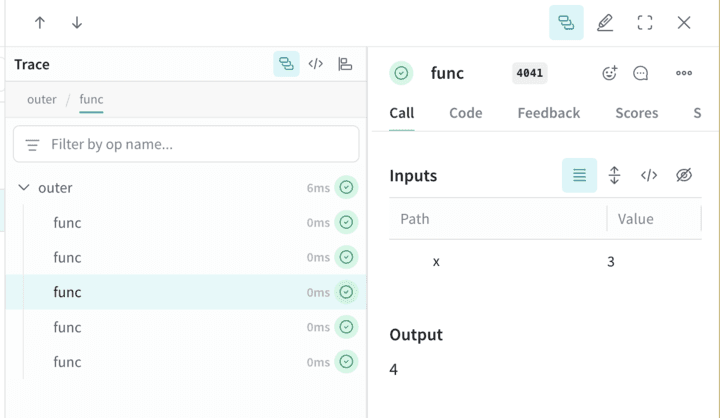
1 つ目の関数 `func` は、`x` を受け取って `x+1` を返すシンプルな Op です。2 つ目の関数 `outer` は、入力のリストを受け取る別の Op です。
`outer` の内部で `ThreadPoolExecutor` と `exc.map(func, inputs)` を使用しているため、`func` への各 Call は同じ親トレースのコンテキストを引き継ぎます。
```python lines theme={"system"}
import weave
@weave.op
def func(x):
return x+1
@weave.op
def outer(inputs):
with weave.ThreadPoolExecutor() as exc:
exc.map(func, inputs)
# Weave プロジェクト名を更新してください
client = weave.init('my-weave-project')
outer([1,2,3,4,5])
```
```text theme={"system"}
This feature is not available in the TypeScript SDK yet.
```
Weights & Biases の UI では、1 つの親 Call の下に 5 つの子 Call がネストされて表示されます。増分の処理は並列で実行されますが、完全な階層構造を持つトレースを得られます。
Call の手動トラッキング
自動インテグレーションも `weave.op` デコレーターもワークフローに合わない場合は、API を直接使用して Call を手動で作成できます。この方法では定型コードが増えますが、Call の開始と終了のタイミングを完全に制御できます。
```python lines theme={"system"}
import weave
# Weave のトレースを初期化
client = weave.init('intro-example')
def my_function(name: str):
# Call を開始
call = client.create_call(op="my_function", inputs={"name": name})
# ... 関数のコード ...
# Call を終了
client.finish_call(call, output="Hello, World!")
# 関数を呼び出す
print(my_function("World"))
```
```text theme={"system"}
この機能は TypeScript SDK ではまだ利用できません。
```
* Call を開始: [POST `/call/start`](/ja/products/wandb/weave/reference/service-api/calls/call-start)
* Call を終了: [POST `/call/end`](/ja/products/wandb/weave/reference/service-api/calls/call-end)
```bash lines theme={"system"}
curl -L 'https://trace.wandb.ai/call/start' \
-H 'Content-Type: application/json' \
-H 'Accept: application/json' \
-d '{
"start": {
"project_id": "string",
"id": "string",
"op_name": "string",
"display_name": "string",
"trace_id": "string",
"parent_id": "string",
"started_at": "2024-09-08T20:07:34.849Z",
"attributes": {},
"inputs": {},
"wb_run_id": "string"
}
}
```
## Related topics
- [What is Weave?](/ja/products/wandb/weave/concepts/what-is-weave.md)