> ## Documentation Index
> Fetch the complete documentation index at: https://docs.coreweave.com/llms.txt
> Use this file to discover all available pages before exploring further.
# Serverless Inference
> Weave で Serverless Inference を使用して、OpenAI 互換 API 経由でオープンソースの基盤モデルの Call をトレースおよび監視します。
Serverless Inference
*Serverless Inference* は、W\&B Weave および OpenAI 互換 API を通じて、オープンソースの基盤モデルへのアクセスを提供します。このガイドでは、API および Weights & Biases UI から Serverless Inference を呼び出す方法と、それらの Call を Weave でトレース、評価、監視する方法について説明します。Serverless Inference を使用すると、次のことができます。
* ホスティングプロバイダーへの登録やモデルのセルフホスティングを行わずに、AI アプリケーションやエージェントを開発する。
* Weave プレイグラウンド でサポートされるモデルを試す。
Serverless Inference のクレジットは、期間限定で Free、Pro、Academic プランに含まれています。Enterprise プランでは提供状況が異なる場合があります。クレジットを使い切った後は、次のようになります。
* Free アカウントで Inference を引き続き使用するには、Pro プランへのアップグレードが必要です。
* Pro プランのユーザーには、モデルごとの料金に基づいて、Inference の超過利用分が毎月請求されます。
詳細については、[料金ページ](https://coreweave.com/forge-pricing)および [Serverless Inference のモデル料金](https://wandb.ai/site/pricing/inference)を参照してください。
Weave を使用すると、Serverless Inference を活用したアプリケーションのトレース、評価、監視を行い、継続的に改善できます。
| モデル | モデル ID (API で使用) | タイプ | コンテキストウィンドウ | パラメーター | 説明 |
| - | - | - | - | - | - |
| DeepSeek R1-0528 | deepseek-ai/DeepSeek-R1-0528 | テキスト | 161K | 37B - 680B (アクティブ - 合計) | 複雑なコーディング、数学、構造化文書の分析など、精密な推論を要するタスク向けに最適化されています。 |
| DeepSeek V3-0324 | deepseek-ai/DeepSeek-V3-0324 | テキスト | 161K | 37B - 680B (アクティブ - 合計) | 高度で複雑な言語処理や包括的な文書分析向けに調整された、堅牢な Mixture-of-Experts モデルです。 |
| Llama 3.1 8B | meta-llama/Llama-3.1-8B-Instruct | テキスト | 128K | 8B (合計) | 多言語チャットボットでの応答性の高い対話向けに最適化された、効率的な会話モデルです。 |
| Llama 3.3 70B | meta-llama/Llama-3.3-70B-Instruct | テキスト | 128K | 70B (合計) | 会話タスク、詳細な指示への追従、コーディングに優れた多言語モデルです。 |
| Llama 4 Scout | meta-llama/Llama-4-Scout-17B-16E-Instruct | テキスト、画像 | 64K | 17B - 109B (アクティブ - 合計) | テキストと画像の理解を統合したマルチモーダルモデルで、視覚タスクや両者を組み合わせた分析に最適です。 |
| Phi 4 Mini | microsoft/Phi-4-mini-instruct | テキスト | 128K | 3.8B (アクティブ - 合計) | リソースが限られた環境での高速な応答に最適な、コンパクトで効率的なモデルです。 |
このガイドでは、次の内容について説明します。
* [前提条件](#prerequisites)
* [Python 経由で API を使用するための追加の前提条件](#additional-prerequisites-for-using-the-api-via-python)
* [API 仕様](#api-specification)
* [エンドポイント](#endpoint)
* [利用可能なメソッド](#available-methods)
* [チャット補完](#chat-completions)
* [サポートされるモデルの一覧表示](#list-supported-models)
* [使用例](#usage-examples)
* [UI](#ui)
* [Inference サービスにアクセスする](#access-the-inference-service)
* [プレイグラウンドでモデルを試す](#try-a-model-in-the-playground)
* [複数のモデルを比較する](#compare-multiple-models)
* [請求と使用状況の情報を表示する](#view-billing-and-usage-information)
* [利用に関する情報と制限](#usage-information-and-limits)
* [API エラー](#api-errors)
前提条件
API または Weights & Biases UI から Serverless Inference サービスにアクセスするには、次のものが必要です。
1. CoreWeave Forge アカウント。[アカウントを作成してください](https://id.coreweave.com/signup)。
2. APIキー。[User Settings](https://forge.coreweave.com/settings) で APIキーを作成してください。
3. Weights & Biases の project。
4. Python から Inference サービスを使用する場合は、[Python 経由で API を使用するための追加の前提条件](#additional-prerequisites-for-using-the-api-via-python)を参照してください。
Python 経由で API を使用するための追加の前提条件
Python から Inference API を使用するには、まず一般的な前提条件を満たしてください。次に、ローカル環境に `openai` ライブラリと `weave` ライブラリをインストールします。`openai` ライブラリは、Inference エンドポイントの呼び出しに使用する OpenAI 互換クライアントを提供します。また、`weave` ライブラリを使用すると、これらの Call をトレースおよび評価できます。
```bash theme={"system"}
pip install openai weave
```
`weave` ライブラリは、Weave を使用して LLM アプリケーションをトレースする場合にのみ必要です。Weave の導入方法については、[Weave クイックスタート](/ja/products/wandb/weave/quickstart)を参照してください。
Weave で Serverless Inference サービスを使用する例については、[API の使用例](#usage-examples)を参照してください。
API 仕様
以下のセクションでは、API 仕様と API の使用例を紹介します。これらを参考にすると、独自のアプリケーションやスクリプトから Inference サービスをプログラムで呼び出せます。
* [エンドポイント](#endpoint)
* [利用可能なメソッド](#available-methods)
* [使用例](#usage-examples)
エンドポイント
Inference サービスには、次のエンドポイントからアクセスします。
```plaintext theme={"system"}
https://api.inference.wandb.ai/v1
```
このエンドポイントにアクセスするには、Inference サービスのクレジットが割り当てられた CoreWeave Forge アカウント、有効な APIキー、および CoreWeave Forge の entity (「チーム」とも呼ばれます) と project が必要です。このガイドのコードサンプルでは、entity (チーム) と project を `/` と表記しています。
利用可能なメソッド
Inference サービスでは、次の API メソッドがサポートされています。
* [チャット補完](#chat-completions)
* [サポートされるモデルの一覧表示](#list-supported-models)
チャット補完
利用できる主な API メソッドは `/chat/completions` です。このメソッドは OpenAI 互換のリクエスト形式をサポートしており、サポートされるモデルにメッセージを送信して補完結果を受け取ることができます。Weave で Serverless Inference サービスを使用する方法については、[API の使用例](#usage-examples)を参照してください。
チャット補完を作成するには、以下が必要です。
* Inference サービスのベース URL `https://api.inference.wandb.ai/v1`
* W\&B APIキー ``
* W\&B の entity 名とプロジェクト名 `/`
* 使用するモデルの ID (以下のいずれか):
* `meta-llama/Llama-3.1-8B-Instruct`
* `deepseek-ai/DeepSeek-V3-0324`
* `meta-llama/Llama-3.3-70B-Instruct`
* `deepseek-ai/DeepSeek-R1-0528`
* `meta-llama/Llama-4-Scout-17B-16E-Instruct`
* `microsoft/Phi-4-mini-instruct`
```bash theme={"system"}
curl https://api.inference.wandb.ai/v1/chat/completions \
-H "Content-Type: application/json" \
-H "Authorization: Bearer " \
-H "OpenAI-Project: /" \
-d '{
"model": "",
"messages": [
{ "role": "system", "content": "You are a helpful assistant." },
{ "role": "user", "content": "Tell me a joke." }
]
}'
```
```python lines theme={"system"}
import openai
client = openai.OpenAI(
# カスタムのベース URL で Serverless Inference を指定します
base_url='https://api.inference.wandb.ai/v1',
# APIキーは https://forge.coreweave.com/settings で作成できます
# 安全のため、代わりに環境変数 OPENAI_API_KEY で設定することを推奨します
api_key="",
# 使用量のトラッキングにはチームと project が必須です
project="/",
)
# を以下のいずれかの値に置き換えてください:
# meta-llama/Llama-3.1-8B-Instruct
# deepseek-ai/DeepSeek-V3-0324
# meta-llama/Llama-3.3-70B-Instruct
# deepseek-ai/DeepSeek-R1-0528
# meta-llama/Llama-4-Scout-17B-16E-Instruct
# microsoft/Phi-4-mini-instruct
response = client.chat.completions.create(
model="",
messages=[
{"role": "system", "content": ""},
{"role": "user", "content": ""}
],
)
print(response.choices[0].message.content)
```
サポートされるモデルの一覧表示
API を使用すると、利用可能なすべてのモデルとその ID をクエリできます。モデルを動的に選択する場合や、お使いの環境で利用可能なモデルを確認する場合に便利です。
```bash theme={"system"}
curl https://api.inference.wandb.ai/v1/models \
-H "Content-Type: application/json" \
-H "Authorization: Bearer " \
-H "OpenAI-Project: /" \
```
```python lines theme={"system"}
import openai
client = openai.OpenAI(
base_url="https://api.inference.wandb.ai/v1",
api_key="",
project="/"
)
response = client.models.list()
for model in response.data:
print(model.id)
```
使用例
以下のセクションでは、Weave で Serverless Inference を使用する方法をいくつかの例で紹介します。まず基本的な例で単一のモデルの Call をトレースし、次に高度な例で複数のモデルを評価・比較します。
* [基本的な例: Weave で Llama 3.1 8B をトレースする](#basic-example-trace-llama-31-8b-with-weave)
* [高度な例: Inference サービスで Weave Evaluations と Leaderboard を使用する](#advanced-example-use-weave-evaluations-and-leaderboards-with-the-inference-service)
基本的な例:Weave で Llama 3.1 8B をトレースする
次の Python コードサンプルでは、Serverless Inference API を使用して **Llama 3.1 8B** モデルにプロンプトを送信し、その Call を Weave でトレースする方法を示します。トレースを使用すると、LLM Call の入力と出力をすべて取得し、パフォーマンスを監視しながら、Weights & Biases UI で結果を分析できます。
詳しくは、[Weave でのトレース](/ja/products/wandb/weave/guides/tracking/tracing)を参照してください。
この例の内容は次のとおりです。
* `@weave.op()` でデコレートされた関数 `run_chat` を定義します。この関数は、OpenAI 互換クライアントを使用してチャット補完リクエストを送信します。
* Weave はトレースを記録し、W\&B の entity と project (`project="/"`) に関連付けます。
* Weave は関数を自動的にトレースし、その入力、出力、レイテンシー、メタデータ (モデル ID など) をログします。
* 結果はターミナルに出力され、トレースは [Forge](https://forge.coreweave.com/wandb) 上の指定した project の **Traces** タブに表示されます。
この例を使用するには、あらかじめ[一般的な前提条件](#prerequisites)と[Python 経由で API を使用するための追加の前提条件](#additional-prerequisites-for-using-the-api-via-python)を満たしておく必要があります。
```python lines theme={"system"}
import weave
import openai
# トレース先となる Weave のチームと project を設定します
weave.init("/")
client = openai.OpenAI(
base_url='https://api.inference.wandb.ai/v1',
# APIキーは https://forge.coreweave.com/settings で作成します
api_key="",
# W&B Inference の使用量のトラッキングに必須です
project="wandb/inference-demo",
)
# Weave でモデルの Call をトレースします
@weave.op()
def run_chat():
response = client.chat.completions.create(
model="meta-llama/Llama-3.1-8B-Instruct",
messages=[
{"role": "system", "content": "You are a helpful assistant."},
{"role": "user", "content": "Tell me a joke."}
],
)
return response.choices[0].message.content
# 関数を実行し、トレースされた Call をログします
output = run_chat()
print(output)
```
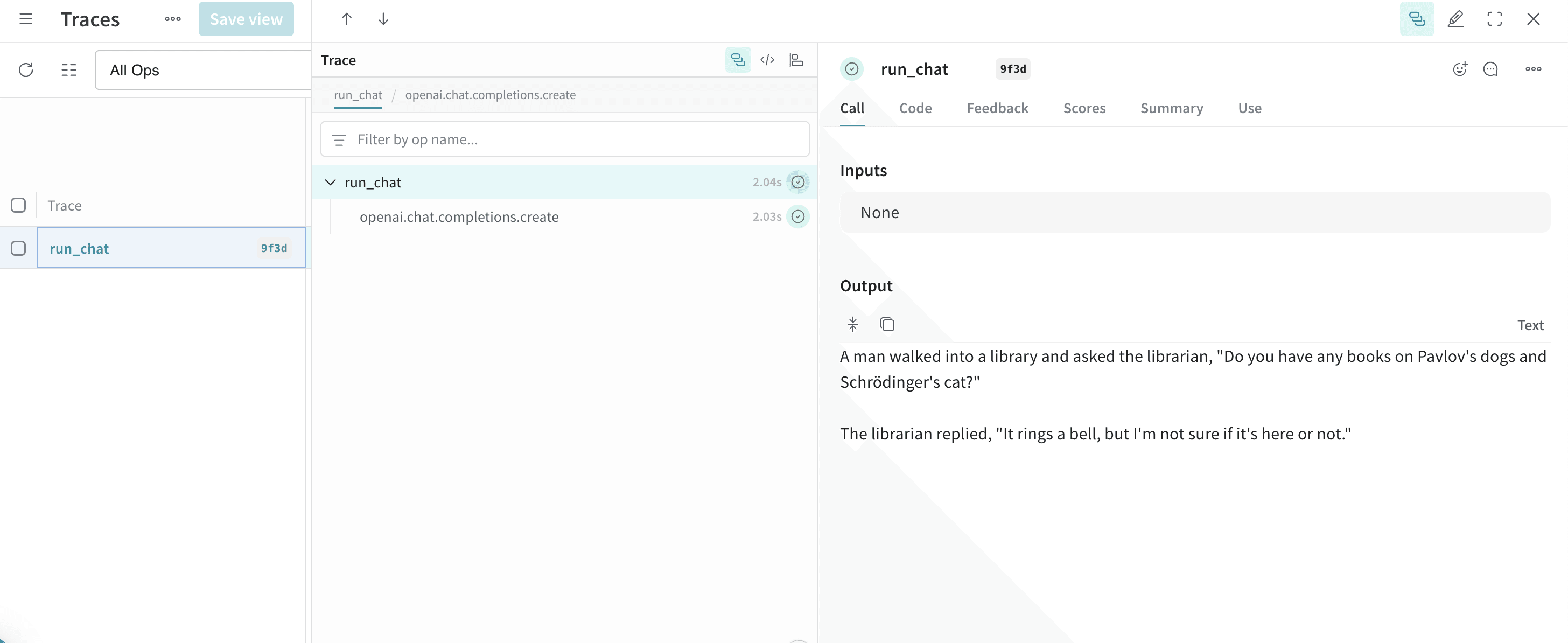
コードサンプルを実行すると、モデルの応答がターミナルに出力され、Call が Weave トレースとしてログされます。Weave でトレースを表示するには、ターミナルに出力されたリンク (例: `https://forge.coreweave.com/wandb///r/call/01977f8f-839d-7dda-b0c2-27292ef0e04g`) をクリックするか、次の手順に従います。
1. [Forge](https://forge.coreweave.com/wandb) にアクセスします。
2. **Traces** タブを選択して、Weave トレースを表示します。
次は、[高度な例](#advanced-example-use-weave-evaluations-and-leaderboards-with-the-inference-service)で複数のモデルを評価・比較してみましょう。
高度な例: Inference サービスで Weave Evaluations と Leaderboard を使用する
また、Inference サービスで Weave を使用すると、[モデルの Call をトレース](/ja/products/wandb/weave/guides/tracking/tracing)したり、[パフォーマンスを評価](/ja/products/wandb/weave/guides/core-types/evaluations)したり、[Leaderboard をパブリッシュ](/ja/products/wandb/weave/guides/core-types/leaderboards)したりすることもできます。次の Python コードサンプルでは、質問応答データセットを使用して 2 つのモデルを比較します。
この例を使用するには、[一般的な前提条件](#prerequisites)と[Python 経由で API を使用するための追加の前提条件](#additional-prerequisites-for-using-the-api-via-python)を満たしておく必要があります。
```python lines theme={"system"}
import os
import asyncio
import openai
import weave
from weave.flow import leaderboard
from weave.trace.ref_util import get_ref
# トレースに使用する Weave のチームと project を設定します
weave.init("/")
dataset = [
{"input": "What is 2 + 2?", "target": "4"},
{"input": "Name a primary color.", "target": "red"},
]
@weave.op
def exact_match(target: str, output: str) -> float:
return float(target.strip().lower() == output.strip().lower())
class WBInferenceModel(weave.Model):
model: str
@weave.op
def predict(self, prompt: str) -> str:
client = openai.OpenAI(
base_url="https://api.inference.wandb.ai/v1",
# APIキーは https://forge.coreweave.com/settings で作成します
api_key="",
# W&B Inference の使用量のトラッキングに必須です
project="/",
)
resp = client.chat.completions.create(
model=self.model,
messages=[{"role": "user", "content": prompt}],
)
return resp.choices[0].message.content
llama = WBInferenceModel(model="meta-llama/Llama-3.1-8B-Instruct")
deepseek = WBInferenceModel(model="deepseek-ai/DeepSeek-V3-0324")
def preprocess_model_input(example):
return {"prompt": example["input"]}
evaluation = weave.Evaluation(
name="QA",
dataset=dataset,
scorers=[exact_match],
preprocess_model_input=preprocess_model_input,
)
async def run_eval():
await evaluation.evaluate(llama)
await evaluation.evaluate(deepseek)
asyncio.run(run_eval())
spec = leaderboard.Leaderboard(
name="Inference Leaderboard",
description="Compare models on a QA dataset",
columns=[
leaderboard.LeaderboardColumn(
evaluation_object_ref=get_ref(evaluation).uri(),
scorer_name="exact_match",
summary_metric_path="mean",
)
],
)
weave.publish(spec)
```
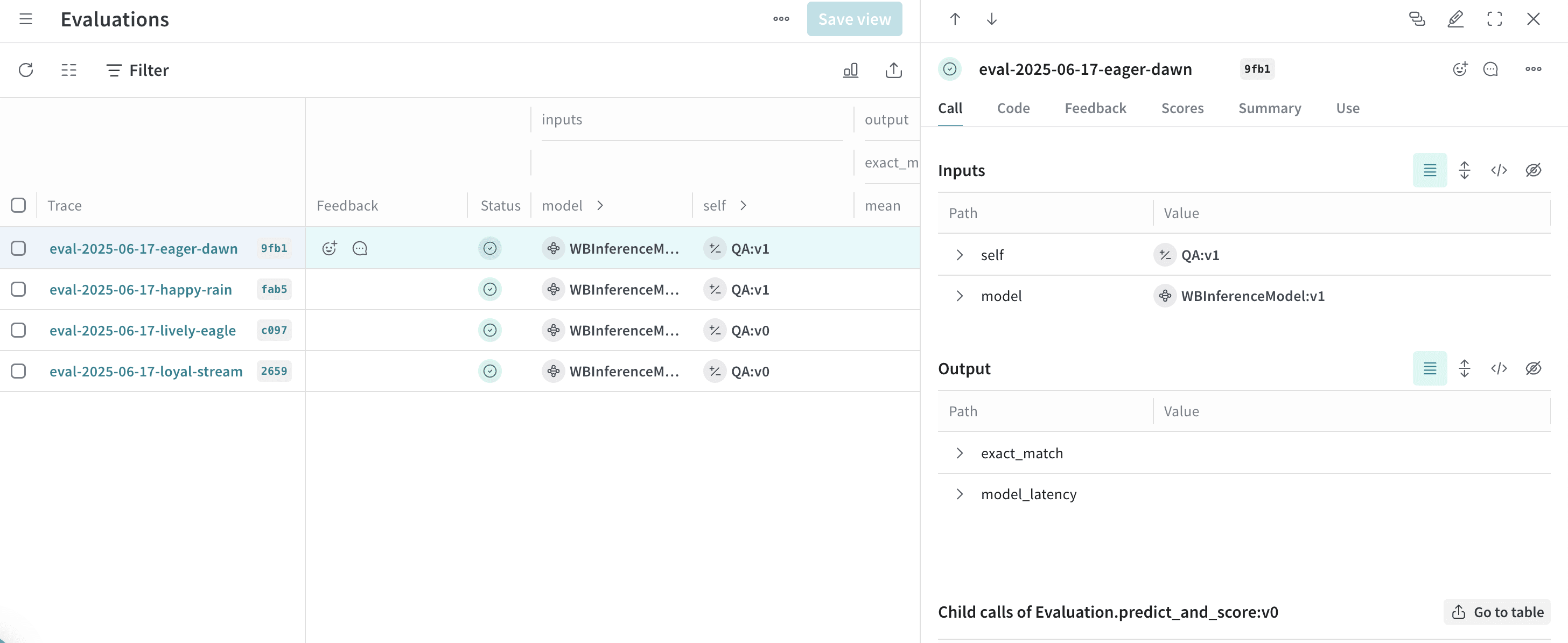
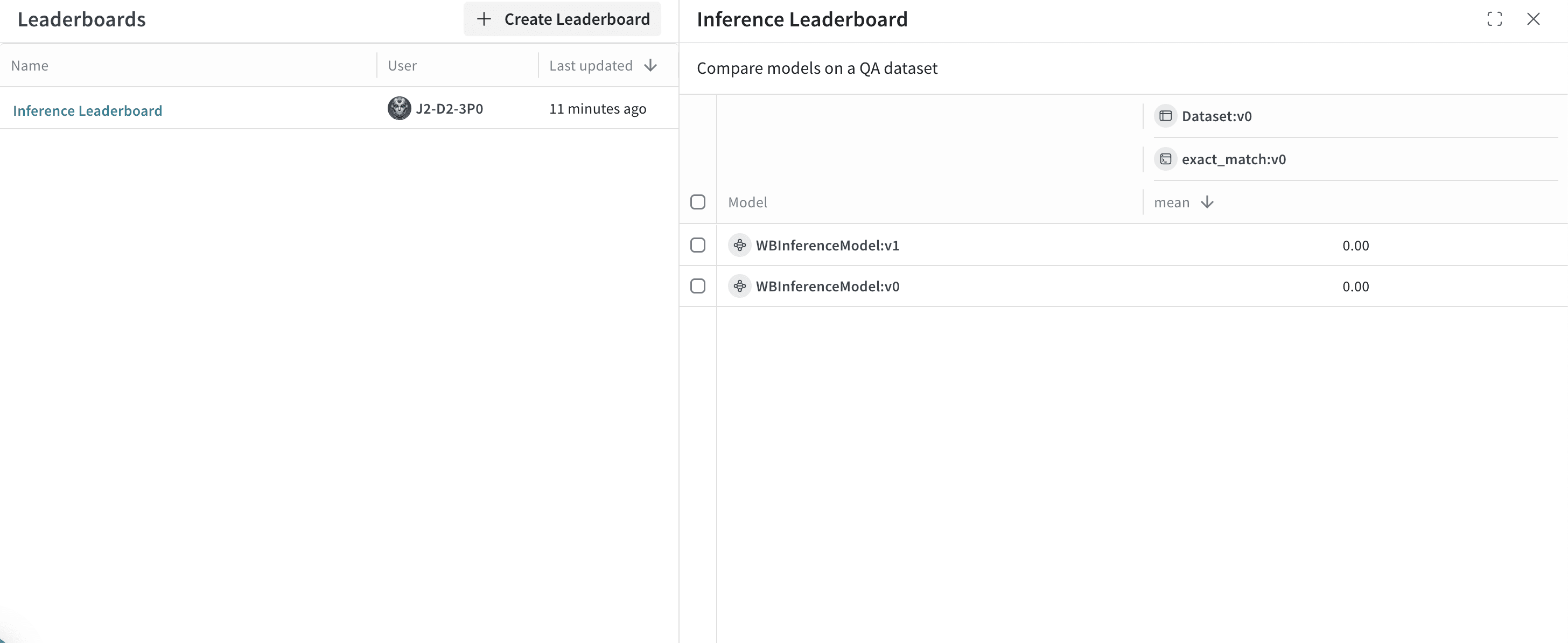
前述のコードサンプルを実行すると、Weave は評価結果、トレース、および 2 つのモデルを比較する Leaderboard を Weights & Biases の project にパブリッシュします。パブリッシュされた結果を確認するには、[Forge](https://forge.coreweave.com/wandb) で CoreWeave Forge アカウントにアクセスし、次の操作を行います。
* **Traces** タブにアクセスして、[トレースを表示](/ja/products/wandb/weave/guides/tracking/tracing)します。
* **Evals** タブにアクセスして、[モデル評価を表示](/ja/products/wandb/weave/guides/core-types/evaluations)します。
* **Leaders** タブにアクセスして、[生成された Leaderboard を表示](/ja/products/wandb/weave/guides/core-types/leaderboards)します。
UI
以下のセクションでは、Weights & Biases UI からの Inference サービスの使い方について説明します。UI から Inference サービスにアクセスするには、事前に[前提条件](#prerequisites)を満たしておく必要があります。
Inference サービスにアクセスする
Inference サービスには、Weights & Biases UI の以下の場所からアクセスできます。
* [直接リンク](#direct-link)
* [Inference タブから](#from-the-inference-tab)
* [プレイグラウンド タブから](#from-the-playground-tab)
直接リンク
[https://forge.coreweave.com/inference](https://forge.coreweave.com/inference) にアクセスします。
Inference タブから
1. [Forge](https://forge.coreweave.com/wandb) で CoreWeave Forge アカウントにアクセスします。
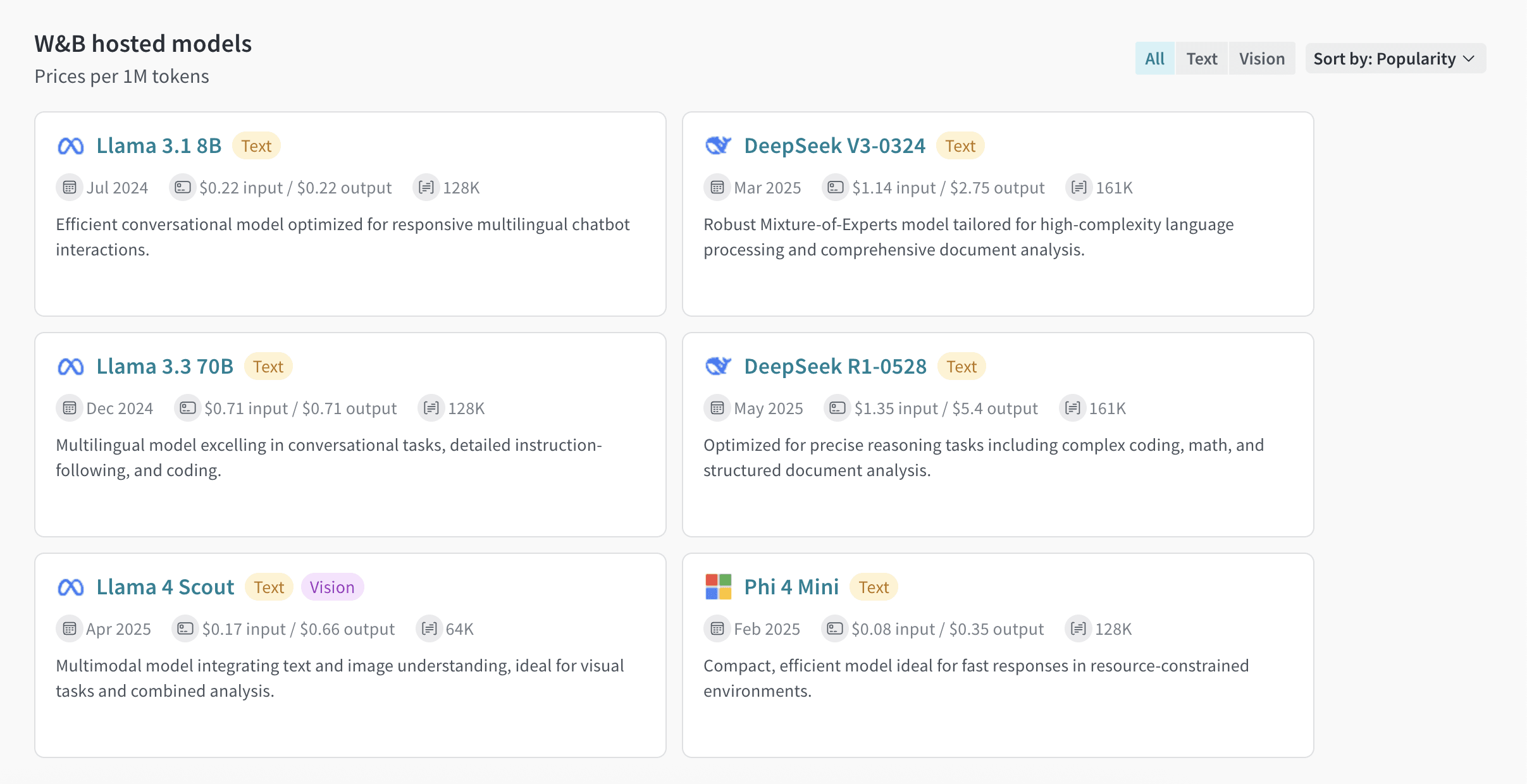
2. 左サイドバーで **Inference** を選択します。利用可能なモデルとその情報を示すページが表示されます。
プレイグラウンド タブから
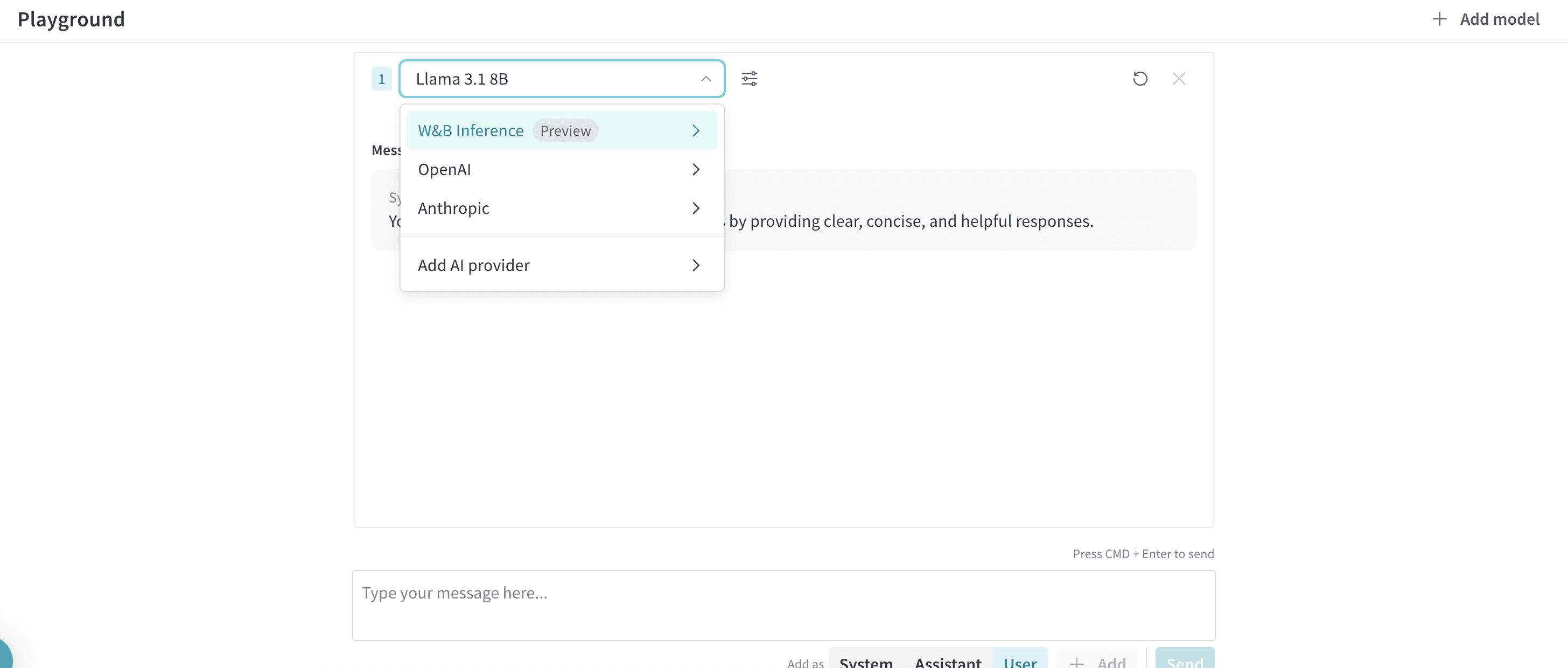
1. 左サイドバーで **プレイグラウンド** を選択します。プレイグラウンド のチャット UI が表示されます。
2. LLM ドロップダウンリストで **Serverless Inference** にカーソルを合わせます。右側に、利用可能な Serverless Inference モデルのドロップダウンが表示されます。
3. Serverless Inference モデルのドロップダウンでは、次の操作を行えます。
* 利用可能なモデル名をクリックして、[プレイグラウンド でそのモデルを試す](#try-a-model-in-the-playground)。
* [プレイグラウンド で 1 つ以上のモデルを比較する](#compare-multiple-models)。
プレイグラウンドでモデルを試す
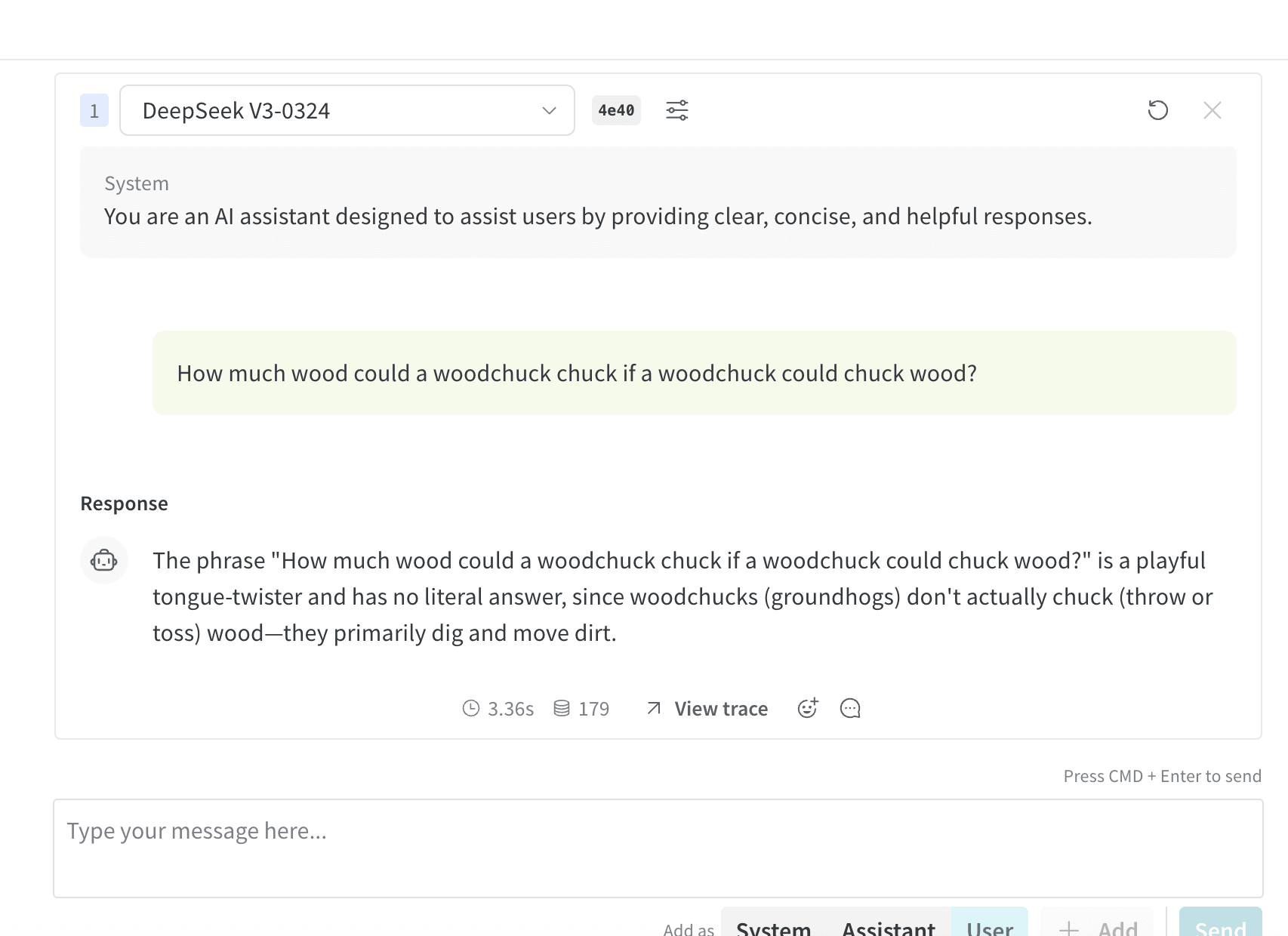
[いずれかのアクセス方法でモデルを選択](#access-the-inference-service)したら、プレイグラウンドでそのモデルを試すことができます。プレイグラウンドでは次の操作を行えます。
* [モデルの設定とパラメーターをカスタマイズする](/ja/products/wandb/weave/guides/tools/playground#customize-settings)
* [メッセージを追加、再試行、編集、削除する](/ja/products/wandb/weave/guides/tools/playground#message-controls)
* [カスタム設定を適用したモデルを保存して再利用する](/ja/products/wandb/weave/guides/tools/playground#saved-models)
* [複数のモデルを比較する](#compare-multiple-models)
複数のモデルを比較する
プレイグラウンドでは、複数の Inference モデルを比較できます。Compare ビューには、次の 2 つの場所からアクセスできます。
* [Inference タブから Compare ビューにアクセスする](#access-the-compare-view-from-the-inference-tab)
* [プレイグラウンド タブから Compare ビューにアクセスする](#access-the-compare-view-from-the-playground-tab)
Inference タブから Compare ビューにアクセスする
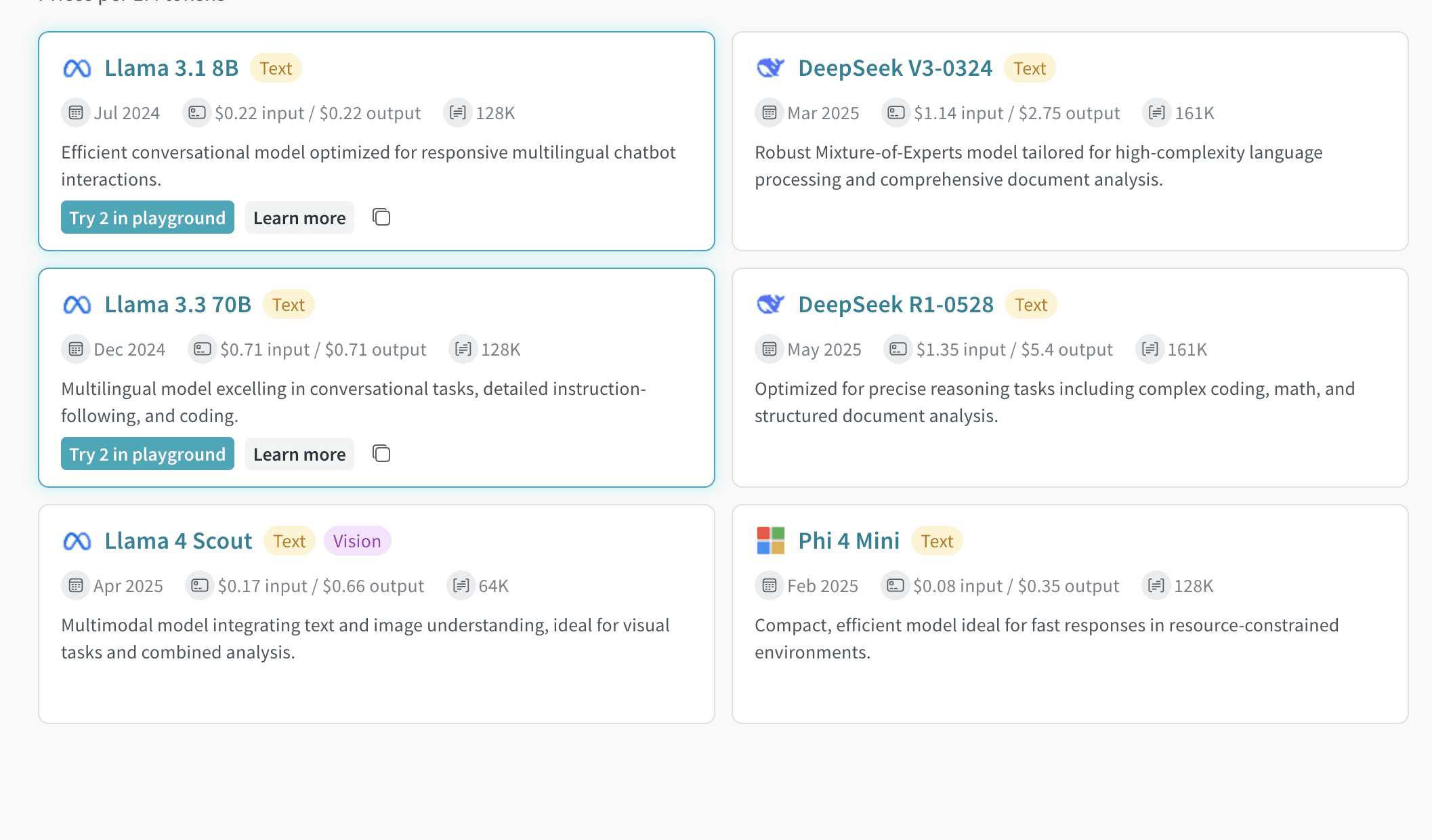
1. 左サイドバーで **Inference** を選択します。利用可能なモデルとその情報を一覧表示するページが開きます。
2. 比較するモデルを選択するには、モデルカード上の任意の場所 (モデル名以外) をクリックします。選択されたモデルカードは、枠線が青色で強調表示されます。
3. 比較するモデルごとにステップ 2 を繰り返します。
4. 選択したいずれかのカードで、**Compare N models in the Playground** ボタンをクリックします (`N` は比較するモデルの数です。たとえば、3 つのモデルを選択した場合、ボタンには **Compare 3 models in the Playground** と表示されます)。Comparison ビューが開きます。
これで、プレイグラウンドでモデルを比較できるようになります。また、[プレイグラウンドでモデルを試す](#try-a-model-in-the-playground)で説明している機能もすべて使用できます。
プレイグラウンド タブから Compare ビューにアクセスする
1. 左サイドバーから **プレイグラウンド** を選択します。プレイグラウンド のチャット UI が表示されます。
2. LLM ドロップダウンリストで **Serverless Inference** にカーソルを合わせます。利用可能な Serverless Inference モデルのドロップダウンが右側に表示されます。
3. ドロップダウンから **Compare** を選択します。**Inference** タブが表示されます。
4. 比較するモデルを選択するには、モデルカードの任意の場所 (モデル名以外) をクリックします。選択されたモデルカードは、枠線が青色でハイライトされます。
5. 比較するモデルごとにステップ 4 を繰り返します。
6. 選択したいずれかのカードで、**Compare N models in the プレイグラウンド** ボタンをクリックします (`N` は比較するモデルの数です。たとえば、3 つのモデルを選択した場合、ボタンには **Compare 3 models in the プレイグラウンド** と表示されます)。Comparison ビューが開きます。
これで、プレイグラウンド でモデルを比較できるようになります。[プレイグラウンドでモデルを試す](#try-a-model-in-the-playground)で説明している機能もすべて使用できます。
組織管理者は、現在の Inference クレジット残高、使用履歴、今後の請求額 (該当する場合) を Weights & Biases UI から直接トラッキングできます。
1. Weights & Biases UI で、W\&B の **Billing** ページにアクセスします。
2. 画面右下に Inference の請求情報カードが表示されます。このカードでは次の操作ができます。
* Inference の請求情報カードにある **View usage** ボタンをクリックすると、使用状況の推移を確認できます。
* 有料プランをご利用の場合は、今後発生する Inference の料金を確認できます。
[モデルごとの料金の内訳については、Inference 価格ページ](https://wandb.ai/site/pricing/inference)をご覧ください。
以下のセクションでは、地理的制限、同時実行制限、料金など、利用に関する重要な情報と制限について説明します。サービスをご利用になる前に、これらの情報を必ずご確認ください。
地理的制限
Inference サービスには、サポートされている場所からのみアクセスできます。詳細は、[利用規約](/policies/terms-of-service/terms-of-use#geographic-restrictions)を参照してください。
同時実行制限
公平な利用と安定したパフォーマンスを確保するため、Serverless Inference API ではユーザー単位および project 単位でレート制限を適用しています。これらの制限には、次の目的があります。
* 不正利用を防ぎ、API の安定性を保護する。
* すべてのユーザーがアクセスできるようにする。
* インフラストラクチャーの負荷を効率的に管理する。
レート制限を超えると、API は `429 Concurrency limit reached for requests` 応答を返します。このエラーを解消するには、同時リクエスト数を減らしてください。
料金
モデルの料金については、[https://wandb.ai/site/pricing/inference](https://wandb.ai/site/pricing/inference) をご覧ください。
API エラー
次の表は、Inference API が返す可能性のあるエラーと、その原因および推奨される対処方法を示しています。
| エラーコード | メッセージ | 原因 | 対処方法 |
| - | - | - | - |
| 401 | 認証が無効です | 認証情報が無効か、Weights & Biases の project の entity またはプロジェクト名が正しくありません。 | 正しい APIキーを使用していること、および Weights & Biases のプロジェクト名と entity が正しいことを確認してください。 |
| 403 | 国、リージョン、または地域がサポートされていません | サポート対象外のロケーションから API にアクセスしています。 | [地理的制限](#geographic-restrictions)を参照してください。 |
| 429 | リクエストの同時実行制限に達しました | 同時リクエストが多すぎます。 | 同時リクエスト数を減らしてください。 |
| 429 | 現在のクォータを超過しました。プランと請求の詳細を確認してください | クレジットを使い切ったか、月間支出上限に達しました。 | クレジットを追加購入するか、制限を引き上げてください。 |
| 500 | リクエストの処理中にサーバーでエラーが発生しました | サーバー内部エラーです。 | 少し待ってから再試行し、問題が続く場合はサポートに問い合わせてください。 |
| 503 | 現在、エンジンが過負荷状態です。後でもう一度お試しください | サーバーへのトラフィックが多くなっています。 | 少し待ってからリクエストを再試行してください。 |
## Related topics
- [Serverless Inference](/ja/products/inference/serverless.md)