> ## Documentation Index
> Fetch the complete documentation index at: https://docs.coreweave.com/llms.txt
> Use this file to discover all available pages before exploring further.
# Anthropic
> Weave を使用して、Anthropic SDK で行われた LLM Call を自動的にトラッキングしてログします
 Weave をコードに統合すると、[Python](https://github.com/anthropics/anthropic-sdk-python) 版と [TypeScript](https://github.com/anthropics/anthropic-sdk-typescript) 版の両方の Anthropic SDK で行われた LLM Call が自動的にトラッキングされ、ログされます。これは、Weave が Anthropic の `Messages.create()` メソッドを自動的に呼び出すことで実現されています。
このガイドでは、Anthropic SDK を使用する際に、トレースを取得する方法、独自の関数を op としてラップする方法、実験用に再利用可能な `Model` を構築する方法、ツールの使用をトラッキングする方法について説明します。これらのパターンを使用すれば、独自のログ処理コードを書かなくても、Claude を活用したアプリケーションのデバッグや比較、反復的な改善を行えます。
Weave をコードに統合すると、[Python](https://github.com/anthropics/anthropic-sdk-python) 版と [TypeScript](https://github.com/anthropics/anthropic-sdk-typescript) 版の両方の Anthropic SDK で行われた LLM Call が自動的にトラッキングされ、ログされます。これは、Weave が Anthropic の `Messages.create()` メソッドを自動的に呼び出すことで実現されています。
このガイドでは、Anthropic SDK を使用する際に、トレースを取得する方法、独自の関数を op としてラップする方法、実験用に再利用可能な `Model` を構築する方法、ツールの使用をトラッキングする方法について説明します。これらのパターンを使用すれば、独自のログ処理コードを書かなくても、Claude を活用したアプリケーションのデバッグや比較、反復的な改善を行えます。
トレース
コードに `weave.init("your-team-name/your-project-name")` を追加すると、Weave は Anthropic SDK のトレースを自動的に取得します。`weave.init()` の引数でチーム名を指定しない場合、Weave は出力を [デフォルトの W\&B entity](/ja/products/wandb/platform/app/settings-page/user-settings#default-team) にログします。プロジェクト名を指定しない場合は、Weave の初期化に失敗します。
次の例は、Anthropic への基本的な Call に Weave を統合する方法を示しています。
```python lines {6} theme={"system"}
import weave
# 通常どおり anthropic ライブラリを使用します
import os
from anthropic import Anthropic
weave.init("anthropic_project")
client = Anthropic(
api_key=os.environ.get("ANTHROPIC_API_KEY"),
)
message = client.messages.create(
max_tokens=1024,
messages=[
{
"role": "user",
"content": "Tell me a joke about a dog",
}
],
model="claude-3-opus-20240229",
)
print(message.content)
```
```typescript twoslash theme={"system"}
// @noErrors
import Anthropic from '@anthropic-ai/sdk';
import * as weave from 'weave';
import { wrapAnthropic } from 'weave';
await weave.init('anthropic_project');
// Anthropic クライアントをラップしてトレースを有効にします
const client = wrapAnthropic(new Anthropic());
const message = await client.messages.create({
max_tokens: 1024,
messages: [
{
role: 'user',
content: 'Tell me a joke about a dog',
}
],
model: 'claude-3-opus-20240229',
});
console.log(message.content);
```
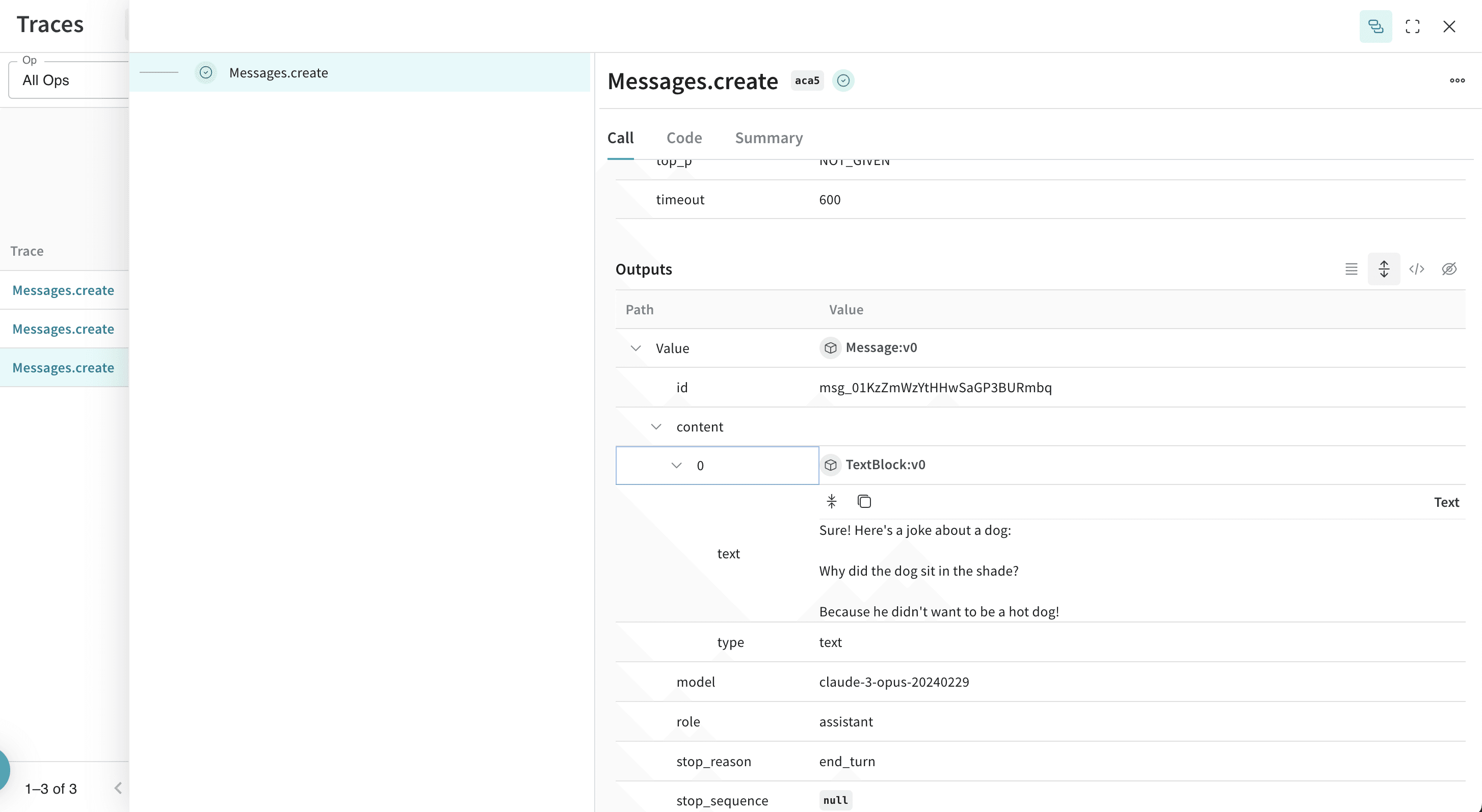
コードに `weave.init()` を含めると、Weave はトレース情報を自動的に取得し、リンクを出力します。リンクをクリックすると、Weights & Biases UI でトレースを確認できます。
[ ](https://forge.coreweave.com/wandb/capecape/anthropic_project/weave/calls)
独自の Op でラップする
`weave.init()` だけでも Anthropic SDK の Call は取得されますが、独自の関数を Op でデコレートすると、各モデルの Call の前後にあるアプリケーションロジックも含めた、より詳細なトレースが得られます。
Weave Op は、実験を進めるたびにコードを自動的にバージョン管理し、その入力と出力を取得します。Python では [`@weave.op()`](/ja/products/wandb/weave/guides/tracking/ops) で関数をデコレートし、TypeScript では [`weave.op()`](/ja/products/wandb/weave/reference/typescript-sdk/functions/op) で関数をラップしたうえで、その関数から [`Anthropic.messages.create()`](https://platform.claude.com/docs/en/build-with-claude/working-with-messages) を呼び出します。これにより、Weave が入力と出力を自動的にトラッキングします。
以下のサンプルでは、関数をトラッキングする方法を示します。
```python lines {5,10,24} theme={"system"}
import weave
import os
from anthropic import Anthropic
weave.init("anthropic_project")
client = Anthropic(
api_key=os.environ.get("ANTHROPIC_API_KEY"),
)
@weave.op()
def call_anthropic(user_input:str, model:str) -> str:
message = client.messages.create(
max_tokens=1024,
messages=[
{
"role": "user",
"content": user_input,
}
],
model=model,
)
return message.content[0].text
@weave.op()
def generate_joke(topic: str) -> str:
return call_anthropic(f"Tell me a joke about {topic}", model="claude-3-haiku-20240307")
print(generate_joke("chickens"))
print(generate_joke("cars"))
```
```typescript twoslash theme={"system"}
// @noErrors
import Anthropic from '@anthropic-ai/sdk';
import * as weave from 'weave';
import { wrapAnthropic } from 'weave';
await weave.init('anthropic_project');
const client = wrapAnthropic(new Anthropic());
const callAnthropic = weave.op(async function callAnthropic(
userInput: string,
model: string
): Promise {
const message = await client.messages.create({
max_tokens: 1024,
messages: [
{
role: 'user',
content: userInput,
}
],
model: model,
});
const content = message.content[0];
return content.type === 'text' ? content.text : '';
});
const generateJoke = weave.op(async function generateJoke(
topic: string
): Promise {
return callAnthropic(`Tell me a joke about ${topic}`, 'claude-3-haiku-20240307');
});
console.log(await generateJoke('chickens'));
console.log(await generateJoke('cars'));
```
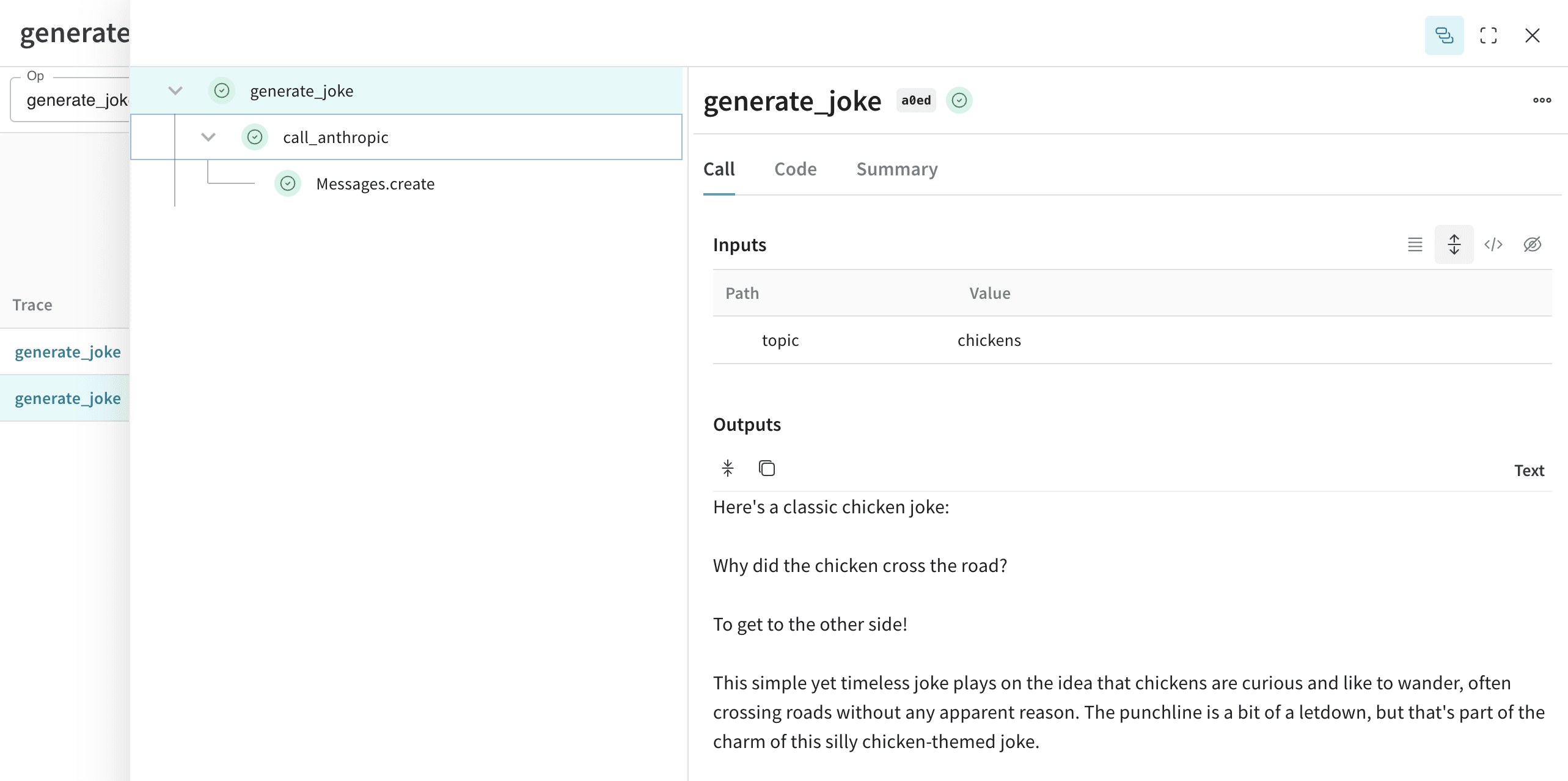
関数を `weave.op()` でデコレートすると、Weave はその関数のコード、入力、出力を取得します。Op を使えば、ネストされた関数も含め、任意の関数をトラッキングできます。
[ ](/ja/products/wandb/weave/guides/tracking/ops)
`Model` を作成して実験を効率化する
個々の Call をトレースできるようになったら、次のステップとして、関連するパラメーターをまとめて整理し、さまざまな設定を比較できるようにします。
`weave.Model` クラスは Weave Python SDK でのみ使用できます。TypeScript では、`weave.op()` ラッパーを使用して、構造化されたパラメーターを持つ関数をトラッキングしてください。
多くの要素が絡み合っていると、実験の整理は難しくなります。[`Model`](/ja/products/wandb/weave/guides/core-types/models) クラスを使用すると、システムプロンプトや使用しているモデルなど、アプリの実験に関する詳細を取得して整理できます。これにより、アプリのさまざまな反復処理を整理して比較しやすくなります。
モデルは、コードのバージョン管理や入力と出力の取得に加えて、アプリケーションの動作を制御する構造化されたパラメーターも取得します。これにより、最も効果的なパラメーターを検索しやすくなります。また、Weave モデルは `serve` や[評価](/ja/products/wandb/weave/guides/core-types/evaluations)と組み合わせて使用することもできます。
次の例では、`model` と `temperature` を変えながら実験できます。
```python lines theme={"system"}
import weave
# anthropic ライブラリは通常どおり使用します
import os
from anthropic import Anthropic
weave.init('joker-anthropic')
class JokerModel(weave.Model): # `weave.Model` に変更します
model: str
temperature: float
@weave.op()
def predict(self, topic): # `predict` に変更します
client = Anthropic()
message = client.messages.create(
max_tokens=1024,
messages=[
{
"role": "user",
"content": f"Tell me a joke about {topic}",
}
],
model=self.model,
temperature=self.temperature
)
return message.content[0].text
joker = JokerModel(
model="claude-3-haiku-20240307",
temperature = 0.1)
result = joker.predict("Chickens and Robots")
print(result)
```
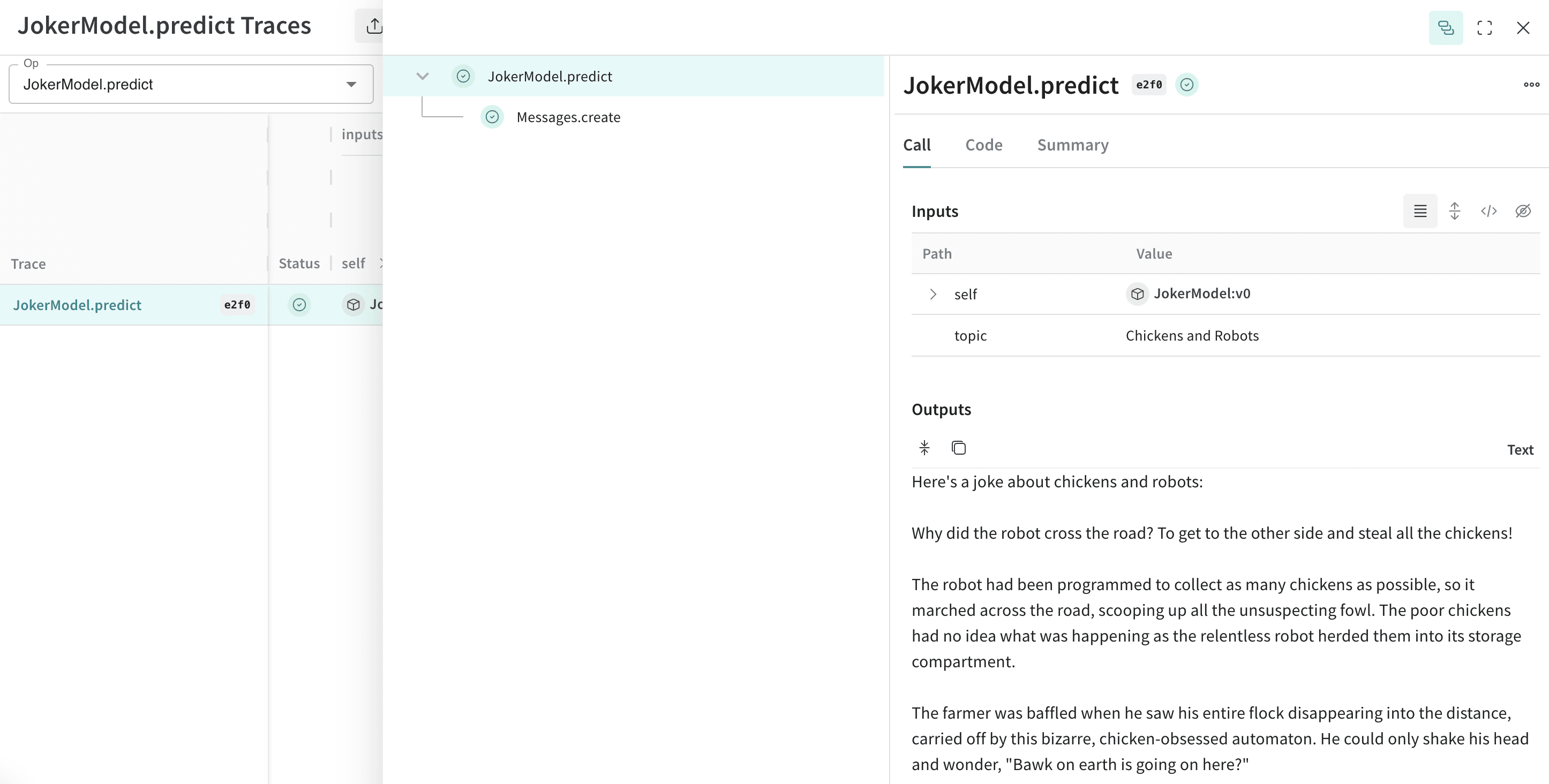
これらの値のいずれかを変更するたびに、Weave は `JokerModel` の新しいバージョンを作成してトラッキングします。これにより、トレースデータをコードの変更と関連付けられるため、ユースケースに最適な設定を判断しやすくなります。
[ ](https://forge.coreweave.com/wandb/capecape/anthropic_project/weave/calls)
Weave は標準のメッセージに加えて、Anthropic のツールの使用インターフェースもインストルメントするため、エージェント型ワークフローをエンドツーエンドでトレースできます。
Anthropic は、Claude が関数の Call をリクエストできる [tools](https://platform.claude.com/docs/en/agents-and-tools/tool-use/overview) インターフェースを提供しています。Weave は、会話全体を通じてツール定義、ツールの使用リクエスト、ツール結果を自動的にトラッキングします。
以下は、Anthropic のツール設定の例 (抜粋) です。
```python lines theme={"system"}
message = client.messages.create(
max_tokens=1024,
messages=[
{
"role": "user",
"content": "What's the weather like in San Francisco?",
}
],
tools=[
{
"name": "get_weather",
"description": "Get the current weather in a given location",
"input_schema": {
"type": "object",
"properties": {
"location": {
"type": "string",
"description": "The city and state, e.g. San Francisco, CA",
}
},
"required": ["location"],
},
},
],
model=model,
)
print(message)
```
```typescript twoslash theme={"system"}
// @noErrors
const message = await client.messages.create({
max_tokens: 1024,
messages: [
{
role: 'user',
content: "What's the weather like in San Francisco?",
}
],
tools: [
{
name: 'get_weather',
description: 'Get the current weather in a given location',
input_schema: {
type: 'object',
properties: {
location: {
type: 'string',
description: 'The city and state, e.g. San Francisco, CA',
}
},
required: ['location'],
},
},
],
model: 'claude-3-opus-20240229',
});
console.log(message);
```
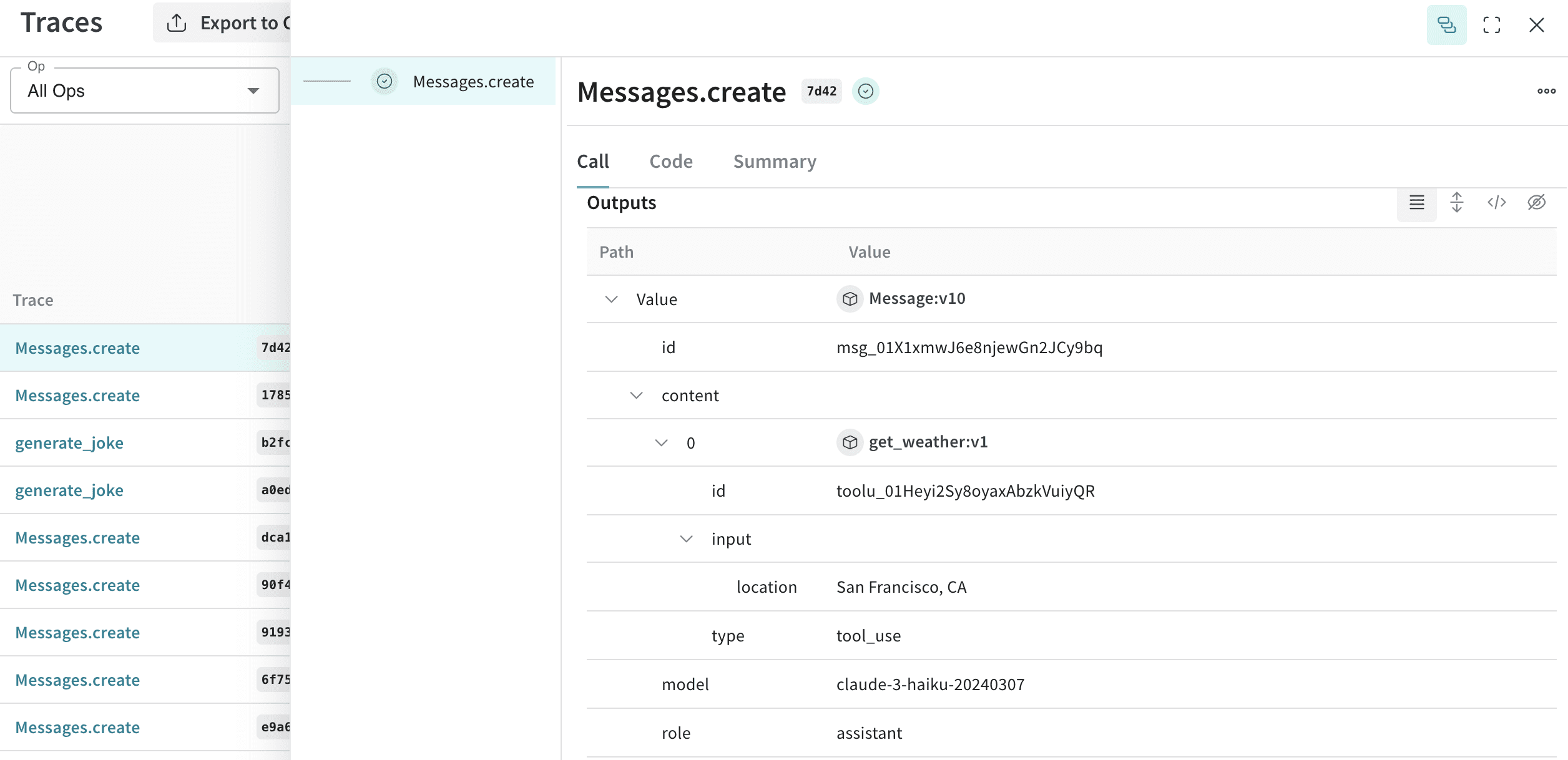
Weave は、会話の各ステップにおけるツール定義、Claude のツールの使用リクエスト、ツール結果を自動的に取得します。
[
](https://forge.coreweave.com/wandb/capecape/anthropic_project/weave/calls)
Weave は標準のメッセージに加えて、Anthropic のツールの使用インターフェースもインストルメントするため、エージェント型ワークフローをエンドツーエンドでトレースできます。
Anthropic は、Claude が関数の Call をリクエストできる [tools](https://platform.claude.com/docs/en/agents-and-tools/tool-use/overview) インターフェースを提供しています。Weave は、会話全体を通じてツール定義、ツールの使用リクエスト、ツール結果を自動的にトラッキングします。
以下は、Anthropic のツール設定の例 (抜粋) です。
```python lines theme={"system"}
message = client.messages.create(
max_tokens=1024,
messages=[
{
"role": "user",
"content": "What's the weather like in San Francisco?",
}
],
tools=[
{
"name": "get_weather",
"description": "Get the current weather in a given location",
"input_schema": {
"type": "object",
"properties": {
"location": {
"type": "string",
"description": "The city and state, e.g. San Francisco, CA",
}
},
"required": ["location"],
},
},
],
model=model,
)
print(message)
```
```typescript twoslash theme={"system"}
// @noErrors
const message = await client.messages.create({
max_tokens: 1024,
messages: [
{
role: 'user',
content: "What's the weather like in San Francisco?",
}
],
tools: [
{
name: 'get_weather',
description: 'Get the current weather in a given location',
input_schema: {
type: 'object',
properties: {
location: {
type: 'string',
description: 'The city and state, e.g. San Francisco, CA',
}
},
required: ['location'],
},
},
],
model: 'claude-3-opus-20240229',
});
console.log(message);
```
Weave は、会話の各ステップにおけるツール定義、Claude のツールの使用リクエスト、ツール結果を自動的に取得します。
[ ](https://forge.coreweave.com/wandb/capecape/anthropic_project/weave/calls)