> ## Documentation Index
> Fetch the complete documentation index at: https://docs.coreweave.com/llms.txt
> Use this file to discover all available pages before exploring further.
# Agno
> OpenTelemetry を使用して Agno のマルチエージェントシステムを Weave でトレースし、エージェント間のやり取り、ツール呼び出し、マルチモーダルなワークフローを取得します。
[OpenTelemetry (OTEL)](https://opentelemetry.io/) を使用すると、[Agno](https://docs.agno.com/) のエージェントとツール呼び出しを Weave でトレースできます。Agno は、共有メモリ、ナレッジ、推論を備えたマルチエージェントシステムを構築するための Python フレームワークです。軽量でモデルに依存しない設計となっており、テキスト、画像、オーディオ、動画の処理を含むマルチモーダル機能をサポートしています。
このガイドでは、OTEL を使用して Agno のエージェントとツール呼び出しをトレースし、そのトレースを Weave で可視化する方法を説明します。必要な依存関係のインストール方法、Weave にデータを送信する OTEL トレーサーの設定方法、Agno のエージェントとツールをインストルメントする方法を紹介します。
Weave での OTEL トレースの詳細については、[Send OTEL Traces to Weave](/ja/products/wandb/weave/guides/tracking/otel) を参照してください。
前提条件
1. 必要な依存関係をインストールします。
```bash theme={"system"}
pip install agno openinference-instrumentation-agno opentelemetry-sdk opentelemetry-exporter-otlp-proto-http
```
2. OpenAI APIキー (または他のモデルプロバイダーのキー) を環境変数に設定します。
```bash theme={"system"}
export OPENAI_API_KEY=your_api_key_here
```
3. [Weave で OTEL トレースを設定します](#configure-otel-tracing-in-weave)。
Agno から Weave にトレースを送信するには、`TracerProvider` と `OTLPSpanExporter` を使用して OTEL を設定します。エクスポーターには、[正しいエンドポイントと、認証および project の識別に必要な HTTP ヘッダー](#required-configuration)を設定してください。
APIキーや project 情報などの機密性の高い環境変数は、環境ファイル (例: `.env`) に保存し、`os.environ` を使用して読み込んでください。これにより、認証情報を安全に管理し、コードベースに含めずに済みます。
必須の設定
次のエンドポイントとヘッダーで OTLP エクスポーターを設定します。
* **エンドポイント:** `https://trace.wandb.ai/otel/v1/traces`
* **ヘッダー:**
* `Authorization`: W\&B APIキーを使用した Basic 認証。
* `project_id`: W\&B の entity/プロジェクト名 (例: `myteam/myproject`) 。
Agno から Weave に OTEL トレースを送信する
[前提条件](#prerequisites)を満たすと、Agno から Weave に OTEL トレースを送信できます。次のコードスニペットでは、OTLP スパンエクスポーターとトレーサープロバイダーを設定し、Agno アプリケーションから Weave に OTEL トレースを送信する方法を示します。
Weave で Agno を正しくトレースするには、コード内で Agno のコンポーネントを使用する*前に*、グローバルトレーサープロバイダーを設定してください。
```python lines theme={"system"}
# tracing.py
import base64
import os
from openinference.instrumentation.agno import AgnoInstrumentor
from opentelemetry.exporter.otlp.proto.http.trace_exporter import OTLPSpanExporter
from opentelemetry.sdk import trace as trace_sdk
from opentelemetry.sdk.trace.export import SimpleSpanProcessor
from opentelemetry import trace
# 機密性の高い値は環境変数から読み込みます
WANDB_BASE_URL = "https://trace.wandb.ai"
# W&B の entity/プロジェクト名(例: "myteam/myproject")
PROJECT_ID = os.environ.get("WANDB_PROJECT_ID")
# W&B APIキーは https://forge.coreweave.com/settings で作成します
WANDB_API_KEY = os.environ.get("WANDB_API_KEY")
WEAVE_OTLP_ENDPOINT = f"{WANDB_BASE_URL}/otel/v1/traces"
AUTH = base64.b64encode(f"api:{WANDB_API_KEY}".encode()).decode()
OTEL_EXPORTER_OTLP_HEADERS = {
"Authorization": f"Basic {AUTH}",
"project_id": PROJECT_ID,
}
# エンドポイントとヘッダーを指定して OTLP スパンエクスポーターを作成します
exporter = OTLPSpanExporter(
endpoint=WEAVE_OTLP_ENDPOINT,
headers=OTEL_EXPORTER_OTLP_HEADERS,
)
# トレーサープロバイダーを作成し、エクスポーターを追加します
tracer_provider = trace_sdk.TracerProvider()
tracer_provider.add_span_processor(SimpleSpanProcessor(exporter))
# Agno をインポート・使用する「前」に、グローバルトレーサープロバイダーを設定します
trace.set_tracer_provider(tracer_provider)
```
OTEL で Agno エージェントをトレースする
トレーサープロバイダーを設定すると、自動トレースを有効にした状態で Agno エージェントを作成して実行できます。以降のエージェントのアクティビティを Weave ですべて取得できるように、エージェントを作成する前に Agno をインストルメントしてください。次の例では、ツールを使用するエージェントを作成する方法を示します。
```python lines theme={"system"}
from agno.agent import Agent
from agno.models.openai import OpenAIChat
from agno.tools.yfinance import YFinanceTools
from dotenv import load_dotenv
load_dotenv()
# 先ほど作成したファイルから AgnoInstrumentor を読み込みます
from tracing import AgnoInstrumentor
# Agno のインストルメンテーションを開始します
AgnoInstrumentor().instrument()
# 金融エージェントを作成します
finance_agent = Agent(
name="Finance Agent",
model=OpenAIChat(id="gpt-4o-mini"),
tools=[
YFinanceTools(
stock_price=True,
analyst_recommendations=True,
company_info=True,
company_news=True
)
],
instructions=["Use tables to display data"],
show_tool_calls=True,
markdown=True,
)
# エージェントを使用します。この Call は Weave によって自動的にトレースされます
finance_agent.print_response(
"What is the current stock price of Apple and what are the latest analyst recommendations?",
stream=True
)
```
Weave はエージェントのすべての操作を自動的にトレースするため、実行フロー、モデルの Call、推論ステップ、ツール invocation を可視化できます。
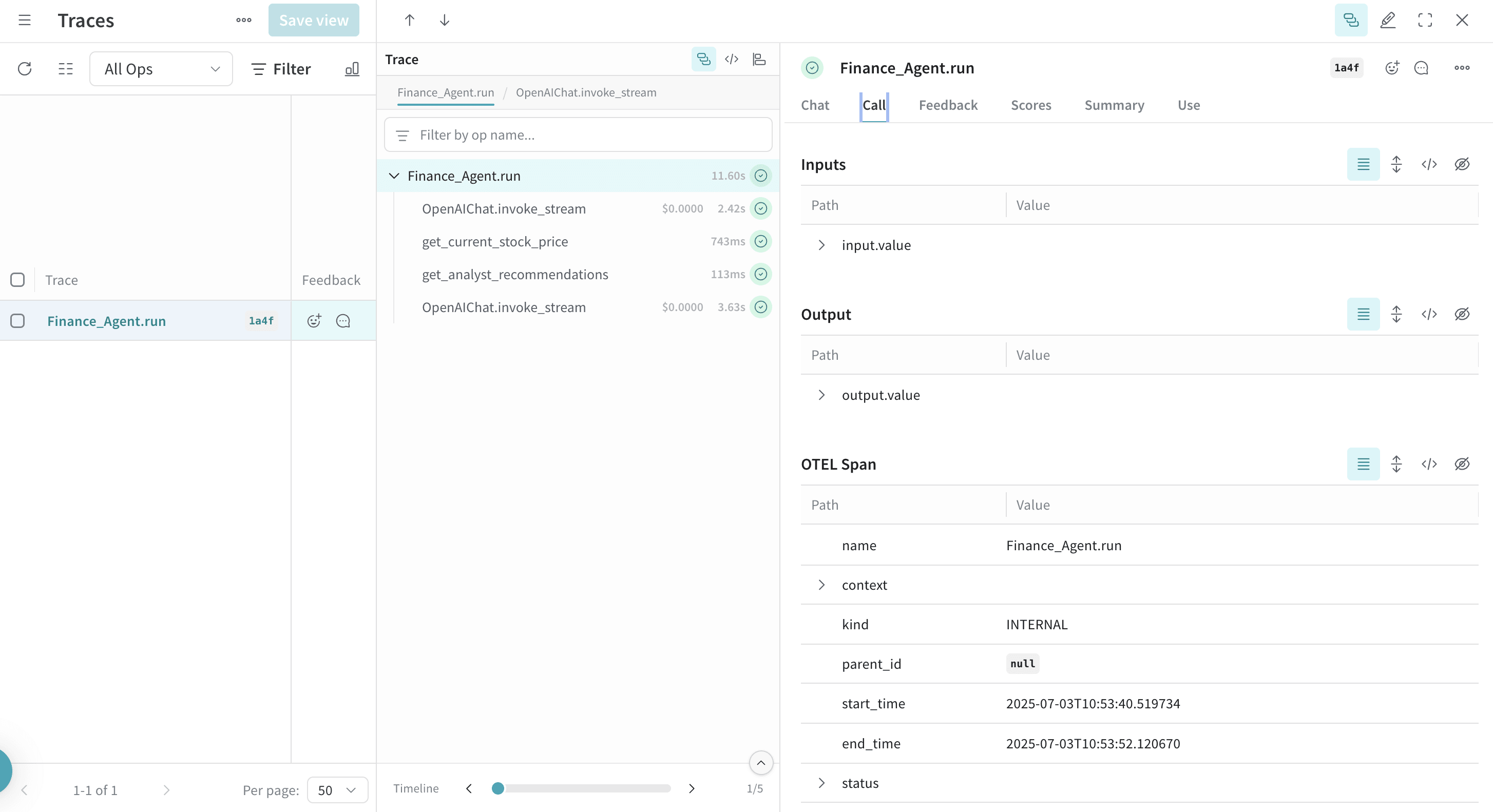 Agno でツールを定義して使用すると、それらのツール呼び出しもトレースに取得されます。OTEL インテグレーションはエージェントの推論プロセスと個々のツール実行の両方を自動的にインストルメントするため、エージェントの動作を包括的に把握できます。
以下は、複数のツールを使用する例です。
```python lines theme={"system"}
from agno.agent import Agent
from agno.models.openai import OpenAIChat
from agno.tools.duckduckgo import DuckDuckGoTools
from agno.tools.yfinance import YFinanceTools
from dotenv import load_dotenv
load_dotenv()
# 上で作成したファイルから AgnoInstrumentor を読み込みます
from tracing import AgnoInstrumentor
# Agno のインストルメンテーションを開始します
AgnoInstrumentor().instrument()
# 複数のツールを備えたエージェントを作成します
research_agent = Agent(
name="Research Agent",
model=OpenAIChat(id="gpt-4o-mini"),
tools=[
DuckDuckGoTools(),
YFinanceTools(stock_price=True, company_info=True),
],
instructions=[
"Search for current information and financial data",
"Always include sources",
"Use tables to display financial data"
],
show_tool_calls=True,
markdown=True,
)
# エージェントを使用します。ツール呼び出しは Weave によってトレースされます
research_agent.print_response(
"Research Tesla's recent performance and news. Include stock price and any recent developments.",
stream=True
)
```
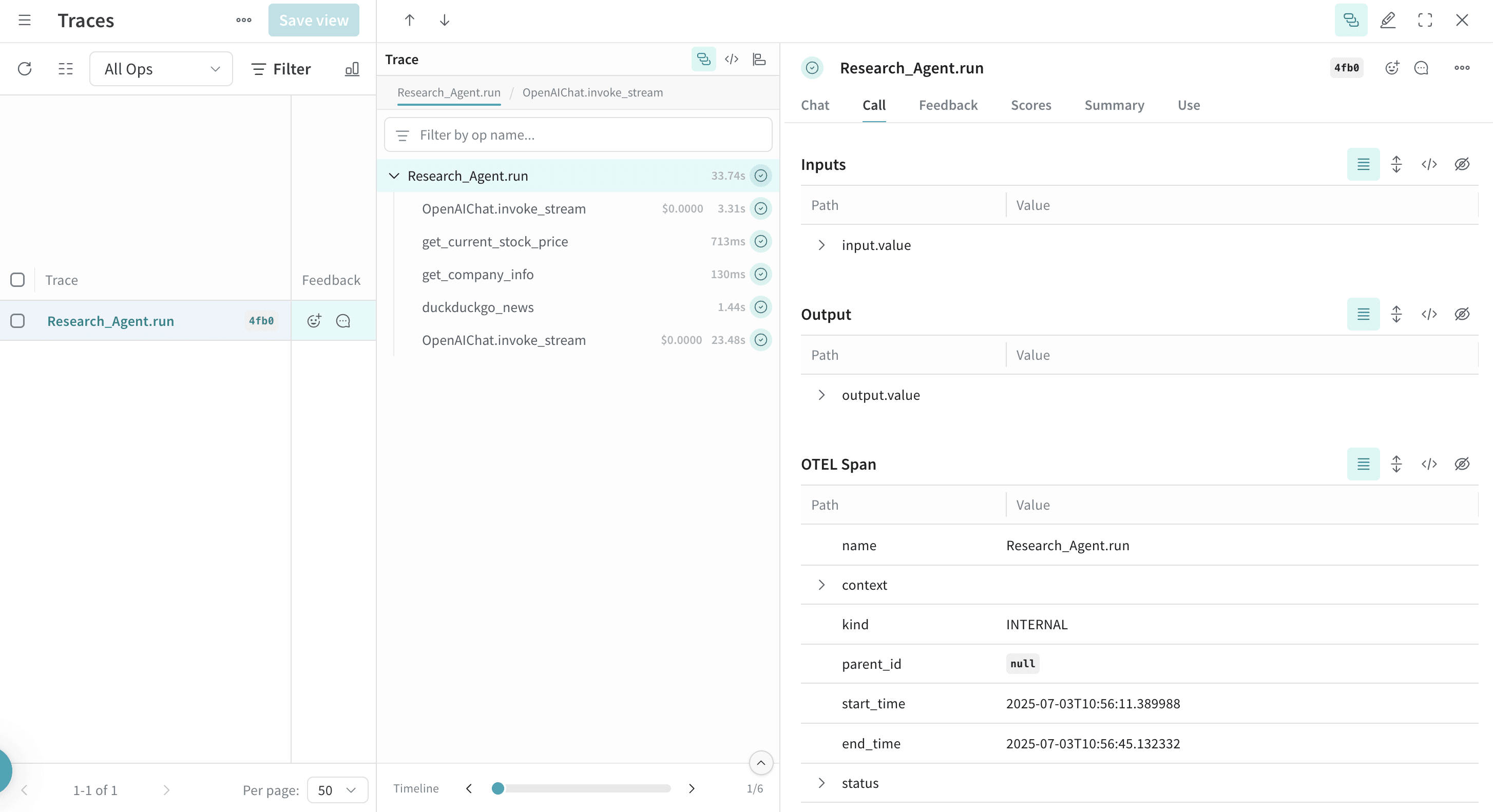
Agno でツールを定義して使用すると、それらのツール呼び出しもトレースに取得されます。OTEL インテグレーションはエージェントの推論プロセスと個々のツール実行の両方を自動的にインストルメントするため、エージェントの動作を包括的に把握できます。
以下は、複数のツールを使用する例です。
```python lines theme={"system"}
from agno.agent import Agent
from agno.models.openai import OpenAIChat
from agno.tools.duckduckgo import DuckDuckGoTools
from agno.tools.yfinance import YFinanceTools
from dotenv import load_dotenv
load_dotenv()
# 上で作成したファイルから AgnoInstrumentor を読み込みます
from tracing import AgnoInstrumentor
# Agno のインストルメンテーションを開始します
AgnoInstrumentor().instrument()
# 複数のツールを備えたエージェントを作成します
research_agent = Agent(
name="Research Agent",
model=OpenAIChat(id="gpt-4o-mini"),
tools=[
DuckDuckGoTools(),
YFinanceTools(stock_price=True, company_info=True),
],
instructions=[
"Search for current information and financial data",
"Always include sources",
"Use tables to display financial data"
],
show_tool_calls=True,
markdown=True,
)
# エージェントを使用します。ツール呼び出しは Weave によってトレースされます
research_agent.print_response(
"Research Tesla's recent performance and news. Include stock price and any recent developments.",
stream=True
)
```
OTEL でマルチエージェントのチームをトレースする
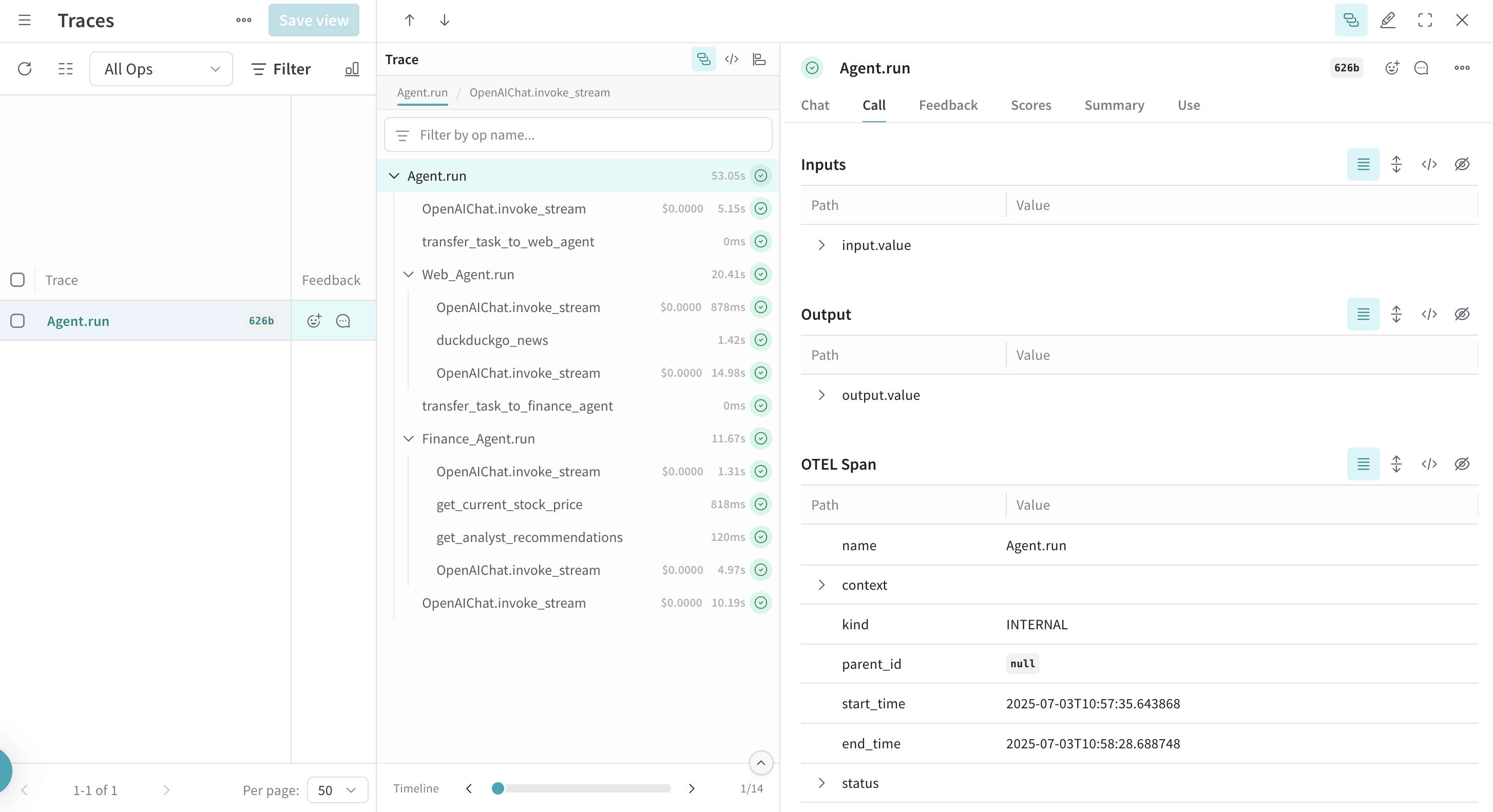
Agno のマルチエージェントアーキテクチャを使うと、互いに連携しながらコンテキストを共有するエージェントのチームを作成できます。Weave は、こうしたチーム内のやり取りもすべてトレースします。
```python lines theme={"system"}
from agno.agent import Agent
from agno.models.openai import OpenAIChat
from agno.tools.duckduckgo import DuckDuckGoTools
from agno.tools.yfinance import YFinanceTools
from dotenv import load_dotenv
load_dotenv()
# tracing.py ファイルから AgnoInstrumentor を読み込みます
from tracing import AgnoInstrumentor
# Agno のインストルメンテーションを開始します
AgnoInstrumentor().instrument()
# 役割ごとに特化したエージェントを作成します
web_agent = Agent(
name="Web Agent",
role="Search the web for information",
model=OpenAIChat(id="gpt-4o-mini"),
tools=[DuckDuckGoTools()],
instructions="Always include sources",
show_tool_calls=True,
markdown=True,
)
finance_agent = Agent(
name="Finance Agent",
role="Get financial data",
model=OpenAIChat(id="gpt-4o-mini"),
tools=[YFinanceTools(stock_price=True, analyst_recommendations=True)],
instructions="Use tables to display data",
show_tool_calls=True,
markdown=True,
)
# エージェントのチームを作成します
agent_team = Agent(
team=[web_agent, finance_agent],
model=OpenAIChat(id="gpt-4o"),
instructions=["Always include sources", "Use tables to display data"],
show_tool_calls=True,
markdown=True,
)
# チームを使用します。エージェントのやり取りはすべて Weave でトレースされます
agent_team.print_response(
"What's the current market sentiment around NVIDIA? Include both news analysis and financial metrics.",
stream=True
)
```
このマルチエージェントのトレースは、Weave 上での各エージェント間の連携を示しています。これにより、エージェントチーム内でタスクがどのように分配され、実行されているかを可視化できます。
推論エージェントを使用する
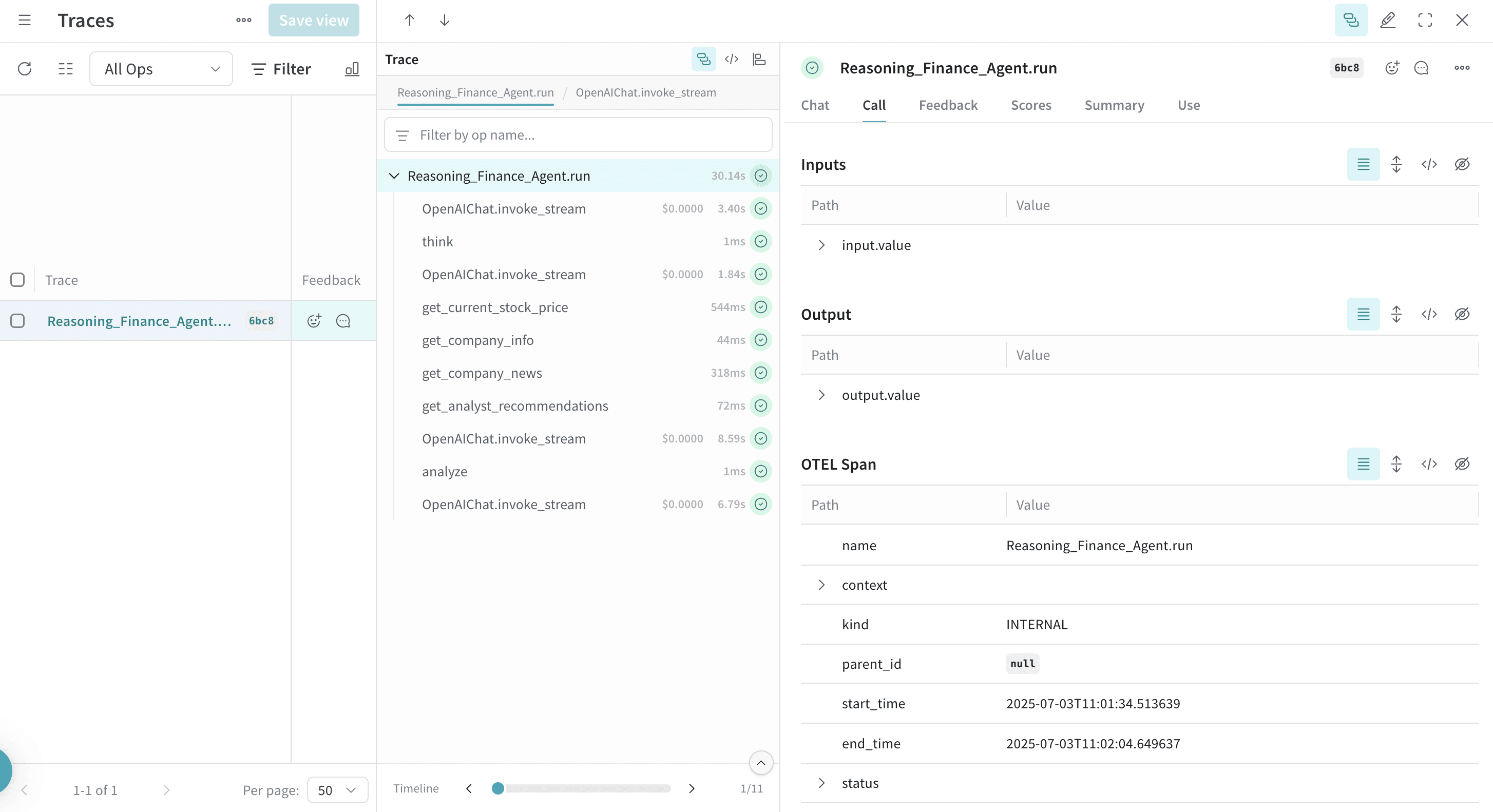
Agno には推論機能が組み込まれており、エージェントは問題を段階的に処理できます。こうした推論プロセスもトレースで取得されます。
```python lines theme={"system"}
from agno.agent import Agent
from agno.models.openai import OpenAIChat
from agno.tools.reasoning import ReasoningTools
from agno.tools.yfinance import YFinanceTools
from dotenv import load_dotenv
load_dotenv()
# tracing.py ファイルから AgnoInstrumentor をインポートします
from tracing import AgnoInstrumentor
# Agno のインストルメンテーションを開始します
AgnoInstrumentor().instrument()
# 推論エージェントを作成します
reasoning_agent = Agent(
name="Reasoning Finance Agent",
model=OpenAIChat(id="gpt-4o"),
tools=[
ReasoningTools(add_instructions=True),
YFinanceTools(
stock_price=True,
analyst_recommendations=True,
company_info=True,
company_news=True
),
],
instructions="Use tables to display data and show your reasoning process",
show_tool_calls=True,
markdown=True,
)
# 推論エージェントを実行します
reasoning_agent.print_response(
"Should I invest in Apple stock right now? Analyze the current situation and provide a reasoned recommendation.",
stream=True
)
```
トレースには推論ステップが表示され、エージェントが複雑な問題をどのように分解し、どのように意思決定を行うかを確認できます。
メモリとナレッジを扱う
Agno のエージェントはメモリを保持し、ナレッジベースにアクセスできるため、複数のやり取りにわたってコンテキストを維持できます。これらの操作も Weave でトレースされます。
```python lines theme={"system"}
from agno.agent import Agent
from agno.models.openai import OpenAIChat
from agno.memory import AgentMemory
from agno.storage.sqlite import SqliteStorage
from dotenv import load_dotenv
load_dotenv()
# tracing.py ファイルから AgnoInstrumentor を読み込む
from tracing import AgnoInstrumentor
# Agno のインストルメンテーションを開始する
AgnoInstrumentor().instrument()
# メモリ付きのエージェントを作成する
memory_agent = Agent(
name="Memory Agent",
model=OpenAIChat(id="gpt-4o-mini"),
memory=AgentMemory(),
storage=SqliteStorage(
table_name="agent_sessions",
db_file="agent_memory.db"
),
instructions="Remember our conversation history",
show_tool_calls=True,
markdown=True,
)
# 1 回目のやり取り
memory_agent.print_response("My name is John and I'm interested in AI investing strategies.")
# 2 回目のやり取り: エージェントは前回のコンテキストを記憶している
memory_agent.print_response("What specific AI companies would you recommend for my portfolio?")
```
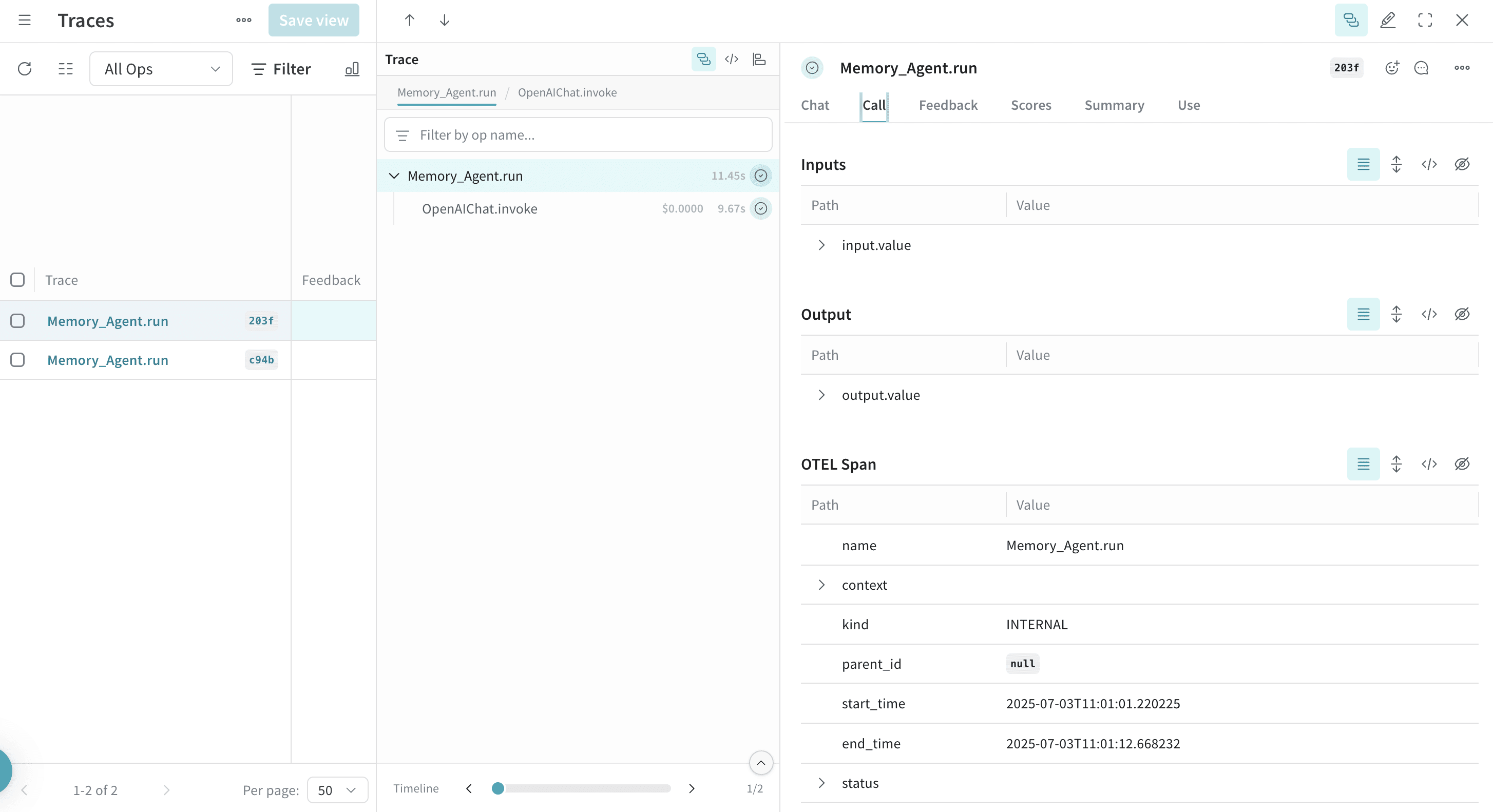 会話履歴の保存や取得などのメモリ操作は、トレースに表示されます。
詳細情報
* [Agno 公式ドキュメント](https://docs.agno.com/)
* [OTEL 公式ドキュメント](https://opentelemetry.io/)
* [Agno の GitHub リポジトリ](https://github.com/agno-agi/agno)
* [OpenInference の Agno インストルメンテーション](https://pypi.org/project/openinference-instrumentation-agno/)
## Related topics
- [インテグレーションの概要](/ja/products/wandb/weave/guides/integrations.md)