> ## Documentation Index
> Fetch the complete documentation index at: https://docs.coreweave.com/llms.txt
> Use this file to discover all available pages before exploring further.

> W&B Sweeps によるハイパーパラメーター探索とモデル最適化

# Sweeps の概要

export const TryProductLink = ({url}) => <a href={url} target="_blank" rel="noopener noreferrer" className="github-source-link">
    <svg width="20" height="20" viewBox="0 0 24 24" fill="none" stroke="currentColor" strokeWidth="2" strokeLinecap="round" strokeLinejoin="round" xmlns="http://www.w3.org/2000/svg">
      <line x1="4" y1="21" x2="4" y2="14"></line>
      <line x1="4" y1="10" x2="4" y2="3"></line>
      <line x1="12" y1="21" x2="12" y2="12"></line>
      <line x1="12" y1="8" x2="12" y2="3"></line>
      <line x1="20" y1="21" x2="20" y2="16"></line>
      <line x1="20" y1="12" x2="20" y2="3"></line>
      <circle cx="4" cy="12" r="2"></circle>
      <circle cx="12" cy="10" r="2"></circle>
      <circle cx="20" cy="14" r="2"></circle>
    </svg>
    Try in W&amp;B
  </a>;

export const ColabLink = ({url}) => <a href={url} target="_blank" rel="noopener noreferrer" className="colab-link">
    <svg width="20" height="20" viewBox="0 0 24 24" fill="currentColor" xmlns="http://www.w3.org/2000/svg">
      <path d="M14.25.18l.9.2.73.26.59.3.45.32.34.34.25.34.16.33.1.3.04.26.02.2-.01.13V8.5l-.05.63-.13.55-.21.46-.26.38-.3.31-.33.25-.35.19-.35.14-.33.1-.3.07-.26.04-.21.02H8.77l-.69.05-.59.14-.5.22-.41.27-.33.32-.27.35-.2.36-.15.37-.1.35-.07.32-.04.27-.02.21v3.06H3.17l-.21-.03-.28-.07-.32-.12-.35-.18-.36-.26-.36-.36-.35-.46-.32-.59-.28-.73-.21-.88-.14-1.05-.05-1.23.06-1.22.16-1.04.24-.87.32-.71.36-.57.4-.44.42-.33.42-.24.4-.16.36-.1.32-.05.24-.01h.16l.06.01h8.16v-.83H6.18l-.01-2.75-.02-.37.05-.34.11-.31.17-.28.25-.26.31-.23.38-.2.44-.18.51-.15.58-.12.64-.1.71-.06.77-.04.84-.02 1.27.05zm-6.3 1.98l-.23.33-.08.41.08.41.23.34.33.22.41.09.41-.09.33-.22.23-.34.08-.41-.08-.41-.23-.33-.33-.22-.41-.09-.41.09zm13.09 3.95l.28.06.32.12.35.18.36.27.36.35.35.47.32.59.28.73.21.88.14 1.04.05 1.23-.06 1.23-.16 1.04-.24.86-.32.71-.36.57-.4.45-.42.33-.42.24-.4.16-.36.09-.32.05-.24.02-.16-.01h-8.22v.82h5.84l.01 2.76.02.36-.05.34-.11.31-.17.29-.25.25-.31.24-.38.2-.44.17-.51.15-.58.13-.64.09-.71.07-.77.04-.84.01-1.27-.04-1.07-.14-.9-.2-.73-.25-.59-.3-.45-.33-.34-.34-.25-.34-.16-.33-.1-.3-.04-.25-.02-.2.01-.13v-5.34l.05-.64.13-.54.21-.46.26-.38.3-.32.33-.24.35-.2.35-.14.33-.1.3-.06.26-.04.21-.02.13-.01h5.84l.69-.05.59-.14.5-.21.41-.28.33-.32.27-.35.2-.36.15-.36.1-.35.07-.32.04-.28.02-.21V6.07h2.09l.14.01.21.03zm-6.47 14.25l-.23.33-.08.41.08.41.23.33.33.23.41.08.41-.08.33-.23.23-.33.08-.41-.08-.41-.23-.33-.33-.23-.41-.08-.41.08z" />
    </svg>
    Try in Colab
  </a>;

<CardGroup cols={4}>
  <ColabLink url="https://colab.research.google.com/github/wandb/examples/blob/master/colabs/pytorch/Organizing_Hyperparameter_Sweeps_in_PyTorch_with_W%26B.ipynb" />

  <TryProductLink url="https://forge.coreweave.com/wandb/stacey/deep-drive/workspace?workspace=user-lavanyashukla" />
</CardGroup>

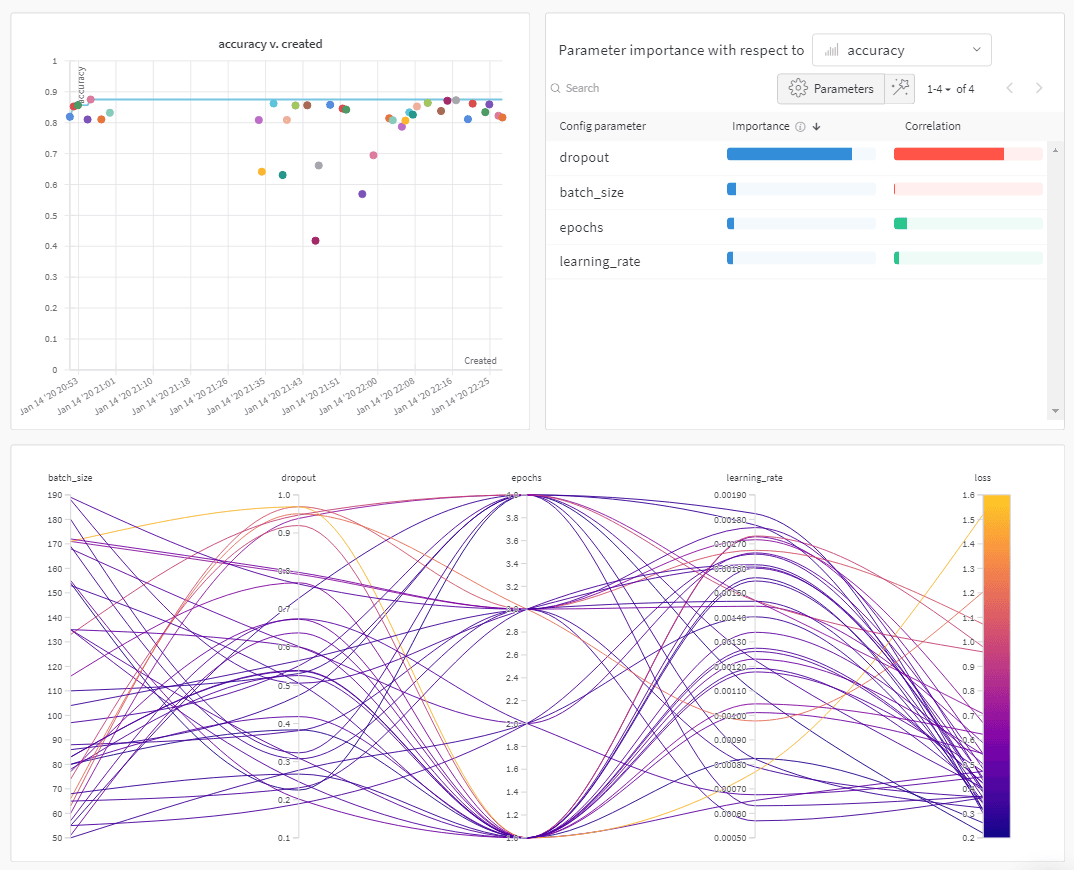
W\&B Sweeps を使用すると、ハイパーパラメーター探索を自動化し、豊富な機能を備えたインタラクティブな実験管理を可視化できます。ベイズ、グリッドサーチ、ランダムなどの一般的な探索手法から選んで、ハイパーパラメーター空間を探索できます。また、1 台または複数台のマシンで sweep をスケールし、並列化することもできます。
<Frame>
  <img src="https://mintcdn.com/coreweave-dbfa0e8d/3Dv_sw2eg8feUJlx/products/wandb/_media/intro_what_it_is.png?fit=max&auto=format&n=3Dv_sw2eg8feUJlx&q=85&s=ba08388f527cf31ca518354c1b04d832" alt="ハイパーパラメーター調整のインサイト" width="1074" height="870" data-path="products/wandb/_media/intro_what_it_is.png" />
</Frame>

<h2 id="how-it-works">
  仕組み
</h2>

sweep は 2 つの [W\&B CLI](/ja/products/wandb/ref/cli) コマンドで作成します。

1. sweep を初期化します。

```bash theme={"system"}
  wandb sweep --project <project-name> <path-to-config file>
```

2. sweep エージェントを開始します。

```bash theme={"system"}
  wandb agent <sweep-ID>
```

<Note>
  上記のコードスニペットと、このページにリンクされている colab では、W\&B CLI を使用して sweep を初期化および作成する方法を説明しています。Python SDK を使用して sweep を設定、初期化、実行する方法については、[Sweeps ウォークスルー](/ja/products/wandb/sweeps/walkthrough) を参照してください。
</Note>

<h2 id="how-to-get-started">
  はじめ方
</h2>

ユースケースに応じて、以下のリソースを参照し、W\&B Sweeps の使用を始めてください。

* [sweep チュートリアル](/ja/products/wandb/sweeps/walkthrough)では、sweep 設定の定義、sweep の初期化、sweep の開始に使用する W\&B Python SDK のコマンドをステップごとに説明しています。
* この章では、以下の方法を学べます。
  * [コードに W\&B を追加する](/ja/products/wandb/sweeps/add-w-and-b-to-your-code)
  * [sweep 設定を定義する](/ja/products/wandb/sweeps/define-sweep-configuration)
  * [sweep を初期化する](/ja/products/wandb/sweeps/initialize-sweeps)
  * [sweep エージェントを開始する](/ja/products/wandb/sweeps/start-sweep-agents)
  * [sweep の結果を可視化する](/ja/products/wandb/sweeps/visualize-sweep-results)
* W\&B Sweeps を使用したハイパーパラメーター最適化を紹介する[厳選された sweep 実験の一覧](/ja/products/wandb/sweeps/useful-resources)をご覧ください。結果は W\&B Reports に保存されています。

ステップごとの解説動画は、[W\&B Sweeps でハイパーパラメーターを簡単に調整する](https://www.youtube.com/watch?v=9zrmUIlScdY\&ab_channel=Weights%26Biases)をご覧ください。

<h3 id="notebook-examples">
  ノートブックのサンプル
</h3>

以下のノートブックのサンプルでは、さまざまなフレームワークとユースケースにわたるハイパーパラメーター最適化のための W\&B Sweeps の使い方を紹介します。

* [Hyperparameter optimization with Sweeps](https://colab.research.google.com/github/wandb/examples/blob/master/colabs/tensorflow/Hyperparameter_Optimization_in_TensorFlow_using_W\&B_Sweeps.ipynb)
* [Using XGBoost with W\&B Sweeps](https://colab.research.google.com/github/wandb/examples/blob/master/colabs/boosting/Using_W\&B_Sweeps_with_XGBoost.ipynb)
