> ## Documentation Index
> Fetch the complete documentation index at: https://docs.coreweave.com/llms.txt
> Use this file to discover all available pages before exploring further.
> 単一の run または分散プロセスから、新しいアーティファクトのバージョンを作成します。
# アーティファクトのバージョンを作成する
新しいアーティファクトのバージョンは、単一の [run](/ja/products/wandb/runs) で作成することも、複数の分散 run で共同して作成することもできます。また、以前のバージョンをもとに新しいアーティファクトのバージョンを作成することも可能です。これを[段階的アーティファクト](#create-a-new-artifact-version-from-an-existing-version)と呼びます。
元のアーティファクトのサイズが非常に大きく、その中の一部のファイルにのみ変更を加えたい場合は、段階的アーティファクトを作成することをお勧めします。
新しいアーティファクトのバージョンを一から作成する
新しいアーティファクトのバージョンは、単一の run または分散 run から作成できます。それぞれの方法は次のとおりです。
* **単一の run**: 単一の run が新しいバージョンに必要なデータをすべて提供します。最も一般的な方法で、必要なデータを 1 つの run で完全に再生成できる場合に適しています。例: 保存済みモデルを出力する場合や、分析用にモデルの予測を表に出力する場合。
* **分散 run**: 複数の run が共同で新しいバージョンに必要なデータをすべて提供します。複数の run が並列でデータを生成することの多い分散ジョブに適しています。例: モデルを分散して評価し、予測を出力する場合。
project に存在しない名前を `wandb.Artifact` API に渡すと、W\&B は新しいアーティファクトを作成し、`v0` エイリアスを割り当てます。同じアーティファクトに再度ログすると、W\&B は内容のチェックサムを計算します。内容が変わっていれば、新しいバージョン `v1` を保存します。
project 内の既存のアーティファクトと一致する名前とアーティファクト タイプを `wandb.Artifact` API に渡すと、W\&B はそのアーティファクトを取得します。取得されるアーティファクトのバージョンは 1 より大きくなります。
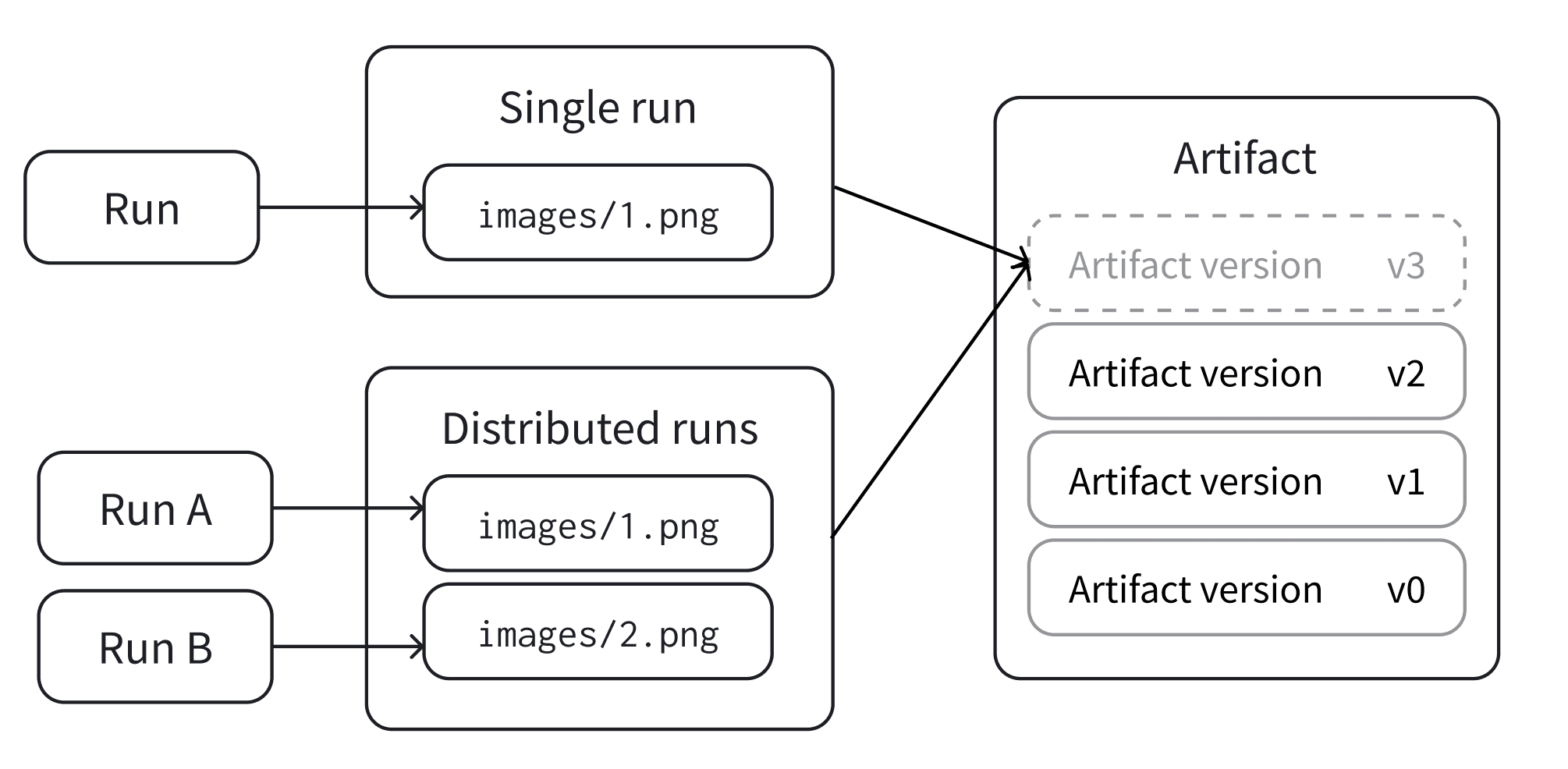
単一の run
アーティファクト内のすべてのファイルを生成する単一の run で、アーティファクトの新しいバージョンをログします。これは、単一の run がアーティファクト内のすべてのファイルを生成する場合に該当します。
ユースケースに応じて、以下のタブのいずれかを選択して、アーティファクトの新しいバージョンを作成してください。
`wandb.Run.log_artifact()` を使用して、アーティファクトを run の出力として明示的に指定します。
簡便なメソッドとして `Artifact.save()` を使用します。実行中の run がある場合、W\&B はその run にアーティファクトをログします。それ以外の場合、W\&B は run を自動的に作成し、そこにログします。
`wandb.Run.log_artifact()` を使用して、アーティファクトを run に明示的に関連付けます。
1. `wandb.init()` で run を作成します。
2. `wandb.Artifact` で新しいアーティファクトを作成するか、既存のアーティファクトを取得します。
3. `wandb.Artifact.add_file()` でアーティファクトにファイルを追加します。
4. `wandb.Run.log_artifact()` で run にアーティファクトをログします。
```python theme={"system"}
with wandb.init() as run:
artifact = wandb.Artifact("artifact_name", "artifact_type")
# `.add`、`.add_file`、`.add_dir`、`.add_reference` を使用して
# アーティファクトにファイルとアセットを追加します
artifact.add_file("image1.png")
run.log_artifact(artifact)
```
現在のコンテキストからアーティファクトを永続化するための簡便なメソッドとして、`wandb.Artifact.save()` を使用します。
1. `wandb.Artifact` で新しいアーティファクトを作成するか、既存のアーティファクトを取得します。
2. `wandb.Artifact.add_file()` でアーティファクトにファイルを追加します。
3. `wandb.Artifact.save()` でアーティファクトを保存します。
```python theme={"system"}
artifact = wandb.Artifact("artifact_name", "artifact_type")
# `.add`、`.add_file`、`.add_dir`、`.add_reference` を使用して
# アーティファクトにファイルとアセットを追加します
artifact.add_file("image1.png")
artifact.save()
```
分散 run
複数の run からなるコレクションが 1 つのバージョンを共同で作成してから、コミットできるようにします。これは、1 つの run が新しいバージョンのデータをすべて提供する、前述の単一の run モードとは異なります。
1. 同じバージョンで共同作業するには、コレクション内の各 run が同じ一意の ID (`distributed_id`) を認識している必要があります。デフォルトでは、`wandb.init(group=GROUP)` で run の `group` が設定されている場合、W\&B はそれを `distributed_id` として使用します。
2. バージョンを「コミット」してその状態を永続的にロックする、最終の run が必要です。
3. 共同作成するアーティファクトへの追加には `upsert_artifact` を、コミットの確定には `finish_artifact` を使用します。
次の例では、異なる run (以下では **Run 1**、**Run 2**、**Run 3** と表記) が、`upsert_artifact` を使用して同じアーティファクトにそれぞれ別の画像ファイルを追加します。
run 1
```python theme={"system"}
with wandb.init() as run:
artifact = wandb.Artifact("artifact_name", "artifact_type")
# Files と Assets をアーティファクトに追加するには
# `.add`, `.add_file`, `.add_dir`, `.add_reference` を使用して
artifact.add_file("image1.png")
run.upsert_artifact(artifact, distributed_id="my_dist_artifact")
```
run 2
```python theme={"system"}
with wandb.init() as run:
artifact = wandb.Artifact("artifact_name", "artifact_type")
# 次のメソッドを使用して、ファイルとアセットをアーティファクトに追加します
# `.add`、`.add_file`、`.add_dir`、および `.add_reference`
artifact.add_file("image2.png")
run.upsert_artifact(artifact, distributed_id="my_dist_artifact")
```
run 3
run 1 と run 2 が完了してから実行する必要があります。`wandb.Run.finish_artifact()` を呼び出す run は、アーティファクトにファイルを含めることができますが、必須ではありません。
```python theme={"system"}
with wandb.init() as run:
artifact = wandb.Artifact("artifact_name", "artifact_type")
# ファイルとアセットをアーティファクトに追加します
# `.add`、`.add_file`、`.add_dir`、および `.add_reference`
artifact.add_file("image3.png")
run.finish_artifact(artifact, distributed_id="my_dist_artifact")
```
既存のバージョンから新しいアーティファクトのバージョンを作成する
既存のアーティファクトのバージョンに含まれるファイルを追加、変更、または削除して、新しいアーティファクトのバージョンを作成します。W\&B は変更されたファイルのみを再インデックスします。こうして作成されたバージョンを *段階的* アーティファクトと呼びます。
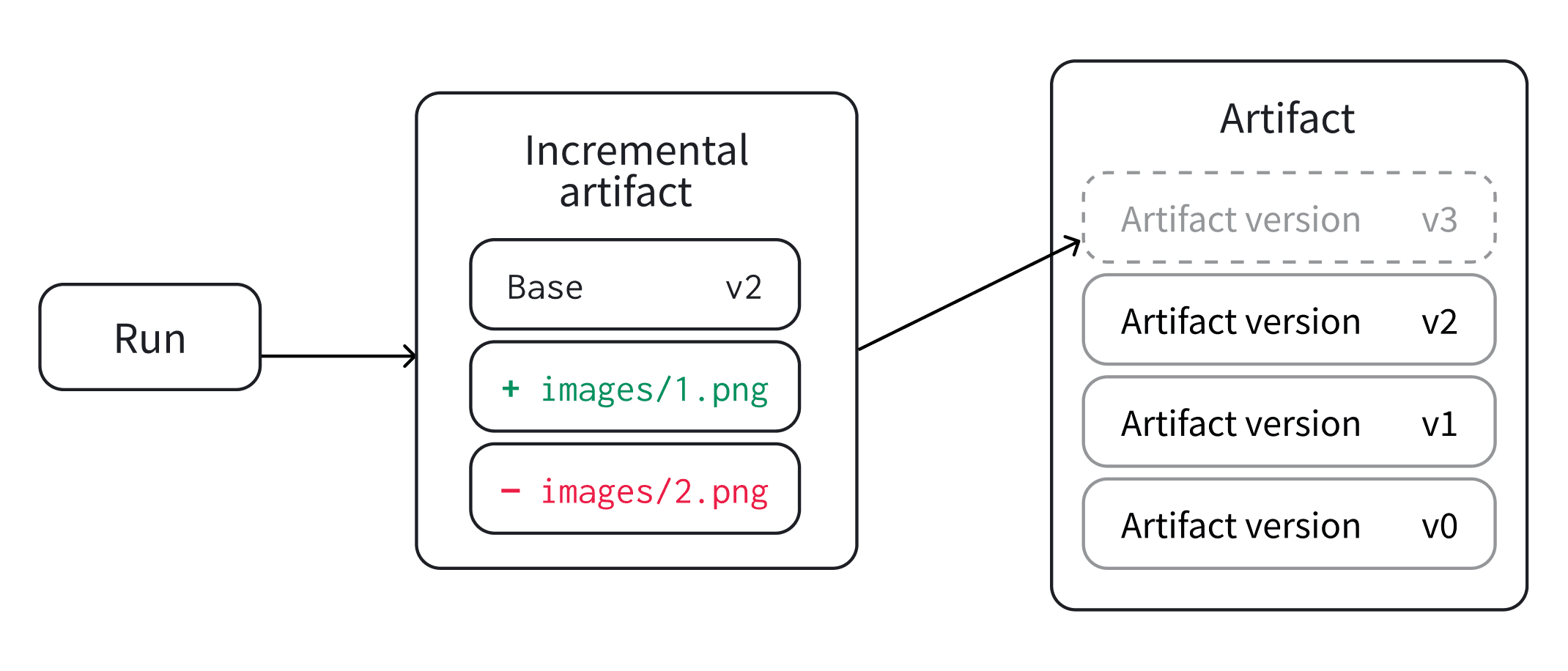 段階的アーティファクトを作成するには、コミット済みの任意のアーティファクトのバージョンから *ドラフト* を作成します。その後、`Artifact.add_file()`、`Artifact.add_dir()`、`Artifact.remove()` などのメソッドを使用してドラフトを変更できます。メソッドの一覧については、[`Artifact` リファレンスドキュメント](/ja/products/wandb/ref/python/experiments/artifact) を参照してください。
ドラフトの変更が完了したら、ログするか保存して、新しいアーティファクトのバージョンを作成します。
段階的アーティファクトを作成する代わりに、新しいアーティファクトを一から作成することもできます。ただし、この方法では、アーティファクトのすべてのファイルがローカルディスク上にある必要があります。段階的アーティファクトでは、以前のアーティファクトのバージョンに含まれる変更のないファイルを再利用しながら、個々のファイルを追加、削除、または変更できます。
段階的アーティファクトは、単一の run で作成することも、複数の run で変更を加えて新しいバージョンを作成することもできます。以下のセクションでは、それぞれの場合に段階的アーティファクトを作成する方法を説明します。
段階的アーティファクトを作成するには、コミット済みの任意のアーティファクトのバージョンから *ドラフト* を作成します。その後、`Artifact.add_file()`、`Artifact.add_dir()`、`Artifact.remove()` などのメソッドを使用してドラフトを変更できます。メソッドの一覧については、[`Artifact` リファレンスドキュメント](/ja/products/wandb/ref/python/experiments/artifact) を参照してください。
ドラフトの変更が完了したら、ログするか保存して、新しいアーティファクトのバージョンを作成します。
段階的アーティファクトを作成する代わりに、新しいアーティファクトを一から作成することもできます。ただし、この方法では、アーティファクトのすべてのファイルがローカルディスク上にある必要があります。段階的アーティファクトでは、以前のアーティファクトのバージョンに含まれる変更のないファイルを再利用しながら、個々のファイルを追加、削除、または変更できます。
段階的アーティファクトは、単一の run で作成することも、複数の run で変更を加えて新しいバージョンを作成することもできます。以下のセクションでは、それぞれの場合に段階的アーティファクトを作成する方法を説明します。
単一の run
現在の run でアーティファクトを使用する場合は、`wandb.Run.use_artifact()` を使用します。W\&B はそのアーティファクトを run の入力として記録します。
1. `wandb.Run.use_artifact()` でアーティファクトのバージョンを取得します。
2. `Artifact.new_draft()` でドラフトを作成します。
3. ドラフト内のエントリを追加、削除、または変更します。
4. `wandb.Run.log_artifact()` でドラフトをログし、新しいアーティファクトのバージョンを作成します。
```python lines theme={"system"}
with wandb.init(job_type="modify dataset") as run:
saved_artifact = run.use_artifact(
"my_artifact:latest"
) # アーティファクトを取得し、run の入力として使用する
draft_artifact = saved_artifact.new_draft() # ドラフトバージョンを作成する
# ドラフトバージョン内の一部のファイルを変更する
draft_artifact.add_file("file_to_add.txt")
draft_artifact.remove("dir_to_remove/")
run.log_artifact(
draft_artifact
) # 変更をログして新しいバージョンを作成し、run の出力としてマークする
```
アーティファクトを run の入力として記録せずに取得するには、Public API を使用します。
1. `wandb.Api.artifact()` でアーティファクトのバージョンを取得します。
2. `Artifact.new_draft()` でドラフトを作成します。
3. ドラフト内のエントリを追加、削除、または変更します。
4. `Artifact.save()` でドラフトバージョンを保存し、新しいアーティファクトのバージョンを作成します。
```python theme={"system"}
client = wandb.Api()
saved_artifact = client.artifact("my_artifact:latest") # アーティファクトを読み込む
draft_artifact = saved_artifact.new_draft() # ドラフトバージョンを作成する
# ドラフトバージョン内の一部のファイルを変更する
draft_artifact.remove("deleted_file.txt")
draft_artifact.add_file("modified_file.txt")
draft_artifact.save() # ドラフトへの変更をコミットする
```
分散 run
複数の run が 1 つのアーティファクトのバージョンにファイルを追加する場合は、`Artifact.upsert_artifact()` と `Artifact.finish_artifact()` を使用します。
次の例は、アーティファクトを [run への入力](/ja/products/wandb/artifacts/create-a-new-artifact-version#use-as-run-input)として使用する場合に、分散 run から新しいアーティファクトのバージョンを作成する方法を示しています。Public API を使用してアーティファクトを[直接取得する](/ja/products/wandb/artifacts/create-a-new-artifact-version#fetch-directly)場合にも、同じ方法を適用できます。
```python theme={"system"}
import wandb
project = ""
artifact_name = ""
distributed_id = "dataset-build-001"
worker_files = [
("data/shards/worker-0.txt", "shards/worker-0.txt"),
("data/shards/worker-1.txt", "shards/worker-1.txt"),
]
for local_path, artifact_path in worker_files:
with wandb.init(project=project, group=distributed_id) as run:
artifact = wandb.Artifact(artifact_name, type="dataset")
artifact.add_file(local_path, name=artifact_path)
run.upsert_artifact(artifact, distributed_id=distributed_id)
with wandb.init(project=project, group=distributed_id) as run:
artifact = wandb.Artifact(artifact_name, type="dataset")
logged = run.finish_artifact(
artifact,
aliases=["latest"],
distributed_id=distributed_id,
)
logged.wait()
```
コミット済みのアーティファクトのバージョンを変更する場合は、`Artifact.new_draft()` を使用します。
複数の run が共同で、確定済みになる前の同じアーティファクトのバージョンを操作する必要がある場合は、`Artifact.upsert_artifact()` と `Artifact.finish_artifact()` を使用します。
## Related topics
- [アーティファクトを作成する](/ja/products/wandb/artifacts/construct-an-artifact.md)