> ## Documentation Index
> Fetch the complete documentation index at: https://docs.coreweave.com/llms.txt
> Use this file to discover all available pages before exploring further.
> W&B Artifacts の概要、仕組み、および使用開始方法について説明します。
# Artifacts の概要
export const TryProductLink = ({url}) =>
Try in W&B
;
export const ColabLink = ({url}) =>
Try in Colab
;
W\&B Artifacts を使用すると、[W\&B run](/ja/products/wandb/runs) の入力および出力となるデータをトラッキングし、バージョン管理できます。たとえば、モデル トレーニングの run では、データセットを入力として受け取り、トレーニング済みモデルを出力として生成します。run にはハイパーパラメーター、メタデータ、メトリクスをログできます。さらに、アーティファクトを使用して、モデルのトレーニングに使用したデータセットを入力としてログ、トラッキング、バージョン管理できます。同様に、結果として得られたモデル チェックポイントも、別のアーティファクトを使用して出力として管理できます。
ユースケース
アーティファクトは、ML ワークフロー全体を通じて [run](/ja/products/wandb/runs) の入力および出力として使用できます。データセットやモデル、さらには他のアーティファクトも、処理の入力として使用できます。
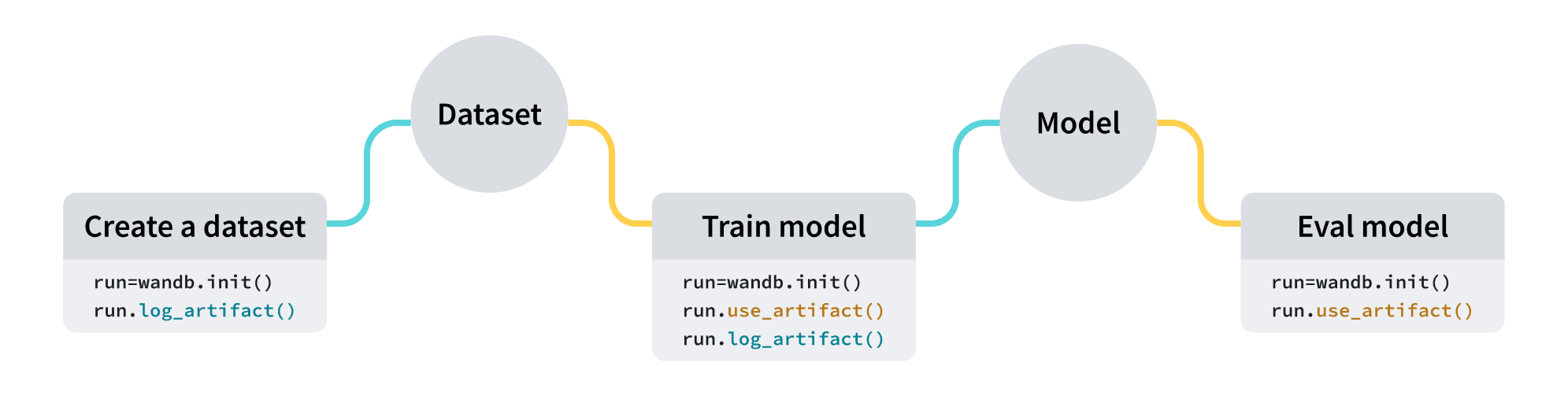 | ユースケース | 入力 | 出力 |
| - | - | - |
| モデルのトレーニング | データセット (トレーニングデータと検証データ) | トレーニング済みモデル |
| データセットの前処理 | データセット (生データ) | データセット (前処理済みデータ) |
| モデル評価 | モデル + データセット (テストデータ) | [W\&B 表](/ja/products/wandb/tables) |
| モデルの最適化 | モデル | 最適化済みモデル |
以下のスニペットは、順番に実行することを前提としています。
| ユースケース | 入力 | 出力 |
| - | - | - |
| モデルのトレーニング | データセット (トレーニングデータと検証データ) | トレーニング済みモデル |
| データセットの前処理 | データセット (生データ) | データセット (前処理済みデータ) |
| モデル評価 | モデル + データセット (テストデータ) | [W\&B 表](/ja/products/wandb/tables) |
| モデルの最適化 | モデル | 最適化済みモデル |
以下のスニペットは、順番に実行することを前提としています。
アーティファクトを作成する
4行のコードでアーティファクトを作成します:
1. [W\&B run](/ja/products/wandb/runs) を作成します。
2. [`wandb.Artifact`](/ja/products/wandb/ref/python/experiments/artifact) でアーティファクト オブジェクトを作成します。
3. `wandb.Artifact.add_file()` で、モデルファイルやデータセットなどの1つ以上のファイルをアーティファクト オブジェクトに追加します。
4. `wandb.Run.log_artifact()` でアーティファクトをW\&Bにログします。
例えば、次のコードスニペットは、`dataset.h5` というファイルを `example_artifact` というアーティファクトにログする方法を示しています:
```python theme={"system"}
import wandb
with wandb.init(project="artifacts-example", job_type="add-dataset") as run:
artifact = wandb.Artifact(name="example_artifact", type="dataset")
artifact.add_file(local_path="./dataset.h5", name="training_dataset")
run.log_artifact(artifact)
```
* アーティファクトの `type` は、W\&B プラットフォーム上での表示方法に影響します。`type` を指定しない場合、デフォルトで `unspecified` になります。
* ドロップダウンの各ラベルは、それぞれ異なる `type` パラメーターの値を表しています。上記のコードスニペットでは、アーティファクトの `type` は `dataset` です。
Amazon S3 バケットなどの外部オブジェクトストレージに保存されているファイルやディレクトリへの参照を追加する方法については、[外部ファイルをトラッキングする](/ja/products/wandb/artifacts/track-external-files) ページを参照してください。
アーティファクトをダウンロードする
run にアーティファクトを入力としてマークしたい場合は、[`wandb.Run.use_artifact()`](/ja/products/wandb/ref/python/experiments/run#use_artifact) メソッドを使用します。
前のコードスニペットに続いて、次のコード例は、以前に作成した `example_artifact` という名前のアーティファクトの使い方を示しています:
```python theme={"system"}
with wandb.init(project="artifacts-example", job_type="add-dataset") as run:
artifact = run.use_artifact("training_dataset:latest") # "my_data" アーティファクトを使用する Run オブジェクトを返します
```
これはアーティファクト オブジェクトを返します。
次に、返されたオブジェクトを使用してアーティファクトのすべてのコンテンツをダウンロードします:
```python theme={"system"}
datadir = artifact.download() # `my_data` アーティファクト全体をデフォルトのディレクトリにダウンロードします。
```
`root` [パラメーター](/ja/products/wandb/ref/python/experiments/artifact) にカスタムのパスを渡すことで、アーティファクトを特定のディレクトリにダウンロードできます。アーティファクトをダウンロードする代替の方法や追加のパラメーターについては、[アーティファクトのダウンロードと使用](/ja/products/wandb/artifacts/download-and-use-an-artifact) のガイドを参照してください。
次のステップ
* アーティファクトの[バージョン管理](/ja/products/wandb/artifacts/create-a-new-artifact-version)と[更新](/ja/products/wandb/artifacts/update-an-artifact)の方法について学びましょう。
* [オートメーション](/ja/products/wandb/automations)を使って、アーティファクトの変更をきっかけにダウンストリームのワークフローをトリガーしたり、Slack チャンネルに通知したりする方法について学びましょう。
* トレーニング済みモデルを格納するスペースである[Registry](/ja/products/registry)について学びましょう。
* [Python SDK](/ja/products/wandb/ref/python/experiments/artifact) と [CLI](/ja/products/wandb/ref/cli/wandb-artifact) のリファレンスガイドもご覧ください。
## Related topics
- [Experiments の概要](/ja/products/wandb/ref/python/experiments.md)