

Production workloads should use Workload Identity Federation instead of static keys. Workload Identity Federation provides a more secure, controlled way to generate time-limited access keys by exchanging tokens from your compute platform or identity provider.
Create access keys in the Cloud Console
Creating access keys in the Cloud Console requires the
Object Storage Admin role or an organization access policy that grants cwobject:CreateAccessKey.- In the Cloud Console, navigate to the Access Keys page.
- Click the Create Key button at the top right corner of the page.
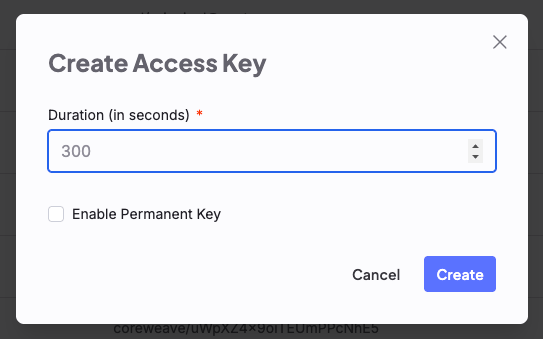
- In the dialog:
- For a temporary key, enter the desired duration in seconds and click Create.
- For a permanent key, select Enable Permanent Key and click Create.
Create access keys with the API
Use this method to create keys programmatically, for example, from a script or automated workflow. To create access keys with the API, you must first create a JSON object that defines the key’s properties. The JSON object must include thedurationSeconds property, which specifies how long the key is valid.
The following sections show how to create permanent and temporary keys.
Permanent keys
Permanent keys don’t expire and can be used indefinitely. To create a permanent access key, setdurationSeconds to 0 in a JSON object. The value of 0 in the example data.json indicates that the key doesn’t expire.
data.json
/access-key endpoint with the JSON object in the body. Replace [API-ACCESS-TOKEN] with your API access token.
Example request
expiry field set to 1970-01-01T00:00:00Z, which indicates that the key doesn’t expire.
Response status code 200
Temporary keys
To create temporary access keys, setdurationSeconds to the desired duration in seconds. Temporary keys expire after the specified duration.
To begin, create a JSON object that defines durationSeconds. The following example creates a key with a 300-second (5-minute) duration.
data.json
/access-key endpoint with the JSON object in the body. Replace [API-ACCESS-TOKEN] with your API access token.
Example request
expiry field is set to the time the key expires.
Response status code 200