Revoke Access Keys
Revoke existing Access Keys
This guide shows how to revoke access keys in Cloud Console and with the Object Storage API.
Prerequisites
- You must be signed in as a user who has the Object Storage Admin IAM role (or equivalent legacy access, such as membership in the
admingroup). - You must have an AI Object Storage Access Key to revoke.
Revoke keys in Cloud Console
- Navigate to the Access Keys page in the Cloud Console.
- Use the Search function to find keys by name or principal.
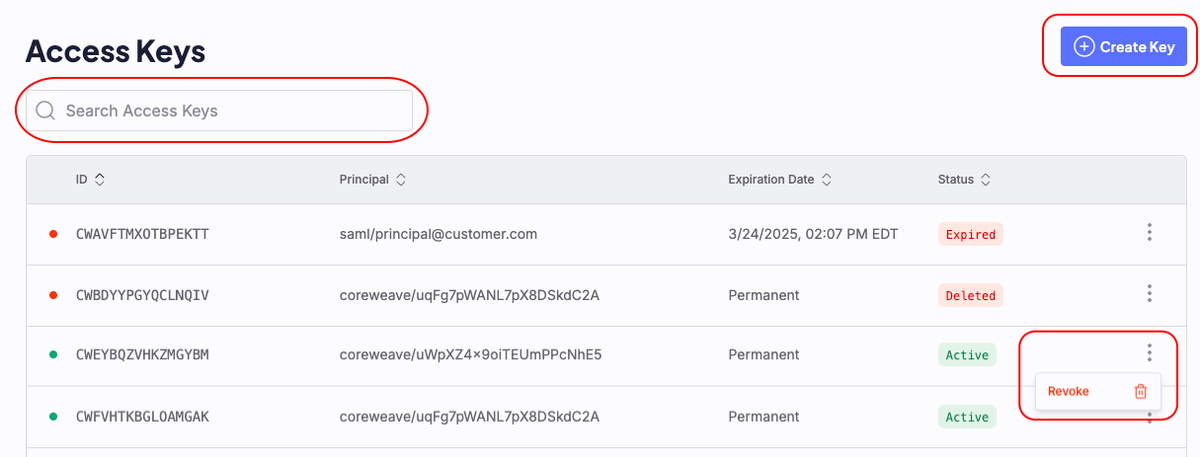
- Click the More menu on the right of the key you want to revoke.
- Click Revoke.
- In the Revoke Key modal, type the ID of the key you want to revoke and click Revoke.
Revoke keys with the Object Storage API
The Object Storage API provides endpoints to revoke individual Access Keys, or all keys associated with a principal.
Revoke an individual access key
To revoke an access key, first create a JSON object that specifies the key ID, such as the example data.json.
{"accessKey": "CWABCDEFGHIJKLMN"}
Then, submit the request to the /revoke-access-key/access-key endpoint with the JSON object in the body. Replace {API_ACCESS_TOKEN} with your API access token.
$curl -X POST https://api.coreweave.com/v1/cwobject/revoke-access-key/access-key \-H "Content-Type: application/json" \-H "Authorization: Bearer {API_ACCESS_TOKEN}" \-d @data.json
A successful response returns an empty object and the key is revoked.
{}
Revoke all Access Keys for a principal
To revoke all Access Keys for a principal, create a JSON object that specifies the principal name.
Then, submit the request to the /revoke-access-key/principal endpoint with the JSON object in the body. Replace {API_ACCESS_TOKEN} with your API access token.
$curl -X POST https://api.coreweave.com/v1/cwobject/revoke-access-key/principal \-H "Content-Type: application/json" \-H "Authorization: Bearer {API_ACCESS_TOKEN}" \-d @data.json
A successful response returns an empty object and all keys for the principal are revoked.
{}