

To compare the types of storage available in CoreWeave and find a storage type that fits your workload, see Choose the right storage on the storage overview page.
Benefits
AI Object Storage provides the following benefits:- Efficiently stores and serves training datasets and model artifacts.
- Supports non-AI data and standard cloud storage workflows. AI Object Storage implements an S3-compatible API, so you can reuse familiar tools and SDKs (such as the AWS CLI, Boto3, and s3cmd) by pointing them at CoreWeave endpoints. You can also browse and manage objects directly from the Cloud Console.
- Delivers data efficiently to CPU and GPU Nodes and integrates with model serializers such as Tensorizer.
- Includes LOTA (Local Object Transport Accelerator), a Node-local connection that accelerates object reads and caches data on GPU and CPU Nodes to reduce load times.
- Automates retention with bucket lifecycle policies that expire objects and versions on a schedule and clean up incomplete multipart uploads.
Availability
AI Object Storage is available in multiple regions across the CoreWeave platform. See Regions and Availability Zones for current information on where AI Object Storage is available.Durability
CoreWeave AI Object Storage is designed to lose fewer than one object in 100 billion per year to equipment failure, equivalent to 99.999999999% annual durability. This figure is a design target for the storage architecture, not a service commitment. The AI Object Storage Service Level Agreement covers availability, not durability. AI Object Storage uses multiple layers of protection:- Object data is encoded as data and parity fragments and distributed across independent storage servers. The service can reconstruct the original data when individual devices or servers fail.
- Object metadata and content-location information are replicated so that no single metadata instance is the sole record of an object.
- Background integrity checks validate the relationships between object records and stored content, and verify that referenced content is present in the storage layer.
- Storage servers are monitored for failures, and missing fragments are rebuilt from the remaining data and parity to restore the intended protection level.
Security
AI Object Storage is designed to safeguard data with encryption and access controls. All data stored in AI Object Storage is encrypted at rest using an industry-standard encryption algorithm (AES-256). See the Encryption section for more details. AI Object Storage uses organization, bucket, and lifecycle policies to enforce access control and configure retention. The Object Storage Admin IAM role manages control plane aspects of Object Storage, such as creating access keys and organization access policies, in the Cloud Console. For more information, see About organization access policies. For production workloads, Workload Identity Federation with OIDC is the recommended method for obtaining Access Keys. It exchanges short-lived OIDC tokens for temporary credentials with a 30-minute lifespan, which eliminates the need to store or rotate long-lived static keys.Encryption
AI Object Storage provides encryption at rest by default and supports encryption in transit through TLS. For additional control, you can supply your own encryption keys using SSE-C. Encryption has no additional cost.Default encryption at rest
All object data stored within AI Object Storage is encrypted at rest by default, using the AES-256 algorithm. Default at-rest encryption is applied automatically to all objects. Only the object data itself is encrypted at rest. Object metadata is not encrypted by default. Customers must ensure confidential information is stored only in object payloads, not metadata fields (including bucket names, object keys, and tags). For workloads that use the Local Object Transport Accelerator (LOTA), cached object data on ephemeral storage is encrypted at the drive level using Linux Unified Key Setup (LUKS). Additionally, if you use S3 Server-Side Encryption with Customer Keys (SSE-C), LOTA encrypts and decrypts data directly on the client machine. This ensures that even host root users cannot access cached data without the customer key, which provides a layer of protection beyond disk-level encryption. AI Object Storage supports server-side encryption with customer-supplied keys (SSE-C). This feature lets you use your own encryption keys to encrypt data while CoreWeave handles the encryption and decryption process.Encryption in transit
Connections to AI Object Storage endpoints support Transport Layer Security (TLS), with TLS version 1.2 or later required for HTTPS. Data transmitted through HTTPS is protected in transit from interception and tampering. LOTA operates as an “untrusted daemon” running on each Node and is not deployed with any user or service secrets. Communication between client Pods and LOTA, as well as between LOTA instances (Pods), is not encrypted by default. The system relies on network segmentation to provide security in these internal communications. When LOTA forwards requests or data to externalcwobject.com endpoints, encryption in transit depends on protocol selection: only connections using HTTPS ensure encrypted traffic.
High performance
Data stored in AI Object Storage is available immediately after upload: clients can read data as soon as it’s written. This is implemented as a “read-after-write” function, meaning anyread operation after a write operation retrieves updated data. This allows for secure parallel access, higher performance, and improved scalability.
Cost management
AI Object Storage includes automated cost optimization features designed for AI workloads with varying access patterns. Objects in theSTANDARD storage class are automatically classified based on when they were last accessed. Archive is a separate storage class that you opt into:
Usage-based billing
Usage-based billing is enabled by default and requires no configuration. Objects transition back to Hot tier pricing when accessed, which makes this ideal for ML datasets, model checkpoints, and training artifacts with irregular usage patterns. Data billed as Cold has the same performance as Hot or Warm data, with no retrieval delays. Unless stated otherwise in a customer contract, AI Object Storage is billed based on the actual consumed storage. Billing calculations are based on hourly total capacity consumption. To calculate the hourly rate, AI Object Storage measures the capacity of the stored data at least once per hour and then averages those capacity measurements across the hour. AI Object Storage has four pricing tiers, all based on actual consumed storage:- Hot: Data accessed in the last 7 days.
- Warm: Data accessed in the last 7 to 30 days.
- Cold: Data not accessed in the last 30 days.
- Archive (Limited Availability): Data stored in the
STANDARD_IAstorage class.
STANDARD storage class, and objects move between them automatically. Archive is different: objects enter STANDARD_IA only when you write or copy them with that storage class, or when you enable Automated Archive on the bucket, and reading an archived object doesn’t return it to STANDARD. See Use the Archive storage class.
Billing for storage resources is calculated at the end of each hour, based on the average usage during that hour. Usage is aggregated across all storage resources in your account and billed according to the tier of each object. Each month has a variable amount of hours based on the number of days in the month. To convert the listed monthly pricing to hourly, divide the monthly pricing by 730.
These hourly charges are summed across all hours in the month to determine your total monthly charge. As STANDARD objects are accessed or left unaccessed, they automatically move between the Hot, Warm, and Cold tiers, so your hourly charges vary based on your actual access patterns.
To find and safely delete objects that have gone cold, for example to reduce cost or reclaim capacity, see Delete cold objects.
The Storage panel of the Usage by Product and Zone dashboard provides more information about storage usage.
What counts as object access
During hourly billing cycles, the last access time is measured. The following actions reset the timer and bring objects back to the Hot tier:Metrics and logging
CoreWeave offers audit logging and other metrics for AI Object Storage. You can use CoreWeave Grafana to view metrics for usage, LOTA, and more in the Grafana dashboard linked in the Cloud Console. The panel group is Auto Archive, and it appears in the CAIOS Usage panel under the Storage dashboard. Audit logging for buckets is available in limited access.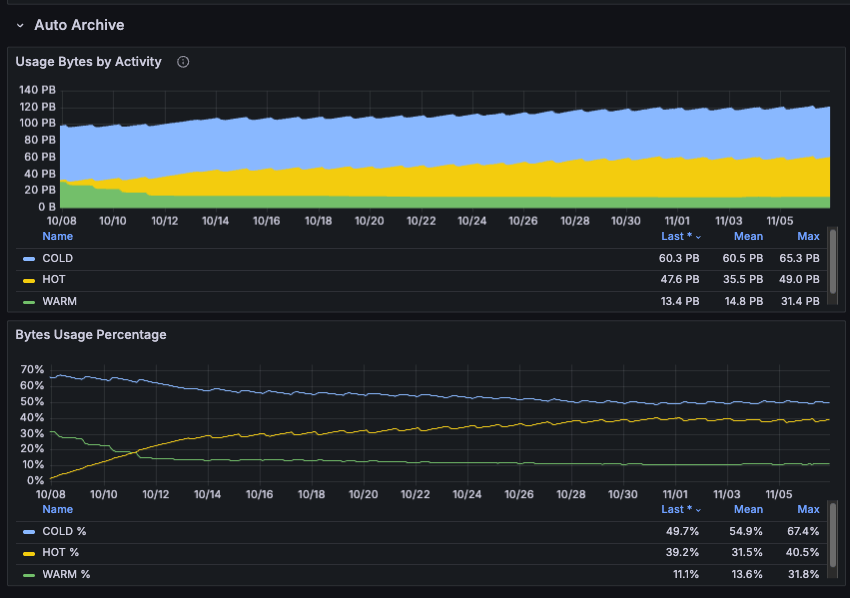
Next steps
- See Get started with AI Object Storage to learn how to create Access Keys, buckets, and policies, and how to use objects and buckets to store and retrieve data.
- See Workload Identity Federation to learn how to use OIDC for secure, automated credential management in production workloads.