

Modify a Node Pool using the Cloud Console
1
Open the Node Pools page
In the Cloud Console, navigate to the Node Pools page (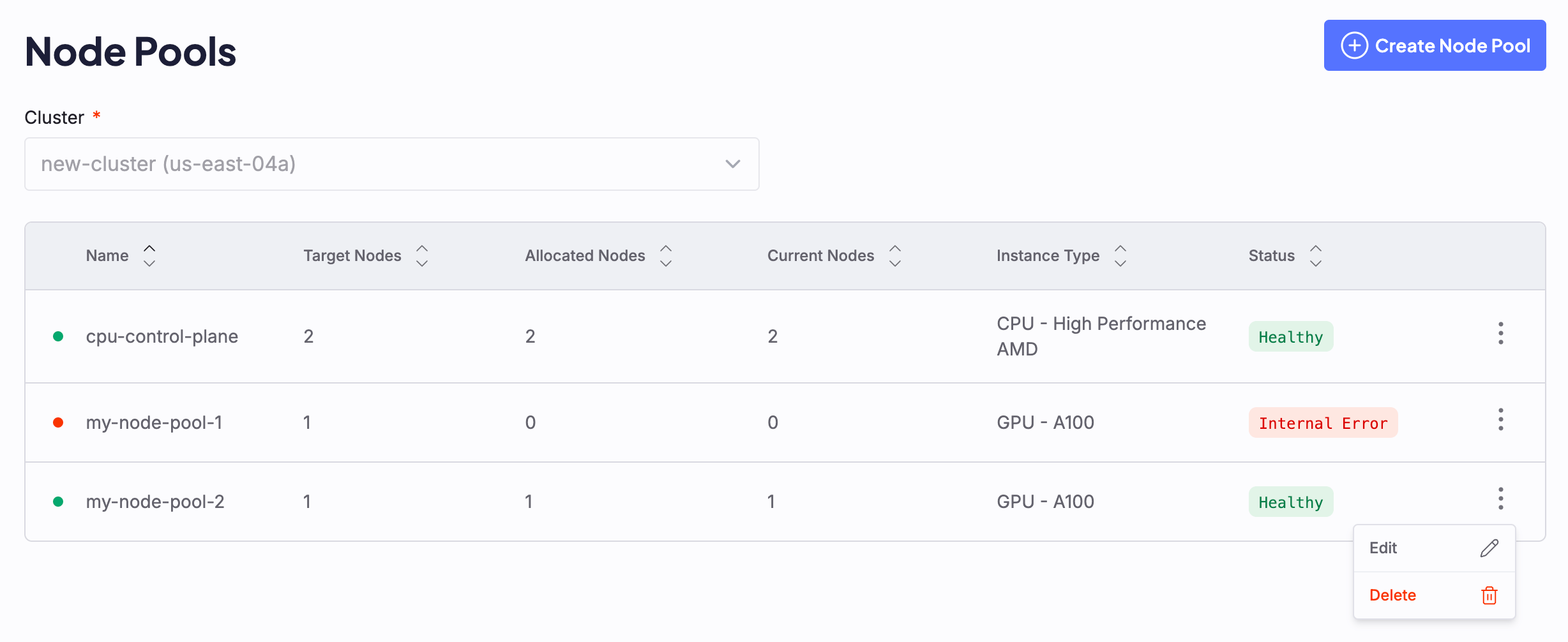
https://console.coreweave.com/zones/[ZONE-NAME]/clusters/[CLUSTER-NAME]/node-pools).All existing Node Pools are listed on the Node Pool dashboard, including the Node Pool containing Control Plane CPU Nodes:2
Open the manifest editor
Click the vertical dot menu to the right of the Node Pool, then click Edit to open the manifest editor: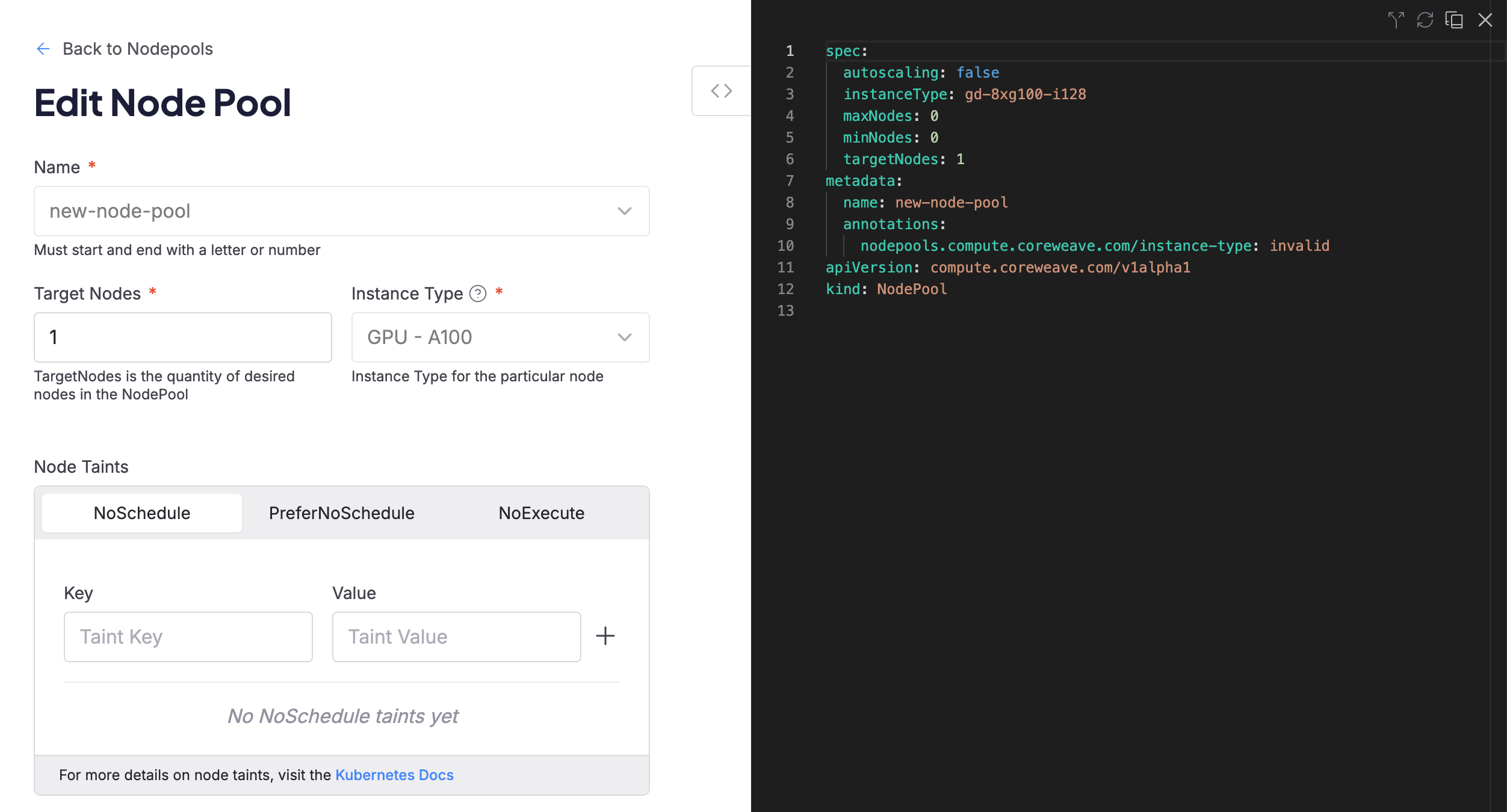
3
Submit your changes
After you make your changes, click the Submit button.
Changes may take a moment to display on the Cloud Console. To learn more about the current status of the Node Pool, hover over the status in the dashboard.
Modify a Node Pool using Kubernetes
To modify a Node Pool, first edit the Node Pool manifest, thenapply the changed manifest using kubectl.
For example, take a Node Pool deployed with the following manifest:
example-nodepool.yaml
10 Nodes. To change it to have only 5 Nodes, first adjust the manifest to change the targetNodes value to 5 as highlighted in the following example:
example-nodepool.yaml
kubectl:
Example command
- Removing Nodes from a Node Pool can take some time.
- See Scaling strategies to learn how CKS responds when the value of
targetNodeschanges.
Use kubectl scale
You can also use kubectl to adjust targetNodes without editing the manifest directly.
For example, to set targetNodes to 5 in example-nodepool, run:
Example command
kubectl scale writes to targetNodes and is not compatible with Node Pools that use targetRacks (rack-based instance types such as GB200 and GB300). To scale a rack-based Node Pool, edit the manifest and update targetRacks directly, then apply with kubectl apply.Verify the updated Node Pool
To check the status of the modified Node Pool, target the Node Pool withkubectl get nodepool. For example:
Example command
Example output
CURRENT (the number of Nodes currently in the Node Pool) should match the value of TARGET (the number of Nodes desired in the Node Pool).
To see further details about the Node Pool in YAML format, target the Node Pool with kubectl get nodepool -o yaml.
Example command
View Node details
Standardkubectl get nodes output doesn’t include CoreWeave-specific metadata such as instance type, reservation status, ncore version, and Node state. Use the CoreWeave Intelligent CLI (cwic) or a custom kubectl command to view these details.
The following sections describe both approaches.
Use CoreWeave Intelligent CLI
For the full command reference and release notes, see the CoreWeave Intelligent CLI repository. The steps below cover a typical install and authentication flow.Install cwic
Download the latest release for your platform from the cwic releases page and move the binary onto your PATH (for example /usr/local/bin or $HOME/.local/bin).
Once installed, cwic can update itself in place:
Authenticate cwic
Generate an API access token from the Tokens page in the Cloud Console, then sign in:
cwic stores it in ~/.cwic/config.json and reuses it for subsequent commands, so you don’t need to export an environment variable. You can also pass the token directly with cwic auth login [TOKEN], or add a friendly name with --name "[LABEL]" when you manage multiple organizations. Switch between authenticated organizations with cwic auth switch, and check the active one with cwic auth whoami.
Kubernetes-based cwic commands (node, sunk, nodepool) require a kubeconfig. Generate one for a single cluster or for every cluster you can access:
KUBECONFIG before running the commands below:
List Nodes with cwic
To list all Nodes in your cluster with CoreWeave-specific details, run:
Example output
Use kubectl
To view CoreWeave-specific Node details with kubectl, add the following alias to your shell configuration:
Example output
Enable Node Pool prefill
Prefill is opt in and off by default. You can enable prefill on new and existing Node Pools when creating or editing the Kubernetes manifest. For an overview of Node Pool prefill, see Node Pool prefill. Prefill has two implementation requirements:- Autoscaling must be disabled. Set
autoscaling: false. You cannot enable prefill and autoscaling on the same Node Pool. - The Node Pool must use
computeClass: default. Prefill is not supported on Spot Node Pools.
prefill block under spec in the Node Pool manifest. For example:
example-nodepool.yaml
timeout: Maximum timeout is 24 hours. Default is 24 hours.maxNodes: Can be between 1 and 4. Default is 3.
kubectl apply -f example-nodepool.yaml. For an overview of prefill behavior and Node conditions, see Node Pool prefill. For full field details, see the Node Pool reference.
Target specific GPUs or CPUs
To ensure CKS schedules your workloads on the correct hardware in a cluster with different GPU types, use a combination of Kubernetes resource requests and node affinities. CKS uses these built-in Kubernetes scheduling features so you can allocate resources for your workloads:These labels are mutually exclusive: use the GPU label only to select GPU types, and the CPU label only to select CPU types. You can’t explicitly select a specific CPU type for GPU Nodes.
Example specs
Select one of the following example specs:- 8xH100
- 8xB300
- 8xRTX PRO 6000
Kubernetes lets you schedule resources with
requests and limits. When you specify only limits, Kubernetes sets the requests to the same amount as the limit.Manage Node Pool configuration
CKS uses Node Pool configurations to boot Nodes into a desired state. Configurations contain information like the ncore (OS) image and GPU Driver version. A unique identifier called anodeProfile references each configuration.
The following sections describe how CKS generates configurations, how to stage a pending configuration, and how to roll back to a previous one.
To see a Node Pool’s active configuration, inspect the status.nodeProfile and the status.nodeConfigurationRevisions, which displays information for all the configurations staged onto your Node Pool, including the active one.
example-nodepool.yaml
Generate Node Pool configurations
CKS generates Node Pool configurations based on the Node Pool spec. If you modify the following fields in your Node Pool spec, CKS generates a new configuration for you: With the default nodeConfigurationUpdateStrategy.typeOnSpecUpdate, CKS automatically stages the resulting nodeProfile onto your NodePool as the default nodeProfile and onto your Nodes. Existing Nodes may need a reconfigure reboot for the configuration updates to take effect.
When CoreWeave publishes an update for your Node Pool, such as a newer ncore image, CKS generates a new configuration. The Manual and default OnSpecUpdate strategies leave it pending until you stage it. With Always, CKS stages it automatically. See Stage Node Pool configurations.
Stage Node Pool configurations
How CKS applies a new configuration depends on what triggered it and yournodeConfigurationUpdateStrategy.type:
To stage a pending configuration, see CoreWeave Intelligent CLI. With
OnSpecUpdate or Always, when you change your Node Pool spec, CKS also incorporates pending CKS-initiated changes into the new staged configuration. With Manual, the new configuration remains pending until you promote it.
The following example shows a Node Pool with a CKS-initiated pending configuration that requires manual acceptance.
example-nodepool.yaml
pendingNodeConfiguration. Staging the configuration sets it as the active status.nodeProfile and tracks it in the nodeConfigurationRevisions.
After CKS applies a new configuration to the Node Pool, new Nodes boot into the desired configuration. Existing Nodes in your Node Pool may need a reconfigure reboot to pick up the new configuration. For more information, see CoreWeave Intelligent CLI.
User-initiated updates
WithOnSpecUpdate set as your nodeConfigurationUpdateStrategy, when you initiate an update to your Node Pool, CKS automatically stages and applies the resulting new configuration. For example, if you modify the image or gpu fields in your Node Pool spec, that’s a user-initiated update. CKS also stages any Nodes already in the Node Pool with the auto-applied NodeProfile.
CKS automatically stages and applies these user-initiated Node Pool configuration updates regardless of which tools you use to update your Node Pool (including kubectl, Cloud Console, GitOps or cwic).
The following example shows a properly configured Node Pool with an automatically staged configuration:
example-nodepool.yaml
GitOps
GitOps tools such as ArgoCD are the primary way to manage your Node Pool configuration in environments where you don’t have a kubeconfig or the correct permissions. Because CKS auto-stages user-initiated updates to the Node Pool configuration with the defaultOnSpecUpdate strategy, you don’t need to take any further action when you update your Node Pool configuration with GitOps aside from reconfigure rebooting existing Nodes.
The following example shows a git diff of the minimum required YAML updates to set the GPU version to 595:
OnSpecUpdate or Always. With Manual, inspect and promote the pending configuration before rebooting existing Nodes.
Cloud Console
You can edit the Node Pool manifest in the Cloud Console, including thespec.gpu.version field. With OnSpecUpdate or Always, CKS stages the resulting Node Profile on the Node Pool and its existing Nodes. New Nodes boot into the staged configuration. Existing Nodes need a reconfigure reboot to adopt it. With Manual, promote the pending configuration first.
For GPU manifest examples, see Update the driver version on an existing Node Pool.
CoreWeave Intelligent CLI
Use the CoreWeave Intelligent CLI (cwic) to stage a pending configuration. After you stage the configuration, only newly created Nodes use the configuration. You need to initiate a reconfigure reboot on the existing Nodes in the Node Pool to Apply Node Pool updates.
The following steps walk through how to stage a pending configuration:
1
Find Node Pools with a pending configuration
To see which Node Pools have a pending configuration:
NODEPOOL-NAME: Replace with the name of your Node Pool.
PENDING CONFIG column lists the Node Pools with a new configuration that you can stage to the Node Pool:2
Stage the new configuration
Stage the new Node Pool configuration:
Example command
NODEPOOL-NAME: Replace with the name of your Node Pool.
3
Find Nodes that need the new configuration
To determine which existing Nodes in the Node Pool need the new configuration:In this example,
Example command
NODEPOOL-NAME: Replace with the name of your Node Pool.
Example output (see the RECONFIGURE column)
node-0 needs a reconfiguration reboot to apply the new Node Profile. For more information on how to perform a reconfigure reboot, see Apply Node Pool updates.Roll back to a previous Node configuration
You can roll back to a previous configuration. ThenodeConfigurationRevisions enumerates all configurations previously applied to the Node Pool for your reference.
If you want to manually roll back a configuration, you must set your nodeConfigurationUpdateStrategy to Manual so that a new auto-staged configuration doesn’t overwrite it.
With the CoreWeave Intelligent CLI (cwic) rollback command, you can omit the nodeProfile identifier to roll back to the previous configuration, or you can specify a nodeProfile to roll back to an exact configuration.
Example command
NODEPOOL-NAME: Replace with the name of your Node Pool.NODEPROFILE: Replace with the Node Profile you want to roll back to.
status.nodeProfile to the desired configuration. Any new Nodes delivered to your Node Pool boot into the rolled-back configuration, and existing Nodes in your cluster may require a reconfigure reboot to pick up the configuration. See Stage Node Pool configurations for more details.
Manually update ncore image
When an ncore image update is available for your Node Pool, CKS creates a pending configuration if your nodeConfigurationUpdateStrategy.type is Manual or OnSpecUpdate. With Always, CKS stages the configuration automatically. Image availability depends on your Node Pool configuration, instance type, and Kubernetes version.
To apply a pending update yourself, inspect and stage it, then queue a reconfigure reboot on existing Nodes.
Complete the following steps to update the ncore image:
1
Check the current ncore version on a Node
To compare the current version with the pending configuration, check the The output shows the
ncore versions on your Nodes using grep and ncore-image. Replace [NODE-ID] with your Node ID:ncore image tag and type, for example:2
Check the ncore version across a Node Pool
To see the
ncore image for all Nodes in a given Node Pool at once, replace [NODE-POOL-NAME] with the name of your Node Pool and run:3
Stage the pending configuration and reboot
Inspect the pending configuration to confirm the target
ncore version, then stage the configuration. To wait for active workloads to stop before rebooting, follow Apply Node Pool updates, which uses the --safe and --reconfigure flags together.ncore image.
If automated configuration updates aren’t available in your environment, or if you need help with a large rollout, contact Support. Before you contact Support, identify the specific ncore image you want to update to so Support can monitor and confirm that Nodes upgrade successfully.
The following sections describe how to test a new image on a subset of Nodes before a full rollout, how to track rollout progress, and how to troubleshoot a rollout that stalls.
Test a new image on a canary subset
You can test a staged image by reconfigure rebooting a small batch of existing Nodes. Other existing Nodes keep their current image until they are reconfigured. Staging also changes the default for new and replacement Nodes. To isolate the image from the rest of the pool, use a separate Node Pool. To test a small batch in the same Node Pool, complete the following steps:1
Stage the new configuration
Stage the new configuration on the Node Pool. See Stage Node Pool configurations.
2
Reboot a small batch of Nodes
Queue a reconfigure reboot for only the Nodes in your batch. See Apply Node Pool updates.
3
Confirm which Nodes run the new image
Confirm which Nodes now run the new image. The To confirm that your canary workload runs on those Nodes, replace
node.coreweave.cloud/ncore-image-tag label shows each Node’s image tag:[NAMESPACE] with its namespace and check the NODE column:4
Validate and roll out to the remaining Nodes
Validate the canary, then reconfigure reboot the remaining Nodes in small batches. Validate each batch before proceeding to limit how many additional Nodes are exposed to a problem with the new image.
Track rollout progress
After you stage a configuration, inspect theNodeReconfigurationRequired condition on the Node Pool.
For the condition’s status values and reasons, see the Node Pool reference.
To check the condition status, reason, and message, replace [NODE-POOL-NAME] with the name of your Node Pool and run:
InternalError reason, an Unknown status, or no output doesn’t confirm completion. A False status alone also doesn’t confirm completion because it can accompany InternalError.
Before declaring the rollout complete, inspect the Node Pool:
status.nodeProfile matches the configuration you intended to apply and status.currentNodes matches your expected Node count. Confirm that the condition reason is AllNodesUpToDate. Check the per-Node image labels with the command in Test a new image on a canary subset, and validate your workloads. Configuration adoption alone doesn’t confirm workload health.
Troubleshoot a stuck or blocked configuration
If a rollout doesn’t complete, check for the following conditions:- A Node that remains in the
production-reconfigure-powercycle-teststate might still be rebooting or running validation. For timing and validation guidance, see Apply Node Pool updates. If the rollout appears stuck, inspect the Node conditions and events withkubectl describe node [NODE-ID]. Contact Support with the Node name and command output for help diagnosing the delay. - A
nodeConfigurationRevisionsentry withdisabled: truemeans delivery of Nodes using that configuration is disabled. Repeated delivery or reconfiguration failures can trigger this state. Contact Support to investigate the cause and restore delivery.
Delete a Node Pool using the Cloud Console
1
Open the Node Pools page
In the Cloud Console, navigate to the Node Pools page (
https://console.coreweave.com/zones/[ZONE-NAME]/clusters/[CLUSTER-NAME]/node-pools).2
Open the delete confirmation
Click the vertical dot menu beside the Node Pool to delete, then click Delete to open the confirmation modal.
3
Confirm the deletion
Enter the name of the Node Pool to confirm deletion.
Delete a Node Pool using Kubernetes
To delete a Node Pool using Kubernetes, delete the Node Pool resource directly usingkubectl:
nodepool resource first removes all Nodes associated with the Node Pool from the cluster, then deletes the Node Pool resource itself.
Next steps
- Reboot Nodes to reboot Nodes manually.
- Apply Node Pool updates to apply Node Pool updates by queuing a reconfigure reboot.
- Connect to a Node to troubleshoot issues with a Node.